linkedin
Taskmaan logo
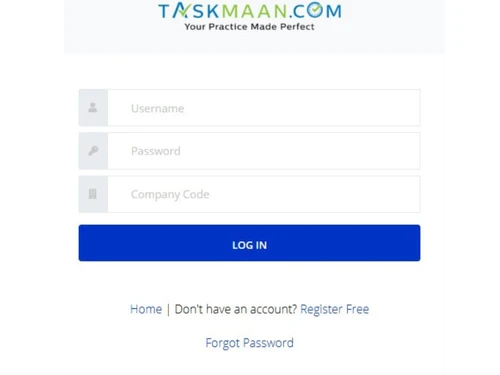
Taskmaan-login
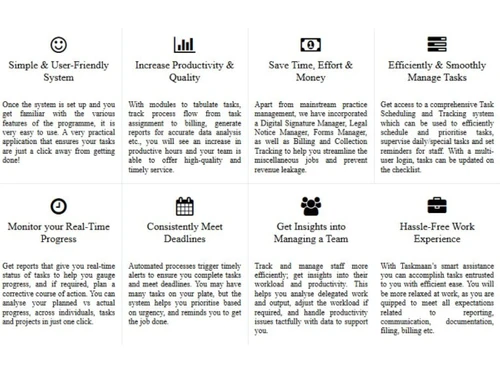
Taskmaan-benefits
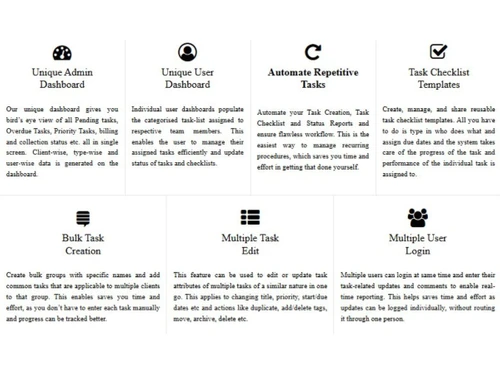
Taskmaan-features

Taskmaan

Brand: Taskmaan

  • 4.5

  • 5 Ratings

Taskmaan is an easy-to-use task and compliance management software for accounting professionals.

See More

Have you used Taskmaan before?

Share your insights for better experience

Add a Review
Starting Price
₹2,000 excl.GST
₹ 2,360 incl. GST

View plans

offer Save upto 18%, Get GST Invoice on your business purchase T&C
offer Buy Now & Pay Later, Check offer on payment page.
Buy Now
100% Genuine
Products
Best Price
Guaranteed
Safe & Secure
Payment
  • Description

  • Pricing

  • Features

  • Specification

  • Review

  • Compare

  • Alternatives

  • FAQ

Starting at ₹2,000
Buy Now

Taskmaan Software Overview

What is Taskmaan?

Taskmaan is an effective and convenient task management software tool addressed to CA /CS /ICWA professionals or tax practitioners to automate and simplify the work process. It facilitates handling tasks, employees, and compliance processes, produces real-time reports, to-do lists, and balances billing status. The software has options such as DSC management, tracking legal notices, and forms management, which guarantee productivity and efficiency.

Taskmaan, developed using the wisdom of experienced Chartered Accountants, is designed to save time, manual effort, and enhance performance in the workplace. It provides an easy-to-use service that organizes schedules, assigns groups, and tracks deadlines, managing the business and freeing professionals to concentrate on growing clients and achieving business success.

Why Businesses Choose TaskMaan Over Other Software?

  • Industry-Specific Solution: Taskmaan is specifically designed with CA/CS/ICWA professionals and tax practitioners in mind, and it has functionalities (such as statutory compliance, DSC management, and tracking of legal notices) that other generic task management tools typically lack.
  • Automation & Efficiency: It automates monotonous workload, produces real-time reports (billing, collections, to-do lists), and streamlines smart reminders that eliminate manual work and errors related to Excel sheets.
  • Comprehensive Task & Staff Management: Under multi-user access, bulk task addition, and priority-wise tracking, companies can easily assign, supervise, and maximize team productivity.
  • Revenue Protection Tools: These features include tracking of billing and collection, reimbursable expenses, and deadline reminders to avoid leakage of revenue and to make had in making follow-ups on time.
  • Expert-Backed Design: Having been made after consulting seasoned CAs, Taskmaan offers a pain-free, customised experience that cannot be found in generic software because it addresses real-world pain points that accounting firms face.
  • Centralized Compliance Management: Compared to generic tools, Taskmaan achieved integration of DSC management, legal notice tracking, and statutory form handling, creating a seamless compliant operation, which does not require switching between systems.
  • Real-Time Insights & Reporting: The flexible dashboards offer real-time insight into an individual's work progress, employee workload, and the financial situation (billing/collections) so that the information can be used to make decisions to more effectively manage the firm.

Taskmaan Pricing

The pricing of Taskmaan starts from INR 2,000 at Techjockey.com. You can get in touch with them for more information related to the software.

Pricing Plans:

  • Starter: INR 2,000
  • Silver: INR 4,000
  • Gold: INR 6,000
  • Platinum: INR 8,000
Read more

Taskmaan Pricing & Plans

Starter

Calculated Price

₹ 2000 Exclusive of all taxes
    • Quantity

      Quantity
      Quantity
    • Yearly

      Yearly
      Yearly

Key Features

  • Task Management

  • DSC Management

  • Legal Notice Management

  • Inward & Outward Register

  • Billing and Collection Tracking

  • Users Upto 4

Silver

Calculated Price

₹ 4000 Exclusive of all taxes
    • Quantity

      Quantity
      Quantity
    • Yearly

      Yearly
      Yearly

Key Features

  • Task Management

  • DSC Management

  • Legal Notice Management

  • Inward & Outward Register

  • Billing and Collection Tracking

  • Users Upto 10

Gold

Calculated Price

₹ 6000 Exclusive of all taxes
    • Quantity

      Quantity
      Quantity
    • Yearly

      Yearly
      Yearly

Key Features

  • Task Management

  • DSC Management

  • Legal Notice Management

  • Inward & Outward Register

  • Billing and Collection Tracking

  • Users Upto 20

Platinum

Calculated Price

₹ 8000 Exclusive of all taxes
    • Quantity

      Quantity
      Quantity
    • Yearly

      Yearly
      Yearly

Key Features

  • Task Management

  • DSC Management

  • Legal Notice Management

  • Inward & Outward Register

  • Billing and Collection Tracking

  • Users Above 20

Taskmaan Features

  • icon_check Admin Dashboard
    Monitor all tasks, deadlines, and analytics in one place
  • icon_check Automate repetitive tasks
    Set up automatic workflows for recurring activities
  • icon_check Task Checklist Templates
    Use predefined templates to standardize task execution
  • icon_check Bulk Task Creation
    Create and assign multiple tasks simultaneously
  • icon_check Multi User Login
    Enable secure team access with customized permissions
  • icon_check Digital Signature
    Manage and track digital signature certificates
  • icon_check Legal Notice Management
    Organize and track legal notices efficiently
  • icon_check Billing & Collection Management
    Oversee invoicing and payment tracking
  • icon_check Reimbursable Expense
    Record and manage client reimbursable costs
  • icon_check E-mail Notification
    Receive timely alerts for tasks and updates
  • icon_check Smart Task Capture
    Captures tasks in a structured queue layout, categorises by owner and priority, ensuring teams never miss action obligations.
  • icon_check Approval Workflow Routing
    Sends tasks through reviewer gates and executive approvals, reducing email back-and-forth while preserving audit integrity.
  • icon_check Kanban Execution Board
    Visual swimlane board lets teams drag, reorder and move cards across execution states mapped to their exact operational stages.

Taskmaan Specifications

Supported Platforms
Ubuntu Ubuntu Windows Windows MacOS MacOS Linux Linux
Devices
Desktop Desktop
Deployment
Cloud-Based Cloud-Based
Suitable For
All Industries
Business Specific
All Businesses
Business Size
Startups Medium Business SMBs SMEs MSMBs
Customer Support
Phone Email
Language
English
Training Resources
Documentation Videos

Explore the Best Alternative Solutions Similar to Your Business Size and Needs

Taskmaan Review

4.5

Out of 5

img

Overall Rating

Based on
5 Verified Ratings

Rating Breakdown

  • Features 4.2
  • Value for Money 4.6
  • Ease of Use 4.9
  • Customer Support 4.6

86% Recommend this Product

Add Review

Techjockey Trusted Reviews from Verified Users

No reviews are currently available for Taskmaan. Discover similar Task Management Software reviews

  • Task Tracker

    4.9

    Whats great - Task Tracker is a very easy-to-use application, as it is having attendance feature with accurate geolocation, assigning tasks... read more

  • Kerika

    4.9

    Whats great - Ease of Use: The software is designed to be user-friendly, making it accessible to a wide range of users within the organisat... read more

  • TaskOPad

    4.8

    Whats great - Would recommend this app for managing your daily activities. After-service is quite nice. read more

Compare Taskmaan With other Task Management Software

Products
Ratings
Pricing
Device Supported
Deployment
Supported Platforms
  • img

    Taskmaan

  • 4.5

  • ₹ 2000.00 excl. GST

  • Desktop

    Mobile

  • Web based

    On Premises

  • Windows

    Mac OS

  • img

    TickTick

  • 4.3

  • Price On Request

  • Desktop

    Mobile

  • Web based

    On Premises

  • Windows

    Mac OS

  • img

    Task Tracker

  • 4.9

  • ₹ 225

  • Desktop

    Mobile

  • Web based

    On Premises

  • Windows

    Mac OS

  • img

    TaskOPad

  • 4.7

  • Price On Request

  • Desktop

    Mobile

  • Web based

    On Premises

  • Windows

    Mac OS

  • img

    Zoho ToDo

  • 4.5

  • Price On Request

  • Desktop

    Mobile

  • Web based

    On Premises

  • Windows

    Mac OS

  • img

    Akiflow

  • 4.7

  • Price On Request

  • Desktop

    Mobile

  • Web based

    On Premises

  • Windows

    Mac OS

  • img

    Todoist

  • 4.5

  • ₹ 330

  • Desktop

    Mobile

  • Web based

    On Premises

  • Windows

    Mac OS

  • img

    Sunsama

  • 4.4

  • Price On Request

  • Desktop

    Mobile

  • Web based

    On Premises

  • Windows

    Mac OS

  • img

    Workona

  • 4.7

  • Price On Request

  • Desktop

    Mobile

  • Web based

    On Premises

  • Windows

    Mac OS

(0) Product(s) selected

Taskmaan Alternatives

See All Taskmaan Alternatives

Starting Price:

$4 /Month

SAVE UPTO 17%

Available

Price on Request

Starting Price:

$34 /month

Starting Price:

$20 /month

Starting Price:

$7 /month

SAVE UPTO 50%

Starting Price:

$4 /Month

Starting Price:

$30 /Month

Articles for Taskmaan

See All Related Articles

How much does Taskmaan cost?

The pricing of Taskmaan starts from INR 2,000 at Techjockey.com.

Who uses Taskmaan?

Taskmaan is widely used by Chartered Accountants (CAs), Company Secretaries (CS), Tax Practitioners, Accounting & Audit Firms, and more.

How does Taskmaan work?

Taskmaan automates task tracking, compliance management, and team productivity for accounting professionals through an easy-to-use digital platform.

Is Taskmaan free?

No, Taskmaan is not available for free.

Is Taskmaan safe to use?

Yes, Taskmaan is secure, featuring encrypted data, role-based access, and protected logins.

Can multiple users access Taskmaan simultaneously?

Yes, Taskmaan supports?multi-user logins, allowing teams to update tasks, track progress, and collaborate in real time without conflicts.

Can I track billing and payments using Taskmaan?

Yes, Taskmaan includes?billing status, collection tracking, and reimbursable expense management?to prevent revenue leakage and improve cash flow.

20,000+ Software Listed

Best Price Guranteed

Free Expert Consultation

2M+ Happy Customers

Terms and Condtions

close

Users with registered businesses can purchase goods from merchants on the platform to satisfy their business needs. Users are not permitted to utilize any products acquired through the platform for resale, advertising, business, or further distribution.

For each purchase made, users will receive a Tax Invoice (or 'GST invoice') that includes specific details such as:

  • the GSTIN of the user associated with their registered business, and

  • the specified Entity Name for their business.

It should be noted that not all products are eligible for GST Invoice. Only the products displayed by participating sellers with the 'GST-based Invoice Available' callout on the product description page would qualify.

Certain goods and services are not eligible to get a GST Invoice, including items with VAS, i.e., Value Added Services (e.g., Total Mobile Protection/Assured Buyback) and those involving an exchange offer at the time of purchase.

Users must ensure the accuracy of the GSTIN, and business entity name provided for the GST Invoice. Requests for corrections into GST Invoice would not be accommodated by Techjockey.com or any Seller, and any issues arising from user-provided information are the sole responsibility of users.

Techjockey.com is not liable for the GST Invoice or any associated input tax credit. To efficiently claim an input tax credit, users should select the registered place of business address as per the GST authority's data and follow the provisions of the GST Act and rules.

To claim an input tax credit, the delivery and billing addresses must match. Furthermore, input tax credits will not be granted if the delivery address and GSTIN on the invoice are from different states. In case of incorrect GST details provided during the order placement, the order will be canceled automatically.