USA
USA UAE
UAESmall Business
Designed for startups and growing businesses


See More





Brand: TaskOPad
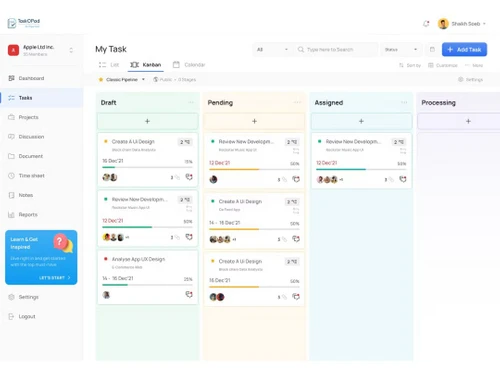
TaskOPad is an end-to-end project management tool that is helping enterprises in streamlining functions like projects, goals and tasks, development activities, sales, docs and spreadsheet management. Team leaders can organize tasks, assign them to employees and track their completion levels at regular intervals. Large teams can work together with ease, using the coordination tools featured by the...
See MoreHave you used TaskOPad before?
Share your insights for better experience
Brand: TaskOPad
Founded Year: 2020
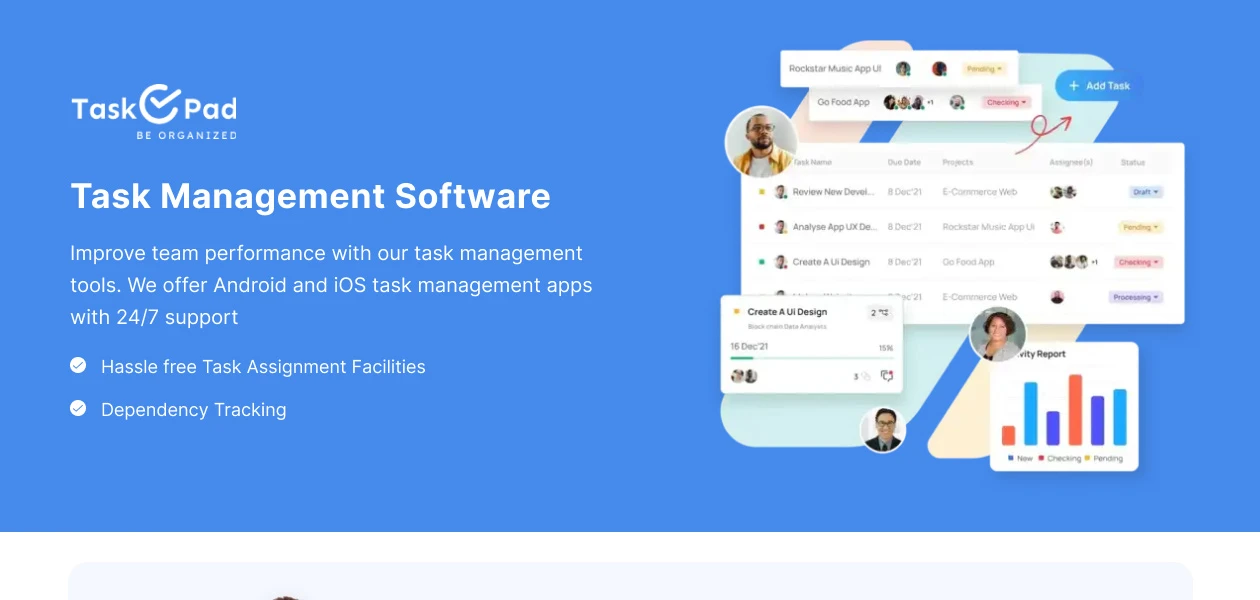
TaskOPad is an end-to-end task management software and app that aims to bring all your daily work and tasks on one platform thereby helping companies stay on top of things and making you more productive!
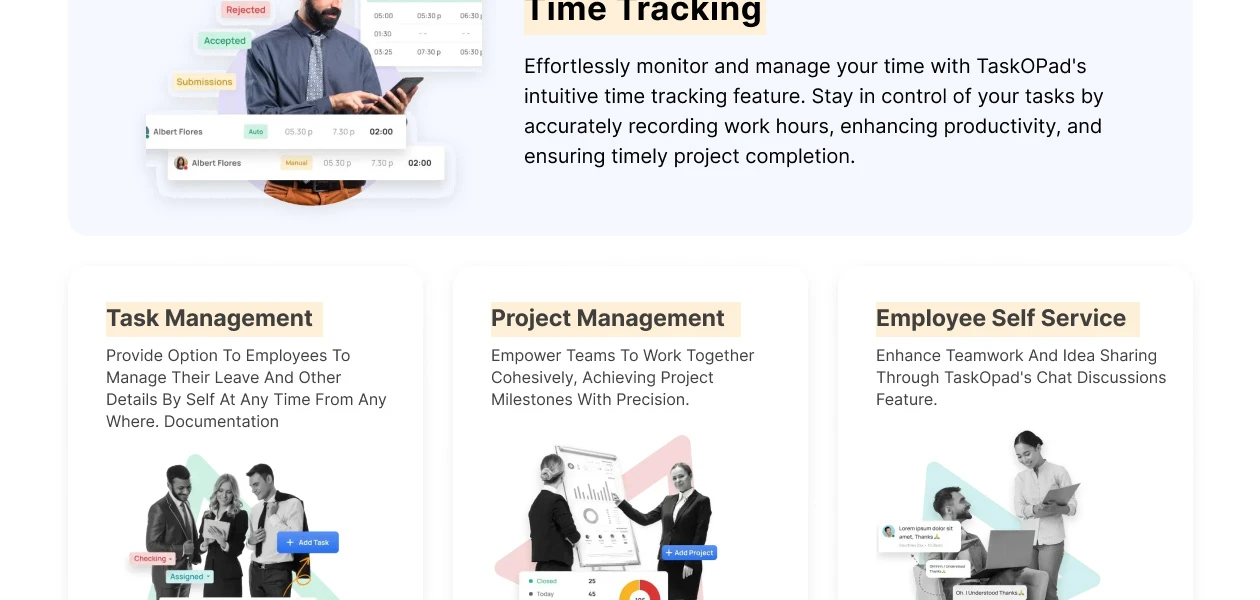
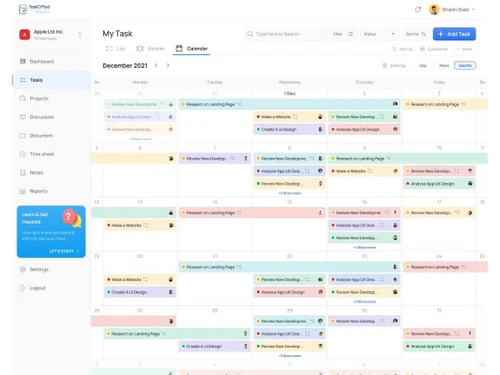
 Dependency Tracking Add Notes and Comments To Do List Project Management Docs & Attachment Chat Discussions Time Tracking Project Collaboration Reports Mobile Access Resource Management Scheduler View

Watch the demo video to explore key features, real workflows, and how the software fits your business needs.


 Windows
  Android
  Desktop
  Mobile
  Cloud-Based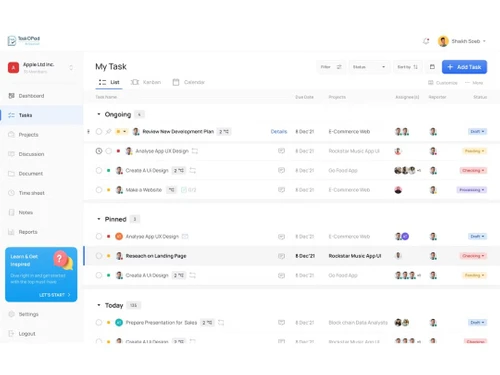
Small Business
Designed for startups and growing businesses
Medium Business
Built for business growth and flexibility
Enterprises
Designed for complex and large-scale business needs
4.7
Out of 5

Overall Rating
Based on
7 Verified Reviews
Rating Breakdown
91% Recommend this Product
Add ReviewUsers generally appreciate TaskOPad for its effective project management capabilities and user-friendly interface, which fosters team collaboration and transparency. Many find it beneficial for organizing tasks and tracking progress, especially for small to medium-sized teams. However, common concerns include a lack of integration options with other applications and limited graphical analytics features. While the software is praised for its affordability and regular updates, users express a desire for more advanced features and automation capabilities.
Pros
"Would recommend this app for managing your daily activities. After-service is quite nice."
"I have managed my unorganized sector into organized sector. I am pretty much happy that I can keep my all track under one roof Thanks to TaskOPad."
Cons
"More features can be there compared to what others are providing."
"I couldn't see something wrong, so I'd love to see further convergence with other app."
"There is no much Graphical analytics to see how much project has been done."


Aditya Ghosh 
Co-founder
Jan 17, 2023
Techjockey Verified
“Would recommend this app for managing your daily activities”
Pros
Would recommend this app for managing your daily activities. After-service is quite nice.
Cons
More features can be there compared to what others are providing.
Reason to switch
Just for experience
May 24, 2021
Techjockey Verified
“Amazingly Effective, All-In-One Project Management”
Pros
All-in-one project management and team collaboration solution that is incredibly efficient. Before we began using TaskOPad, we struggled with intra-team cooperation and bad, militated connectivity. This amazing and functional tool was a breakthrough for us and I'm not overwhelming here! TaskOPad is a one-stop solution that has all the right features under one roof, making it simple for all the team members to be on the same page. Intelligent task management helped to promote openness and consistency in the team when everybody knew the tasks and when it should be completed. The need to use emails to ask questions and answer questions has minimized group talk. Team participants can only send and receive direct communications in a matter of seconds. TaskOPad is a pocket-friendly tool for small and growing teams with easy, defined pricing plans.
Cons
I couldn't see something wrong, so I'd love to see further convergence with other app.
Apr 28, 2021
Techjockey Verified
““Great scalable solution for small and medium size”
Pros
TaskOPad is very easy to use, the interface is clean and intuitive. We can invite external clients to see the status of their projects without incurring in additional costs and the pricing strategy makes sense for us.
Cons
Not any kind of Integration is available.

TaskOPad
Price On Request
Desktop
Mobile
Web based
On Premises
Windows
Mac OS

TickTick
Price On Request
Desktop
Mobile
Web based
On Premises
Windows
Mac OS

Task Tracker
₹ 225
Desktop
Mobile
Web based
On Premises
Windows
Mac OS

Microsoft Planner
₹ 996
Desktop
Mobile
Web based
On Premises
Windows
Mac OS
Taskmaan
₹ 2000
Desktop
Mobile
Web based
On Premises
Windows
Mac OS

Aarvi Task Management System
Price On Request
Desktop
Mobile
Web based
On Premises
Windows
Mac OS

Akiflow
Price On Request
Desktop
Mobile
Web based
On Premises
Windows
Mac OS

Todoist
₹ 330
Desktop
Mobile
Web based
On Premises
Windows
Mac OS

Sunsama
Price On Request
Desktop
Mobile
Web based
On Premises
Windows
Mac OS

Zoho ToDo
Price On Request
Desktop
Mobile
Web based
On Premises
Windows
Mac OS

Workona
Price On Request
Desktop
Mobile
Web based
On Premises
Windows
Mac OS
(0) Product(s) selected
Starting Price:
$4 /Month
Starting Price:
₹996 /Month ₹1,200
Starting Price:
$34 /month
Starting Price:
$20 /month
Available
Price on Request
Starting Price:
$7 /month

Starting Price:
$50 $100

Available
Price on Request

Starting Price:
$30 /Month

Starting Price:
$4 /Month
Advanced filters included within TaskOPad lets users monitor the progress levels (completed/ ongoing) of individual tasks on a daily basis, the coming week and months.
A dedicated document management system in TaskOPad, enables users to share or save images, documents and other relevant information as per convenience.
The task management solution offers a dedicated section, enabling admins to assign tasks to their in-house employees and external teams.
Yes, the task management solution features a dedicated mobile app for iOS and Android users.
Business-related sensitive data gets stored with 256-bit encryption.
TaskOPad ERP solution pricing starts at Rs. 300 /User/Month at techjockey.com.
20,000+ Software Listed
Best Price Guranteed
Free Expert Consultation
2M+ Happy Customers
Terms and Condtions

Users with registered businesses can purchase goods from merchants on the platform to satisfy their business needs. Users are not permitted to utilize any products acquired through the platform for resale, advertising, business, or further distribution.
For each purchase made, users will receive a Tax Invoice (or 'GST invoice') that includes specific details such as:
the GSTIN of the user associated with their registered business, and
the specified Entity Name for their business.
It should be noted that not all products are eligible for GST Invoice. Only the products displayed by participating sellers with the 'GST-based Invoice Available' callout on the product description page would qualify.
Certain goods and services are not eligible to get a GST Invoice, including items with VAS, i.e., Value Added Services (e.g., Total Mobile Protection/Assured Buyback) and those involving an exchange offer at the time of purchase.
Users must ensure the accuracy of the GSTIN, and business entity name provided for the GST Invoice. Requests for corrections into GST Invoice would not be accommodated by Techjockey.com or any Seller, and any issues arising from user-provided information are the sole responsibility of users.
Techjockey.com is not liable for the GST Invoice or any associated input tax credit. To efficiently claim an input tax credit, users should select the registered place of business address as per the GST authority's data and follow the provisions of the GST Act and rules.
To claim an input tax credit, the delivery and billing addresses must match. Furthermore, input tax credits will not be granted if the delivery address and GSTIN on the invoice are from different states. In case of incorrect GST details provided during the order placement, the order will be canceled automatically.