linkedin
Aarvi Task Management System logo
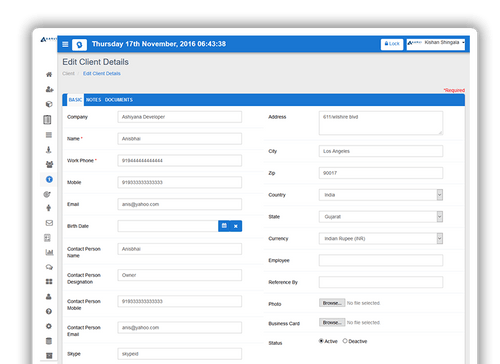
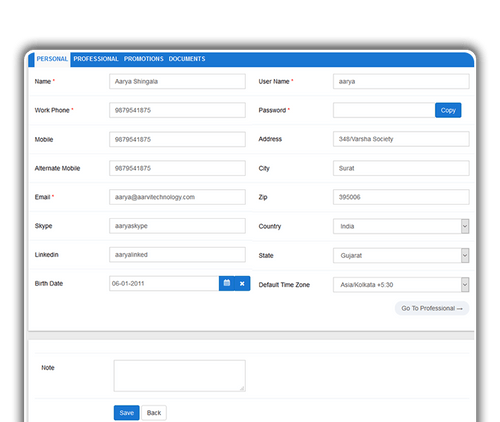
Aarvi Task Management System add client details
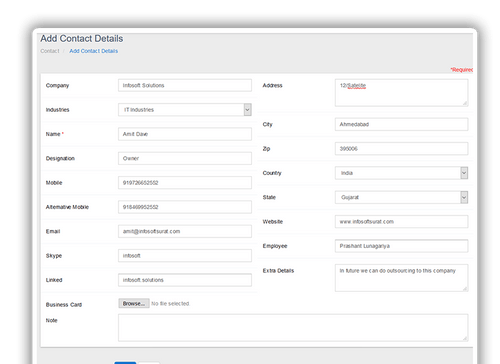
Aarvi Task Management System add contact details
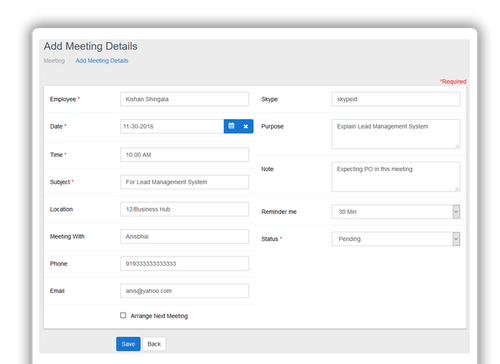
Aarvi Task Management System add meeting details

Aarvi Task Management System

Brand: Aarvi Technology

  • 4.1

  • 5 Ratings

Aarvi Task Management System aims to simplify all business operations with a wide variety of task management tools. It helps enhance the efficiency of a business by promoting better collaboration between teams and individuals working on a project. Users can quickly communicate with their clients and employees directly from the software via SMS and emails. They can also update their task schedule ...

See More

Have you used Aarvi Task Management System before?

Share your insights for better experience

Add a Review

Price Available on Request

Questions about pricing or customization? We’re here to help, just a click away.

100% Genuine
Products
Best Price
Guaranteed
Safe & Secure
Payment
  • Description

  • Pricing

  • Features

  • Specification

  • Review

  • Compare

  • Alternatives

  • FAQ

Aarvi Task Management System Software Overview

What is Aarvi Task Management System?

Aarvi Task Management System aims to simplify all business operations with a wide variety of task management tools. It helps enhance the efficiency of a business by promoting better collaboration between teams and individuals working on a project. Users can quickly communicate with their clients and employees directly from the software via SMS and emails. They can also update their task schedule and the software will send them automatic reminders for deadlines. Users can also streamline their company's recruitment and document management process through the task management software. Further, they can also manage their employees and keep track of their performance and process their promotion and payroll on time.

What is the Testing Management module of Aarvi Task Management Software?

  1. The testing team of an organisation can create advanced test cases for their employees or new joiners and store their results within this module.
  2. They can also track the time and resources spent on each test.
  3. Admins get to view a detailed history of all conducted test cases.
  4. They can create specific tasks from each test case.

Pricing of Aarvi Task Management Software

Aarvi Task Management System pricing depends on the requirement of the user. You can request a callback and our experts will connect with you at your convenient time.

Compatible platforms for Aarvi Task Management System

Aarvi Task Management System is a web-based solution, accessible from a compatible web browser from any device with a stable internet connection.

Benefits of using Aarvi Task Management Software

  1. Manage contacts - Company admins can update their contact lists on the software’s database and communicate with them as per their marketing strategy to generate potential business leads.
  2. Resource Management -Users can keep track of all the business-related items and resources using the advanced resource management module of the software.
  3. Wishlist - Users can upload their goals and wishlist on the software’s database and keep track of their progress from time to time.
  4. Goals - Managers and higher authorities can define their goals and track their progress from the goals module offered by Aarvi Task Management System.
Read more

Aarvi Technology Company Details

Founded Year:  2015

Aarvi Technology is providing customize solutions which will satisfy all your business needs.

Director/Founders Aarvi Technology
Company Size 1-100 Employees

Aarvi Task Management System Pricing & Plans

Looking for The Right Pricing?

Share your requirements and get a plan built around your business.

  • Define your business needs
  • Get customised pricing
  • Choose features that fit your workflow

Price Available on Request

Get personalised Aarvi Task Management System pricing that fits your needs. Our team will connect with you.

Aarvi Task Management System Features

  • icon_check Mobile App
    Aarvi Task Management System is a web based software and can be accessed from any mobile devices with ease.
  • icon_check Multi User login & Role based access
    Admins can create multiple users accounts and assign role based access rights to employees.
  • icon_check Real Time Analytics
    Users get access to a wide variety of intuitive charts based on the progress of their projects, purchase details, monthly work
  • icon_check Email and SMS Notifications
    Aarvi Task Management System sends alerts and notifications about meetings and upcoming events via email and SMS.
  • icon_check 24/7 Remote Access in the Cloud
    The entire data is stored in the Cloud with proper security. Users can access that data at any time from any place.
  • icon_check User Friendly Interface
    Aarvi Task Management Software offers a friendly user interface, enabling them to enhance their productivity level while reducing
  • icon_check Dashboards
    Dashboard the software provides useful information, such as quick action buttons, notifications, recent works, goal progress,
  • icon_check Employee Management
    The software can be used to monitor employees' activities, manage their professional documents, grant access to employee portal
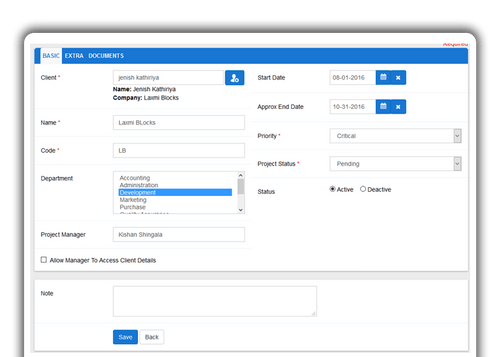
  • icon_check Project Management
    Users can manage projects, assign team members for specific projects, keep track of their progress and track the resource time as
  • icon_check Task Management
    Aarvi Task Management System enables its users to assign tasks to team members, keep track of their progress, add specific notes
  • icon_check Testing Management
    Testing teams get to create test cases, conduct tests, view detailed history of all test cases and also store the results of each
  • icon_check Resource Management
    Users can track all business related items and resources available in their company. They can also assign resources to
  • icon_check Lead Management
    The lead management module provided by the task management software helps users to keep track of all lead-related activities,
  • icon_check HR Module
    The HR module helps users to manage job description, store the candidates resume, send interview reminders, offer letters and
  • icon_check Meeting
    Users can update their meeting schedule within the software database. Aarvi Task Management System sends automated reminders
  • icon_check Finance
    You can handle all finance related operations including sales, purchase, income, expense and bank transactions. You can also
  • icon_check Client Management
    By using Aarvi Task Management System, you can update the clients’ list on the database, add specific notes and manage related
  • icon_check Document Management
    With Aarvi Task Management System, users can store documents, manage their letterhead settings, print them or store all the
  • icon_check Contact Management
    The software helps store details of your contacts, and communicate with them for higher conversion.
  • icon_check Administration
    Admins can assign user based access rights on the employees in order to ensure proper security for confidential documents.
  • icon_check Reports
    You can avail various kinds of reports based on client details, employee working hours, projects, lead stage life cycle, purchase

Aarvi Task Management System Specifications

Supported Platforms
Ubuntu Ubuntu Windows Windows iOS iOS Android Android MacOS MacOS Windows(Phone) Windows(Phone)
Devices
Desktop Desktop Mobile Mobile
Deployment
Cloud-Based Cloud-Based
Suitable For
All Industries
Business Specific
All Businesses
Business Size
Individual Small Business Startups Medium Business Enterprises
Customer Support
Phone Email Communities Forums
Language
English

Explore the Best Alternative Solutions Similar to Your Business Size and Needs

Aarvi Task Management System Review

4.1

Out of 5

img

Overall Rating

Based on
5 Verified Ratings

Rating Breakdown

  • Features 3.9
  • Value for Money 4.1
  • Ease of Use 4.3
  • Customer Support 4.3

88% Recommend this Product

Add Review

Techjockey Trusted Reviews from Verified Users

No reviews are currently available for Aarvi Task Management System. Discover similar Task Management Software reviews

  • Task Tracker

    4.9

    Whats great - Task Tracker is a very easy-to-use application, as it is having attendance feature with accurate geolocation, assigning tasks... read more

  • Kerika

    4.9

    Whats great - Ease of Use: The software is designed to be user-friendly, making it accessible to a wide range of users within the organisat... read more

  • TaskOPad

    4.8

    Whats great - Would recommend this app for managing your daily activities. After-service is quite nice. read more

Compare Aarvi Task Management System With other Task Management Software

Products
Ratings
Pricing
Device Supported
Deployment
Supported Platforms
  • img

    Aarvi Task Management System

  • 4.1

  • Price On Request

  • Desktop

    Mobile

  • Web based

    On Premises

  • Windows

    Mac OS

  • img

    Semsto

  • 5

  • ₹ 2500

  • Desktop

    Mobile

  • Web based

    On Premises

  • Windows

    Mac OS

  • img

    TickTick

  • 4.3

  • Price On Request

  • Desktop

    Mobile

  • Web based

    On Premises

  • Windows

    Mac OS

  • img

    TaskOPad

  • 4.7

  • Price On Request

  • Desktop

    Mobile

  • Web based

    On Premises

  • Windows

    Mac OS

  • img

    Task Tracker

  • 4.9

  • ₹ 225

  • Desktop

    Mobile

  • Web based

    On Premises

  • Windows

    Mac OS

  • img

    Zoho ToDo

  • 4.5

  • Price On Request

  • Desktop

    Mobile

  • Web based

    On Premises

  • Windows

    Mac OS

  • img

    Taskmaan

  • 4.5

  • ₹ 2000

  • Desktop

    Mobile

  • Web based

    On Premises

  • Windows

    Mac OS

  • img

    Akiflow

  • 4.7

  • Price On Request

  • Desktop

    Mobile

  • Web based

    On Premises

  • Windows

    Mac OS

  • img

    Todoist

  • 4.5

  • ₹ 330

  • Desktop

    Mobile

  • Web based

    On Premises

  • Windows

    Mac OS

  • img

    Workona

  • 4.7

  • Price On Request

  • Desktop

    Mobile

  • Web based

    On Premises

  • Windows

    Mac OS

(0) Product(s) selected

Aarvi Task Management System Alternatives

See All Aarvi Task Management System Alternatives

Starting Price:

$4 /Month

SAVE UPTO 17%

Available

Price on Request

Starting Price:

$34 /month

Starting Price:

$7 /month

Starting Price:

$20 /month

SAVE UPTO 50%

Starting Price:

$4 /Month

Starting Price:

$30 /Month

Articles for Aarvi Task Management System

See All Related Articles

Can I add notes about clients through Aarvi Task Management System?

Yes, users can add notes about their clients through Aarvi Task Management System.

How is the dashboard offered by Aarvi Task Management System helpful for its users?

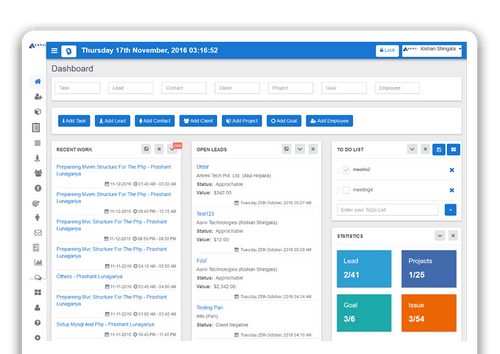
Admins get access to quick action buttons, view their recent work,revenue, projects in hand, manage their to-do list and daily meetings.

Can I get a demo of the Aarvi Task Management System?

Yes, interested users can request an online demo of Aarvi Task Management System. In-house product experts of Techjockey will get back to them.

How is the lead management feature of Aarvi Task Management Software useful for its users?

The intuitive lead management system offered by the software helps its users to create new leads, manage the lead stages, related documents and meetings and relevant history.

Does Aarvi Task Management Software have a mobile app?

No, Aarvi Task Management System does not have a mobile app.

How much does Aarvi Task Management System cost?

Aarvi Task Management System’s pricing details are available on request at techjockey.com.

20,000+ Software Listed

Best Price Guranteed

Free Expert Consultation

2M+ Happy Customers

Terms and Condtions

close

Users with registered businesses can purchase goods from merchants on the platform to satisfy their business needs. Users are not permitted to utilize any products acquired through the platform for resale, advertising, business, or further distribution.

For each purchase made, users will receive a Tax Invoice (or 'GST invoice') that includes specific details such as:

  • the GSTIN of the user associated with their registered business, and

  • the specified Entity Name for their business.

It should be noted that not all products are eligible for GST Invoice. Only the products displayed by participating sellers with the 'GST-based Invoice Available' callout on the product description page would qualify.

Certain goods and services are not eligible to get a GST Invoice, including items with VAS, i.e., Value Added Services (e.g., Total Mobile Protection/Assured Buyback) and those involving an exchange offer at the time of purchase.

Users must ensure the accuracy of the GSTIN, and business entity name provided for the GST Invoice. Requests for corrections into GST Invoice would not be accommodated by Techjockey.com or any Seller, and any issues arising from user-provided information are the sole responsibility of users.

Techjockey.com is not liable for the GST Invoice or any associated input tax credit. To efficiently claim an input tax credit, users should select the registered place of business address as per the GST authority's data and follow the provisions of the GST Act and rules.

To claim an input tax credit, the delivery and billing addresses must match. Furthermore, input tax credits will not be granted if the delivery address and GSTIN on the invoice are from different states. In case of incorrect GST details provided during the order placement, the order will be canceled automatically.