linkedin
Morgen logo
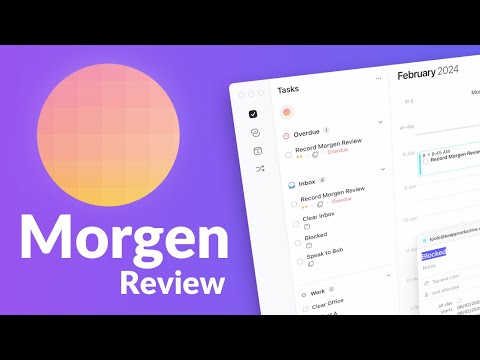
play Intro to Morgen, not just another calendar
Morgen Task Manager
Morgen Time Blocking

Morgen

Brand: Morgen

  • 4.1

  • 5 Ratings & 1 Review

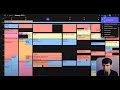
Morgen is a versatile productivity tool that enhances scheduling and time management. It offers features like time blocking, natural language processing, and task management to streamline your day and improve collaboration.

See More

Have you used Morgen before?

Share your insights for better experience

Add a Review
Starting Price
$30

View plans

100% Genuine
Products
Best Price
Guaranteed
Safe & Secure
Payment
  • Description

  • Pricing

  • Features

  • Specification

  • Review

  • Compare

  • Alternatives

  • FAQ

Starting at $30

Morgen Software Overview

What is Morgen?

Morgen is an intuitive business software that simplifies time management and scheduling. As a project management software and task management software, Morgen is essential for both individuals and teams. It helps users organize their calendars, manage tasks, and boost productivity. With innovative features like time blocking and natural language processing, it adapts to changing schedules, keeping users on track. Built for flexibility, Morgen integrates seamlessly with various calendar services and third-party applications. This makes it ideal for professionals optimizing their workflow, whether at home or in an office environment.

The software's user-friendly design ensures that anyone can use it effectively, from beginners to experienced users. With Morgen, you can easily track your tasks, set alerts, and collaborate with others, all in one platform. By providing comprehensive tools for scheduling and task management, Morgen enables users to prioritize their time efficiently. Whether you're managing a busy work schedule or planning personal activities, Morgen helps you stay organized and focused. Its ability to adapt to your unique needs makes it a valuable asset for enhancing productivity and achieving your goals.

Why Choose Morgen?

  • User-Friendly Design: Morgen's interface is simple and easy to navigate, making it accessible for everyone.
  • Efficient Scheduling: Manage your time effectively with advanced scheduling tools and features.
  • Seamless Integration: Connect with various calendars and third-party apps for a smooth workflow.
  • Customizable Alerts: Set reminders to keep track of important tasks and deadlines.
  • Enhanced Collaboration: Use collaboration tools to coordinate with team members and boost productivity.

Benefits of Morgen

  • Improved Time Management: Helps users organize their schedules and prioritize tasks effectively.
  • Increased Productivity: Streamlines daily activities, leading to more efficient use of time.
  • Clear Insights: Provides detailed analytics for better understanding of time usage.
  • Stress Reduction: Keeps you on track with alerts, reducing the stress of missed deadlines.
  • Flexibility: Adapts to your needs, making it suitable for both personal and professional use.
  • Enhanced Collaboration: Facilitates teamwork with easy sharing and coordination tools.
  • Customizable Workflows: Tailor the software to fit your unique workflow and preferences.
  • Seamless Synchronization: Integrates all your calendars for a comprehensive view of your schedule.

Pricing of Morgen

Morgen price starts from $30 at techjockey.com. The pricing model is based on different parameters, including extra features, deployment type, and the total number of users. For further queries related to the product, you can contact our product team and learn more about the pricing and offers.

Read more

Morgen Company Details

Founded Year:  2021

Morgen is a universal time management platform where you can merge your calendars, to do’s, productivity apps and schedulers.

Director/Founders David Tedaldi, Marco Ancona
Company Size 1-100 Employees

Morgen Pricing & Plans

Individual Monthly
Starting at $30
    • Licenses

      Licenses
      Licenses
    • Monthly

      Monthly
      Monthly

Key Features

  • Time blocking supported by AI Planner

  • Time blocking/task scheduling

  • Assistant with Slack?integration

  • Team Meeting Optimizer

  • Team dashboard and insights

  • Calendar integration

Individual yearly(USD 15 per month)
Starting at $180
    • Licenses

      Licenses
      Licenses
    • Yearly

      Yearly
      Yearly

Key Features

  • All in Pro Monthly

  • Time blocking/task scheduling

  • Assistant with Slack?integration

  • Team Meeting Optimizer

  • Team dashboard and insights

  • Calendar integration

Team Monthly
Starting at $50
    • Seat

      Seat
      Seat
    • Monthly

      Monthly
      Monthly

Key Features

  • Time blocking supported by AI Planner

  • Time blocking/task scheduling

  • Assistant with Slack?integration

  • Team Meeting Optimizer

  • Team dashboard and insights

  • Calendar integration

Team Yearly(USD 10 per seat, per month)
Starting at $240
    • Seat

      Seat
      Seat
    • Yearly

      Yearly
      Yearly

Key Features

  • All in Pro Monthly

  • Time blocking/task scheduling

  • Assistant with Slack?integration

  • Team Meeting Optimizer

  • Team dashboard and insights

  • Calendar integration

Morgen Features

  • icon_check Time Blocking
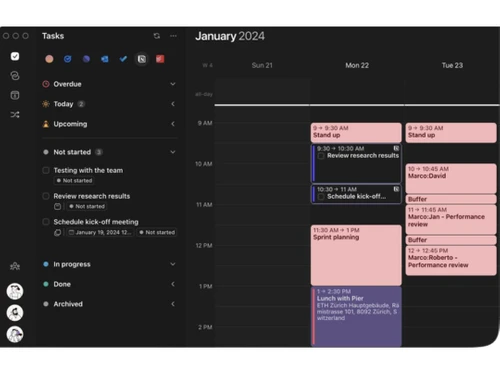
    Organize your day by allocating specific times for tasks and activities.
  • icon_check Natural Language Processing
    Schedule meetings effortlessly using simple language commands.
  • icon_check Unified Calendar Integration
    Connect multiple calendars into a single unified planning surface so events from all accounts stay synced and conflict free.
  • icon_check Smart Time Blocking
    Block focused time directly on the calendar to protect deep work hours so important priorities remain intentional and uninterrupte
  • icon_check Task Scheduling Engine
    Drag tasks from the task list onto the calendar to assign a precise execution slot and eliminate vague later or someday buckets.
  • icon_check Cross Platform Access
    Use Morgen across macOS Windows Linux and mobile to keep the same synchronized planner view regardless of device context.
  • icon_check Meeting Availability Links
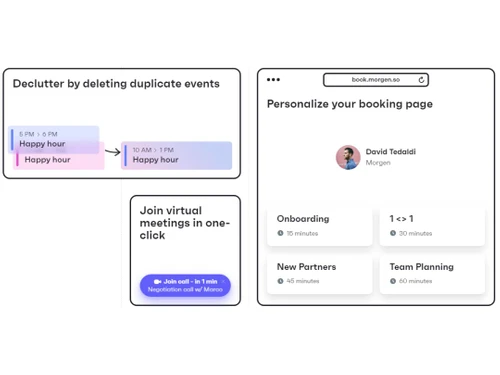
    Generate personal booking links based on real availability to let others self schedule time without email ping pong delays.
  • icon_check Scheduling
    Plan and manage appointments with ease.
  • icon_check Calendar Management
    Sync multiple calendars for a unified view of your schedule.
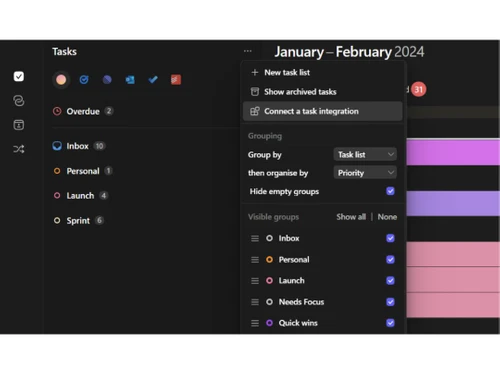
  • icon_check Task Management
    Track and prioritize tasks to ensure nothing is overlooked.
  • icon_check Alerts & Notifications
    Stay informed with timely reminders and updates.
  • icon_check Collaboration Tools
    Work together with team members for better productivity.
  • icon_check Third-Party Integrations
    Connect with your favorite apps for a streamlined experience.
Morgen Demo Video play icon

Get Morgen Demo

Watch the demo video to explore key features, real workflows, and how the software fits your business needs.

Understand
Key Features
Personal
Demo Insights
Interactive
Demo Support

Morgen Specifications

Supported Platforms
Ubuntu Ubuntu Windows Windows iOS iOS Android Android MacOS MacOS Linux Linux
Devices
Desktop Desktop Mobile Mobile Tablet Tablet iPad iPad
Deployment
Cloud-Based Cloud-Based
Suitable For
All Industries
Business Specific
All Businesses
Business Size
Small Business Startups Medium Business Enterprises
Customer Support
Email Communities
Language
English français Italiano Español
Training Resources
Videos

Explore the Best Alternative Solutions Similar to Your Business Size and Needs

Morgen Review

4.1

Out of 5

img

Overall Rating

Based on
1 Verified Review

Rating Breakdown

  • Features 4.7
  • Value for Money 4
  • Ease of Use 4
  • Customer Support 3.9

92% Recommend this Product

Add Review

Morgen Video Review

youtubeVideoId

4.3

“Morgen Review: Best All Round Calendar?”

Review by: Tool finder

Compare Morgen With other Task Management Software

Products
Ratings
Pricing
Device Supported
Deployment
Supported Platforms
  • img

    Morgen

  • 4.1

  • Price On Request

  • Desktop

    Mobile

  • Web based

    On Premises

  • Windows

    Mac OS

  • img

    TickTick

  • 4.3

  • Price On Request

  • Desktop

    Mobile

  • Web based

    On Premises

  • Windows

    Mac OS

  • img

    TaskOPad

  • 4.7

  • Price On Request

  • Desktop

    Mobile

  • Web based

    On Premises

  • Windows

    Mac OS

  • img

    Task Tracker

  • 4.9

  • ₹ 225

  • Desktop

    Mobile

  • Web based

    On Premises

  • Windows

    Mac OS

  • img

    Zoho ToDo

  • 4.5

  • Price On Request

  • Desktop

    Mobile

  • Web based

    On Premises

  • Windows

    Mac OS

  • img

    Taskmaan

  • 4.5

  • ₹ 2000

  • Desktop

    Mobile

  • Web based

    On Premises

  • Windows

    Mac OS

  • img

    Akiflow

  • 4.7

  • Price On Request

  • Desktop

    Mobile

  • Web based

    On Premises

  • Windows

    Mac OS

  • img

    Todoist

  • 4.5

  • ₹ 330

  • Desktop

    Mobile

  • Web based

    On Premises

  • Windows

    Mac OS

  • img

    Workona

  • 4.7

  • Price On Request

  • Desktop

    Mobile

  • Web based

    On Premises

  • Windows

    Mac OS

(0) Product(s) selected

Morgen Alternatives

See All Morgen Alternatives

Starting Price:

$4 /Month

SAVE UPTO 17%

Available

Price on Request

Starting Price:

$34 /month

Starting Price:

$7 /month

Starting Price:

$20 /month

SAVE UPTO 50%

Starting Price:

$4 /Month

Articles for Morgen

See All Related Articles

What is Morgen used for?

Morgen is used for managing schedules, tasks, and enhancing productivity through effective time management.

How does time blocking work in Morgen?

Time blocking allows users to allocate specific time slots for tasks, helping to focus and manage time efficiently.

Can Morgen integrate with other apps?

Yes, Morgen supports third-party integrations, allowing seamless connection with various apps and calendars.

Is Morgen suitable for teams?

Absolutely, Morgen offers collaboration tools that make it ideal for team coordination and project management.

How does Morgen handle notifications?

Morgen provides customizable alerts to remind you of important tasks and deadlines, keeping you on track.

Can I use natural language for scheduling in Morgen?

Yes, Morgen's natural language processing feature lets you schedule tasks using simple commands.

Is Morgen easy to use for beginners?

Yes, Morgen's intuitive design ensures that even beginners can navigate and use it effectively.

Does Morgen support multiple calendars?

Yes, Morgen allows you to sync multiple calendars for a comprehensive view of your schedule.

What platforms does Morgen support?

Morgen is available on various platforms, making it accessible on different devices.

Is my data secure with Morgen?

Yes, Morgen uses industry-standard security measures to protect your data and privacy.

How much does Morgen Software cost?

Morgen price starts from $30 at techjockey.com.

20,000+ Software Listed

Best Price Guranteed

Free Expert Consultation

2M+ Happy Customers

Terms and Condtions

close

Users with registered businesses can purchase goods from merchants on the platform to satisfy their business needs. Users are not permitted to utilize any products acquired through the platform for resale, advertising, business, or further distribution.

For each purchase made, users will receive a Tax Invoice (or 'GST invoice') that includes specific details such as:

  • the GSTIN of the user associated with their registered business, and

  • the specified Entity Name for their business.

It should be noted that not all products are eligible for GST Invoice. Only the products displayed by participating sellers with the 'GST-based Invoice Available' callout on the product description page would qualify.

Certain goods and services are not eligible to get a GST Invoice, including items with VAS, i.e., Value Added Services (e.g., Total Mobile Protection/Assured Buyback) and those involving an exchange offer at the time of purchase.

Users must ensure the accuracy of the GSTIN, and business entity name provided for the GST Invoice. Requests for corrections into GST Invoice would not be accommodated by Techjockey.com or any Seller, and any issues arising from user-provided information are the sole responsibility of users.

Techjockey.com is not liable for the GST Invoice or any associated input tax credit. To efficiently claim an input tax credit, users should select the registered place of business address as per the GST authority's data and follow the provisions of the GST Act and rules.

To claim an input tax credit, the delivery and billing addresses must match. Furthermore, input tax credits will not be granted if the delivery address and GSTIN on the invoice are from different states. In case of incorrect GST details provided during the order placement, the order will be canceled automatically.