USA
USA UAE
UAESmall Business
Designed for startups and growing businesses
See More


Brand: Felenasoft Ltd
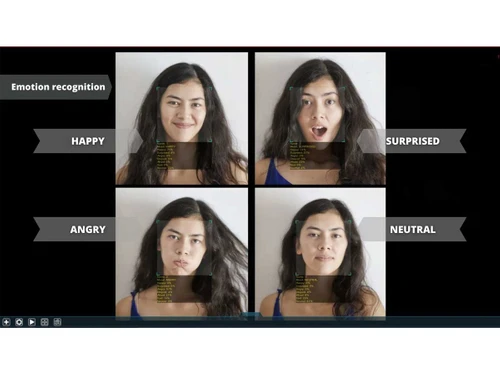
Xeoma is a smart security camera software that spots people, cars, and threats using AI, works on any device, and keeps your data private.
See MoreHave you used Xeoma before?
Share your insights for better experience
Brand: Felenasoft Ltd
Founded Year: 2004
Felenasoft has been operating in the video surveillance market since 2004 and specializes in developing video surveillance software.
Looking for The Right Pricing?
Share your requirements and get a plan built around your business.
Price Available on Request
Get personalised Xeoma pricing that fits your needs. Our team will connect with you.
Video Capture & Recording
 Recording Modes Anomaly Detection Camera Compatibility Video Compression & Quality PTZ Control Edge Storage & Failover Multicast & Multi-Stream Hardware-Accelerated Detection Multi-Live Streaming Tamper Detection
 Storage & Retention
Storage Options Retention & Data Management Redundancy & Failover Hot & Cold Failover Recording Evidence Locking & Retention Media Database Encryption Video Playback & Retrieval
Playback Features Smart Search & Retrieval Incident Manager & Bookmarks Export & Sharing Evidence Chain of Custody Video Analytics
Customizable Dashboards Behavioral Analysis Motion & Object Detection Facial & License Plate Recognition Integrations
Third Party Integrations Multi-Site Federated Management Interconnected Video Feeds Open API & Protocols Firmware Upgrades Smart Map Integration LDAP/Active Directory Integration Automated Device Discovery Alerts & Notifications
Customizable Dashboards Event-Based Alerts Notification Channels Alarm Manager Security & Compliance
Audit Logs Data Security Data Encryption Regulatory Compliance Secure Remote Access Role-Based Access Control (RBAC) Audit Trails ONVIF Compliance Authentication & Authorization Device Password Management Incident Reporting  Ubuntu
  Windows
  iOS
iOS  Android MacOS Windows(Phone)
  Linux
Linux  Desktop
  Mobile
  Tablet
  iPad
iPad  Cloud-Based
  Perpetual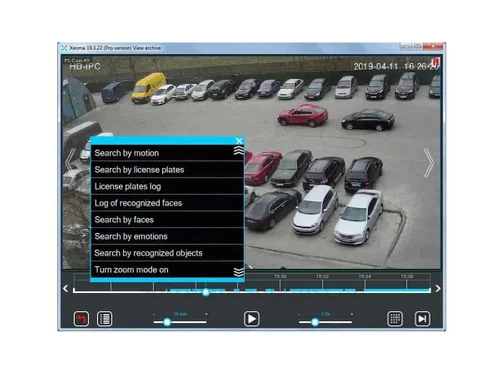
Small Business
Designed for startups and growing businesses
Medium Business
Built for business growth and flexibility
Enterprises
Designed for complex and large-scale business needs
4.4
Out of 5

Overall Rating
Based on
4 Verified Ratings
Rating Breakdown
80% Recommend this Product
Add ReviewThis product has no reviews yet. Be the first to leave your feedback.
Add Review
Xeoma
Price On Request
Desktop
Mobile
Web based
On Premises
Windows
Mac OS

XProtect
Price On Request
Desktop
Mobile
Web based
On Premises
Windows
Mac OS

Luxriot EVO
Price On Request
Desktop
Mobile
Web based
On Premises
Windows
Mac OS

Videonetics
Price On Request
Desktop
Mobile
Web based
On Premises
Windows
Mac OS

Axis VMS
Price On Request
Desktop
Mobile
Web based
On Premises
Windows
Mac OS

Avigilon
Price On Request
Desktop
Mobile
Web based
On Premises
Windows
Mac OS

BVMS
Price On Request
Desktop
Mobile
Web based
On Premises
Windows
Mac OS

exacqVision
Price On Request
Desktop
Mobile
Web based
On Premises
Windows
Mac OS

Mobotix VMS
Price On Request
Desktop
Mobile
Web based
On Premises
Windows
Mac OS

Arlo Secure
Price On Request
Desktop
Mobile
Web based
On Premises
Windows
Mac OS

VIGI VMS
Price On Request
Desktop
Mobile
Web based
On Premises
Windows
Mac OS
(0) Product(s) selected
Available
Price on Request
Available
Price on Request
Available
Price on Request
Available
Price on Request

Available
Price on Request

Available
Price on Request

Starting Price:
$19 /Month

Available
Price on Request

Available
Price on Request

Starting Price:
$100 /License

Available
Price on Request
The pricing of Xeoma starts from 11 USD at Techjockey.com.
Xeoma is widely used by Homeowners, Retail & Hospitality, Banks & Corporations, and Smart Cities & Government.
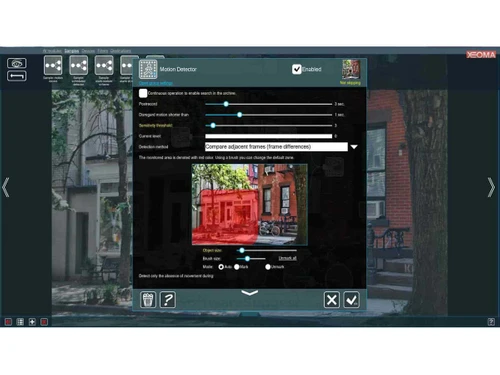
Xeoma works by connecting to cameras and using AI-powered modules to analyse video feeds in real-time for security alerts, object recognition, and automated responses, all managed through an intuitive drag-and-drop interface.
No, Xeoma is not available for free.
Yes, Xeoma is safe to use with local/encrypted storage, no forced cloud uploads, and privacy-focused features like face/object blurring.
20,000+ Software Listed
Best Price Guranteed
Free Expert Consultation
2M+ Happy Customers
Terms and Condtions

Users with registered businesses can purchase goods from merchants on the platform to satisfy their business needs. Users are not permitted to utilize any products acquired through the platform for resale, advertising, business, or further distribution.
For each purchase made, users will receive a Tax Invoice (or 'GST invoice') that includes specific details such as:
the GSTIN of the user associated with their registered business, and
the specified Entity Name for their business.
It should be noted that not all products are eligible for GST Invoice. Only the products displayed by participating sellers with the 'GST-based Invoice Available' callout on the product description page would qualify.
Certain goods and services are not eligible to get a GST Invoice, including items with VAS, i.e., Value Added Services (e.g., Total Mobile Protection/Assured Buyback) and those involving an exchange offer at the time of purchase.
Users must ensure the accuracy of the GSTIN, and business entity name provided for the GST Invoice. Requests for corrections into GST Invoice would not be accommodated by Techjockey.com or any Seller, and any issues arising from user-provided information are the sole responsibility of users.
Techjockey.com is not liable for the GST Invoice or any associated input tax credit. To efficiently claim an input tax credit, users should select the registered place of business address as per the GST authority's data and follow the provisions of the GST Act and rules.
To claim an input tax credit, the delivery and billing addresses must match. Furthermore, input tax credits will not be granted if the delivery address and GSTIN on the invoice are from different states. In case of incorrect GST details provided during the order placement, the order will be canceled automatically.