USA
USA UAE
UAESmall Business
Designed for startups and growing businesses

See More




Brand: ZenoHosp
Have you used ZenoHosp before?
Share your insights for better experience
Brand: ZenoHosp
Founded Year: 2025
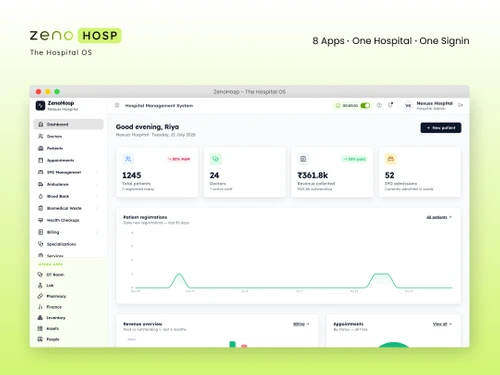
Zenohosp is designed it around how hospitals, clinics, and specialty centres actually work, not how software vendors imagine they work. The goal is simple: less admin, fewer errors, and more time for staff to spend on patients instead of paperwork.
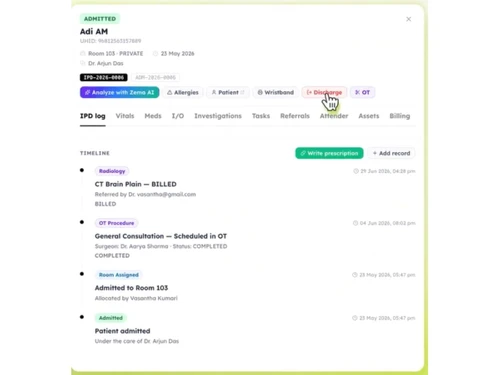
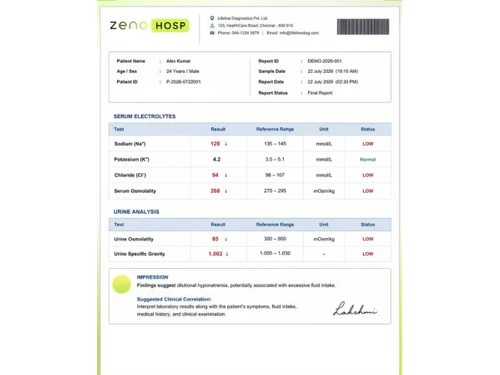
 Patient Registration Electronic Medical Records Appointment Scheduling OPD Management IPD Management OT Management Pharmacy Management Laboratory Management Billing & Invoicing Insurance & TPA Management Inventory Management Asset Management Role-Based Access Control (RBAC) Workflow Automation HR & Payroll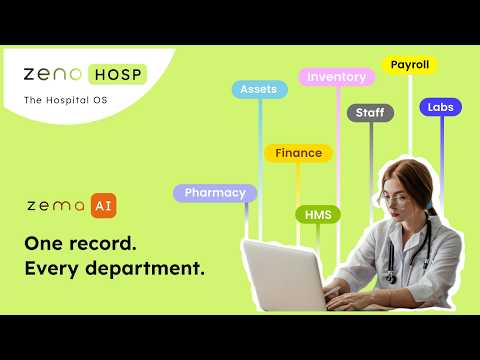

Watch the demo video to explore key features, real workflows, and how the software fits your business needs.
 Windows
  iOS
iOS  Android MacOS
  Linux
Linux  Desktop
  Mobile
  Tablet
  iPad
iPad  Cloud-Based
  Perpetual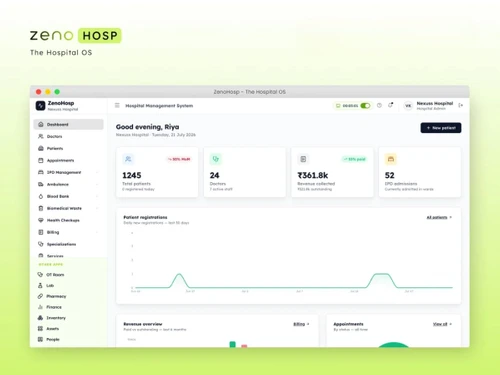
Small Business
Designed for startups and growing businesses
Medium Business
Built for business growth and flexibility
Enterprises
Designed for complex and large-scale business needs
4.7
Out of 5

Overall Rating
Based on
1 Verified Review
Rating Breakdown
100% Recommend this Product
Add Review
Aug 4, 2026
Techjockey Verified
“Feature-Rich Hospital Management Software with Great Value”
I've been using ZenoHosp for hospital administration, and it has made our daily operations much smoother. The interface is easy to understand, and managing patient records, appointments, billing, and other administrative tasks has become much more organized. One thing I appreciate is that the team is responsive to feedback and keeps improving the product based on real user needs. The implementation process was smooth, and the integration was easy and helped a lot in connecting our existing workflows without any hassle. Whenever we needed support, the team was quick to help. Overall, ZenoHosp is a reliable hospital management solution that has helped improve efficiency and reduce manual work. I'd definitely recommend it to hospitals looking for a practical and user-friendly HMS.
Pros
The software brings essential hospital operations such as OPD, IPD, billing, pharmacy, lab, OT, and inventory into one centralized platform. Automated workflows, customizable processes, real-time dashboards, flexible deployment options, and responsive customer support help improve operational efficiency and reduce manual work.
Cons
Some advanced reports may require additional customization based on specific hospital requirements. Since the platform includes a wide range of features, new users may also need some initial training to explore its full capabilities.
ZenoHosp
₹ 9000.00 excl. GST
Desktop
Mobile
Web based
On Premises
Windows
Mac OS

Acssel HMS
₹ 1500
Desktop
Mobile
Web based
On Premises
Windows
Mac OS

Practo Insta
Price On Request
Desktop
Mobile
Web based
On Premises
Windows
Mac OS

Ether HMS
₹ 2000
Desktop
Mobile
Web based
On Premises
Windows
Mac OS
Hosman
Price On Request
Desktop
Mobile
Web based
On Premises
Windows
Mac OS

Lifemaan
Price On Request
Desktop
Mobile
Web based
On Premises
Windows
Mac OS

E_kshitiz
₹ 100000
Desktop
Mobile
Web based
On Premises
Windows
Mac OS
MediVaulta
Price On Request
Desktop
Mobile
Web based
On Premises
Windows
Mac OS

Meshink Hospital Management
₹ 10000
Desktop
Mobile
Web based
On Premises
Windows
Mac OS

OmniWorks HMS
₹ 15000
Desktop
Mobile
Web based
On Premises
Windows
Mac OS

Ashrisha Hospital Management Software
₹ 55000
Desktop
Mobile
Web based
On Premises
Windows
Mac OS
(0) Product(s) selected
Available
Price on Request
Available
Price on Request
Available
Price on Request
Starting Price:
₹15,000 /Year ₹30,000

Available
Price on Request

Starting Price:
₹100,000 /License

Starting Price:
₹99,999 /User/Year

Starting Price:
₹80,000 /Year

Starting Price:
₹2,000

Starting Price:
₹1,500,000

Starting Price:
₹25,000 /OneTime
20,000+ Software Listed
Best Price Guranteed
Free Expert Consultation
2M+ Happy Customers
Terms and Condtions

Users with registered businesses can purchase goods from merchants on the platform to satisfy their business needs. Users are not permitted to utilize any products acquired through the platform for resale, advertising, business, or further distribution.
For each purchase made, users will receive a Tax Invoice (or 'GST invoice') that includes specific details such as:
the GSTIN of the user associated with their registered business, and
the specified Entity Name for their business.
It should be noted that not all products are eligible for GST Invoice. Only the products displayed by participating sellers with the 'GST-based Invoice Available' callout on the product description page would qualify.
Certain goods and services are not eligible to get a GST Invoice, including items with VAS, i.e., Value Added Services (e.g., Total Mobile Protection/Assured Buyback) and those involving an exchange offer at the time of purchase.
Users must ensure the accuracy of the GSTIN, and business entity name provided for the GST Invoice. Requests for corrections into GST Invoice would not be accommodated by Techjockey.com or any Seller, and any issues arising from user-provided information are the sole responsibility of users.
Techjockey.com is not liable for the GST Invoice or any associated input tax credit. To efficiently claim an input tax credit, users should select the registered place of business address as per the GST authority's data and follow the provisions of the GST Act and rules.
To claim an input tax credit, the delivery and billing addresses must match. Furthermore, input tax credits will not be granted if the delivery address and GSTIN on the invoice are from different states. In case of incorrect GST details provided during the order placement, the order will be canceled automatically.





![[Infographic] How HMS can help you boost revenue and enhance patient care](https://cdn.techjockey.com/blog/wp-content/uploads/2019/08/05185944/how-hms-can-help-boost-hospital-revenue-and-patient-care.jpg?d=265x163 "Blog - [Infographic] How HMS can help you boost revenue and enhance patient care")