1 Answers
A:
To add Google Fonts to CKEditor, follow the steps given below:
Add the Google Fonts link in the page where CKEditor is embedded

Modify the CKEditor configuration by adding the font name to the
font_names
configuration option in the config.js file:

Use the Google Font in the CKEditor content by selecting it from the font dropdown.
Related Question and Answers
Q:
A:
To migrate form CKEditor 4 to CKEditor 5, follow the steps given below:
Remove CKEditor 4 from your project.
Install CKEditor 5 via npm or CDN:

Update your JavaScript code to initialize CKEditor 5 instead of CKEditor 4. Example:

Check the plugins that you used in CKEditor 4 and find their CKEditor 5 equivalents, as architecture of plugins is different.
If you used custom plugins or configurations, rewrite them using CKEditor 5’s new API and plugin system.
Test your editor to make sure that everything works as expected with CKEditor 5’s modern features and UI.
Q:
A:
To upload files and images in CKEditor 4, follow the steps given below:
Download CKEditor from its official website.
Make sure you use the 'Standard' or 'Full' build, as these include the necessary plugins for file uploads.
Navigate to your CKEditor configuration file (typically
config.js
).
Add this line to enable file upload:
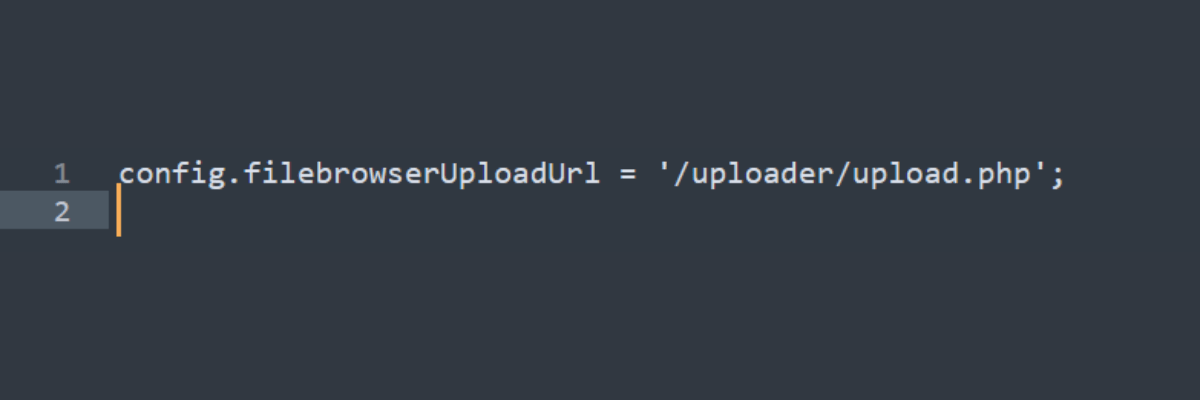
This points to a server-side script (e.g.
upload.php
) that handles the actual file uploads.
After setting everything up, open CKEditor and use the image or file button to open the dialog box.
In the dialog, you will see an Upload tab where you can select a file from your computer and upload it to the server.
Create the
upload.php
file (or use another server-side language) to handle the file upload logic.
Configure the script to store the files on your server and return the file path to CKEditor after a successful upload.
After setting everything up, open CKEditor and use the image or file button to open the dialog box.
In the dialog, you will see an Upload tab where you can select a file from your computer and upload it to the server.
Q:
A:
You can use the autosave functionality which automatically saves the editor content at regular intervals to prevent your content from getting lost in CKEditor 4.
Q:
A:
The CKEditor 4 core team doesn’t work on MediaWiki integrations. If you need to utilize any other custom format like Wiki markup, you will have to alter the output format of the editor.
Q:
A:
To embed videos, pictures and other media in CKEditor 4, you must use the ‘Media Embed’ plugin. To embed media in CKeditor 4, follow the steps given below:

CKEditor
CKSource Holding LtdDisclaimer
Techjockey’s software industry experts offer advice for educational and informational purposes only. A category or product query or issue posted, created, or compiled by Techjockey is not meant to replace your independent judgment.
 20,000+ Software Listed
 Best
Price Guaranteed
Best
Price Guaranteed
 Free Expert
Consultation
Free Expert
Consultation
 2M+
Happy Customers
2M+
Happy Customers
 USA
USA UAE
UAE