linkedin
123FormBuilder logo
play Use Online Forms to Increase Productivity | 123FormBuilder
123formbuilder-enterprise
123formbuilder-business

123FormBuilder

Brand: 123 Form Builder

  • 4.1

  • 6 Ratings

Enables businesses to design customizable forms, surveys, and quizzes without coding. It integrates seamlessly with various platforms, offering robust data collection and analytics.

See More

Have you used 123FormBuilder before?

Share your insights for better experience

Add a Review
Starting Price
$37

View plans

100% Genuine
Products
Best Price
Guaranteed
Safe & Secure
Payment
  • Description

  • Pricing

  • Features

  • Specification

  • Review

  • Compare

  • Alternatives

  • FAQ

Starting at $37

123FormBuilder Software Overview

What is 123FormBuilder?

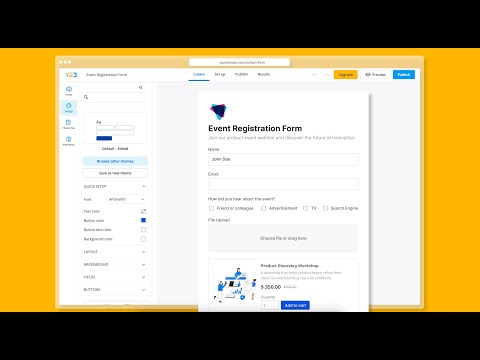
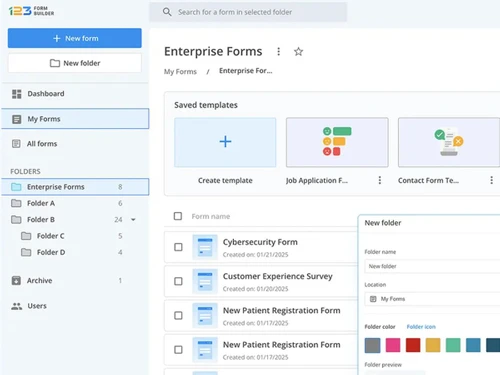
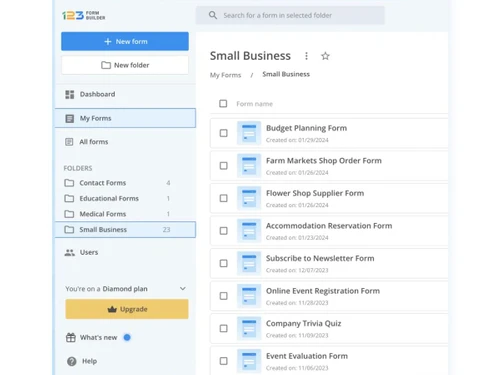
123FormBuilder is a versatile survey software that helps users create forms, surveys, and quizzes effortlessly, without requiring any coding skills. It offers a drag-and-drop interface, making form creation simple and intuitive.

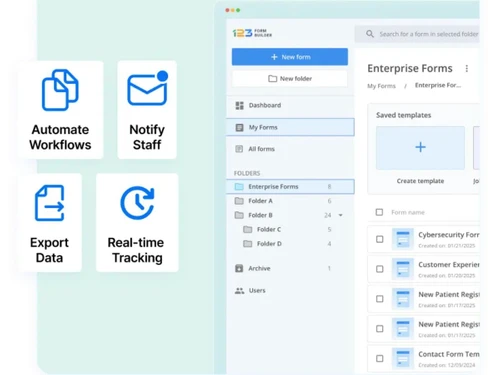
The platform provides a wide range of templates and customization options to suit diverse business needs. With powerful integrations, it connects seamlessly with CRMs, email marketing tools, and other platforms to streamline data collection. Advanced analytics and reporting features allow users to gain valuable insights from responses. Designed for businesses, educators, and nonprofits, 123FormBuilder ensures secure and efficient data handling.

Why Choose 123FormBuilder Software?

  • No-Code Solution: It allows users to create forms easily without any coding skills, making it accessible to everyone.
  • Extensive Template Library: With over 3,000 customizable templates, users can quickly get started on various types of forms, from surveys to registration forms.
  • Robust Security Features: The platform offers advanced security measures, including GDPR and HIPAA compliance, ensuring that sensitive data is collected and stored securely.
  • Seamless Integrations: It integrates with numerous digital tools and payment processors, automating workflows and enhancing productivity.
  • Dynamic Form Capabilities: Users can create interactive forms with features like conditional logic and branching, improving user engagement and completion rates.
  • Responsive Design: Forms are designed to be mobile-friendly, ensuring a smooth experience for respondents on any device.
  • Custom Branding Options: Users can fully customize the look and feel of their forms to match their brand identity, enhancing professionalism.
  • Automated Document Generation: The software allows users to automatically generate documents like invoices or contracts based on form submissions.
  • User-Friendly Interface: The drag-and-drop interface makes it simple for anyone to design and manage forms without technical expertise.
  • Dedicated Customer Support: It provides excellent customer service, assisting users with any questions or issues they may encounter.

Benefits of 123FormBuilder Software

  • Data Residency Options: It allows users to choose where their data is stored, offering flexibility between US and EU data centers to meet organizational security protocols.
  • Accessibility Compliance: The software adheres to WCAG 2.1 standards, including alt-text functionality, ensuring forms are accessible to individuals with visual impairments or cognitive disabilities.
  • Advanced Security Protocols: It include features like SSO, custom roles and permissions, audit trails, and email authentication protocols (SPF and DKIM) for enhanced data confidentiality.
  • Dynamic Form Features: The platform supports branching, conditional logic, and prefill functionality, enabling forms to adapt based on user inputs for better engagement and accuracy.
  • Seamless Payment Integration: Users can connect forms with multiple payment processors like PayPal and Stripe, making it easy to collect payments directly through forms.
  • Autoresponders for Efficiency: The software enables automated email responses to form submissions, improving communication and data management.
  • Intuitive Mobile Responsiveness: Forms automatically adjust to any screen size, ensuring a seamless experience across desktops, smartphones, and tablets.
  • Custom Document Generation: Automatically create documents such as invoices or contracts based on form submissions, saving time and reducing manual effort.
  • Extensive Form Customization: Users can modify every aspect of a form’s design—colors, fonts, layout—to align perfectly with their brand identity.
  • Free Stellar Customer Support: It provides free customer service to assist users in maximizing the platform's capabilities.

Pricing of 123FormBuilder

123FormBuilder price in India starts at $37/month at techjockey.com.

The pricing model is based on different parameters, including extra features, deployment type, and the total number of users. For further queries related to the product, you can contact our product team and learn more about the pricing and offers.

Read more

123 Form Builder Company Details

Founded Year:  2008

123FormBuilder is a versatile and innovative form builder used by over 2 million individuals and businesses around the world to automate data collection processes and workflows.

Director/Founders Florin Cornianu, Tudor Bastea
Company Size 101-500 Employees

123FormBuilder Pricing & Plans

Gold
Starting at $37
    • Licenses

      Licenses
      Licenses
    • Monthly

      Monthly
      Monthly

Key Features

  • 1+ Users

  • Number of Forms: 25

  • Monthly Submissions: 5000

  • Fields per Form: 250

  • Total File Storage: 1 GB

  • 3rd Party Integrations: 23+ built-in

Platinum
Starting at $49
    • Licenses

      Licenses
      Licenses
    • Monthly

      Monthly
      Monthly

Key Features

  • 1+ Users

  • Number of Forms: 100

  • Monthly Submissions: 20000

  • Fields per Form: 500

  • Total File Storage: 10 GB

  • 3rd Party Integrations: 42+ built-in

Diamond
Starting at $99
    • Licenses

      Licenses
      Licenses
    • Monthly

      Monthly
      Monthly

Key Features

  • 1+ Users

  • Number of Forms: 200

  • Monthly Submissions: 100000

  • Fields per Form: 800

  • Total File Storage: 100 GB

  • 3rd Party Integrations: 44+ built-in

Enterprise-(Billed annually)
Starting at $225
    • Licenses

      Licenses
      Licenses
    • Monthly

      Monthly
      Monthly

Key Features

  • 1+ Users

  • Number of Forms: Unlimited

  • Monthly Submissions: Unlimited

  • Fields per Form: Unlimited

  • Total File Storage: 100 GB+

  • 3rd Party Integrations: 45+ built-in

123FormBuilder Features

  • icon_check Approval Process Control
    Enables automated workflows with approval steps for form submissions.
  • icon_check Data Analysis
    Provides tools to analyze collected data and generate insights.
  • icon_check Online Payment
    Supports payment processing through integrated payment gateways.
  • icon_check Reminders & Notifications
    Sends automated reminders and notifications based on form actions.
  • icon_check 360 Degree Feedback
    Collects feedback from all stakeholders to assess performance comprehensively.
  • icon_check Email Marketing
    Integrates with email marketing tools for targeted campaigns.
  • icon_check Social Media Integration
    Allows sharing forms and surveys via social media platforms.
  • icon_check Registrations
    Manages event or user registrations with customizable forms.
  • icon_check Remote Access
    Access and manage forms and data from anywhere, on any device.
  • icon_check Attendance Management
    Tracks and manages attendance through forms.
  • icon_check Analytics
    Provides detailed reporting and analytics on survey and form data.
  • icon_check Event Calendar
    Displays and manages events through an integrated calendar.
  • icon_check Survey Management
    Allows easy creation, distribution, and management of surveys.
  • icon_check Collaboration
    Enables team collaboration in designing and analyzing forms and surveys.
123FormBuilder Demo Video play icon

Get 123FormBuilder Demo

Watch the demo video to explore key features, real workflows, and how the software fits your business needs.

Understand
Key Features
Personal
Demo Insights
Interactive
Demo Support

123FormBuilder Specifications

Supported Platforms
Ubuntu Ubuntu Windows Windows MacOS MacOS Linux Linux
Devices
Desktop Desktop
Deployment
Cloud-Based Cloud-Based
Suitable For
All Industries
Business Specific
All Businesses
Business Size
Small Business Startups Medium Business Enterprises SMBs SMEs MSMBs MSMEs
Customer Support
Email Communities
Language
English
Training Resources
Videos
Compliance Regulation
COPPA HIPAA CCPA GDPR

Explore the Best Alternative Solutions Similar to Your Business Size and Needs

123FormBuilder Review

4.1

Out of 5

img

Overall Rating

Based on
6 Verified Ratings

Rating Breakdown

  • Features 4.2
  • Value for Money 4.5
  • Ease of Use 3.6
  • Customer Support 4.3

91% Recommend this Product

Add Review

Techjockey Trusted Reviews from Verified Users

No reviews are currently available for 123FormBuilder. Discover similar Survey Software reviews

  • QS Plus Quantity surveying software

    4.9

    Whats great - Jon from Techjockey was very in tune with our requirements, and after a good discussion recommended some good products/vendor... read more

  • SurveySparrow

    4.3

    Whats great - Perfectly planned front and back end. Exceptionally simple to set up a study, send it by means of email by their administrati... read more

  • Zoho Survey

    4.8

    Whats great - Zoho Survey is really clear to utilize in the event that you know about making studies. Some overviews can get very intricate... read more

Compare 123FormBuilder With other Survey Software

Products
Ratings
Pricing
Device Supported
Deployment
Supported Platforms
  • img

    123FormBuilder

  • 4.1

  • Price On Request

  • Desktop

    Mobile

  • Web based

    On Premises

  • Windows

    Mac OS

  • img

    Zoho Survey

  • 4.5

  • ₹ 4992

  • Desktop

    Mobile

  • Web based

    On Premises

  • Windows

    Mac OS

  • img

    Zoho Forms

  • 4.4

  • Price On Request

  • Desktop

    Mobile

  • Web based

    On Premises

  • Windows

    Mac OS

  • img

    SogoCore

  • 4.3

  • Price On Request

  • Desktop

    Mobile

  • Web based

    On Premises

  • Windows

    Mac OS

  • img

    Formsite

  • 4.4

  • Price On Request

  • Desktop

    Mobile

  • Web based

    On Premises

  • Windows

    Mac OS

  • img

    Alchemer

  • 4.2

  • Price On Request

  • Desktop

    Mobile

  • Web based

    On Premises

  • Windows

    Mac OS

  • img

    User Interviews

  • 4.2

  • Price On Request

  • Desktop

    Mobile

  • Web based

    On Premises

  • Windows

    Mac OS

  • img

    Formly

  • 4.3

  • Price On Request

  • Desktop

    Mobile

  • Web based

    On Premises

  • Windows

    Mac OS

  • img

    Microsoft Forms

  • 4.1

  • Price On Request

  • Desktop

    Mobile

  • Web based

    On Premises

  • Windows

    Mac OS

  • img

    SurveySparrow

  • 4.3

  • ₹ 2397

  • Desktop

    Mobile

  • Web based

    On Premises

  • Windows

    Mac OS

(0) Product(s) selected

123FormBuilder Alternatives

See All 123FormBuilder Alternatives

Starting Price:

$25 /Month

Starting Price:

$55 /User/Month

Starting Price:

$19 /User/Month

Starting Price:

$19 /Month

Starting Price:

$10 /Month

Available

Price on Request

Starting Price:

$83 /User/Month

Available

Price on Request

Starting Price:

$25 /Month

Articles for 123FormBuilder

See All Related Articles

How much does 123FormBuilder Software Cost?

The price of 123FormBuilder in India starts at $37/month, available on TechJockey.com.

Is there any 123FormBuilder Software App?

No, 123FormBuilder has no mobile app for both Android and iOS devices.

Which operating system does 123FormBuilder Software Support?

123FormBuilder is a web-based application that supports Windows operating systems.

Does 123FormBuilder Software offer a free trial?

Yes, 123FormBuilder offers a free trial for its paid plans.

How does 123FormBuilder Software Work?

123FormBuilder allows users to create forms and surveys through a drag-and-drop interface, with data collection, analysis, and integration features.

Who are the potential users of 123FormBuilder Software?

Potential users of 123FormBuilder include businesses, educators, nonprofits, and individuals needing customizable forms and surveys.

Is there any free demo for 123FormBuilder Software?

Yes, 123FormBuilder provides a free demo of its features.

Is 123FormBuilder Software Free?

123FormBuilder offers a free plan with limited features, and paid plans are available for advanced functionality.

20,000+ Software Listed

Best Price Guranteed

Free Expert Consultation

2M+ Happy Customers

Terms and Condtions

close

Users with registered businesses can purchase goods from merchants on the platform to satisfy their business needs. Users are not permitted to utilize any products acquired through the platform for resale, advertising, business, or further distribution.

For each purchase made, users will receive a Tax Invoice (or 'GST invoice') that includes specific details such as:

  • the GSTIN of the user associated with their registered business, and

  • the specified Entity Name for their business.

It should be noted that not all products are eligible for GST Invoice. Only the products displayed by participating sellers with the 'GST-based Invoice Available' callout on the product description page would qualify.

Certain goods and services are not eligible to get a GST Invoice, including items with VAS, i.e., Value Added Services (e.g., Total Mobile Protection/Assured Buyback) and those involving an exchange offer at the time of purchase.

Users must ensure the accuracy of the GSTIN, and business entity name provided for the GST Invoice. Requests for corrections into GST Invoice would not be accommodated by Techjockey.com or any Seller, and any issues arising from user-provided information are the sole responsibility of users.

Techjockey.com is not liable for the GST Invoice or any associated input tax credit. To efficiently claim an input tax credit, users should select the registered place of business address as per the GST authority's data and follow the provisions of the GST Act and rules.

To claim an input tax credit, the delivery and billing addresses must match. Furthermore, input tax credits will not be granted if the delivery address and GSTIN on the invoice are from different states. In case of incorrect GST details provided during the order placement, the order will be canceled automatically.