linkedin
Accops HyMobile logo
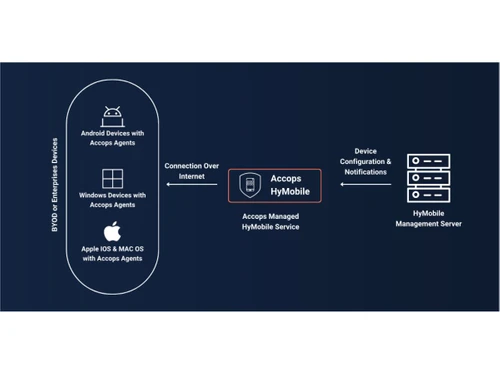
Accops HyMobile Flowchart
Accops HyMobile MDM
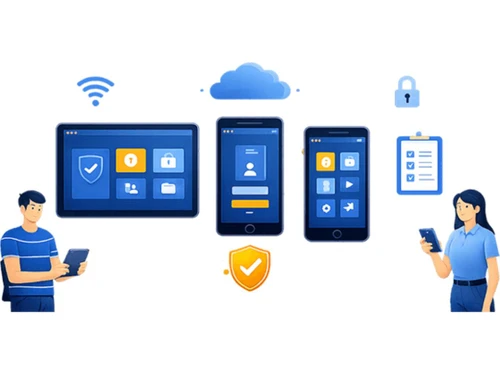
Accops HyMobile Security

Accops HyMobile

Brand: Accops

  • No Ratings & Reviews

Accops HyMobile is a secure, intuitive, and adaptive mobile device and endpoint management solution that helps organizations securely manage endpoints along with applications, content, and emails from a centralized platform.

See More

Have you used Accops HyMobile before?

Share your insights for better experience

Add a Review

Price Available on Request

Questions about pricing or customization? We’re here to help, just a click away.

100% Genuine
Products
Best Price
Guaranteed
Safe & Secure
Payment
  • Description

  • Pricing

  • Features

  • Specification

  • Review

  • FAQ

Accops HyMobile Software Overview

What is Accops HyMobile?

Accops HyMobile MDM Software is a secure, intuitive, and adaptive Mobile Device and Endpoint Management solution. Operating through a unified dashboard, it helps organizations manage endpoints (including Android, iOS, Windows, macOS, and digital signage) along with applications, content, and emails.

This platform streamlines endpoint administration by supporting automated workflows, device enrollment, policy management, role-based access control, remote troubleshooting, and geofencing. It features VoIP calling, NuovoTeam integration for secure communication, OEM-backed hardware control, and remote screen casting with voice call control for rapid issue resolution.

With DeepDive analytics, data loss prevention (DLP), website restrictions, an in-built browser, website whitelisting, remote cache clearing, and kiosk-mode controls, Accops HyMobile maximizes mobile security, simplifies IT operations, and boosts remote workforce productivity across organizations of all sizes.

Benefits of Accops HyMobile Mobile Device Management Software

  • Mobile Application Management: Deploy, configure, update, and control enterprise mobile applications remotely.
  • Mobile Content Management: Pushes and manages enterprise files to devices via FileDock app.
  • Role-Based Access Control: Restrict device and application access based on user roles and responsibilities.
  • HyMobile Communication Suite: Unified cloud communication suite for secure iOS and Android engagement.
  • Remote Cast Control: View and control device screens remotely while assisting users through voice calls.
  • Centralized Device Administration: Manage enterprise mobility policies and mobile endpoints from a unified dashboard.


Why Use Accops HyMobile MDM Software?

  • Streamlined Device Deployment: Accelerate onboarding with support for Android Zero-touch, Apple DEP, IMEI, serial number, QR code enrollment.
  • Stronger Mobile Security: Protect enterprise data with DLP policies, password enforcement, compliance monitoring, and security policy management.
  • Advanced Device Monitoring: Track device location, receive geofence alerts, and monitor health, battery usage, and data consumption through DeepDive analytics.
  • Built for Scale: Reliably manage everything from a small fleet to thousands of enterprise endpoints without compromising performance.
  • Remote Troubleshooting: Resolve device issues quickly through live screen casting, remote control, and voice-assisted support.
  • Comprehensive Policy Management: Configure and enforce security, application, and device policies from a centralized console.
  • Optimized Workforce Productivity: Keep remote users connected, secure, and productive with centralized endpoint and mobility management.

Accops HyMobile Pricing

Accops HyMobile price is available on request at techjockey. The pricing model is based on different parameters, including extra features, deployment type, and the total number of users. For further queries related to the product, you can contact our product team and learn more about the pricing and offers.

Read more

Accops Company Details

Founded Year:  2012

Accops is a premier digital workspace and cybersecurity solutions provider, empowering thousands of organisations globally. Delivering robust, integrated IT infrastructure, Accops accelerates business growth while ensuring secure remote access. Backed by a responsive customer care ecosystem

Director/Founders Mohan Bhat, Vijender Yadav
Company Size 101-500 Employees

Accops HyMobile Pricing & Plans

Looking for The Right Pricing?

Share your requirements and get a plan built around your business.

  • Define your business needs
  • Get customised pricing
  • Choose features that fit your workflow

Price Available on Request

Get personalised Accops HyMobile pricing that fits your needs. Our team will connect with you.

Accops HyMobile Features

  • icon_check Mobile Device Management
    Centrally manage and secure enterprise mobile devices and endpoints.
  • icon_check Unified Endpoint Management
    Manage Android, iOS, Windows, macOS, Linux, and digital signage devices.
  • icon_check Device Enrollment
    Enroll devices using QR code, IMEI, serial number, Zero-touch, or Apple DEP.
  • icon_check Device Provisioning
    Configure enterprise devices remotely with predefined settings.
  • icon_check Device Inventory Management
    Maintain a centralized inventory of managed devices and assets.
  • icon_check Policy Management
    Apply security and usage policies across managed devices.
  • icon_check Remote Control
    View and control remote device screens for troubleshooting.
  • icon_check Remote Screen Sharing
    Share device screens with administrators during support sessions.
  • icon_check Mobile Application Management
    Deploy, update, and manage enterprise applications securely.
  • icon_check Secure File Management
    Control enterprise file access using a secure file repository.
  • icon_check Geofencing
    Trigger alerts when devices enter or leave designated locations.
  • icon_check Data Usage Monitoring
    Track mobile data consumption across managed devices.
  • icon_check Compliance Management
    Detect policy violations and enforce security compliance.
  • icon_check Data Loss Prevention
    Protect sensitive enterprise data with DLP policies.
  • icon_check Role-Based Access Control (RBAC)
    Restrict administrative access based on user roles.
  • icon_check Workflow Automation
    Automate enrollment, provisioning, and policy deployment.
  • icon_check Reporting & Analytics
    Generate reports on device inventory, compliance, and usage.
  • icon_check Analytics Dashboard
    Monitor devices, compliance, and security from a centralized dashboard.
  • icon_check Device Encryption Management
    Ensure enterprise devices use encryption for data protection.

Accops HyMobile Specifications

Supported Platforms
Windows Windows iOS iOS Android Android MacOS MacOS
Devices
Desktop Desktop Mobile Mobile Tablet Tablet iPad iPad
Deployment
Cloud-Based Cloud-Based Perpetual Perpetual
Suitable For
All Industries
Business Specific
All Businesses
Business Size
Small Business Startups Medium Business Enterprises
Customer Support
Phone Email
Language
English
Training Resources
Webinars Documentation Videos

Accops HyMobile Review

Techjockey Trusted Reviews from Verified Users

No reviews are currently available for Accops HyMobile. Discover similar Mobile Device Management (MDM) Software reviews

  • uMobix

    4.4

    Whats great - The stealth mode is perfect—the icon is completely invisible on Android after installation, and it operates silently in the b... read more
  • Seqrite mSuite

    4.5

    Whats great - Techjockey was very helpful in taking my listed requirements and narrowing my search to a usable list of providers. Techjocke... read more
  • Broken Android Data Extraction

    4.8

    Whats great - My Samsung Galaxy Note 5 telephone screen is broken. I can press the catch, however can't see the information. Subsequent to ... read more

Articles for Accops HyMobile

See All Related Articles

How much does Accops HyMobile software cost?

Accops HyMobile pricing is available on request at techjockey.

Which operating systems are compatible with Accops HyMobile?

Accops HyMobile manages endpoints across Android, iOS, Windows, and macOS operating systems.

Does Accops HyMobile offer a free trial?

Yes, Accops HyMobile offers a free trial of its mobile device and endpoint management capabilities.

How does Accops HyMobile function?

Accops HyMobile helps with mobile device and endpoint management by enabling device enrollment, application deployment, content management, policy enforcement, remote support, compliance monitoring, and analytics through a single administration console.

Who uses Accops HyMobile?

Accops HyMobile is used by enterprises, government organizations, healthcare providers, educational institutions, BFSI organizations, and businesses that need secure mobile device and application management.

Is a free demo available for Accops HyMobile?

Yes, Accops HyMobile free demo is available at techjockey.

Is Accops HyMobile available for free?

No, Accops HyMobile free version is not available online.

20,000+ Software Listed

Best Price Guranteed

Free Expert Consultation

2M+ Happy Customers

Terms and Condtions

close

Users with registered businesses can purchase goods from merchants on the platform to satisfy their business needs. Users are not permitted to utilize any products acquired through the platform for resale, advertising, business, or further distribution.

For each purchase made, users will receive a Tax Invoice (or 'GST invoice') that includes specific details such as:

  • the GSTIN of the user associated with their registered business, and

  • the specified Entity Name for their business.

It should be noted that not all products are eligible for GST Invoice. Only the products displayed by participating sellers with the 'GST-based Invoice Available' callout on the product description page would qualify.

Certain goods and services are not eligible to get a GST Invoice, including items with VAS, i.e., Value Added Services (e.g., Total Mobile Protection/Assured Buyback) and those involving an exchange offer at the time of purchase.

Users must ensure the accuracy of the GSTIN, and business entity name provided for the GST Invoice. Requests for corrections into GST Invoice would not be accommodated by Techjockey.com or any Seller, and any issues arising from user-provided information are the sole responsibility of users.

Techjockey.com is not liable for the GST Invoice or any associated input tax credit. To efficiently claim an input tax credit, users should select the registered place of business address as per the GST authority's data and follow the provisions of the GST Act and rules.

To claim an input tax credit, the delivery and billing addresses must match. Furthermore, input tax credits will not be granted if the delivery address and GSTIN on the invoice are from different states. In case of incorrect GST details provided during the order placement, the order will be canceled automatically.