linkedin
Broken Android Data Extraction logo
play How to Fix and Extract Data from Disabled Android Phone
broken android data extraction-image1
broken android data extraction-image2

Broken Android Data Extraction

Brand: AiseeSoft

  • 4.7

  • 2 Ratings & 2 Reviews

Broken Android Data Extraction is a reliable and user-friendly software that helps you recover data from broken Android devices. Whether your phone is damaged due to a broken screen, water exposure, or a system crash, this software ensures that your essential data such as contacts, messages, photos,...

See More

Have you used Broken Android Data Extraction before?

Share your insights for better experience

Add a Review
Starting Price 41% OFF
₹1,365 excl.GST  ₹2,314
₹ 1,365 incl. GST

View plans

offer Save upto 18%, Get GST Invoice on your business purchase T&C
offer Buy Now & Pay Later, Check offer on payment page.
Buy Now
100% Genuine
Products
Best Price
Guaranteed
Safe & Secure
Payment
  • Description

  • Pricing

  • Features

  • Specification

  • Review

  • Compare

  • Alternatives

  • FAQ

Starting at ₹1,365
Buy Now

Broken Android Data Extraction Software Overview

What is Broken Android Data Extraction?

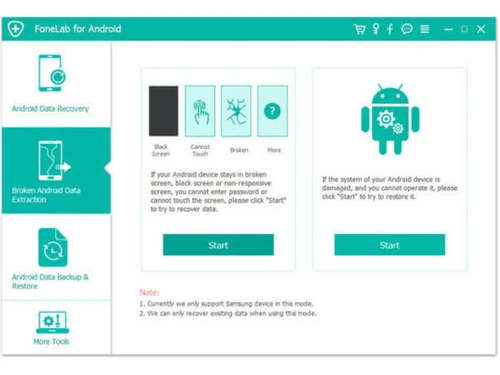
Broken Android Data Extraction is a specialized business software designed to help Android phone users retrieve data from damaged devices. It is especially useful when your phone has a broken screen, is unresponsive, or has any other issues like being frozen or water-damaged.

With this endpoint security software, you can easily extract data from both the internal storage and SD card of your Android device. The Mobile Device Management (MDM) Software ensures compatibility with all Android models and provides a simple, safe, and effective way to recover lost or inaccessible data.

When your Android phone screen is broken or unresponsive, accessing your files can be challenging. Broken Android Data Extraction bypasses these obstacles, providing a direct way to extract important data without causing further harm to the device.

Why Choose Broken Android Data Extraction?

  • Compatible with All Android Devices: It supports a wide range of Android devices, ensuring that regardless of your phone's make or model, data recovery is possible.
  • Easy to Use: The software’s interface is simple, allowing even non-tech-savvy users to recover data with just a few clicks.
  • Safe Data Recovery: The tool ensures that your data is extracted securely without causing any damage to your phone’s internal system.
  • Fix System Issues: It can fix frozen, black-screen, or system-crash issues, making your phone operational again while recovering your data.
  • Recover Lost Data: Whether you lost data due to a broken screen, virus attack, or accidental deletion, Broken Android Data Extraction ensures a safe and easy recovery process.
  • Support for SD Card and Internal Storage: It allows you to recover data from both your phone’s internal storage and SD card, giving you access to all your important files.
  • Quick Recovery: The tool speeds up the recovery process, saving you time and effort.
  • No Risk of Data Loss: The program ensures that no data is lost during the recovery process, and all your files are retrieved intact.

Benefits of Broken Android Data Extraction

  • Quick and Efficient Recovery: It retrieves data in no time, reducing the stress of waiting for long periods for recovery.
  • Easy Three-Step Process: With its three-step guide, you can start the recovery process without complicated setups or technical steps.
  • Works with Multiple Issues: Broken Android Data Extraction is not only a data recovery tool but also helps fix common Android issues like screen locks, system crashes, and more.
  • Preserves Your Data: It ensures that no data is harmed or lost during the recovery, preserving your valuable files.
  • User-Friendly Interface: With clear instructions and easy-to-understand options, anyone can use the software, even without prior technical knowledge.
  • Affordable Solution: It offers a cost-effective way to recover data from broken or damaged phones compared to costly repair services.
  • No Rooting Required: The software doesn’t require rooting your phone, reducing the risk of voiding the warranty or causing system damage.
  • Works Across All Android Phones: Whether it’s a Samsung, LG, or any other Android device, Broken Android Data Extraction ensures compatibility with all major Android brands.

Pricing of Broken Android Data Extraction software

Broken Android Data Extraction price starts at INR 1365 per month for a single pc and 6 devices at techjockey.com. The pricing model is based on different parameters, including extra features, deployment type, and the total number of users. For further queries related to the product, you can contact our product team and learn more about the pricing and offers.

Read more

AiseeSoft Company Details

Founded Year:  2008

Aiseesoft

Director/Founders Pele Thomas
Company Size 1-100

Broken Android Data Extraction Pricing & Plans

1 Month License

Calculated Price

1365 ₹2314
SAVE UPTO 41%
Exclusive of all taxes
    • Device

      Device
      Device
    • Pc

      Pc
      Pc

Key Features

  • Extract Data

  • Quick data extraction

  • Fixes frozen/crashed phones

Lifetime License

Calculated Price

3720 ₹4642
SAVE UPTO 20%
Exclusive of all taxes
    • Device

      Device
      Device
    • Pc

      Pc
      Pc

Key Features

  • Quick data extraction

  • Lifetime software versions

  • Reliable data rescue

Broken Android Data Extraction Features

  • icon_check Across All Devices
    Supports a wide range of Android devices, so you can recover your data regardless of the phone’s make or model.
  • icon_check Data Recovery
    The software recovers lost or inaccessible data, ensuring you don't lose important contacts, photos, videos, and messages.
  • icon_check Android Data Recovery
    Effortlessly recover deleted text messages, contacts, and call logs from your Android phone or internal memory.
  • icon_check Media File Retrieval
    Retrieve lost photos, music, videos, and WhatsApp files from various Android tablets and smartphones quite easily.
  • icon_check Broad Device Support
    Restore deleted data from popular brands like Samsung, HTC, LG, Huawei, Sony, and many other Android manufacturers.
  • icon_check SD Card Data Scanning
    Perform a deep scan of your Android device's external SD card to find and get back lost or accidentally deleted files.
  • icon_check Card Restoration
    Recover vital information directly from your Subscriber Identity Module (SIM card) including saved names and numbers.
  • icon_check WhatsApp Chat Recovery
    Get back your deleted WhatsApp chat history, attached photos, and video or audio files after accidental uninstallation.
  • icon_check Extract Data
    You can extract data from both your phone’s internal storage and SD card to recover your files even when the phone is damaged.
  • icon_check Easy to Use
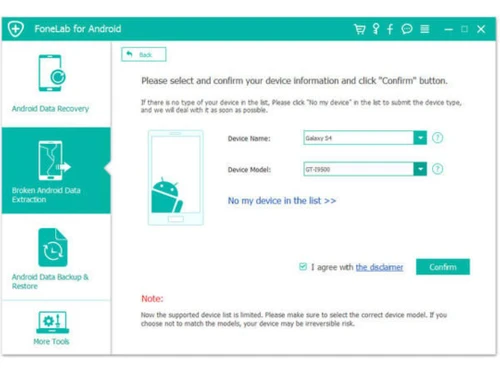
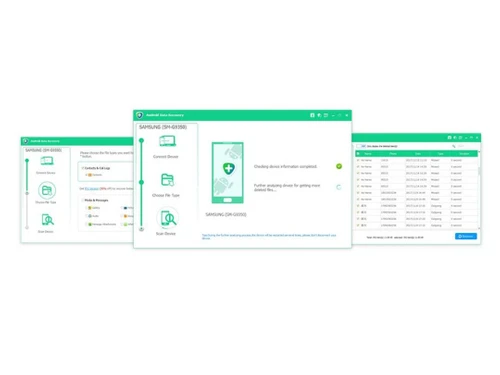
    Offers a simple interface for users to follow three easy steps to recover their data, with no technical expertise required.
  • icon_check Fix
    Fix various issues such as frozen, crashed, or black-screen phones and bring them back to normal while recovering data.
  • icon_check Support for Black Screen/Frozen Phone
    Works when Android device is stuck, frozen, or shows black screen and cannot be used normally.
  • icon_check USB debugging
    Connect your device via USB to Windows PC for recovery operations to start.
  • icon_check Recover Multiple File Types
    Contacts, SMS, call logs, photos, videos, WhatsApp attachments and documents all supported.
  • icon_check Export Recovered Data to PC
    After extraction you can save your recovered files (contacts, messages, media, docs) onto your computer.
Broken Android Data Extraction Demo Video play icon

Get Broken Android Data Extraction Demo

Watch the demo video to explore key features, real workflows, and how the software fits your business needs.

Understand
Key Features
Personal
Demo Insights
Interactive
Demo Support

Broken Android Data Extraction Specifications

Supported Platforms
Windows Windows Android Android MacOS MacOS
Devices
Desktop Desktop Mobile Mobile Tablet Tablet
Deployment
Cloud-Based Cloud-Based Perpetual Perpetual
Suitable For
All Industries
Business Specific
All Businesses
Business Size
Individual Small Business SMBs SMEs Freelancers
Customer Support
Email
Language
English
Training Resources
Documentation Videos

Explore the Best Alternative Solutions Similar to Your Business Size and Needs

Broken Android Data Extraction Reviews

4.7

Out of 5

img

Overall Rating

Based on
2 Verified Reviews

Rating Breakdown

  • Features 4.7
  • Value for Money 4.7
  • Ease of Use 5
  • Customer Support 4.5

90% Recommend this Product

Add Review

sujit kanoria

User

4.7

Reviewed on: Mar 11, 2019

Techjockey Verified

“Broken Phone”

Pros

My Samsung Galaxy Note 5 telephone screen is broken. I can press the catch, however can't see the information. Subsequent to attempting this apparatus, it detected my telephone information, and I separate the information to my PC. Presently, I can surrender this messed up screen telephone old telephone.

Cons

NO CONS

Bijay Kumar

User

4.7

Reviewed on: Jan 9, 2019

Techjockey Verified

“Well ordered”

Pros

Interface with instinctive well ordered; Recuperates adulterated, lost, and erased documents; Can be utilized to back up Android information; Overly quick information Scan and recuperation speed.

Cons

NO CONS

Compare Broken Android Data Extraction With other Mobile Device Management (MDM) Software

Products
Ratings
Pricing
Device Supported
Deployment
Supported Platforms
  • img

    Broken Android Data Extraction

  • 4.7

  • ₹ 1365.24 excl. GST

  • Desktop

    Mobile

  • Web based

    On Premises

  • Windows

    Mac OS

  • img

    uMobix

  • 4.3

  • Price On Request

  • Desktop

    Mobile

  • Web based

    On Premises

  • Windows

    Mac OS

  • img

    jamf Pro

  • 4.0

  • Price On Request

  • Desktop

    Mobile

  • Web based

    On Premises

  • Windows

    Mac OS

  • img

    AirDroid Business

  • 4.2

  • Price On Request

  • Desktop

    Mobile

  • Web based

    On Premises

  • Windows

    Mac OS

  • img

    KioWare Kiosk

  • 4.2

  • Price On Request

  • Desktop

    Mobile

  • Web based

    On Premises

  • Windows

    Mac OS

  • img

    Seqrite mSuite

  • 4.4

  • Price On Request

  • Desktop

    Mobile

  • Web based

    On Premises

  • Windows

    Mac OS

(0) Product(s) selected

Broken Android Data Extraction Alternatives

See All Broken Android Data Extraction Alternatives
SAVE UPTO 20%

Available

Price on Request

Starting Price:

$3 /Month

Starting Price:

$7 /Host/Month

Articles for Broken Android Data Extraction

See All Related Articles

How does Broken Android Data Extraction work?

Broken Android Data Extraction works by connecting your damaged Android phone to your computer and scanning it for recoverable data.

Can Broken Android Data Extraction recover data from a water-damaged Android phone?

Yes, Broken Android Data Extraction can recover data from water-damaged Android phones.

Is Broken Android Data Extraction safe to use?

Yes, Broken Android Data Extraction is completely safe to use. The tool does not cause any harm to your phone or data.

Does Broken Android Data Extraction require rooting the Android device for data recovery?

No, Broken Android Data Extraction does not require you to root your Android phone. It allows you to recover data without rooting, which helps to avoid potential system damage or voiding the device warranty.

Can I recover all types of data using Broken Android Data Extraction?

Broken Android Data Extraction can recover a wide range of data, including contacts, text messages, call logs, photos, videos, documents, and more.

How long does it take to recover data with Broken Android Data Extraction?

The time required to recover data with Broken Android Data Extraction depends on the amount of data and the condition of your phone.

Can Broken Android Data Extraction help fix system issues on my Android phone?

Yes, Broken Android Data Extraction is designed not only for data recovery but also to fix system issues like frozen screens, system crashes, black screens, and more.

Do I need technical expertise to use Broken Android Data Extraction?

No, you do not need technical expertise to use Broken Android Data Extraction.

What devices are compatible with Broken Android Data Extraction?

Broken Android Data Extraction is compatible with all major Android devices, including Samsung, LG, HTC, Sony, and many others.

Is Broken Android Data Extraction a one-time purchase?

Yes, Broken Android Data Extraction is a one-time purchase.

How much does Broken Android Data Extraction software cost?

Broken Android Data Extraction price starts at INR 1365 per month for a single pc and 6 devices at techjockey.com.

20,000+ Software Listed

Best Price Guranteed

Free Expert Consultation

2M+ Happy Customers

Terms and Condtions

close

Users with registered businesses can purchase goods from merchants on the platform to satisfy their business needs. Users are not permitted to utilize any products acquired through the platform for resale, advertising, business, or further distribution.

For each purchase made, users will receive a Tax Invoice (or 'GST invoice') that includes specific details such as:

  • the GSTIN of the user associated with their registered business, and

  • the specified Entity Name for their business.

It should be noted that not all products are eligible for GST Invoice. Only the products displayed by participating sellers with the 'GST-based Invoice Available' callout on the product description page would qualify.

Certain goods and services are not eligible to get a GST Invoice, including items with VAS, i.e., Value Added Services (e.g., Total Mobile Protection/Assured Buyback) and those involving an exchange offer at the time of purchase.

Users must ensure the accuracy of the GSTIN, and business entity name provided for the GST Invoice. Requests for corrections into GST Invoice would not be accommodated by Techjockey.com or any Seller, and any issues arising from user-provided information are the sole responsibility of users.

Techjockey.com is not liable for the GST Invoice or any associated input tax credit. To efficiently claim an input tax credit, users should select the registered place of business address as per the GST authority's data and follow the provisions of the GST Act and rules.

To claim an input tax credit, the delivery and billing addresses must match. Furthermore, input tax credits will not be granted if the delivery address and GSTIN on the invoice are from different states. In case of incorrect GST details provided during the order placement, the order will be canceled automatically.