USA
USA UAE
UAESmall Business
Designed for startups and growing businesses


See More




Brand: AiseeSoft
Fix and cure your iOS device of simple problems with iOS System Recovery. This is the best data recovery software that works on all the latest iOS devices such as iPhone X/8/8 Plus/7/7 Plus/SE/6S Plus, iPad Pro, iPad Air, iPad mini, iPod and more. Ensure the safety of your device and data with iOS S...
See MoreHave you used AiseeSoft iOS System Recovery before?
Share your insights for better experience
Brand: AiseeSoft
Founded Year: 2008
Aiseesoft
 Disaster Recovery Backup Recover iOS System Fast,Secure and Easy

Watch the demo video to explore key features, real workflows, and how the software fits your business needs.
 Windows
  iOS MacOS
  Desktop
  Mobile
  iPad
iPad  Cloud-Based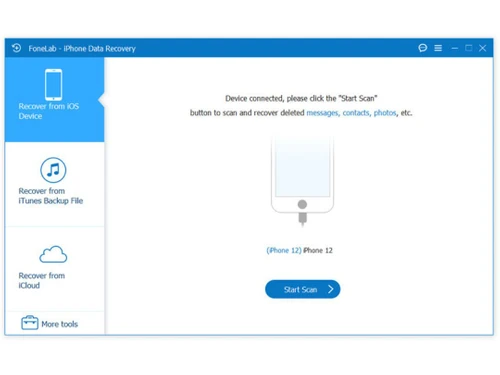
Small Business
Designed for startups and growing businesses
Medium Business
Built for business growth and flexibility
Enterprises
Designed for complex and large-scale business needs
4.5
Out of 5

Overall Rating
Based on
2 Verified Reviews
Rating Breakdown
85% Recommend this Product
Add Review
Feb 6, 2019
Techjockey Verified
“Worked as I anticipated ”
Pros
It Worked similarly as I anticipated! It can recoup information as per the particular hard drive. Furthermore, it has an extremely quick filtering rate. I utilized it to recoup some significant pictures, and it worked extraordinary!
Cons
NO CONS
Jun 1, 2018
Techjockey Verified
“Great experience!”
Pros
Very responsive and provided helpful direction to narrow our search
Cons
N/A

AiseeSoft iOS System Recovery
Price On Request
Desktop
Mobile
Web based
On Premises
Windows
Mac OS

Dr.Fone - Data Recovery
₹ 1899
Desktop
Mobile
Web based
On Premises
Windows
Mac OS

Ideas Plus
Price On Request
Desktop
Mobile
Web based
On Premises
Windows
Mac OS

Iperius Data Backup Software
₹ 3190
Desktop
Mobile
Web based
On Premises
Windows
Mac OS

Apna Backup
₹ 1562
Desktop
Mobile
Web based
On Premises
Windows
Mac OS

Allway Sync
Price On Request
Desktop
Mobile
Web based
On Premises
Windows
Mac OS

Staz
₹ 1000
Desktop
Mobile
Web based
On Premises
Windows
Mac OS

Retrospect Backup
Price On Request
Desktop
Mobile
Web based
On Premises
Windows
Mac OS

Veeam Data Cloud
Price On Request
Desktop
Mobile
Web based
On Premises
Windows
Mac OS

iTransor for iOS
₹ 3289
Desktop
Mobile
Web based
On Premises
Windows
Mac OS
Quest NetVault Backup
Price On Request
Desktop
Mobile
Web based
On Premises
Windows
Mac OS
(2) Product(s) selected
Starting Price:
₹1,562 /Month ₹2,003
Available
Price on Request
Starting Price:
$20
Starting Price:
₹3,289 /Quantity ₹4,936
Available
Price on Request

Available
Price on Request

Starting Price:
$149 /Year

Starting Price:
$579 Yearly/

Available
Price on Request

Starting Price:
$499

Available
Price on Request
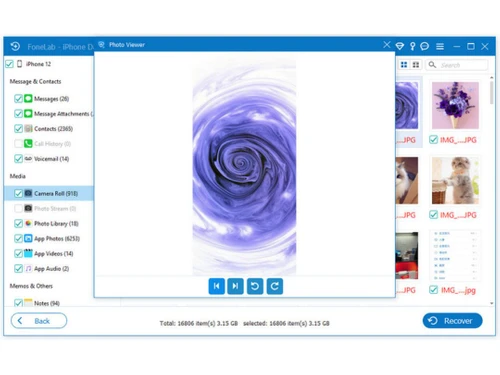
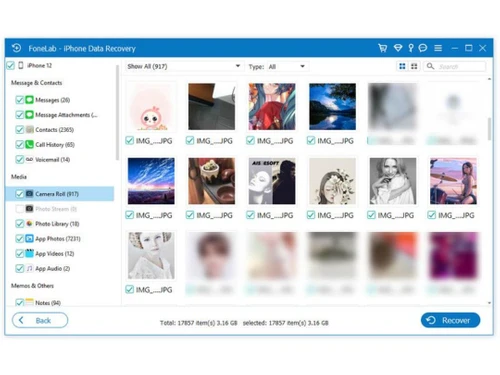
Yes, FoneLab is safe iPhone data recovery software. Please rest assured that when you recover files using FoneLab, it will not rewrite or make any changes to your devices.
You can deal with the matter with the following steps. 1)Make sure you are using the latest version. 2) Close any anti-virus software that is running. 3) Restart your iPhone and computer. 4) Disconnect all other USB devices. 5) Reinstall this software and restart it. If the problem still exists, please contact us at anytime.
If your iOS device is stuck with white Apple logo, you can refer to following steps to restore your iPhone and get it working again: 1) Run Aiseesoft iOS System Recovery. 2) Connect the device to your computer via the USB cable. 3) Click Start button to begin to fix iPhone frozen on Apple logo. You need to put iPhone into Recovery or DFU mode to fix iPhone stuck on Apple logo. 4) Select the right iPhone model and then click "Download" to download the repaired device plug-in. It will take a few minutes to complete the downloading. 5) When the plug-in download is finished, iOS System Recovery will automatically fix iPhone/iPod/iPad stuck on Apple issue.
20,000+ Software Listed
Best Price Guranteed
Free Expert Consultation
2M+ Happy Customers
Terms and Condtions

Users with registered businesses can purchase goods from merchants on the platform to satisfy their business needs. Users are not permitted to utilize any products acquired through the platform for resale, advertising, business, or further distribution.
For each purchase made, users will receive a Tax Invoice (or 'GST invoice') that includes specific details such as:
the GSTIN of the user associated with their registered business, and
the specified Entity Name for their business.
It should be noted that not all products are eligible for GST Invoice. Only the products displayed by participating sellers with the 'GST-based Invoice Available' callout on the product description page would qualify.
Certain goods and services are not eligible to get a GST Invoice, including items with VAS, i.e., Value Added Services (e.g., Total Mobile Protection/Assured Buyback) and those involving an exchange offer at the time of purchase.
Users must ensure the accuracy of the GSTIN, and business entity name provided for the GST Invoice. Requests for corrections into GST Invoice would not be accommodated by Techjockey.com or any Seller, and any issues arising from user-provided information are the sole responsibility of users.
Techjockey.com is not liable for the GST Invoice or any associated input tax credit. To efficiently claim an input tax credit, users should select the registered place of business address as per the GST authority's data and follow the provisions of the GST Act and rules.
To claim an input tax credit, the delivery and billing addresses must match. Furthermore, input tax credits will not be granted if the delivery address and GSTIN on the invoice are from different states. In case of incorrect GST details provided during the order placement, the order will be canceled automatically.