linkedin
Iru(Formerly Kandji) logo
play Introducing Endpoint Detection & Response
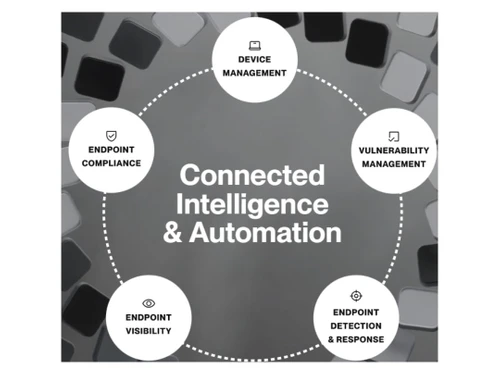
Kandji-Connected Intelligence & Automation
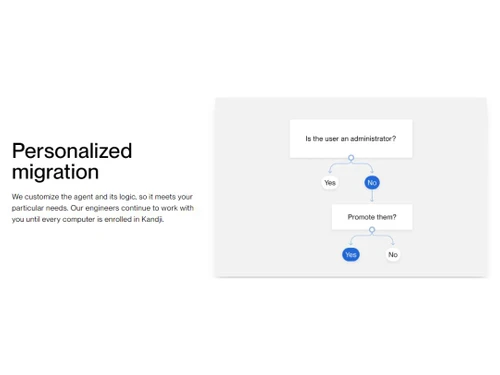
Kandji-Personalized migration

Iru(Formerly Kandji)

Brand: Kandji

  • 4.2

  • 4 Ratings

Iru, formerly Kandji, is an AI-powered platform that unifies endpoint, identity, and compliance management to help IT and security teams manage and secure devices and access.

See More

Have you used Iru(Formerly Kandji) before?

Share your insights for better experience

Add a Review

Price Available on Request

Questions about pricing or customization? We’re here to help, just a click away.

100% Genuine
Products
Best Price
Guaranteed
Safe & Secure
Payment
  • Description

  • Pricing

  • Features

  • Specification

  • Review

  • Compare

  • Alternatives

  • FAQ

Iru(Formerly Kandji) Software Overview

What is Iru?

Iru, formerly known as Kandji, is a comprehensive, integrated software platform designed for modern IT and security teams. It unifies endpoint management, identity security, and compliance into a single, cohesive system. The platform provides a centralized view of all users, applications, and devices within an organization, enabling administrators to secure access, protect endpoints, and maintain continuous, audit-ready compliance.

Engineered to manage a diverse device ecosystem, Iru supports Apple devices (Mac, iPhone, iPad, Apple TV, Vision Pro), Windows, and Android. It operates through a single, lightweight agent, simplifying deployment and reducing the toolset complexity that often hinders productivity. By integrating artificial intelligence through Iru AI, the platform automates critical tasks, provides intelligent insights, and ensures that security and management actions are performed with full context of the user, device, and application environment.

Why Choose Iru?

  • Integrated Platform: Eliminate tool sprawl by managing endpoint security, device management, identity, and compliance from one dashboard. This single-pane-of-glass approach saves time and reduces administrative overhead.
  • AI-Powered Automation: Iru AI is built into the core of the platform, automating everything from compliance evidence collection to threat detection. It uses a proprietary Context Model to understand relationships between users, apps, and devices for smarter, safer actions.
  • Flexible Management Styles: Iru caters to different team workflows. Administrators can use a fully visual, point-and-click interface for rapid configuration and deployment, or leverage a "configuration-as-code" model for granular control, versioning, and peer-reviewed changes.
  • Enhanced Security Posture: The platform combines Endpoint Detection & Response (EDR), Vulnerability Management, and passwordless identity to create a robust security framework. It actively stops zero-day exploits and provides real-time threat containment.
  • Superior Employee Experience: By enabling zero-touch deployment and automated patching for over 230 applications, Iru ensures that employees have the tools they need without disruptive IT interventions, boosting productivity and satisfaction.

Advanced Features of Iru

  • Iru AI: At the heart of the platform, Iru AI connects data across all modules. It powers compliance automation by tailoring controls from frameworks, assists in threat detection with purpose-built machine learning models, and provides strategic insights for device management.
  • Configuration-as-Code: For teams that require precise control and auditability, this feature allows you to manage your device fleet like a software project. Every configuration change can be versioned, reviewed in a pull request, and rolled back from your repository.
  • Passwordless Workforce Identity: Move beyond traditional passwords with a secure, user-friendly identity solution. It utilizes device-bound passkeys and one-step multifactor authentication to grant secure, single sign-on access to applications.
  • Automated Patching & Auto Apps: Iru's library of over 230 Auto Apps enables zero-touch, automated patching. This ensures that third-party applications are always up-to-date, closing security vulnerabilities without manual intervention.
  • Adaptive Evidence Mapping: A key component of the compliance module, this AI-driven feature automatically collects and maps evidence to security controls. It keeps your organization continuously audit-ready and simplifies demonstrating compliance.
  • Assignment Maps: This visual configuration tool allows administrators to effortlessly build and trace deployment logic, making it simple to assign policies, apps, and scripts to specific device groups in minutes.
  • Guided Migration Tools: Iru's Migration Agent automates the process of switching from another MDM, migrating thousands of Mac devices within days with minimal user interaction. Compliance customers can also migrate frameworks, requirements, and controls from Vanta, Drata, Sprinto, or Secureframe in just a few clicks.

Modules of Iru

  • Endpoint Management: Provision devices, enforce security policies, and automate software updates across Apple, Windows, and Android fleets using a single lightweight agent.
  • Endpoint Detection & Response (EDR): Detect, investigate, and automatically contain threats in real-time. This module uses purpose-built ML models and in-house security research to protect against emerging threats.
  • Vulnerability Management: Unify vulnerability detection, prioritization, and remediation. It provides the fastest app inventory updates and leverages zero-touch patching for rapid remediation.
  • Workforce Identity: Eliminate passwords and provide seamless single sign-on with device-bound passkeys and live device posturing to ensure only trusted users on trusted devices can access resources.
  • Compliance Automation: Stay continuously audit-ready with AI-generated controls, automated evidence collection, and cross-functional visibility for compliance tasks.
  • Trust Center: Accelerate sales and procurement cycles by providing a public-facing portal that demonstrates your organization's security and compliance posture, with an AI-powered assistant to answer questions.

How to Use Iru?

Getting started with Iru is designed to be a rapid and intuitive process. The platform allows organizations to go from initial setup to a fully configured state within hours, not weeks. The typical workflow involves deploying the single Iru agent to all endpoints, which can be automated through zero-touch deployment for new devices.

Once devices are enrolled, administrators can use the visual interface and Assignment Maps to build configuration profiles. This involves defining policies, security settings, and application deployments and assigning them to specific groups of devices. For more advanced control, teams can utilize the configuration-as-code workflow to manage changes through a Git repository.

Day-to-day management involves monitoring the fleet through the unified dashboard, responding to security alerts from the EDR module, and ensuring vulnerabilities are patched automatically. The compliance module works continuously in the background, collecting evidence and mapping it to controls, requiring minimal manual input to stay audit-ready.

Iru Pricing

Iru pricing details are available on request on techjockey.com.

The pricing model is based on different parameters, including extra features, deployment type, and the total number of users. For further queries related to the product, you can contact our product team and learn more about the pricing and offers.

Read more

Kandji Company Details

Founded Year:  2018

Kandji, the Device Harmony platform for Apple devices in the enterprise, tears down the wall between IT and InfoSec teams to keep Apple users secure and productive.

Director/Founders Adam Pettit
Company Size 101-500 Employees

Iru(Formerly Kandji) Pricing & Plans

Looking for The Right Pricing?

Share your requirements and get a plan built around your business.

  • Define your business needs
  • Get customised pricing
  • Choose features that fit your workflow

Price Available on Request

Get personalised Iru(Formerly Kandji) pricing that fits your needs. Our team will connect with you.

Iru(Formerly Kandji) Features

  • icon_check Lightweight Agent
    A single, low-overhead agent installs on Mac & Windows to unify device management and threat protection.
  • icon_check Cross-Platform Device Management
    Manage Apple, Windows, Android endpoints from one console with conditional logic for configuration.
  • icon_check Application Deployment
    Deploy business apps via Auto Apps, custom packages, Google Play, Apple App Store across devices.
  • icon_check Security Controls Enforcement
    Enforce disk encryption, firewalls, data-leak prevention and native security frameworks.
  • icon_check App Blocking
    Block or allow apps by hash/path/publisher to control unapproved software usage.
  • icon_check Software Update Automation
    Keep apps up-to-date with quiet updates, and prompt users ahead of deadlines.
  • icon_check File & Behavioural Detections
    AI-enhanced scans and behaviour monitoring track process chains and detect novel threats.
  • icon_check Vulnerability Management
    See vulnerable software, blast radius and remediation paths in one dashboard.
  • icon_check SIEM Integration
    Stream endpoint events/logs to Amazon S3 or SIEM systems for deeper analytics and workflow triggers.
  • icon_check Threat Timeline
    Provide clear timelines of threats, affected hosts, processes and remediation actions.
  • icon_check BI Dashboards
    Real-time dashboards to monitor device posture, threat detection, and update status.
  • icon_check Rapid Rollout
    Designed for rapid deployment with minimal disruption to end-users and low-maintenance overhead.
Iru(Formerly Kandji) Demo Video play icon

Get Iru(Formerly Kandji) Demo

Watch the demo video to explore key features, real workflows, and how the software fits your business needs.

Understand
Key Features
Personal
Demo Insights
Interactive
Demo Support

Iru(Formerly Kandji) Specifications

Supported Platforms
iOS iOS MacOS MacOS
Devices
Desktop Desktop iPad iPad
Deployment
Cloud-Based Cloud-Based
Suitable For
All Industries
Business Specific
All Businesses
Business Size
Medium Business Enterprises
Language
English
Integration
API Integration
Training Resources
Webinars Documentation Videos

Explore the Best Alternative Solutions Similar to Your Business Size and Needs

Iru(Formerly Kandji) Review

4.2

Out of 5

img

Overall Rating

Based on
4 Verified Ratings

Rating Breakdown

  • Features 4.7
  • Value for Money 4.2
  • Ease of Use 3.8
  • Customer Support 4.2

87% Recommend this Product

Add Review

Techjockey Trusted Reviews from Verified Users

No reviews are currently available for Iru(Formerly Kandji). Discover similar Mobile Device Management (MDM) Software reviews

  • uMobix

    4.4

    Whats great - The stealth mode is perfect—the icon is completely invisible on Android after installation, and it operates silently in the b... read more

  • Seqrite mSuite

    4.5

    Whats great - Techjockey was very helpful in taking my listed requirements and narrowing my search to a usable list of providers. Techjocke... read more
  • Broken Android Data Extraction

    4.8

    Whats great - My Samsung Galaxy Note 5 telephone screen is broken. I can press the catch, however can't see the information. Subsequent to ... read more

Compare Iru(Formerly Kandji) With other Mobile Device Management (MDM) Software

Products
Ratings
Pricing
Device Supported
Deployment
Supported Platforms
  • img

    Iru(Formerly Kandji)

  • 4.2

  • Price On Request

  • Desktop

    Mobile

  • Web based

    On Premises

  • Windows

    Mac OS

  • img

    uMobix

  • 4.3

  • Price On Request

  • Desktop

    Mobile

  • Web based

    On Premises

  • Windows

    Mac OS

  • img

    jamf Pro

  • 4.0

  • Price On Request

  • Desktop

    Mobile

  • Web based

    On Premises

  • Windows

    Mac OS

  • img

    AirDroid Business

  • 4.2

  • Price On Request

  • Desktop

    Mobile

  • Web based

    On Premises

  • Windows

    Mac OS

  • img

    Celltracker

  • 4.3

  • Price On Request

  • Desktop

    Mobile

  • Web based

    On Premises

  • Windows

    Mac OS

  • img

    KioWare Kiosk

  • 4.2

  • Price On Request

  • Desktop

    Mobile

  • Web based

    On Premises

  • Windows

    Mac OS

  • img

    Accops HyMobile

  • Price On Request

  • Desktop

    Mobile

  • Web based

    On Premises

  • Windows

    Mac OS

(0) Product(s) selected

Iru(Formerly Kandji) Alternatives

See All Iru(Formerly Kandji) Alternatives
SAVE UPTO 41%

Available

Price on Request

SAVE UPTO 20%

Starting Price:

$3 /Month

Starting Price:

$7 /Host/Month

Articles for Iru(Formerly Kandji)

See All Related Articles

What is Iru?

Iru is an integrated platform designed for IT and security teams to manage devices, identity, and compliance from a single interface. It provides a unified view of users, applications, and devices to secure access, protect endpoints, and ensure audit-ready compliance.

Is Iru an MDM?

Yes, Iru includes robust Mobile Device Management (MDM) capabilities as part of its Endpoint Management module, allowing IT teams to provision devices, enforce policies, and automate updates across various platforms like Apple, Windows, and Android. However, it is a broader platform encompassing identity and compliance beyond just MDM.

How much does Iru cost?

Iru pricing details are available on request on techjockey.com.

Who can use Iru (Formerly Kandji)?

Iru is designed for IT and security teams within organizations of all sizes, including Managed Service Providers (MSPs), who need to efficiently manage devices, secure identities, and ensure compliance across their entire infrastructure.

What are the core product areas offered by Iru?

Iru offers three core product areas: Endpoint, which includes management, detection & response, and vulnerability management; Identity, for passwordless workforce identity; and Compliance, featuring automation and a public trust center.

What devices does Iru support?

Iru supports a wide range of devices, including Mac, Android, Windows, iPhone & iPad, Apple TV, and Vision Pro, providing comprehensive management and security across these platforms.

How does Iru leverage AI?

Iru AI is integrated across the platform to automate compliance, generate insights, and facilitate intelligent actions by connecting agents across identity, endpoint, and compliance. It uses the Iru Context Model to understand users, apps, and devices for safe and intelligent operations.

Does Iru offer configuration-as-code capabilities?

Yes, Iru provides configuration-as-code capabilities, allowing teams to manage their device fleet like code, including versioning changes, reviewing them in pull requests, and rolling back configurations from a repository for enhanced control.

20,000+ Software Listed

Best Price Guranteed

Free Expert Consultation

2M+ Happy Customers

Terms and Condtions

close

Users with registered businesses can purchase goods from merchants on the platform to satisfy their business needs. Users are not permitted to utilize any products acquired through the platform for resale, advertising, business, or further distribution.

For each purchase made, users will receive a Tax Invoice (or 'GST invoice') that includes specific details such as:

  • the GSTIN of the user associated with their registered business, and

  • the specified Entity Name for their business.

It should be noted that not all products are eligible for GST Invoice. Only the products displayed by participating sellers with the 'GST-based Invoice Available' callout on the product description page would qualify.

Certain goods and services are not eligible to get a GST Invoice, including items with VAS, i.e., Value Added Services (e.g., Total Mobile Protection/Assured Buyback) and those involving an exchange offer at the time of purchase.

Users must ensure the accuracy of the GSTIN, and business entity name provided for the GST Invoice. Requests for corrections into GST Invoice would not be accommodated by Techjockey.com or any Seller, and any issues arising from user-provided information are the sole responsibility of users.

Techjockey.com is not liable for the GST Invoice or any associated input tax credit. To efficiently claim an input tax credit, users should select the registered place of business address as per the GST authority's data and follow the provisions of the GST Act and rules.

To claim an input tax credit, the delivery and billing addresses must match. Furthermore, input tax credits will not be granted if the delivery address and GSTIN on the invoice are from different states. In case of incorrect GST details provided during the order placement, the order will be canceled automatically.