linkedin
jamf Pro logo
play Automating Jamf Pro deployments | JNUC 2020
jamf pro app lifecycle management
jamf pro features

jamf Pro

Brand: JAMF

  • 4.0

  • 4 Ratings

A mobile device management (MDM) software that helps businesses easily manage and secure Apple devices like iPhones, iPads, and Macs.

See More

Have you used jamf Pro before?

Share your insights for better experience

Add a Review
Starting Price
$69

View plans

100% Genuine
Products
Best Price
Guaranteed
Safe & Secure
Payment
  • Description

  • Pricing

  • Features

  • Specification

  • Review

  • Compare

  • Alternatives

  • FAQ

Starting at $69

jamf Pro Software Overview

What is Jamf Pro?

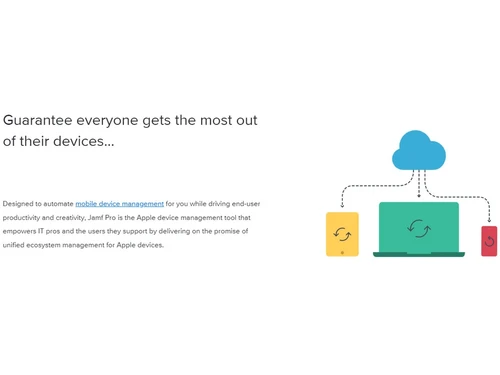
Jamf Pro is a mobile device management (MDM) software that helps organizations manage Apple devices (like Macs, iPhones, iPads, and Apple TVs) from a central place. With it, IT teams can remotely set up devices (zero touch deployment), install apps, push updates, and enforce security rules.

It automatically collects information about hardware, software, and device settings so admins can see what's on each device (inventory). It also lets users install approved apps by themselves (self-service), without needing to ask IT.

When a device is lost or compromised, IT can remotely lock, wipe, or secure it. Jamf Pro works with existing systems (like Microsoft, Google, and Okta) for identity and access management.

Why Choose Jamf Pro Software?

  • Apple-Only Focus: Built just for managing Apple devices like Mac, iPhone, iPad, and Apple TV.
  • Remote Setup: Devices can be set up automatically without touching them.
  • Smart Grouping: Group devices based on rules for easier updates and control.
  • Device Templates: Apply ready-made settings to devices for consistency.
  • Live Inventory: Track device info like hardware, software, and settings in real-time.
  • Auto Security Rules: Enforce passcodes, encryption, and restrictions automatically.
  • Remote Control: Lock, wipe, or reset lost or stolen devices from anywhere.
  • App Management: Easily install, update, or remove apps across all devices.
  • Self-Service Access: Users can install approved apps without needing IT help.
  • Compliance Tools: Helps meet industry security standards and audits.
  • Secure Login Integration: Works with Google, Okta, and Microsoft for safe logins.
  • Apple Services Support: Connects to Apple Business/School Manager for easy setup.
  • BYOD Support: Securely manage personal devices brought by users.
  • Scalable for Any Size: Works for small teams or large enterprises with many devices.

Benefits of jamf Pro Software

  • Task Automation: Routine tasks like updates run automatically.
  • Fast Onboarding: New users get pre-configured devices ready to go.
  • OS Update Ready: Supports Apple's newest OS on launch day.
  • Threat Protection: Detects and blocks security risks early.
  • Custom Reports: Create reports on usage, compliance, and more.
  • Advanced Setup Options: Supports scripting and complex configurations.
  • Quick Fixes: Push updates or changes instantly to fix issues.
  • Smooth User Experience: Keeps devices secure and users productive.
  • Trusted Worldwide: Used by top companies, schools, and organizations.
  • Integration-Friendly: Connects with many third-party tools and services.
  • Full Lifecycle Management: Manage devices from setup to retirement all in one tool.

jamf Pro Pricing

jamf Pro pricing starts at $69 per year at Techjockey.com. The pricing model is based on different parameters, including extra features, deployment type, and the total number of users. For further queries related to the product, you can contact our product team and learn more about the pricing and offers.

Read more

JAMF Company Details

Founded Year:  2002

Jamf creates IT software that manages Apple devices and helps organizations succeed.

Director/Founders Zach Halmstad
Company Size 501-1000 Employees

jamf Pro Pricing & Plans

Jamf for Mac
Starting at $69
    • Device (MacOS Device)

      Device (MacOS Device)
      Device (MacOS Device)
    • Yearly

      Yearly
      Yearly

Key Features

  • 25-device minimum

  • Core MacOS device management & workflow automation

  • Endpoint protection

  • Vulnerability management and content filtering

  • Identity and access management

Jamf for Mobile
Starting at $120
    • Device

      Device
      Device
    • Yearly

      Yearly
      Yearly

Key Features

  • 25-device minimum

  • Complete mobile device management

  • Mobile threat defense

  • Zero Trust Network Access for mobile devices

jamf Pro Features

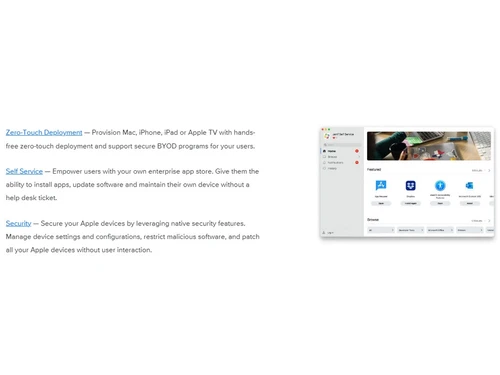
  • icon_check Zero-Touch Device Deployment
    Provision Mac, iPad, iPhone or Apple TV with hands-free zero-touch enrollment and setup.
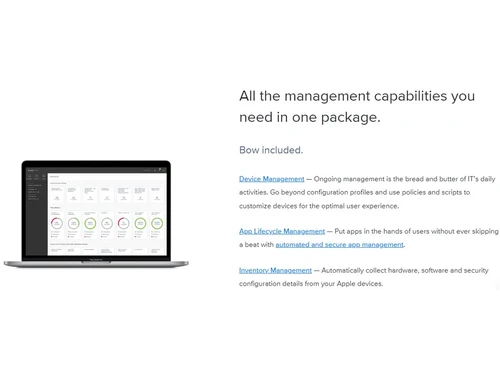
  • icon_check Inventory Management
    Automatically collect hardware, software, security and user data from Apple devices.
  • icon_check App Lifecycle Management
    Automate distribution, updates, versioning and removal of apps for enterprise devices.
  • icon_check Self Service Portal
    End-users can install approved apps, software updates and resources without help-desk tickets.
  • icon_check Remote Command Prompt
    Remotely lock, wipe, disable features or restrict access for lost or compromised devices.
  • icon_check User Enrollment Support
    Support for personally-owned devices with separation of corporate resources and user privacy.
  • icon_check Identity Integrations
    Integrate with Microsoft Entra, Google Workspace, Okta and enforce identity-based device access.
  • icon_check AI Assistant for IT & Security
    Built-in AI assistant to help search, troubleshoot and automate workflows inside the console.
  • icon_check Reporting & Analytics
    Real-time dashboards, reports, and alerts on inventory, compliance and device health.
  • icon_check Device Grouping
    Define scope by user group, device type, site/location to apply settings selectively.
  • icon_check Custom Branding
    Customize Self-Service portal, workflows and enrolment experience for your organisation.
  • icon_check Supervision
    Supervise devices for additional control (especially macOS/iOS) and enforce strict settings.
jamf Pro Demo Video play icon

Get jamf Pro Demo

Watch the demo video to explore key features, real workflows, and how the software fits your business needs.

Understand
Key Features
Personal
Demo Insights
Interactive
Demo Support

jamf Pro Specifications

Supported Platforms
Windows Windows iOS iOS MacOS MacOS
Devices
Desktop Desktop Mobile Mobile iPad iPad
Deployment
Cloud-Based Cloud-Based Perpetual Perpetual
Suitable For
All Industries
Business Specific
All Businesses
Business Size
Small Business Startups Medium Business Enterprises SMBs SMEs MSMBs MSMEs
Customer Support
Phone Email Forums
Language
English français Deutsche 日本人
Integration
API Integration
Training Resources
Videos

Explore the Best Alternative Solutions Similar to Your Business Size and Needs

jamf Pro Review

4.0

Out of 5

img

Overall Rating

Based on
4 Verified Ratings

Rating Breakdown

  • Features 4
  • Value for Money 3.7
  • Ease of Use 4.3
  • Customer Support 4.1

87% Recommend this Product

Add Review

Techjockey Trusted Reviews from Verified Users

No reviews are currently available for jamf Pro. Discover similar Mobile Device Management (MDM) Software reviews

  • uMobix

    4.4

    Whats great - The stealth mode is perfect—the icon is completely invisible on Android after installation, and it operates silently in the b... read more

  • Seqrite mSuite

    4.5

    Whats great - Techjockey was very helpful in taking my listed requirements and narrowing my search to a usable list of providers. Techjocke... read more
  • Broken Android Data Extraction

    4.8

    Whats great - My Samsung Galaxy Note 5 telephone screen is broken. I can press the catch, however can't see the information. Subsequent to ... read more

Compare jamf Pro With other Mobile Device Management (MDM) Software

Products
Ratings
Pricing
Device Supported
Deployment
Supported Platforms
  • img

    jamf Pro

  • 4.0

  • Price On Request

  • Desktop

    Mobile

  • Web based

    On Premises

  • Windows

    Mac OS

  • img

    jamf Now

  • 4.3

  • Price On Request

  • Desktop

    Mobile

  • Web based

    On Premises

  • Windows

    Mac OS

  • img

    jamf School

  • 4.3

  • Price On Request

  • Desktop

    Mobile

  • Web based

    On Premises

  • Windows

    Mac OS

  • img

    uMobix

  • 4.3

  • Price On Request

  • Desktop

    Mobile

  • Web based

    On Premises

  • Windows

    Mac OS

  • img

    AirDroid Business

  • 4.2

  • Price On Request

  • Desktop

    Mobile

  • Web based

    On Premises

  • Windows

    Mac OS

  • img

    Celltracker

  • 4.3

  • Price On Request

  • Desktop

    Mobile

  • Web based

    On Premises

  • Windows

    Mac OS

  • img

    KioWare Kiosk

  • 4.2

  • Price On Request

  • Desktop

    Mobile

  • Web based

    On Premises

  • Windows

    Mac OS

(0) Product(s) selected

jamf Pro Alternatives

See All jamf Pro Alternatives
SAVE UPTO 41%

Available

Price on Request

SAVE UPTO 20%

Starting Price:

$3 /Month

Starting Price:

$7 /Host/Month

Articles for jamf Pro

See All Related Articles

How much does jamf Pro cost?

jamf Pro pricing starts at $69 per year at Techjockey.com.

Is there a mobile app available for jamf Pro Software?

Yes, jamf Pro iOS mobile app is available.

Which operating systems are compatible with jamf Pro Software?

jamf Pro works on Windows, MacOS and iOS.

Does jamf Pro Software offer a free trial?

Yes, jamf Pro free trial is available.

How does jamf Pro Software function?

Jamf Pro manages, secures, and deploys Apple devices remotely through automation and policies.

Who uses jamf Pro Software?

Businesses, schools, and government agencies that manage Apple devices use Jamf Pro.

Is a free demo available for jamf Pro Software?

Yes, Jamf offers a free trial or demo on their official website.

Is jamf Pro Software available for free?

No, jamf Pro is a paid software.

20,000+ Software Listed

Best Price Guranteed

Free Expert Consultation

2M+ Happy Customers

Terms and Condtions

close

Users with registered businesses can purchase goods from merchants on the platform to satisfy their business needs. Users are not permitted to utilize any products acquired through the platform for resale, advertising, business, or further distribution.

For each purchase made, users will receive a Tax Invoice (or 'GST invoice') that includes specific details such as:

  • the GSTIN of the user associated with their registered business, and

  • the specified Entity Name for their business.

It should be noted that not all products are eligible for GST Invoice. Only the products displayed by participating sellers with the 'GST-based Invoice Available' callout on the product description page would qualify.

Certain goods and services are not eligible to get a GST Invoice, including items with VAS, i.e., Value Added Services (e.g., Total Mobile Protection/Assured Buyback) and those involving an exchange offer at the time of purchase.

Users must ensure the accuracy of the GSTIN, and business entity name provided for the GST Invoice. Requests for corrections into GST Invoice would not be accommodated by Techjockey.com or any Seller, and any issues arising from user-provided information are the sole responsibility of users.

Techjockey.com is not liable for the GST Invoice or any associated input tax credit. To efficiently claim an input tax credit, users should select the registered place of business address as per the GST authority's data and follow the provisions of the GST Act and rules.

To claim an input tax credit, the delivery and billing addresses must match. Furthermore, input tax credits will not be granted if the delivery address and GSTIN on the invoice are from different states. In case of incorrect GST details provided during the order placement, the order will be canceled automatically.