USA
USA UAE
UAESmall Business
Designed for startups and growing businesses
See More





Brand: KioWare
KioWare Kiosk System Software is lockdown software that secures your desktop and allows you to turn your PC or mobile device into a self-service kiosk. Configure KioWare to restrict access to the application(s) or website(s) you permit. KioWare kiosk software is available for bothWindows® and An...
See MoreHave you used KioWare Kiosk before?
Share your insights for better experience
Brand: KioWare
Founded Year: 1991
KioWare
 Customizable Lockdown User Session Management External Device Integration Remote Management Kiosk Modes Assistive Technology Support Multi-Site Deployment Device Health Heartbeats & Alerts Mobile Control

Watch the demo video to explore key features, real workflows, and how the software fits your business needs.
 Windows
  iOS
iOS  Android
  Desktop
  Mobile
  Tablet
  Cloud-Based
  Perpetual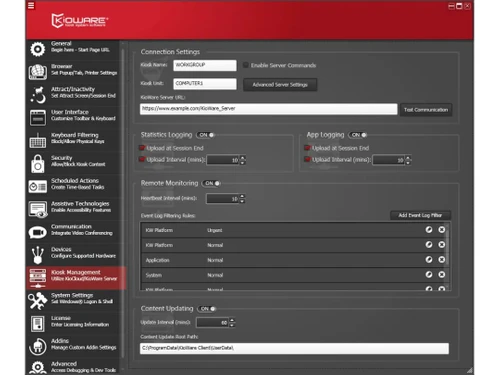
Small Business
Designed for startups and growing businesses
Medium Business
Built for business growth and flexibility
Enterprises
Designed for complex and large-scale business needs
4.2
Out of 5

Overall Rating
Based on
6 Verified Ratings
Rating Breakdown
90% Recommend this Product
Add ReviewTechjockey Trusted Reviews from Verified Users
No reviews are currently available for KioWare Kiosk . Discover similar Mobile Device Management (MDM) Software reviews

uMobix
Whats great - The stealth mode is perfect—the icon is completely invisible on Android after installation, and it operates silently in the b... read more

Seqrite mSuite
Whats great - Techjockey was very helpful in taking my listed requirements and narrowing my search to a usable list of providers. Techjocke... read more
Broken Android Data Extraction
Whats great - My Samsung Galaxy Note 5 telephone screen is broken. I can press the catch, however can't see the information. Subsequent to ... read more

KioWare Kiosk
Price On Request
Desktop
Mobile
Web based
On Premises
Windows
Mac OS

Iru(Formerly Kandji)
Price On Request
Desktop
Mobile
Web based
On Premises
Windows
Mac OS
Broken Android Data Extraction
₹ 1365
Desktop
Mobile
Web based
On Premises
Windows
Mac OS
uMobix
Price On Request
Desktop
Mobile
Web based
On Premises
Windows
Mac OS

Aiseesoft FoneEraser
₹ 2764
Desktop
Mobile
Web based
On Premises
Windows
Mac OS

jamf Pro
Price On Request
Desktop
Mobile
Web based
On Premises
Windows
Mac OS

Esper Android Device Manaement
Price On Request
Desktop
Mobile
Web based
On Premises
Windows
Mac OS

AirDroid Business
Price On Request
Desktop
Mobile
Web based
On Premises
Windows
Mac OS

Celltracker
Price On Request
Desktop
Mobile
Web based
On Premises
Windows
Mac OS

Wondershare TunesGo
Price On Request
Desktop
Mobile
Web based
On Premises
Windows
Mac OS

Wondershare MobileGo
Price On Request
Desktop
Mobile
Web based
On Premises
Windows
Mac OS
(0) Product(s) selected
Available
Price on Request
Starting Price:
₹1,365 /User ₹2,314
Available
Price on Request
Starting Price:
₹2,764 /Lifetime ₹3,455
Starting Price:
$12 /Year
Available
Price on Request

Starting Price:
$3 /Month
Available
Price on Request

Available
Price on Request

Available
Price on Request

Starting Price:
$7 /Host/Month
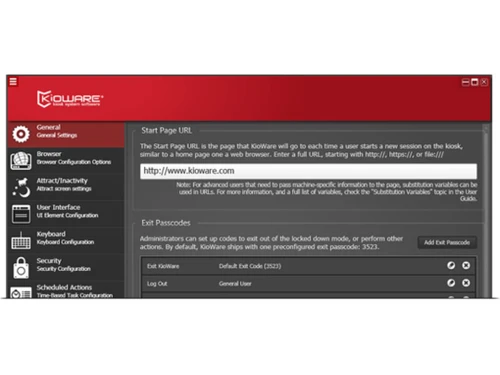
The default password is 3523. Use the Configuration Tool to change
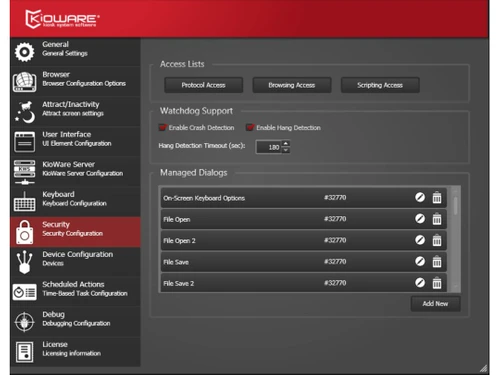
For applications where the user has access to USB ports, it is important that the user not be able to access a memory stick containing programs that can stop KioWare, or otherwise harm the system. The following Microsoft Knowledgebase article describes steps necessary to manually do this on XP. Keep in mind that the Config Tool performs the steps in the article below for XP, so the article is mainly here for reference. MS Article for XP If you are using Windows XP, this can safely be done from the Security tab of the Config Tool by checking USB Storage under the Disable Devices section. However, if you are running Vista, Windows 7, or higher, you will need to apply a group policy setting to safely disable removable drives. Below are provided steps to enable this group policy setting: Click the Windows Start button Type gpedit.msc in the search box and press Enter Expand Computer Configuration Expand Administrative Templates Expand System Click Removable Devices Double click Removable Disks: Deny read access Set it to Enabled
The reason you normally don't see this in Internet Explorer is because IE has script error alerts turned off by default. In KioWare you can turn these alerts off in the Configuration Tool on the Browser tab - Error Handling... - Disable Script Error Alerts.
The usage statistics are stored in an Access database called KioskStats.mdb located in the Kioware program installation directory (typically, c:\Program Files\KioWare\).
1. Click the upper left corner of the screen. 2. Click the upper right corner of the screen. 3. Click the lower right corner of the screen. 4. Click the lower left corner of the screen. Then, enter your password. Default is 3523.
20,000+ Software Listed
Best Price Guranteed
Free Expert Consultation
2M+ Happy Customers
Terms and Condtions

Users with registered businesses can purchase goods from merchants on the platform to satisfy their business needs. Users are not permitted to utilize any products acquired through the platform for resale, advertising, business, or further distribution.
For each purchase made, users will receive a Tax Invoice (or 'GST invoice') that includes specific details such as:
the GSTIN of the user associated with their registered business, and
the specified Entity Name for their business.
It should be noted that not all products are eligible for GST Invoice. Only the products displayed by participating sellers with the 'GST-based Invoice Available' callout on the product description page would qualify.
Certain goods and services are not eligible to get a GST Invoice, including items with VAS, i.e., Value Added Services (e.g., Total Mobile Protection/Assured Buyback) and those involving an exchange offer at the time of purchase.
Users must ensure the accuracy of the GSTIN, and business entity name provided for the GST Invoice. Requests for corrections into GST Invoice would not be accommodated by Techjockey.com or any Seller, and any issues arising from user-provided information are the sole responsibility of users.
Techjockey.com is not liable for the GST Invoice or any associated input tax credit. To efficiently claim an input tax credit, users should select the registered place of business address as per the GST authority's data and follow the provisions of the GST Act and rules.
To claim an input tax credit, the delivery and billing addresses must match. Furthermore, input tax credits will not be granted if the delivery address and GSTIN on the invoice are from different states. In case of incorrect GST details provided during the order placement, the order will be canceled automatically.