USA
USA UAE
UAESmall Business
Designed for startups and growing businesses


See More




Brand: Antamedia
Antamedia Internet Cafe is an endpoint security solution for internet cafes, public computers within libraries and hotels, public WiFis and gaming centers. Users get to restrict unauthorized access to the information stored in their desktop, folders and drives, using a wide variety of security management tools offered by Antamedia internet cafe software. Further, they can also generate bills for...
See MoreHave you used Antamedia Internet cafe before?
Share your insights for better experience
Brand: Antamedia
Founded Year: 2001
Antamedia, one of the first WiFi companies that developed PC-based WiFi management software.
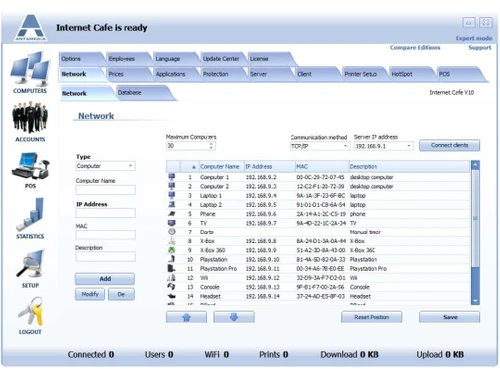
 Security Server and Clients (plus WiFi) Pre-Paid Prices and Vouchers Play & Pay Prices Access Control Windows 10 full support POS Integration

Watch the demo video to explore key features, real workflows, and how the software fits your business needs.
 Windows
  Desktop
  Cloud-Based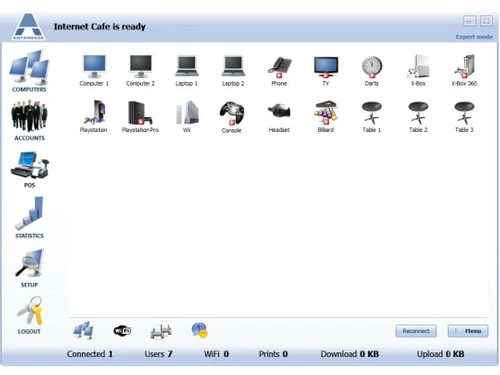
Small Business
Designed for startups and growing businesses
Medium Business
Built for business growth and flexibility
Enterprises
Designed for complex and large-scale business needs
4.4
Out of 5

Overall Rating
Based on
3 Verified Reviews
Rating Breakdown
90% Recommend this Product
Add ReviewUsers generally appreciate Antamedia Internet Cafe for its efficiency and comfort in managing multiple devices, highlighting the effective monitoring capabilities. The support team receives commendations for their quick responses and professionalism, with many users noting the variety of software packages available. However, while the feedback is largely positive, the reviews do not mention any significant drawbacks or limitations, indicating a strong overall satisfaction with the product and its services.

Jan 14, 2019
Techjockey Verified
“Comfortable way of dealing with internet”
Pros
Efficient and comfortable way of dealing with every laptop from your net cafe or gaming middle, by means of monitoring them and the time each client spends on each one.
Cons
NO CONS
Mar 3, 2019
Techjockey Verified
“Numerous Module”
Pros
They were exceptionally useful and proficient. They reacted immediately after I reached them by means of their site. Approached numerous product bundles I had never known about! As of now had a demo with one of their suggestions and that was likewise taken care of great. Would utilize them once more.
Cons
NO CONS
Sep 25, 2017
Techjockey Verified
“consultation given”
Pros
They were very helpful and professional. They responded right away after I contacted them via their website. Had access to many software packages I had never heard of! Already had a demo with one of their recommendations and that was also handled very well. Would use them again.
Cons
N/A

Antamedia Internet cafe
Price On Request
Desktop
Mobile
Web based
On Premises
Windows
Mac OS

Antamedia Kiosk
Price On Request
Desktop
Mobile
Web based
On Premises
Windows
Mac OS

Seqrite Endpoint Security For Business
Price On Request
Desktop
Mobile
Web based
On Premises
Windows
Mac OS

Seqrite Endpoint Security Cloud
₹ 1550
Desktop
Mobile
Web based
On Premises
Windows
Mac OS

Avast Premium Business Security
₹ 231
Desktop
Mobile
Web based
On Premises
Windows
Mac OS

Sophos Endpoint Protection
Price On Request
Desktop
Mobile
Web based
On Premises
Windows
Mac OS

K7 Endpoint Security
Price On Request
Desktop
Mobile
Web based
On Premises
Windows
Mac OS

Webroot SecureAnywhere
₹ 1976
Desktop
Mobile
Web based
On Premises
Windows
Mac OS

NinjaOne
Price On Request
Desktop
Mobile
Web based
On Premises
Windows
Mac OS

ThreatLocker
Price On Request
Desktop
Mobile
Web based
On Premises
Windows
Mac OS

Syxsense
Price On Request
Desktop
Mobile
Web based
On Premises
Windows
Mac OS
(0) Product(s) selected
Starting Price:
$27 /Users
Available
Price on Request
Starting Price:
₹1,976
Available
Price on Request
Available
Price on Request
Available
Price on Request

Available
Price on Request

Available
Price on Request

Available
Price on Request

Available
Price on Request

Available
Price on Request
The Print Panel section once enabled shows valuable information on print management. Users also get to view paused printing jobs and pending printing confirmations as well.
Users can load the chat window by pressing on the chat button. The chat option allows them to communicate with their clients’ computers as per their requirements.
You can send in a demo request for Antamedia Internet Cafe software mentioning a fixed time and date. Techjockey experts will get back to you accordingly.
User’s system needs to have: ? RAM: 4GB RAM ? Processor: 2GHz or faster processors ? Any Ethernet attached base WiFi station.
No, Antamedia Internet Cafe software does not has a mobile app.
20,000+ Software Listed
Best Price Guranteed
Free Expert Consultation
2M+ Happy Customers
Terms and Condtions

Users with registered businesses can purchase goods from merchants on the platform to satisfy their business needs. Users are not permitted to utilize any products acquired through the platform for resale, advertising, business, or further distribution.
For each purchase made, users will receive a Tax Invoice (or 'GST invoice') that includes specific details such as:
the GSTIN of the user associated with their registered business, and
the specified Entity Name for their business.
It should be noted that not all products are eligible for GST Invoice. Only the products displayed by participating sellers with the 'GST-based Invoice Available' callout on the product description page would qualify.
Certain goods and services are not eligible to get a GST Invoice, including items with VAS, i.e., Value Added Services (e.g., Total Mobile Protection/Assured Buyback) and those involving an exchange offer at the time of purchase.
Users must ensure the accuracy of the GSTIN, and business entity name provided for the GST Invoice. Requests for corrections into GST Invoice would not be accommodated by Techjockey.com or any Seller, and any issues arising from user-provided information are the sole responsibility of users.
Techjockey.com is not liable for the GST Invoice or any associated input tax credit. To efficiently claim an input tax credit, users should select the registered place of business address as per the GST authority's data and follow the provisions of the GST Act and rules.
To claim an input tax credit, the delivery and billing addresses must match. Furthermore, input tax credits will not be granted if the delivery address and GSTIN on the invoice are from different states. In case of incorrect GST details provided during the order placement, the order will be canceled automatically.