linkedin
PanAgro logo
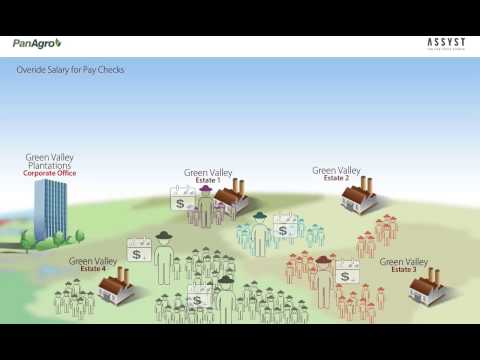
play Override Salary for Paychecks - Pan Agro ERP Solution - Assyst PanAgro Demo
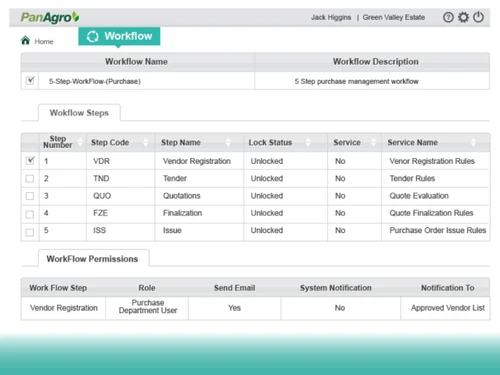
panagro erp-workflow
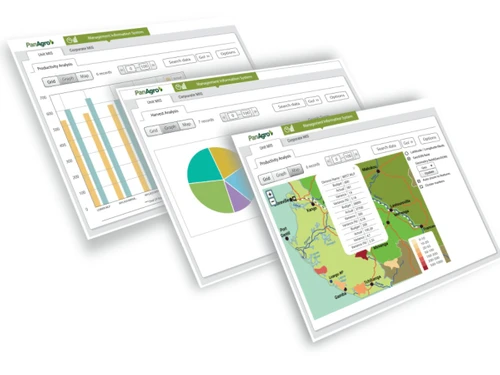
panagro erp-analytics

PanAgro

Brand: PanApps

  • 4.2

  • 4 Ratings

PanAgro is a best Agriculture Erp software. It's an end-to-end ERP solution for small to large scale agri businesses globally. The solution is designed keeping in mind the unique requirements of planters. It automates business processes and brings operational efficiencies by providing Stakeholde...

See More

Have you used PanAgro before?

Share your insights for better experience

Add a Review

Price Available on Request

Questions about pricing or customization? We’re here to help, just a click away.

100% Genuine
Products
Best Price
Guaranteed
Safe & Secure
Payment
  • Description

  • Pricing

  • Features

  • Specification

  • Review

  • Compare

  • Alternatives

  • FAQ

PanAgro Software Overview

PanAgro is a best Agriculture Erp software. It's an end-to-end ERP solution for small to large scale agri businesses globally. The solution is designed keeping in mind the unique requirements of planters. It automates business processes and brings operational efficiencies by providing Stakeholders a complete insight into their daily field & factory operations. With PanAgro, managing diverse and remote plantation operations is simplified. PanAgro can be configured for a variety of crops including Tea, Coffee, Rubber, Oil Palm, Cotton, Forestry and Tobacco. It is highly configurable, user-friendly and can be deployed on Cloud or on premise.

Product Features

PanBI agro is one of its kind agri ERP which helps in managing diverse and remote plantation operations in an easy way. The solution helps user in estimating budgets, forecasting and planning, Manage HR & Payroll, etc.
Below are certain specific features of the solution:

  • Budget: User can set goals, measure progress and ensure accountability to estate performance. Compare actual and budgeted figures for Production, Sales and Profitability for estates. Forecast Output targets and perform “what-if” analysis.
  • Field: Helps capture and record all activities in the field ranging from nursery operations, Agronomy to Contract farming in a streamlined process and manage it coherently.
  • Production: Optimize usage of critical resources, take control of production planning schedules, inspection, and maximize the productivity, etc.
  • Materials: Manage purchases, store operations, move and control material inventory to carry out the desired job as per schedule, improve on-time deliveries, enhance cash flow, and increase profit levels.
  • Marketing & sales: The solution can make sales process more efficient by improving delivery timings, minimizing wastage and integrating sales information with other modules. A user can manage the complete sales cycle from enquiry, quotation, product, price, order to auction and export management and ramp up productivity.
  • Engineering: A user can manage engineering operations such as workshop and plant maintenance, logistics and contract works seamlessly. Keep track of WIP, delivery schedule, accident logging, cost reporting, down time details etc. The solution also helps user monitor, analyse and control all contract projects within estimated cost.
  • Finance: Enables a user to handle the postings and processing of all accounting transactions created across various PanAgro modules. Review financial position of the company in real time for better decision making and strategic planning and drive enterprise performance.
  • HR: It simplifies implementation of complex labor wage settlements with payroll process.  A user can integrate with online and third party devices that capture labor attendance and harvesting details, run payroll, generate payslips and get extensive reports on productivity analysis, harvester analysis etc.
  • MIS: Analyse reports in different dashboard formats at different levels in the enterprise such as at the estate/garden/unit/factory/mill level, group office/regional office level, etc.
Read more

PanApps Company Details

Founded Year:  2005

PanApps is a global software product company that provides solutions and services to help modernize the IT functions of multilateral, government and private sector organizations.

Director/Founders Vijay Nair
Company Size 501-1000 Employees

PanAgro Pricing & Plans

Looking for The Right Pricing?

Share your requirements and get a plan built around your business.

  • Define your business needs
  • Get customised pricing
  • Choose features that fit your workflow

Price Available on Request

Get personalised PanAgro pricing that fits your needs. Our team will connect with you.

PanAgro Features

  • icon_check Multi Entity Consolidation
    Manages complex organizational structures including multiple subsidiaries, legal entities, and business units in one system.
  • icon_check Payroll Automation
    Processes complex wage settlements and worker incentives based on field attendance and specific harvest productivity data.
  • icon_check Real Time Data Access
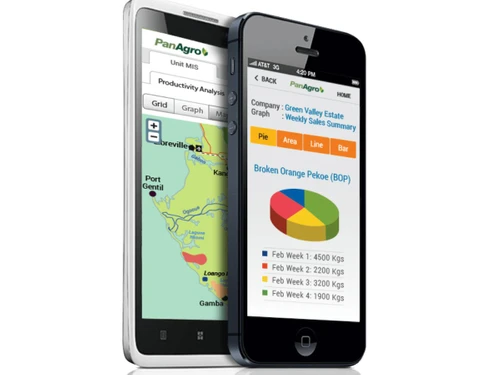
    Provides immediate synchronization of operational data across mobile devices and tablets for remote field monitoring tasks.
  • icon_check GIS Production Mapping
    Utilizes geographic information systems and heat maps to visualize production areas and enhance field management efficiency.
  • icon_check Nursery Management
    Tracks all botanical activities from initial nursery operations to agronomy and contract farming within a unified workflow.
  • icon_check Automated Workflow
    Defines sequences of operational activities that are assigned to users automatically to ensure task completion protocols.
  • icon_check Resource Optimization
    Monitors usage of critical farming resources to control production planning schedules and maximize overall output levels.
  • icon_check Inventory Control
    Manages procurement and movement of material stock to improve delivery timing and maintain optimal cash flow requirements.
  • icon_check Workshop Maintenance
    Tracks engineering operations for plant maintenance and workshop activities including work-in-progress and downtime logs.
  • icon_check Financial Ledger
    Processes all accounting transactions created across various modules to provide a real-time view of the company position.
  • icon_check Budgetary Forecasting
    Sets performance goals and compares actual figures against budgeted targets for production, sales, and total profitability.
  • icon_check What If Analysis
    Performs predictive simulations on output targets to determine how different variables impact the overall estate performance.
  • icon_check Attendance Tracking
    Integrates with third-party handheld devices to capture labor attendance and crop harvesting details directly from fields.
  • icon_check Contract Farming Oversight
    Streamlines the coordination of external contract farming processes to ensure adherence to corporate quality standards.
  • icon_check Multi-Currency Support
    Facilitates international business operations by supporting multiple languages and various global currency configurations.
PanAgro Demo Video play icon

Get PanAgro Demo

Watch the demo video to explore key features, real workflows, and how the software fits your business needs.

Understand
Key Features
Personal
Demo Insights
Interactive
Demo Support

PanAgro Specifications

Supported Platforms
Windows Windows
Devices
Desktop Desktop
Deployment
Cloud-Based Cloud-Based Perpetual Perpetual
Suitable For
Agriculture
Business Specific
Agriculture
Business Size
Small Business Medium Business Enterprises MSMEs
Customer Support
Phone Email Communities
Language
English
Integration
API Integration
Training Resources
Videos

PanAgro Review

4.2

Out of 5

img

Overall Rating

Based on
4 Verified Ratings

Rating Breakdown

  • Features 4.2
  • Value for Money 4.7
  • Ease of Use 4
  • Customer Support 4

87% Recommend this Product

Add Review

Techjockey Trusted Reviews from Verified Users

No reviews are currently available for PanAgro. Discover similar Agriculture ERP reviews

  • Satya FIMS

    4.6

    Whats great - This helped me in managing day to day farming activities with various things like seed procurement. read more
  • Amity Agriculture ERP

    4.4

    Whats great - > Customer customisation > Easy to use > Simple to understand UI > Thorough training > Reporting, auditing, weather data, soi... read more

  • Agrivi Farm Management Software

    4.4

    Whats great - Agrivi is an information based homestead the executives programming that helps ranchers in information driven basic leadershi... read more
Compare PanAgro With other Agriculture ERP

Products
Ratings
Pricing
Device Supported
Deployment
Supported Platforms
  • img

    PanAgro

  • 4.2

  • Price On Request

  • Desktop

    Mobile

  • Web based

    On Premises

  • Windows

    Mac OS

  • img

    Satya FIMS

  • 4.5

  • Price On Request

  • Desktop

    Mobile

  • Web based

    On Premises

  • Windows

    Mac OS

  • img

    CropIn SmartFarm

  • 4.2

  • Price On Request

  • Desktop

    Mobile

  • Web based

    On Premises

  • Windows

    Mac OS

  • img

    KissanAI

  • 4.3

  • Price On Request

  • Desktop

    Mobile

  • Web based

    On Premises

  • Windows

    Mac OS

  • img

    CropRigate

  • 4.3

  • Price On Request

  • Desktop

    Mobile

  • Web based

    On Premises

  • Windows

    Mac OS

  • img

    Dataman Aahar

  • 4.1

  • Price On Request

  • Desktop

    Mobile

  • Web based

    On Premises

  • Windows

    Mac OS

  • img

    CropTrails

  • 4.1

  • Price On Request

  • Desktop

    Mobile

  • Web based

    On Premises

  • Windows

    Mac OS

(0) Product(s) selected

PanAgro Alternatives

See All PanAgro Alternatives

Available

Price on Request

Available

Price on Request

Available

Price on Request

Available

Price on Request

Articles for PanAgro

See All Related Articles

Which operating system does PanAgro support?

PanAgro Agriculture ERP is compatible with Windows operating systems.

Is there any PanAgro app?

PanAgro Agriculture ERP app is not available.

What is deployment type of PanAgro?

PanAgro Agriculture ERP supports Web-Based.

Who are the potential users of PanAgro?

PanAgro Agriculture ERP is typically used in Agriculture.

Is there any free trial or demo for PanAgro?

PanAgro Agriculture ERP demo is available for free with Techjockey.com

Is PanAgro free?

PanAgro Agriculture ERP offers a free trial. However, the premium plan with advanced features available at Techjockey .

How can you download PanAgro?

For PanAgro Agriculture ERP installation, insert the given CD/USB flash storage in your system and open the Setup Wizard to get started.

How does PanAgro work?

PanAgro Agriculture ERP helps with Workflow,Mobile Support,Crop Management and Farm Analytics & Reports. It's a complete solution for Financial Management,Resources & Inventory,Sales Management and HR & Payroll.

20,000+ Software Listed

Best Price Guranteed

Free Expert Consultation

2M+ Happy Customers

Terms and Condtions

close

Users with registered businesses can purchase goods from merchants on the platform to satisfy their business needs. Users are not permitted to utilize any products acquired through the platform for resale, advertising, business, or further distribution.

For each purchase made, users will receive a Tax Invoice (or 'GST invoice') that includes specific details such as:

  • the GSTIN of the user associated with their registered business, and

  • the specified Entity Name for their business.

It should be noted that not all products are eligible for GST Invoice. Only the products displayed by participating sellers with the 'GST-based Invoice Available' callout on the product description page would qualify.

Certain goods and services are not eligible to get a GST Invoice, including items with VAS, i.e., Value Added Services (e.g., Total Mobile Protection/Assured Buyback) and those involving an exchange offer at the time of purchase.

Users must ensure the accuracy of the GSTIN, and business entity name provided for the GST Invoice. Requests for corrections into GST Invoice would not be accommodated by Techjockey.com or any Seller, and any issues arising from user-provided information are the sole responsibility of users.

Techjockey.com is not liable for the GST Invoice or any associated input tax credit. To efficiently claim an input tax credit, users should select the registered place of business address as per the GST authority's data and follow the provisions of the GST Act and rules.

To claim an input tax credit, the delivery and billing addresses must match. Furthermore, input tax credits will not be granted if the delivery address and GSTIN on the invoice are from different states. In case of incorrect GST details provided during the order placement, the order will be canceled automatically.