linkedin
Attest360 logo
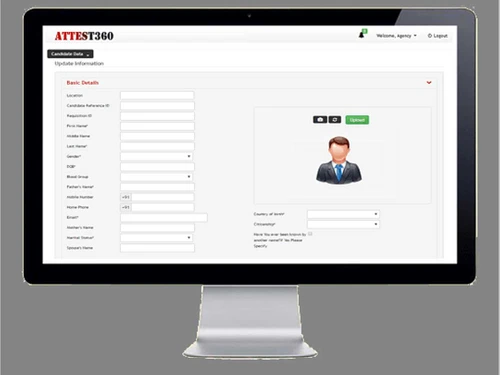
Attest360 Customizable Forms
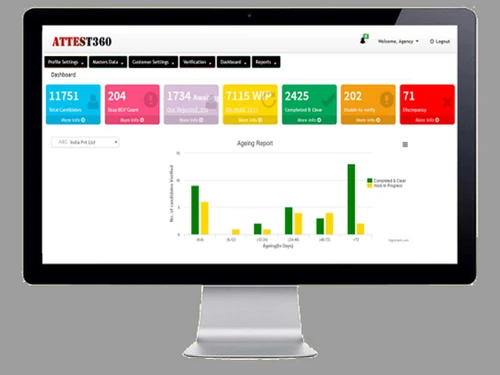
Attest360 dashboard
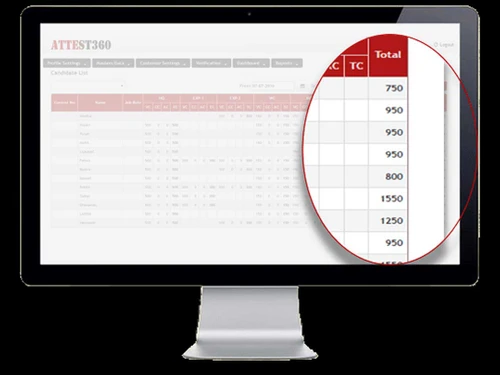
Attest360 job card

Attest360

Brand: Attest360

  • 4.2

  • 5 Ratings

Attest360 connects organizations and verification agencies to automate and streamline the background check process, making it faster and more efficient.

See More

Have you used Attest360 before?

Share your insights for better experience

Add a Review

Price Available on Request

Questions about pricing or customization? We’re here to help, just a click away.

100% Genuine
Products
Best Price
Guaranteed
Safe & Secure
Payment
  • Description

  • Pricing

  • Features

  • Specification

  • Review

  • Compare

  • Alternatives

  • FAQ

Attest360 Software Overview

What is Attest360?

Attest360 is a cloud-based platform designed for background verification that connects verification agencies, regulatory bodies, organizations, and candidates in one place. It streamlines the background check process by automating various verification types, which helps save time and reduce costs for businesses and agencies.

Users can easily manage verifications through defined workflows and real-time dashboards, allowing for quick access to the status of checks. The platform also enables candidates to submit their information securely, ensuring data protection with advanced encryption methods. Attest360 supports multiple customers and offers customizable reporting features tailored to organizational needs.

Why Choose Attest360 Software?

  • Complete Process Automation: Automates the entire background verification process, reducing manual effort and increasing efficiency.
  • Streamlined Workflows: Features well-defined workflows that help organize and expedite verification tasks, leading to faster turnaround times.
  • Self-Service Portals: Offers interactive dashboards and self-service portals for candidates and clients, enhancing user engagement and transparency.
  • Accurate Reporting: Generates automated reports that improve accuracy and reduce the time spent on data organization and categorization.
  • Multi-Stakeholder Collaboration: Connects employers, verification agencies, and candidates on a single platform for seamless collaboration.
  • Customizable Features: Allows verification agencies to manage multiple customers and generate customer-specific reports in real-time.
  • Cost-Effective Solution: Saves businesses time and money by streamlining background checks and reducing the resources needed for manual processes.
  • User-Friendly Interface: Designed for ease of use, making it accessible for all users involved in the background verification process.

Benefits of Attest360 Software

  • Time Efficiency: Automates the background verification process, significantly reducing the time taken for checks compared to traditional methods.
  • Cost Savings: Streamlines operations, leading to reduced costs associated with manual verification processes.
  • Enhanced Accuracy: Provides automated report generation and real-time updates, improving the accuracy of background checks.
  • User-Friendly Interface: Features intuitive dashboards and self-service portals for candidates and clients, making it easy to navigate and use.
  • Customizable Workflows: Allows organizations to tailor the verification process according to their specific needs and requirements.
  • Real-Time Notifications: Sends automated alerts via email and SMS to keep all stakeholders informed about the status of verifications.
  • Multi-Agency Collaboration: Facilitates seamless collaboration between verification agencies, employers, and candidates on a single platform.
  • Comprehensive Reporting: Offers detailed reports that can be customized for different clients, providing insights into the verification process.
  • Scalability: Designed to accommodate businesses of all sizes, from startups to large enterprises, without compromising performance.
  • No IT Maintenance Required: As a cloud-based solution, Attest360 requires no on-premise IT maintenance, allowing users to focus on their core activities.

Pricing of Attest360

Attest360 price details are available upon request at techjockey.com.

The pricing model is based on different parameters, including extra features, deployment type, and the total number of users. For further queries related to the product, you can contact our product team and learn more about the pricing and offers.

Read more

Attest360 Company Details

Founded Year:  2020

Background verification is becoming a standard practice in organizations across industries and geographies. Organizations are on a constant lookout for newer ways to mitigate risks and prevent fraudulent activities.

Director/Founders Krishna RK
Company Size 1-100 Employees

Attest360 Pricing & Plans

Looking for The Right Pricing?

Share your requirements and get a plan built around your business.

  • Define your business needs
  • Get customised pricing
  • Choose features that fit your workflow

Price Available on Request

Get personalised Attest360 pricing that fits your needs. Our team will connect with you.

Attest360 Features

Candidate Management

  • icon_check Candidate Scoring
    Evaluate candidates based on verification outcomes to assist in decision-making.
  • icon_check Profile Creation
    Develop and manage detailed candidate profiles, storing personal information and relevant documents.
  • icon_check Bulk Uploads
    Import multiple candidate details simultaneously to enhance efficiency.
  • icon_check Status Tracking
    Monitor the real-time progress of each candidate's verification process.
  • icon_check Candidate Portal
    Provide a self-service interface for candidates to submit information and track their verification status.
  • icon_check Alias and Maiden Name Search
    Identify and verify any alternative names used by the candidate.

Verification Modules

  • icon_check Criminal Record Check
    Conduct comprehensive searches for any past criminal activities.
  • icon_check International Screening
    Perform background checks across global databases and records.
  • icon_check Education Verification
    Confirm academic credentials and institutions attended.
  • icon_check Employment Verification
    Validate previous employment details, including roles and durations.
  • icon_check Address Verification
    Verify current and previous residential addresses.
  • icon_check Identity Verification
    Authenticate personal identification documents to confirm the candidate's identity.
  • icon_check Credit Check
    Assess financial responsibility, especially for roles involving financial management.
  • icon_check Social Media Screening
    Analyze social media profiles for behaviors that may impact employment.
  • icon_check Drug Testing
    Interface with drug testing services for comprehensive candidate screening.

Administration and Workflow Management

  • icon_check Customizable Workflows
    Tailor verification processes to meet specific organizational needs.
  • icon_check Task Assignment
    Delegate specific verification tasks to team members or departments.
  • icon_check Automatic Follow-ups
    Schedule reminders and follow-ups for pending tasks to ensure timely completion.
  • icon_check Notification System
    Provide alerts and updates to stakeholders regarding verification statuses.

Integrations

  • icon_check Third Party Integrations
    Facilitate connections with external vendors or services as needed.
  • icon_check Applicant Tracking System (ATS) Integration
    Seamlessly connect with existing ATS to streamline the hiring process.
  • icon_check HRMS Integration
    Ensure compatibility with HR platforms for unified data management.
  • icon_check API Integration
    Allow connections with third-party services and databases for extended functionalities.
  • icon_check Payment Gateway Integration
    Support processing of payments for services rendered.
  • icon_check Help Desk Integration
    Integrate with support systems to address candidate or user inquiries efficiently.
  • icon_check Property Management Systems Integration
    Connect with property management tools for tenant screenings.

Security and Compliance

  • icon_check Consent Management
    Obtain and manage candidate consent for various verification processes.
  • icon_check Role-Based Access Control (RBAC)
    Implement permissions based on user roles to enhance security.
  • icon_check Data Encryption
    Protect sensitive information through robust encryption methods.
  • icon_check GDPR/CCPA Compliance
    Ensure adherence to data protection regulations applicable in various regions.
  • icon_check Audit Compliance
    Maintain records and processes that meet audit requirements.
  • icon_check FCRA Compliance
    Adhere to the Fair Credit Reporting Act guidelines for background checks.
  • icon_check Compliance Tracking
    Monitor adherence to legal and regulatory standards throughout the verification process.
  • icon_check Audit Trail
    Maintain detailed logs of all actions for transparency and accountability.
  • icon_check I-9 Compliance
    Ensure verification of employment eligibility in the U.S. through Form I-9 compliance.

Analytics and Reporting

  • icon_check Customizable Reports
    Allow tailoring of reports to meet specific organizational needs.
  • icon_check Analytics Dashboard
    Provide visual representations of data for better insights.
  • icon_check Real Time Status Updates
    Offer immediate updates on the progress of background checks.
  • icon_check Comprehensive Reporting
    Generate detailed reports summarizing verification results.
  • icon_check Batch Processing
    Handle multiple background checks simultaneously to improve efficiency.
  • icon_check Audit Logs
    Maintain logs of all actions for compliance and accountability.

Alerts And Notifications

  • icon_check Email and SMS Notifications
    Supports real-time communication.
  • icon_check Security Alerts
    Strengthens system security.
  • icon_check Custom Event Alerts
    Useful for production or inventory updates.
  • icon_check Non-Compliance Issues
    Critical for addressing quality deviations.

AI Capabilities

  • icon_check Automated Background Checks
    Streamline the verification process through automation.
  • icon_check Adverse Action Management
    Facilitate legally required procedures when adverse information is found.
  • icon_check AI-Powered Analytics and Detection
    Utilize artificial intelligence to identify patterns and anomalies in data.

Others

  • icon_check Document Management
    Store and manage documents securely within the system.

Attest360 Specifications

Supported Platforms
Windows Windows
Devices
Desktop Desktop
Deployment
Cloud-Based Cloud-Based
Suitable For
All Industries
Business Specific
All Businesses
Business Size
Small Business Medium Business SMBs SMEs
Customer Support
Phone Email Forums
Language
English
Training Resources
Live Online

Explore the Best Alternative Solutions Similar to Your Business Size and Needs

Small Business

Designed for startups and growing businesses

onfido

4.2

Veremark

4.2

Jumio

4.3

See More

Attest360 Review

4.2

Out of 5

img

Overall Rating

Based on
5 Verified Ratings

Rating Breakdown

  • Features 4.5
  • Value for Money 4.1
  • Ease of Use 3.9
  • Customer Support 4.3

94% Recommend this Product

Add Review

Techjockey Trusted Reviews from Verified Users

No reviews are currently available for Attest360. Discover similar Background Verification Software reviews

  • TraqCheck

    4.4

    Whats great - TraqCheck is expanding internationally (UK, Europe) and recently raised bridge funding at a $17M valuation. It's increasingly... read more

  • OnGrid

    4.4

    Whats great - Global DB checks, ready for international hires read more

  • onfido

    4.0

    Whats great - Onfido has user friendly interface, easy integration, fast and effective report creation. read more

Compare Attest360 With other Background Verification Software

Products
Ratings
Pricing
Device Supported
Deployment
Supported Platforms
  • img

    Attest360

  • 4.2

  • Price On Request

  • Desktop

    Mobile

  • Web based

    On Premises

  • Windows

    Mac OS

  • img

    Checkr 

  • 4.5

  • Price On Request

  • Desktop

    Mobile

  • Web based

    On Premises

  • Windows

    Mac OS

  • img

    AuthBridge

  • 4.5

  • Price On Request

  • Desktop

    Mobile

  • Web based

    On Premises

  • Windows

    Mac OS

  • img

    Statfin BGV

  • 4.1

  • Price On Request

  • Desktop

    Mobile

  • Web based

    On Premises

  • Windows

    Mac OS

  • img

    onfido

  • 4.2

  • Price On Request

  • Desktop

    Mobile

  • Web based

    On Premises

  • Windows

    Mac OS

  • img

    Veremark

  • 4.2

  • Price On Request

  • Desktop

    Mobile

  • Web based

    On Premises

  • Windows

    Mac OS

  • img

    OnGrid

  • 4.3

  • Price On Request

  • Desktop

    Mobile

  • Web based

    On Premises

  • Windows

    Mac OS

  • img

    TraqCheck

  • 4.3

  • Price On Request

  • Desktop

    Mobile

  • Web based

    On Premises

  • Windows

    Mac OS

  • img

    GoodHire

  • 4.2

  • Price On Request

  • Desktop

    Mobile

  • Web based

    On Premises

  • Windows

    Mac OS

  • img

    Verified First

  • 4.2

  • Price On Request

  • Desktop

    Mobile

  • Web based

    On Premises

  • Windows

    Mac OS

  • img

    Certiphi Screening

  • 4.5

  • Price On Request

  • Desktop

    Mobile

  • Web based

    On Premises

  • Windows

    Mac OS

(0) Product(s) selected

Attest360 Alternatives

See All Attest360 Alternatives

Available

Price on Request

Available

Price on Request

Available

Price on Request

Available

Price on Request

Available

Price on Request

Starting Price:

$49 /Month

Available

Price on Request

Available

Price on Request

Available

Price on Request

Articles for Attest360

See All Related Articles

How much does Attest360 Software Cost?

The cost of Attest360 software is available upon request at techjockey.com.

Is there any Attest360 Software App?

No, Attest360 does not offer a mobile app.

Which operating system does Attest360 Software Support?

Attest360 is a cloud-based solution, accessible via Windows operating systems.

Does Attest360 offer a free trial?

No, Attest360 does not offer a free trial for its software..

How does Attest360 Software Work?

Attest360 Software works by automating the entire background verification process, allowing organizations, verification agencies, and candidates to collaborate on a single platform with real-time updates, predefined workflows, and automated notifications for efficient and accurate verifications.

Who are the potential users of Attest360 Software?

The potential users of Attest360 Software include employers, verification agencies, HR professionals, and candidates seeking background verification services.

Is there any free demo for Attest360 Software?

Yes, Attest360 offers a demo on request.

Is Attest360 Software Free?

No, Attest360 does not offer a free version, but it provides a free trial for users to experience the software before committing to a subscription.

20,000+ Software Listed

Best Price Guranteed

Free Expert Consultation

2M+ Happy Customers

Terms and Condtions

close

Users with registered businesses can purchase goods from merchants on the platform to satisfy their business needs. Users are not permitted to utilize any products acquired through the platform for resale, advertising, business, or further distribution.

For each purchase made, users will receive a Tax Invoice (or 'GST invoice') that includes specific details such as:

  • the GSTIN of the user associated with their registered business, and

  • the specified Entity Name for their business.

It should be noted that not all products are eligible for GST Invoice. Only the products displayed by participating sellers with the 'GST-based Invoice Available' callout on the product description page would qualify.

Certain goods and services are not eligible to get a GST Invoice, including items with VAS, i.e., Value Added Services (e.g., Total Mobile Protection/Assured Buyback) and those involving an exchange offer at the time of purchase.

Users must ensure the accuracy of the GSTIN, and business entity name provided for the GST Invoice. Requests for corrections into GST Invoice would not be accommodated by Techjockey.com or any Seller, and any issues arising from user-provided information are the sole responsibility of users.

Techjockey.com is not liable for the GST Invoice or any associated input tax credit. To efficiently claim an input tax credit, users should select the registered place of business address as per the GST authority's data and follow the provisions of the GST Act and rules.

To claim an input tax credit, the delivery and billing addresses must match. Furthermore, input tax credits will not be granted if the delivery address and GSTIN on the invoice are from different states. In case of incorrect GST details provided during the order placement, the order will be canceled automatically.