 USA
 UAE



Available
Price on Request





Brand: Sage Group plc
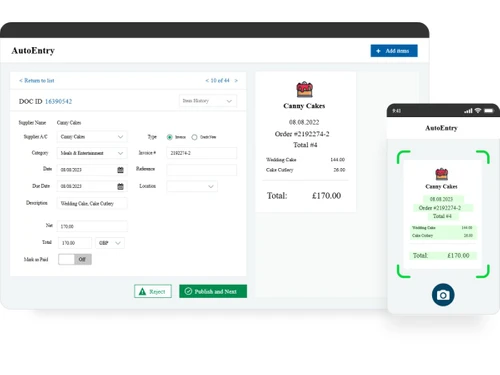
AutoEntry uses AI to automate financial data entry by capturing information from documents and integrating it with accounting software.
See MoreHave you used AutoEntry before?
Share your insights for better experience
Brand: Sage Group plc
Founded Year: 1981
Sage provide businesses with software and services that are simple and easy to use, as we work with you to give you that feeling of confidence. Customers trust our Payroll, HR, and Finance software to make business flow with ease.
 OCR Based Data Extraction Smart Supplier Suggestions VAT Code Suggestions Custom Categorization Rules Invoice to PO Matching Duplicate Detection Multi-Currency Support Accounting Software Integration Role based access Drag and Drop Functionality

Watch the demo video to explore key features, real workflows, and how the software fits your business needs.
 Ubuntu
 Windows
 iOS
 Android MacOS
 Linux
 Desktop
 Mobile
 Cloud-Based
4.3
Out of 5

Overall Rating
Based on
3 Verified Ratings
Rating Breakdown
80% Recommend this Product
Add ReviewThis product has no reviews yet. Be the first to leave your feedback.
Add Review
AutoEntry
Price On Request
Desktop
Mobile
Web based
On Premises
Windows
Mac OS
TranSyncPro
Price On Request
Desktop
Mobile
Web based
On Premises
Windows
Mac OS

Parascript FormXtra
Price On Request
Desktop
Mobile
Web based
On Premises
Windows
Mac OS

Rossum
Price On Request
Desktop
Mobile
Web based
On Premises
Windows
Mac OS

Grooper
Price On Request
Desktop
Mobile
Web based
On Premises
Windows
Mac OS
(2) Product(s) selected
Available
Price on Request
Available
Price on Request
Available
Price on Request
Available
Price on Request
AutoEntry automates data entry for accountants, bookkeepers, and businesses by using AI to automatically extract data from financial documents like receipts, invoices, and statements. It streamlines the process of getting financial information into accounting software, turning days of admin into minutes.
AutoEntry price starts at Pounds 15 at techjockey.com.
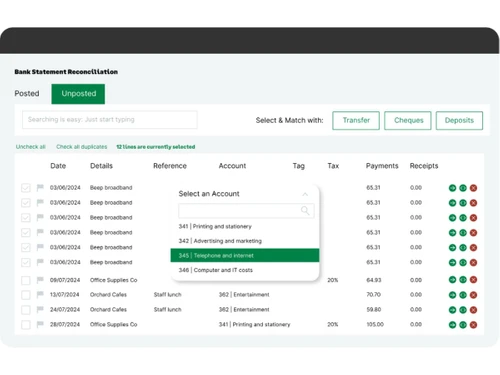
AutoEntry's main features include AI-powered automated data extraction from financial documents, a mobile app for on-the-go capture, seamless integration with popular accounting software, and high accuracy up to 99%. It also offers expenses and mileage management, statement reconciliation, and VAT grouping and reporting.
Yes, AutoEntry offers a free trial that includes 25 free credits, allowing users to experience the software's automated data entry capabilities before committing to a plan.
AutoEntry is designed for a broad range of users, including accountants and bookkeepers in practice, as well as small and medium-sized businesses looking to automate their financial data entry processes.
AutoEntry ensures high data accuracy, up to 99%, by utilizing proprietary optical character recognition (OCR) and machine learning artificial intelligence technology to process and extract information from documents.
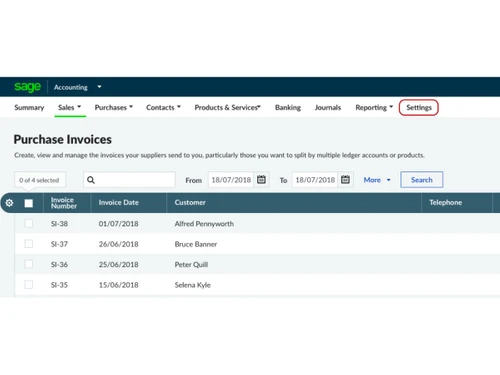
AutoEntry integrates seamlessly with popular HMRC-recognised accounting platforms such as Xero, Sage, and QuickBooks, ensuring records are MTD-ready and facilitating direct data transfer.
Users can submit documents to AutoEntry by taking a snap with the mobile app, uploading from a desktop, or by sending PDF documents to a dedicated AutoEntry email address.
AccountsPrep is an add-on to an AutoEntry subscription, specifically designed for accountants and bookkeepers in the UK and Ireland, which helps quickly prepare accounts for clients by allowing them to prepare, adjust, and output a trial balance.
20,000+ Software Listed
Best Price Guranteed
Free Expert Consultation
2M+ Happy Customers
Terms and Condtions

Users with registered businesses can purchase goods from merchants on the platform to satisfy their business needs. Users are not permitted to utilize any products acquired through the platform for resale, advertising, business, or further distribution.
For each purchase made, users will receive a Tax Invoice (or 'GST invoice') that includes specific details such as:
the GSTIN of the user associated with their registered business, and
the specified Entity Name for their business.
It should be noted that not all products are eligible for GST Invoice. Only the products displayed by participating sellers with the 'GST-based Invoice Available' callout on the product description page would qualify.
Certain goods and services are not eligible to get a GST Invoice, including items with VAS, i.e., Value Added Services (e.g., Total Mobile Protection/Assured Buyback) and those involving an exchange offer at the time of purchase.
Users must ensure the accuracy of the GSTIN, and business entity name provided for the GST Invoice. Requests for corrections into GST Invoice would not be accommodated by Techjockey.com or any Seller, and any issues arising from user-provided information are the sole responsibility of users.
Techjockey.com is not liable for the GST Invoice or any associated input tax credit. To efficiently claim an input tax credit, users should select the registered place of business address as per the GST authority's data and follow the provisions of the GST Act and rules.
To claim an input tax credit, the delivery and billing addresses must match. Furthermore, input tax credits will not be granted if the delivery address and GSTIN on the invoice are from different states. In case of incorrect GST details provided during the order placement, the order will be canceled automatically.