linkedin
Azhagi Tamil Typing Software logo
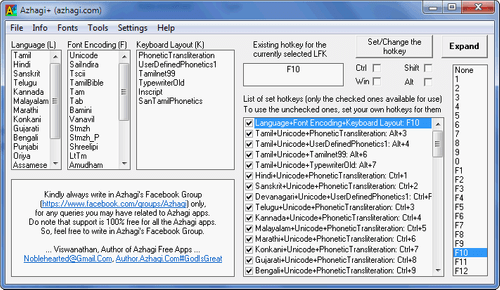
Azhagi Tamil Typing Software keyboard
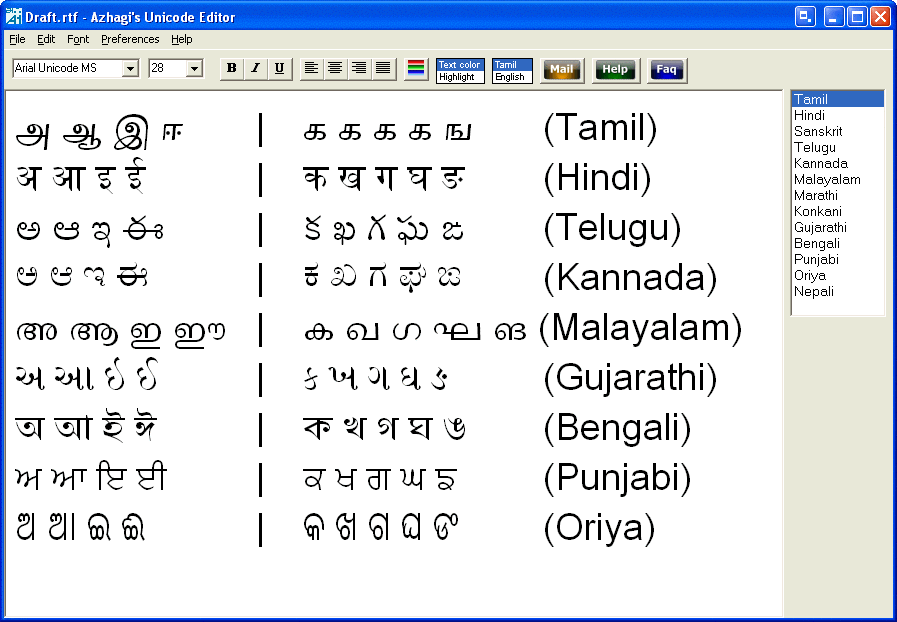
Azhagi Tamil Typing Software data
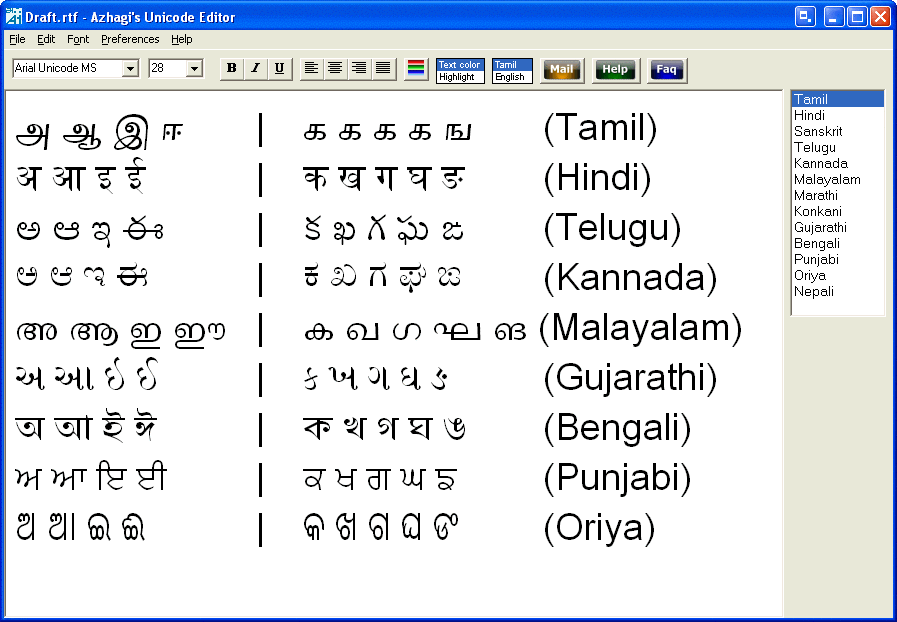
Azhagi Tamil Typing Software editor

Azhagi Tamil Typing Software

Brand: Azhagi

  • 4.3

  • 5 Ratings

Azhagi is a fast and user-friendly Tamil translation software. It allows users to type in 16 Indian languages such as Tamil, Telugu, Kannada, Malayalam, Marathi, Gujarati, Oriya, Bengali, Assamese, Devanagari, etc. Users can add more languages of their choice as well. The software is compatible with multiple applications like MS Word, Facebook, WhatsApp, Quora, CorelDraw, Skype, Excel, Gmail, Pow...

See More

Have you used Azhagi Tamil Typing Software before?

Share your insights for better experience

Add a Review

Price Available on Request

Questions about pricing or customization? We’re here to help, just a click away.

100% Genuine
Products
Best Price
Guaranteed
Safe & Secure
Payment
  • Description

  • Pricing

  • Features

  • Specification

  • Review

  • Compare

  • Alternatives

  • FAQ

Azhagi Tamil Typing Software Overview

What is Azhagi Tamil Typing Software?

Azhagi is a fast and user-friendly Tamil translation software. It allows users to type in 16 Indian languages such as Tamil, Telugu, Kannada, Malayalam, Marathi, Gujarati, Oriya, Bengali, Assamese, Devanagari, etc. Users can add more languages of their choice as well. The software is compatible with multiple applications like MS Word, Facebook, WhatsApp, Quora, CorelDraw, Skype, Excel, Gmail, PowerPoint, etc. by the simple click of a hotkey.

Ever since its inception in 2000, this Tamil typing software has possessed one of the fastest Tamil transliterations among all. You can extend Azhagi to transliterate to any Tamil language font, type in any language+font+keyboard, change the existing key mappings, have custom keys to toggle between languages and utilize an inbuilt font viewer. You can also transliterate by voice input.

What fonts and keyboard layouts are supported in Azhagi Tamil Typing Software?

Azhagi software supports the following encodings and keyboard layouts:

  1. Tamil Font Encodings: Saiindira, TamilBible, STMZH, Shreelipi, Tscii, Bamini, TAM, etc.
  2. Tamil Keyboard Layouts: UserDefinedPhonetics, Transliteration, TamilNet99, Inscript, etc.

Steps to Typing in Tamil using Azhagi Tamil Typing Software

Users can perform the Tamil transliteration and typing in multiple platforms like Facebook, Gmail, Instagram, Quora, Excel, etc. Following are the steps:

  1. Start Azhagi software
  2. Open MS Word
  3. Press the required ‘hotkey’ by pressing Alt+3 (or F10 or F11) while the cursor stays at the typing area.
  4. Type in English and see it in Tamil.
  5. Press the ‘hotkey’ again and start typing in English.

Pricing of Azhagi Tamil Typing Software

The pricing of Azhagi Tamil Typing Software is available as per the request of the interested buyers. You can send us a callback request, and our product experts will get back to you at the earliest.

What are the benefits of using Azhagi Tamil Typing software?

Some of the unique features of Azhagi Tamil Typing Software are:

  1. You can use the software to transliterate in any Tamil font.
  2. Unique font encodings converter by which users can convert font encodings into MS Word Documents.
  3. Users can type in Photoshop CC/CS in STMZH Tamil fonts.
  4. One can type in any language in the world by creating an XML file.
  5. The reverse transliteration feature of the software is unique in its own way because of the output it provides while transliterating from Tamil to English.
  6. Some of the special features are “Dual-Screen Transliteration”, “Sath Transliteration” and “Auto Transliteration”.
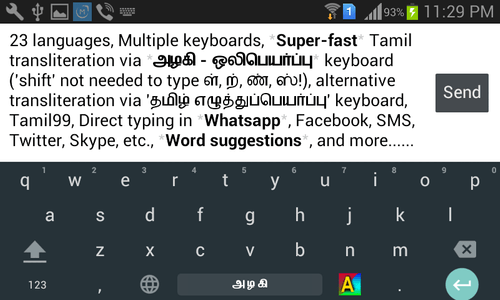
  7. You don’t need to press the “Shift” key to transliterate in the Android app of Azhagi.

Compatibility of Azhagi Tamil Typing Software

The software is supported on both the desktop as well as mobile versions and runs on Windows and Android OS.

Read more

Azhagi Tamil Typing Software Pricing & Plans

Looking for The Right Pricing?

Share your requirements and get a plan built around your business.

  • Define your business needs
  • Get customised pricing
  • Choose features that fit your workflow

Price Available on Request

Get personalised Azhagi Tamil Typing Software pricing that fits your needs. Our team will connect with you.

Azhagi Tamil Typing Software Features

  • icon_check Multi Language Management
    The software allows users to type in over 24 languages like Tamil, Bengali, Hindi, Urdu, Sanskrit, Telugu, Malayalam, Gujarati,
  • icon_check Access Anywhere, Any Time
    Azhagi Tamil Software allows its users to write in English, Tamil and Hindi, either for MS Word or for Facebook, Gmail, Twitter,
  • icon_check Mobile App
    The software has its own mobile app that allows users to transliterate in a superfast way. Users do not have to press the
  • icon_check Predictive Text
    Azhagi Tamil Typing Software comes equipped with smart word suggestions, auto-correction of spelling mistakes, suggestions for
  • icon_check Stable and reliable
    The software offers high-speed transliteration along with custom ‘hotkey’ to toggle between languages, utilization of inbuilt

Azhagi Tamil Typing Software Specifications

Supported Platforms
Windows Windows Android Android
Devices
Desktop Desktop Mobile Mobile
Deployment
Cloud-Based Cloud-Based Perpetual Perpetual
Suitable For
All Industries
Business Specific
All Businesses
Language
தமிழ்

Azhagi Tamil Typing Software Review

4.3

Out of 5

img

Overall Rating

Based on
5 Verified Ratings

Rating Breakdown

  • Features 4.3
  • Value for Money 4.6
  • Ease of Use 4.2
  • Customer Support 4.4

86% Recommend this Product

Add Review

Be the First to Review

This product has no reviews yet. Be the first to leave your feedback.

Add Review

Compare Azhagi Tamil Typing Software With other Tamil Typing Software

Products
Ratings
Pricing
Device Supported
Deployment
Supported Platforms
  • img

    Azhagi Tamil Typing Software

  • 4.3

  • Price On Request

  • Desktop

    Mobile

  • Web based

    On Premises

  • Windows

    Mac OS

  • img

    Easy Tamil Typing

  • 4.4

  • Price On Request

  • Desktop

    Mobile

  • Web based

    On Premises

  • Windows

    Mac OS

  • img

    NHM Writer

  • 4.1

  • Price On Request

  • Desktop

    Mobile

  • Web based

    On Premises

  • Windows

    Mac OS

  • img

    Tamil Indic Input

  • 4.4

  • Price On Request

  • Desktop

    Mobile

  • Web based

    On Premises

  • Windows

    Mac OS

  • img

    Tamil Typing

  • 4.3

  • Price On Request

  • Desktop

    Mobile

  • Web based

    On Premises

  • Windows

    Mac OS

  • img

    PramukhIME

  • 4.0

  • Price On Request

  • Desktop

    Mobile

  • Web based

    On Premises

  • Windows

    Mac OS

  • img

    Iniya Tamil

  • 4.2

  • Price On Request

  • Desktop

    Mobile

  • Web based

    On Premises

  • Windows

    Mac OS

(2) Product(s) selected

Azhagi Tamil Typing Software Alternatives

See All Azhagi Tamil Typing Software Alternatives

Available

Price on Request

Available

Price on Request

How can I find the Unicorn Editor button in Azhagi Tamil Typing Software?

Users can transliterate in practically all Indian languages such as Tamil, Telugu, Kannada, Bengali, Urdu, Sanskrit, Assamese, etc. by pressing the Unicorn Editor button at the top right corner of the Azhagi screen or by pressing the F8 button.

What are the keyboard layouts supported in Azhagi Tamil Typing Software?

Some of the keyboard layouts supported in Azhagi software are Transliteration, TamilNet99, TamilTypewriterOld among others.

Can I get a demo of Azhagi Tamil Typing Software?

Yes, Techjockey will provide you with an online demo of Azhagi Tamil typing software based on your preferred date and time.

Can users create their own keyboard layouts using Azhagi Tamil Typing Software?

Users can change the existing key mappings, transliterate multiple Tamil fonts and also create their own keyboard layouts by using the software.

Does Azhagi Tamil Typing Software have a mobile app?

As the software is compatible with Android OS, you can easily install the Azhagi app on your smartphones.

20,000+ Software Listed

Best Price Guranteed

Free Expert Consultation

2M+ Happy Customers

Terms and Condtions

close

Users with registered businesses can purchase goods from merchants on the platform to satisfy their business needs. Users are not permitted to utilize any products acquired through the platform for resale, advertising, business, or further distribution.

For each purchase made, users will receive a Tax Invoice (or 'GST invoice') that includes specific details such as:

  • the GSTIN of the user associated with their registered business, and

  • the specified Entity Name for their business.

It should be noted that not all products are eligible for GST Invoice. Only the products displayed by participating sellers with the 'GST-based Invoice Available' callout on the product description page would qualify.

Certain goods and services are not eligible to get a GST Invoice, including items with VAS, i.e., Value Added Services (e.g., Total Mobile Protection/Assured Buyback) and those involving an exchange offer at the time of purchase.

Users must ensure the accuracy of the GSTIN, and business entity name provided for the GST Invoice. Requests for corrections into GST Invoice would not be accommodated by Techjockey.com or any Seller, and any issues arising from user-provided information are the sole responsibility of users.

Techjockey.com is not liable for the GST Invoice or any associated input tax credit. To efficiently claim an input tax credit, users should select the registered place of business address as per the GST authority's data and follow the provisions of the GST Act and rules.

To claim an input tax credit, the delivery and billing addresses must match. Furthermore, input tax credits will not be granted if the delivery address and GSTIN on the invoice are from different states. In case of incorrect GST details provided during the order placement, the order will be canceled automatically.