linkedin
BioMax N-K30 Biometric Device logo
play BioMax - N-G4W
BioMax K30 Biometric Device

BioMax N-K30 Biometric Device

Brand: Biomax Security

  • 4.4

  • 4 Ratings & 4 Reviews

BioMax K30 is a biometric device that is equipped with fingerprint attendance and access control. It is designed to be used in gyms, schools and offices to manage day-to-day attendance. It augments the security of the premises whether it is an office or an educational institution. Uses of BioMax K30 Biometric This biometric device is equipped with an inbuilt access control system that keeps the f...

See More

Have you used BioMax N-K30 Biometric Device before?

Share your insights for better experience

Add a Review

Price Available on Request

Questions about pricing or customization? We’re here to help, just a click away.

100% Genuine
Products
Best Price
Guaranteed
Safe & Secure
Payment
  • Specification

  • Pricing

  • Features

  • Description

  • Review

  • Compare

  • Alternatives

  • FAQ

BioMax N-K30 Biometric Device Specifications

Suitable For
All Industries
Business Specific
All Businesses

BioMax N-K30 Biometric Device Pricing & Plans

Looking for The Right Pricing?

Share your requirements and get a plan built around your business.

  • Define your business needs
  • Get customised pricing
  • Choose features that fit your workflow

Price Available on Request

Get personalised BioMax N-K30 Biometric Device pricing that fits your needs. Our team will connect with you.

BioMax N-K30 Biometric Device Features

  • icon_check Storage Capacity
     It has 1000 Fingerprint templates, 1000 card storage and a card reader along with 10,000-capacity transaction
  • icon_check Access Control
    The relay voltage required for running the device is just 12V.
  • icon_check Power Supply
     It requires a power supply of 12V and 1.5 Amp to operate.
  • icon_check Physical Dimension
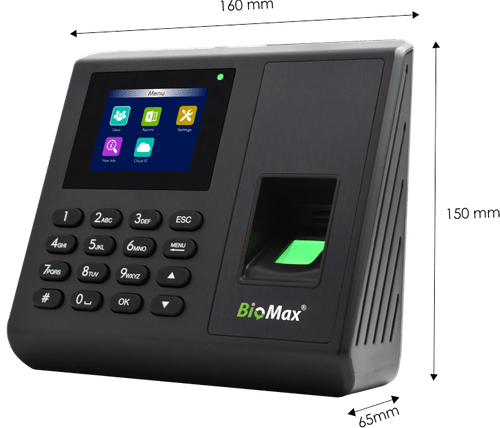
    The length, breadth and height are respectively 185 mm, 140 mm and 30 mm.
  • icon_check Operating Environment
    The device needs a temperature range of 0 to 45? and humidity between 20 to 80%.
  • icon_check Communication
    It follows a standard TCP/IP protocol with a USB host and standard features like SSR Recorder, Self-service query, T9 Input, etc.
  • icon_check Fingerprint Scanner
     It is fitted with an optical sensor of capacity 500 DPI. 
  • icon_check Audio/ Visual Specifications
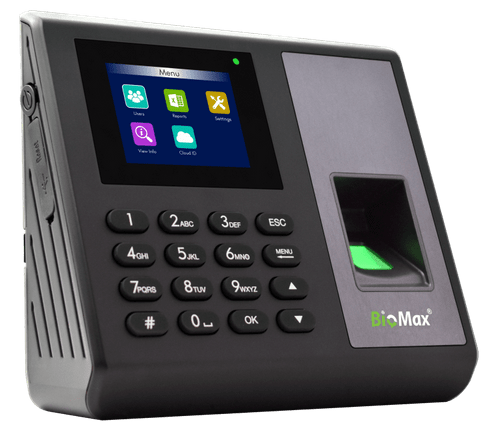
     It has a display screen of 2.8”, 4*4 keypad, LED indicator of green and red generally and a clear mini speaker.
  • icon_check Exit Readers
    Dual mode of SSR and software is equipped with this device along with a button battery.
  • icon_check Specifications
     It has an identification of less than 1 sec and an algorithm verification rate of 10. 

BioMax N-K30 Biometric Device Overview

What is BioMax K30 Biometric?

BioMax K30 is a biometric device that is equipped with fingerprint attendance and access control. It is designed to be used in gyms, schools and offices to manage day-to-day attendance. It augments the security of the premises whether it is an office or an educational institution.

Uses of BioMax K30 Biometric

This biometric device is equipped with an inbuilt access control system that keeps the fingerprint or any other identification attribute of an authorized individual. It also helps in comparing attributes to the ones in the database, making the device completely safe and trustworthy. Users can check the attendance of employees in an office and teachers in a school. Even gyms have started to use this device for recording attendance. 

The device gives an effective idea as to whether there is any attendance mismatch and whether anybody is remaining absent for a long period of time. There is no scope of manipulation of data as everything is recorded accurately for future references. 

Based on the number of working days served by an employee, the salary is issued. Nowadays, biometric attendance is becoming the norm and BioMax K30 serves that purpose.

BioMax K30 in Attendance Management in Schools

Schools have started to use biometric attendance for teachers, non-teaching staff and even for students. This serves compact attendance maintenance and integrated security purposes with end-to-end management. This results in teachers recording daily attendance and the school management keeping a track of which teacher is absent. 

This helps in eliminating any gaps caused as a result when teacher allocation to a respective class if the teacher of that class is found to be absent. Students can sometimes try to manipulate attendance, but with the BioMax K30 attendance machine there is no chance of a tampering and teachers can accurately manage attendance-sheets. 

Even non-teaching staff’s attendance can be managed through BioMax K30’s biometric solution so that management can track who has come and which department is empty on that particular day.

Pricing of BioMax K30

Pricing of BioMax K30 is available on request. It is completely customizable, and users are requested to give us a callback for any further updates on pricing.

Read more
BioMax N-K30 Biometric Device Demo Video play icon

Get BioMax N-K30 Biometric Device Demo

Watch the demo video to explore key features, real workflows, and how the software fits your business needs.

Understand
Key Features
Personal
Demo Insights
Interactive
Demo Support

BioMax N-K30 Biometric Device Reviews

4.4

Out of 5

img

Overall Rating

Based on
4 Verified Reviews

Rating Breakdown

  • Features 4.2
  • Value for Money 4.7
  • Ease of Use 4.6
  • Customer Support 4.7

85% Recommend this Product

Add Review

Pramod Kumar

User

4.6

Reviewed on: Nov 1, 2018

Techjockey Verified

“Techjockey has great operating model”

Pros

Techjockey was very helpful in taking my listed requirements and narrowing my search to a usable list of providers. Techjockey then facilitated contact with these providers to provide a more in-depth evaluation. All recommended providers would have met my requirements.

Cons

N/A

lakshay chhabra

User

4.1

Reviewed on: Oct 25, 2018

Techjockey Verified

“Great Experience with Techjockey”

Pros

In beginning what was shaping up to be a long, labor-intensive, and overwhelming slog through sales pitches for a new LMS provider, I decided to start by providing some of my company's preliminary LMS requirements to Techjockey.

Cons

N/A

Pramod Kumar

User

4.9

Reviewed on: Nov 1, 2018

Techjockey Verified

“Techjockey has great operating model”

Pros

Techjockey was very helpful in taking my listed requirements and narrowing my search to a usable list of providers. Techjockey then facilitated contact with these providers to provide a more in-depth evaluation. All recommended providers would have met my requirements.

Cons

N/A

See All BioMax N-K30 Reviews

Compare BioMax N-K30 Biometric Device With other Biometric Devices

Products
Ratings
Pricing
Device Supported
Deployment
Supported Platforms
  • img

    BioMax N-K30 Biometric Device

  • 4.4

  • Price On Request

  • Desktop

    Mobile

  • Web based

    On Premises

  • Windows

    Mac OS

  • img

    Biomax N-X990

  • 4.4

  • Price On Request

  • Desktop

    Mobile

  • Web based

    On Premises

  • Windows

    Mac OS

  • img

    Biomax N-X90W

  • 4.3

  • Price On Request

  • Desktop

    Mobile

  • Web based

    On Premises

  • Windows

    Mac OS

  • img

    Biomax N-Bio101 W

  • 4.2

  • Price On Request

  • Desktop

    Mobile

  • Web based

    On Premises

  • Windows

    Mac OS

  • img

    Biomax N-BM30W

  • 4.1

  • Price On Request

  • Desktop

    Mobile

  • Web based

    On Premises

  • Windows

    Mac OS

  • img

    Biomax N-BM20+ ID

  • 4.2

  • Price On Request

  • Desktop

    Mobile

  • Web based

    On Premises

  • Windows

    Mac OS

(2) Product(s) selected

BioMax N-K30 Biometric Device Alternatives

See All BioMax N-K30 Biometric Device Alternatives

Articles for BioMax N-K30 Biometric Device

See All Related Articles

What communication protocol is followed in BioMax K30 Biometric?

A standard TCP / IP protocol is followed along with a USB host and features like SSR Recorder, T9 Input for effective communication.

Is there any scope of manipulation of data?

Data manipulation is not possible in BioMax K30 as everything is digitalized and fingerprint attendance is recorded which makes it secure. Moreover, fingerprints are unique, and no two sets are the same.

How does the device identify and verify each individual?

BioMax K30 has special inbuilt features of identifying fingerprint in less than 1 second and verifying the person by its special algorithm verification rate of 10 to verify from its internal database.

What are the electrical specifications required for running BioMax K30?

The device needs just 12 Volts and 1.5 Ampere current to operate smoothly. A relay voltage for access control to the device is also 12 Volts.

What is the effective capacity and role of the optical sensor in BioMax K30?

The capacity of the optical sensor of the device is 500 dots/inch. It is used to record fingerprints and convert them effectively into a device-readable format for database monitoring.

20,000+ Software Listed

Best Price Guranteed

Free Expert Consultation

2M+ Happy Customers

Terms and Condtions

close

Users with registered businesses can purchase goods from merchants on the platform to satisfy their business needs. Users are not permitted to utilize any products acquired through the platform for resale, advertising, business, or further distribution.

For each purchase made, users will receive a Tax Invoice (or 'GST invoice') that includes specific details such as:

  • the GSTIN of the user associated with their registered business, and

  • the specified Entity Name for their business.

It should be noted that not all products are eligible for GST Invoice. Only the products displayed by participating sellers with the 'GST-based Invoice Available' callout on the product description page would qualify.

Certain goods and services are not eligible to get a GST Invoice, including items with VAS, i.e., Value Added Services (e.g., Total Mobile Protection/Assured Buyback) and those involving an exchange offer at the time of purchase.

Users must ensure the accuracy of the GSTIN, and business entity name provided for the GST Invoice. Requests for corrections into GST Invoice would not be accommodated by Techjockey.com or any Seller, and any issues arising from user-provided information are the sole responsibility of users.

Techjockey.com is not liable for the GST Invoice or any associated input tax credit. To efficiently claim an input tax credit, users should select the registered place of business address as per the GST authority's data and follow the provisions of the GST Act and rules.

To claim an input tax credit, the delivery and billing addresses must match. Furthermore, input tax credits will not be granted if the delivery address and GSTIN on the invoice are from different states. In case of incorrect GST details provided during the order placement, the order will be canceled automatically.