linkedin
BookFor logo
bookfor-employees
bookfor customer
bookfor-Appointment Managemen

BookFor

Brand: BookFor

  • 4.3

  • 4 Ratings

BookFor is booking software for beauty and wellbeing businesses that helps manage appointments with branded booking sites, automated reminders, and other scheduling tools.

See More

Have you used BookFor before?

Share your insights for better experience

Add a Review
Starting Price
£30

View plans

100% Genuine
Products
Best Price
Guaranteed
Safe & Secure
Payment
  • Description

  • Pricing

  • Features

  • Specification

  • Review

  • Compare

  • Alternatives

Starting at £30

BookFor Software Overview

What is BookFor?

BookFor is a sophisticated and user-friendly appointment scheduling software specifically engineered for businesses in the beauty and wellbeing sectors. It provides a comprehensive suite of tools designed to streamline daily operations, reduce administrative tasks, and foster business growth. The platform is ideal for a wide range of professionals, including barbershops, hair and beauty salons, photographers, personal trainers, and counsellors.

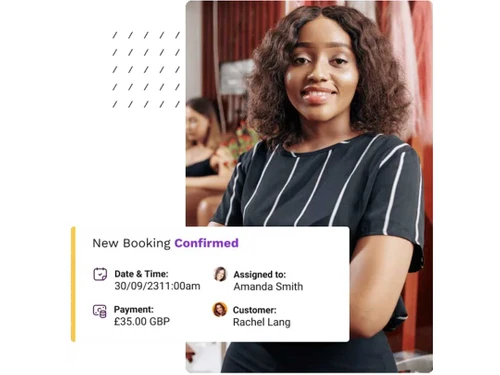
At its core, BookFor empowers businesses to accept and manage client bookings 24/7. For businesses without an online presence, the software instantly generates a fully branded, responsive booking website with no coding required. For those with existing websites, it offers seamless integration through customisable widgets. The system is built to handle everything from individual appointments to complex team and multi-location management, making it a versatile solution for service-based entrepreneurs and established brands alike.

Why Choose BookFor?

  • Unlimited Growth Potential: Unlike many competitors, BookFor does not charge extra for adding more employees. All plans include unlimited employees, services, customers, appointments, and locations, providing predictable costs as your business expands.
  • Drastically Reduce No-Shows: The platform features automated appointment reminders sent via Email, SMS, and WhatsApp. This proactive communication significantly minimises missed appointments, protecting your revenue and optimising your schedule.
  • All-in-One Online Presence: Instantly create a professional, user-friendly booking website that reflects your brand. This eliminates the need for separate web development, allowing customers to find and book your services on any device within minutes of setup.
  • Flexible and Secure Payments: Enhance your cash flow by accepting payments directly through the booking system. BookFor integrates with multiple payment gateways, offering flexible options for clients to pay a deposit or the full amount upfront.
  • Seamless Calendar Synchronisation: Maintain a single source of truth for your schedule. The platform offers robust 2-way synchronisation with Google, Outlook, and Apple calendars, preventing double bookings and keeping your entire team aligned.

Advanced Features of BookFor

  • Intelligent Automation: Leverage an AI Booking Chatbot to handle inquiries and schedule appointments automatically. Utilise Webhooks to create custom automations and connect BookFor to other critical business applications.
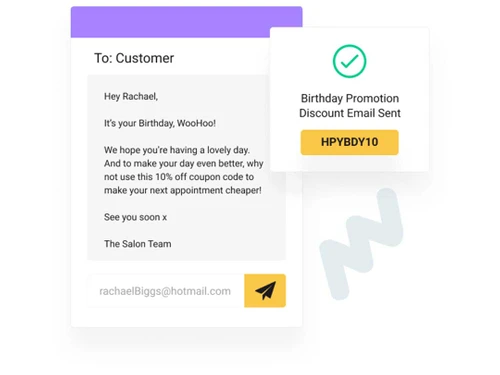
  • Powerful Customer Engagement: Build client loyalty with a built-in coupon and discount generator. Easily create and distribute special offers via email and SMS to reward repeat customers or attract new ones.
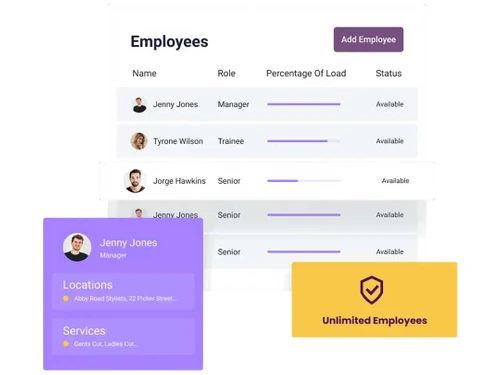
  • Comprehensive Team Management: Define custom roles and permissions for your staff, ensuring they only have access to relevant information. The system also allows for scheduling special working days or block-out periods for individual employees.
  • Multi-Platform Accessibility: Manage your business from anywhere with dedicated admin apps for both iOS and Android devices. Additionally, BookFor offers the option to create branded mobile apps for your customers, allowing them to book your services directly from their phones.
  • Enhanced Booking Options: Cater to diverse client needs with support for group bookings and recurring appointments. This flexibility is perfect for classes, workshops, or clients who require regular sessions.
  • Google Ecosystem Integration: Maximise your online visibility with a "Reserve with Google" integration, allowing clients to book directly from Google Search and Maps. The software also integrates with Google Meet for virtual consultations.

Key Capabilities of BookFor

  1. Online Scheduling & Calendar Management: The core of the system provides a self-service portal for clients to book appointments 24/7. It includes multi-location support, group and recurring booking options, and seamless 2-way calendar synchronisation to prevent conflicts.
  2. Client Relationship Management: Maintain an unlimited database of customers. The platform automates client communication through email and SMS notifications and provides tools like the coupon generator to foster loyalty and repeat business.
  3. Business & Team Operations: Efficiently manage unlimited staff members with custom roles, track services, and oversee operations across multiple locations. The system centralises administrative tasks, freeing up valuable time for you and your team.
  4. Payment Processing: Securely process online payments at the time of booking. You can configure the system to require a deposit to secure an appointment or to collect the full payment in advance, reducing financial risk from no-shows.
  5. Marketing & Online Presence: BookFor helps you attract more clients by generating a branded booking website and enabling "Book Now" buttons on social media platforms like Facebook and Instagram.

How to Use BookFor?

  1. Begin Your Free Trial: Sign up for the risk-free 90-day trial. No credit card is required, and the BookFor team will create your admin account within a few hours.
  2. Configure Your Business: Log in to your account and set up your core details. This includes defining your services and prices, adding your business locations, and creating profiles for your employees.
  3. Deploy Your Booking Portal: Once configured, your branded booking website is instantly live and ready to be shared with clients. If you have an existing website, you can easily embed the BookFor booking widget. You can also add "Book Now" links to your social media profiles.
  4. Manage Appointments: Use the intuitive admin dashboard or the dedicated iOS/Android mobile app to oversee your calendar, manage incoming bookings, and monitor your team's schedules in real-time.
  5. Choose a Plan: Towards the end of your 90-day trial, you can select a paid subscription that best fits your business needs to continue using the service without interruption. Migration assistance from other systems is available if needed.

BookFor Pricing

BookFor price starts at GBP 30 at techjockey.com.

The pricing model is based on different parameters, including extra features, deployment type, and the total number of users. For further queries related to the product, you can contact our product team and learn more about the pricing and offers.

Read more

BookFor Pricing & Plans

Pro Plan
Starting at £30
    • Users

      Users
      Users
    • Monthly

      Monthly
      Monthly

Key Features

  • Unlimited Locations

  • All Features of Start Plan

  • Unlimited Customers

Max Plan
Starting at £45
    • Users

      Users
      Users
    • Monthly

      Monthly
      Monthly

Key Features

  • Custom Domain/Custom Email

  • All Features of Pro Plan

  • Unlimited Customers

BookFor Features

  • icon_check Appointment Management
  • icon_check Customer Management
  • icon_check Inventory Management
  • icon_check Email & SMS Notification
  • icon_check Coupon Generator
  • icon_check Auto Reminder
    Reduce no-shows with SMS & email alerts.
  • icon_check Integrations
    Sync with Google, Outlook, & Apple Calendars.
  • icon_check Staff Management
    Add & manage team members for free.
  • icon_check Multi Location

BookFor Specifications

Supported Platforms
Windows Windows
Devices
Desktop Desktop
Deployment
Cloud-Based Cloud-Based
Suitable For
Spa & Salon
Business Specific
All Businesses
Business Size
Small Business Startups Medium Business SMBs SMEs MSMBs
Customer Support
Phone Email Live Chat
Language
English
Training Resources
Live Online Videos

Explore the Best Alternative Solutions Similar to Your Business Size and Needs

BookFor Review

4.3

Out of 5

img

Overall Rating

Based on
4 Verified Ratings

Rating Breakdown

  • Features 4
  • Value for Money 4.5
  • Ease of Use 4.6
  • Customer Support 4.1

85% Recommend this Product

Add Review

Techjockey Trusted Reviews from Verified Users

No reviews are currently available for BookFor. Discover similar Appointment Scheduling Software reviews

  • Agriya Zocdoc Clone

    4.4

    Whats great - I might propose to anyone agriya offerings. They may be very expert and they're very friendly group. There's lot of work on t... read more

  • Omnify Software

    5.0

    Whats great - extremely helpful team who did everything they could to help solve our issues read more

  • OnceHub (formerly ScheduleOnce)

    1.0

    Whats great - ScheduleOnce sadly is a company that started with a great concept. I used them because at the time, they were one of the ver... read more

Compare BookFor With other Appointment Scheduling Software

Products
Ratings
Pricing
Device Supported
Deployment
Supported Platforms
  • img

    BookFor

  • 4.3

  • Price On Request

  • Desktop

    Mobile

  • Web based

    On Premises

  • Windows

    Mac OS

  • img

    Calendly

  • 4.5

  • Price On Request

  • Desktop

    Mobile

  • Web based

    On Premises

  • Windows

    Mac OS

  • img

    Reservio

  • 4.4

  • Price On Request

  • Desktop

    Mobile

  • Web based

    On Premises

  • Windows

    Mac OS

  • img

    GlossGenius

  • 4.5

  • Price On Request

  • Desktop

    Mobile

  • Web based

    On Premises

  • Windows

    Mac OS

  • img

    Zoho Bookings

  • 4.2

  • ₹ 480

  • Desktop

    Mobile

  • Web based

    On Premises

  • Windows

    Mac OS

  • img

    GoSchedule

  • 4.3

  • Price On Request

  • Desktop

    Mobile

  • Web based

    On Premises

  • Windows

    Mac OS

  • img

    Booksy

  • 4.1

  • Price On Request

  • Desktop

    Mobile

  • Web based

    On Premises

  • Windows

    Mac OS

  • img

    SuperSaaS

  • 4.3

  • Price On Request

  • Desktop

    Mobile

  • Web based

    On Premises

  • Windows

    Mac OS

  • img

    Setmore

  • 4.3

  • Price On Request

  • Desktop

    Mobile

  • Web based

    On Premises

  • Windows

    Mac OS

  • img

    Zoho Calendar

  • 4.2

  • Price On Request

  • Desktop

    Mobile

  • Web based

    On Premises

  • Windows

    Mac OS

(0) Product(s) selected

BookFor Alternatives

See All BookFor Alternatives

Starting Price:

$60 /Month

Starting Price:

$30 /Month

Starting Price:

$9 /Month

Starting Price:

$12 /User/Month

Starting Price:

$4

Articles for BookFor

See All Related Articles

20,000+ Software Listed

Best Price Guranteed

Free Expert Consultation

2M+ Happy Customers

Terms and Condtions

close

Users with registered businesses can purchase goods from merchants on the platform to satisfy their business needs. Users are not permitted to utilize any products acquired through the platform for resale, advertising, business, or further distribution.

For each purchase made, users will receive a Tax Invoice (or 'GST invoice') that includes specific details such as:

  • the GSTIN of the user associated with their registered business, and

  • the specified Entity Name for their business.

It should be noted that not all products are eligible for GST Invoice. Only the products displayed by participating sellers with the 'GST-based Invoice Available' callout on the product description page would qualify.

Certain goods and services are not eligible to get a GST Invoice, including items with VAS, i.e., Value Added Services (e.g., Total Mobile Protection/Assured Buyback) and those involving an exchange offer at the time of purchase.

Users must ensure the accuracy of the GSTIN, and business entity name provided for the GST Invoice. Requests for corrections into GST Invoice would not be accommodated by Techjockey.com or any Seller, and any issues arising from user-provided information are the sole responsibility of users.

Techjockey.com is not liable for the GST Invoice or any associated input tax credit. To efficiently claim an input tax credit, users should select the registered place of business address as per the GST authority's data and follow the provisions of the GST Act and rules.

To claim an input tax credit, the delivery and billing addresses must match. Furthermore, input tax credits will not be granted if the delivery address and GSTIN on the invoice are from different states. In case of incorrect GST details provided during the order placement, the order will be canceled automatically.