


linkedin
CampusIRIS logo
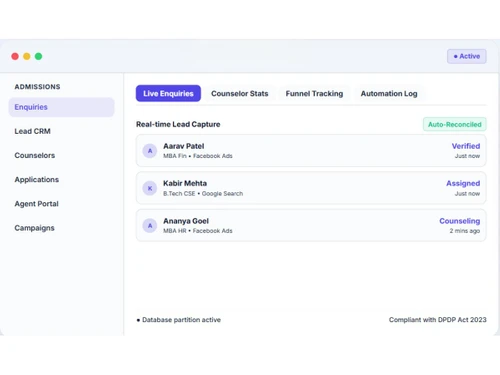
CampusIRIS enquiries
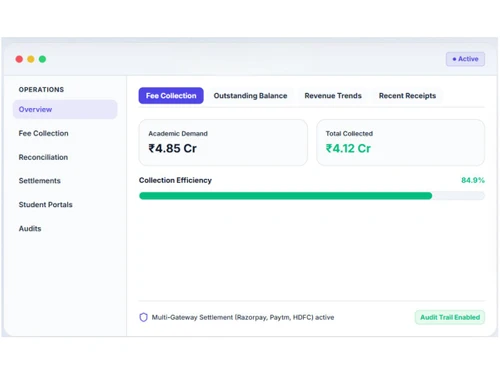
CampusIRIS fee collection
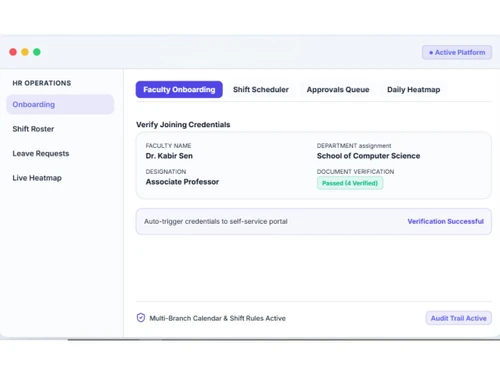
CampusIRIS onboarding

CampusIRIS

Brand: CampusIRIS Innovations Pvt Ltd

  • 4.8

  • 2 Ratings & 2 Reviews

Have you used CampusIRIS before?

Share your insights for better experience

Add a Review
Starting Price
₹39,999 excl.GST
₹ 47,199 incl. GST

View plans

100% Genuine
Products
Best Price
Guaranteed
Safe & Secure
Payment
  • Pricing

  • Features

  • Specification

  • Review

  • Compare

  • Alternatives

Starting at ₹39,999

CampusIRIS Pricing & Plans

CampusIRIS
Key Features
  • Admission Management
  • Lead Capture
  • Counsellor Management
  • Fee Management
  • Course Management
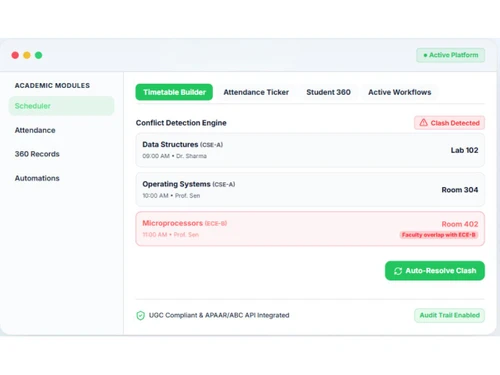
  • Timetable Management

Calculated Price

₹ 39999 Exclusive of all taxes
    • Quantity

      Quantity
      Quantity
    • Yearly

      Yearly
      Yearly

Key Features

  • Admission Management

  • Lead Capture

  • Counsellor Management

  • Fee Management

  • Course Management

  • Timetable Management

CampusIRIS Features

  • icon_check Admission Management
    Capture enquiries, manage counsellors, automate follow-ups and convert leads into enrolled students.
  • icon_check Lead Capture
    Capture student enquiries from multiple channels and manage them in one admissions pipeline.
  • icon_check Counsellor Management
    Allocate leads to counsellors and monitor their activities and conversion performance.
  • icon_check Fee Management
    Configure fee structures, generate dues and manage student fee collection.
  • icon_check Course Management
    Create courses, configure curricula, electives, prerequisites and syllabus mappings.
  • icon_check Time Table Management
    Build class timetables and manage faculty schedules and roster assignments.
  • icon_check Attendance Tracking
    Record student attendance and monitor attendance trends across academic groups.
  • icon_check Library Management
    Manage book catalogues, barcodes, issue/return transactions, fines and member records.
  • icon_check Hostel Management
    Manage room allocation, bed occupancy, hostel fees, visitors and maintenance workflows.
  • icon_check Reports & Analytics
    Monitor institution-wide metrics and generate reports across departments and operations.
  • icon_check Role-Based Access Control (RBAC)
    Control user permissions for staff, faculty, management and administrators with granular access.
  • icon_check Audit Logs
    Maintain activity trails of critical actions across the platform for accountability and compliance.
  • icon_check Student Records
    Maintain centralized student profiles, academic records, documents and related information.
  • icon_check Batch Management
    Manage student batches, sections, intake limits, roll numbers and promotions.
  • icon_check Leave Management
    Manage staff leave requests and approval workflows from the HRMS.

CampusIRIS Specifications

Supported Platforms
Ubuntu Ubuntu Windows Windows iOS iOS Android Android MacOS MacOS Windows(Phone) Windows(Phone) Linux Linux
Devices
Desktop Desktop Mobile Mobile Tablet Tablet iPad iPad
Deployment
Cloud-Based Cloud-Based
Suitable For
Education Schools & Institutes Schools Universities
Business Specific
All Businesses
Business Size
Small Business Medium Business Enterprises SMBs SMEs
Customer Support
Phone Email
Language
English
Training Resources
Live Online Documentation Videos

CampusIRIS Reviews

4.8

Out of 5

img

Overall Rating

Based on
2 Verified Reviews

Rating Breakdown

  • Features 5
  • Value for Money 5
  • Ease of Use 4.5
  • Customer Support 5

100% Recommend this Product

Add Review

Sneha Singh

Administrator

Industry: Education

5

Reviewed on: Aug 28, 2026

Techjockey Verified

“Comprehensive College Management Platform for Better Coordination”

CampusIris has helped bring multiple college operations into one platform, making admissions, follow-ups, and departmental coordination more organized. It reduces manual work and dependence on spreadsheets while offering flexible workflows for different institutional needs.

Pros

CampusIris brings multiple college functions into one platform, making admissions and follow-ups easier to track while reducing dependence on spreadsheets and manual processes. Its flexible workflows also help institutions manage different operational requirements.

Cons

The initial setup and data migration may require some planning, while new users may need time to become familiar with the different modules. Some workflows may also require configuration to match institutional processes.

Switched from CAMPUS COVER

Reason to switch

Our previous system was mainly focused on individual functions and did not provide enough visibility across departments. We wanted a single system where management could track admissions, academics, finance and other operations from one place. CampusIRIS better suited this need with its connected modules and centralized reporting.

Neeraj

IT Manager

Industry: Education

4.7

Reviewed on: Aug 28, 2026

Techjockey Verified

“A simple and effective platform for managing campus operations”

CampusIRIS brings admissions, academics, finance and other college operations together in one platform. It helps reduce dependency on spreadsheets and separate systems and makes information easier to manage across departments. The admissions and workflow features are particularly useful for keeping processes organised and tracking activities. Overall, it is a practical solution for colleges looking to digitise their day-to-day operations.

Pros

The biggest advantage is having multiple functions in one system. Admissions, finance, academics and other departments can work on connected data instead of maintaining separate records. The interface is easy to understand, and the workflow approach helps keep tasks and processes organised.

Cons

Since the platform covers many functions, users may need some initial training to become comfortable with all the modules. Setting up existing data and processes also requires some planning during implementation.

Switched from College Management ERP

Reason to switch

Our earlier setup involved multiple tools and a lot of manual work. We switched to CampusIRIS to bring admissions, finance, academics and other operations onto one platform and make day-to-day processes easier to manage.

Compare CampusIRIS With other Campus Management Software

Products
Ratings
Pricing
Device Supported
Deployment
Supported Platforms
  • img

    CampusIRIS

  • 4.8

  • ₹ 39999.00 excl. GST

  • Desktop

    Mobile

  • Web based

    On Premises

  • Windows

    Mac OS

  • img

    SoftCampus ERP

  • 4.8

  • Price On Request

  • Desktop

    Mobile

  • Web based

    On Premises

  • Windows

    Mac OS

  • img

    Eduflex

  • 4.6

  • Price On Request

  • Desktop

    Mobile

  • Web based

    On Premises

  • Windows

    Mac OS

  • img

    EDU

  • 4.4

  • Price On Request

  • Desktop

    Mobile

  • Web based

    On Premises

  • Windows

    Mac OS

  • img

    IMS X7

  • 4.5

  • ₹ 15000

  • Desktop

    Mobile

  • Web based

    On Premises

  • Windows

    Mac OS

  • img

    Clobas

  • 4.5

  • Price On Request

  • Desktop

    Mobile

  • Web based

    On Premises

  • Windows

    Mac OS

  • img

    Inficare Reso

  • 4.4

  • ₹ 50100

  • Desktop

    Mobile

  • Web based

    On Premises

  • Windows

    Mac OS

(0) Product(s) selected

CampusIRIS Alternatives

See All CampusIRIS Alternatives

Available

Price on Request

EDU

4.4

Available

Price on Request

Starting Price:

₹15,000 /Month

Available

Price on Request

Available

Price on Request

Available

Price on Request

Available

Price on Request

Available

Price on Request

Articles for CampusIRIS

See All Related Articles

20,000+ Software Listed

Best Price Guranteed

Free Expert Consultation

2M+ Happy Customers

Terms and Condtions

close

Users with registered businesses can purchase goods from merchants on the platform to satisfy their business needs. Users are not permitted to utilize any products acquired through the platform for resale, advertising, business, or further distribution.

For each purchase made, users will receive a Tax Invoice (or 'GST invoice') that includes specific details such as:

  • the GSTIN of the user associated with their registered business, and

  • the specified Entity Name for their business.

It should be noted that not all products are eligible for GST Invoice. Only the products displayed by participating sellers with the 'GST-based Invoice Available' callout on the product description page would qualify.

Certain goods and services are not eligible to get a GST Invoice, including items with VAS, i.e., Value Added Services (e.g., Total Mobile Protection/Assured Buyback) and those involving an exchange offer at the time of purchase.

Users must ensure the accuracy of the GSTIN, and business entity name provided for the GST Invoice. Requests for corrections into GST Invoice would not be accommodated by Techjockey.com or any Seller, and any issues arising from user-provided information are the sole responsibility of users.

Techjockey.com is not liable for the GST Invoice or any associated input tax credit. To efficiently claim an input tax credit, users should select the registered place of business address as per the GST authority's data and follow the provisions of the GST Act and rules.

To claim an input tax credit, the delivery and billing addresses must match. Furthermore, input tax credits will not be granted if the delivery address and GSTIN on the invoice are from different states. In case of incorrect GST details provided during the order placement, the order will be canceled automatically.