USA
USA UAE
UAESmall Business
Designed for startups and growing businesses

See More





Brand: Octoze Technology
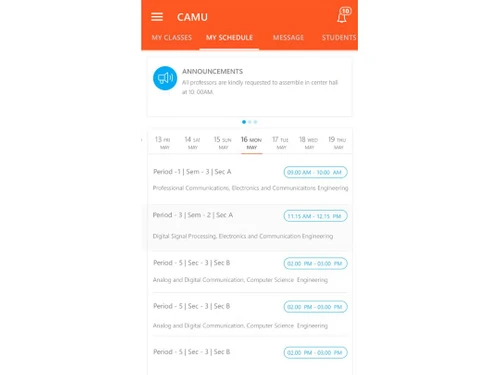
Camu Educational and Campus Management Software is designed for HigherEd and other educational institutes to accelerate and improve their daily tasks. Currently used by over 420+ institutions across 7 countries, Camu Institute ERP software is recognized as a credible solution to drive quality in education industry. This academic ERP software provides specific modules related to campus and college...
See MoreHave you used Camu Educational Software before?
Share your insights for better experience
Looking for The Right Pricing?
Share your requirements and get a plan built around your business.
Price Available on Request
Get personalised Camu Educational Software pricing that fits your needs. Our team will connect with you.
 Virtual Classes Staff Profile Student Records Academic Planner Assignments Online Assessments

Watch the demo video to explore key features, real workflows, and how the software fits your business needs.
 iOS
iOS  Android MacOS
  Mobile
  iPad
iPad  Cloud-Based
  Perpetual
Small Business
Designed for startups and growing businesses
Medium Business
Built for business growth and flexibility
Enterprises
Designed for complex and large-scale business needs
4.8
Out of 5

Overall Rating
Based on
8 Verified Reviews
Rating Breakdown
93% Recommend this Product
Add ReviewCamu Educational Software receives overwhelmingly positive feedback from users, particularly for its comprehensive features that enhance curriculum design, financial tracking, and student performance monitoring. Many users appreciate its integration of various educational tools, which have proven beneficial during challenging times like the Covid-19 pandemic. While the initial learning curve and complexity of reporting templates have been noted as minor drawbacks, overall satisfaction remains high, with users reporting smooth functionality and significant improvements in campus management.
Pros
"The software offers many new features for improving ed-tech capabilities. It is also extremely simple to use."
"Camu simplified and consolidated the way we track a student’s improvement on different factors. It is very good and highly recommended."
"Our faculties have used Camu to improve their performance significantly with a flexible curriculum design & delivery."
Cons
"We haven't faced any issue from Camu software as of now. Still running good."
"We haven’t encountered a difficulty while using Camu till date. Everything is smooth and quick."
"Way too much reporting templates can be quite confusing sometimes but you have a lot of too choose from."

Sep 7, 2021
Techjockey Verified
“Best educational software for campus management”
Pros
The software offers many new features for improving ed-tech capabilities. It is also extremely simple to use.
Cons
We haven't faced any issue from Camu software as of now. Still running good.
Reason to switch
Learning based modules were not meeting our expectations.
Sep 6, 2021
Techjockey Verified
“Camu has improved the way we manage our campus visibly”
Pros
Camu Software offers a high quality learning system for teachers and top rated ERP features for non-academic staff to manage office activities. Camu’s application has led to reduced expenses on several things.
Cons
We haven’t encountered a difficulty while using Camu till date. Everything is smooth and quick.
Reason to switch
ASAP had a messy user interface. The software also had storage issues. We had to switch so we shifted to Camu.
Jun 16, 2020
Techjockey Verified
“Recommended for campus & activities management”
Pros
The features of Camu are designed to help you improve your outcomes in terms of curriculum design, assessment, examination management. Features like outcome-based education and choice based credit system offer flexibility in learning management. Our academic faculty has benefitted a lot from the pragmatic approach deployed by Camus. It has also helped us to keep tabs on student’s educational and co-curricular development.
Cons
Camu lack in few reports to understand generic business processes, except that Camus is unbeatable.
Reason to switch
We were searching for a new software as Alma was not very good for our operations.

Camu Educational Software
Price On Request
Desktop
Mobile
Web based
On Premises
Windows
Mac OS

CampusIRIS
₹ 39999
Desktop
Mobile
Web based
On Premises
Windows
Mac OS

Eduflex
Price On Request
Desktop
Mobile
Web based
On Premises
Windows
Mac OS

Kalvisalai College ERP
Price On Request
Desktop
Mobile
Web based
On Premises
Windows
Mac OS

SoftCampus ERP
Price On Request
Desktop
Mobile
Web based
On Premises
Windows
Mac OS

i-Genius School Management Software
Price On Request
Desktop
Mobile
Web based
On Premises
Windows
Mac OS

EDU
Price On Request
Desktop
Mobile
Web based
On Premises
Windows
Mac OS

IMS X7
₹ 15000
Desktop
Mobile
Web based
On Premises
Windows
Mac OS

Clobas
Price On Request
Desktop
Mobile
Web based
On Premises
Windows
Mac OS

G-IMS (Gayatri Institute Management)
₹ 24999
Desktop
Mobile
Web based
On Premises
Windows
Mac OS

Inficare Reso
₹ 50100
Desktop
Mobile
Web based
On Premises
Windows
Mac OS
(2) Product(s) selected
Available
Price on Request
Available
Price on Request
Available
Price on Request
Starting Price:
₹15,000 /Month
Available
Price on Request

Available
Price on Request

Available
Price on Request

Available
Price on Request

Available
Price on Request

Available
Price on Request

Available
Price on Request
Once you download the Camu app from Google Play or the App Store, you can use login id and password provided by the software vendor to access the dashboard.
Camu is compatible with Android and iOS operating systems.
Camu is available for Android and iOS devices.
Camu supports cloud-based deployment.
Camu pricing starts at a nominal cost. Contact Techjockey team for pricing details.
Camu is typically used in education industry.
Camu demo is available for free with techjockey.com.
There is no free version of Camu software. Camu Educational Software demo is available at techjockey.com for free. However, the premium plan with advanced features starts at a very nominal cost at Techjockey.
For Camu Camu installation, download Camu app on your smartphone from Google Play Store or Apple Store.
Camu helps with student information, virtual classes and learning management. It's a complete solution for accreditations, choice-based credit system and student lifecycle management.
Yes, Camu app is available on Google Play Store for Android devices.
20,000+ Software Listed
Best Price Guranteed
Free Expert Consultation
2M+ Happy Customers
Terms and Condtions

Users with registered businesses can purchase goods from merchants on the platform to satisfy their business needs. Users are not permitted to utilize any products acquired through the platform for resale, advertising, business, or further distribution.
For each purchase made, users will receive a Tax Invoice (or 'GST invoice') that includes specific details such as:
the GSTIN of the user associated with their registered business, and
the specified Entity Name for their business.
It should be noted that not all products are eligible for GST Invoice. Only the products displayed by participating sellers with the 'GST-based Invoice Available' callout on the product description page would qualify.
Certain goods and services are not eligible to get a GST Invoice, including items with VAS, i.e., Value Added Services (e.g., Total Mobile Protection/Assured Buyback) and those involving an exchange offer at the time of purchase.
Users must ensure the accuracy of the GSTIN, and business entity name provided for the GST Invoice. Requests for corrections into GST Invoice would not be accommodated by Techjockey.com or any Seller, and any issues arising from user-provided information are the sole responsibility of users.
Techjockey.com is not liable for the GST Invoice or any associated input tax credit. To efficiently claim an input tax credit, users should select the registered place of business address as per the GST authority's data and follow the provisions of the GST Act and rules.
To claim an input tax credit, the delivery and billing addresses must match. Furthermore, input tax credits will not be granted if the delivery address and GSTIN on the invoice are from different states. In case of incorrect GST details provided during the order placement, the order will be canceled automatically.