USA
USA UAE
UAESmall Business
Designed for startups and growing businesses
See More


Brand: Chartered Info
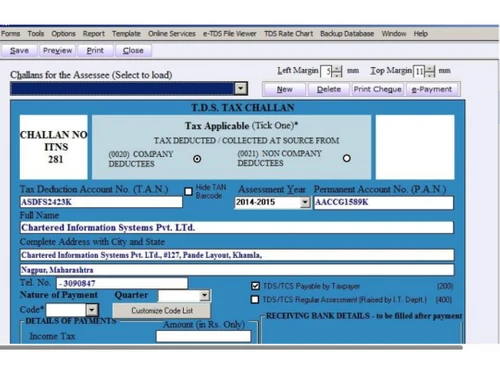
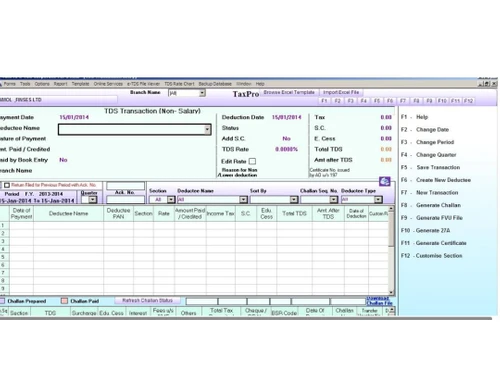
TaxPro e-TDS is one of the best e-TDS filing software that helps professionals prepare and file their TDS online. This audit management tool has all the required provisions or functionalities which are to be taken care of while managing TDS returns. The TDS calculator software aims at making the user’s life easier by making it the simplest process of generating quarterly e-TDS returns. Other th...
See MoreHave you used TaxPro TDS Software before?
Share your insights for better experience
View plans
 Save upto 18%, Get GST Invoice on your business purchase T&C Buy Now & Pay Later, Check offer on payment page.
 Brand: Chartered Info
Founded Year: 2002
Chartered Info
 E-Return PAN Verification File TDS File e-TDS Generate Form-16s Import/Export Management
  Ubuntu
  Windows
  MacOS
MacOS  Linux
Linux  Desktop
  Cloud-Based
  Perpetual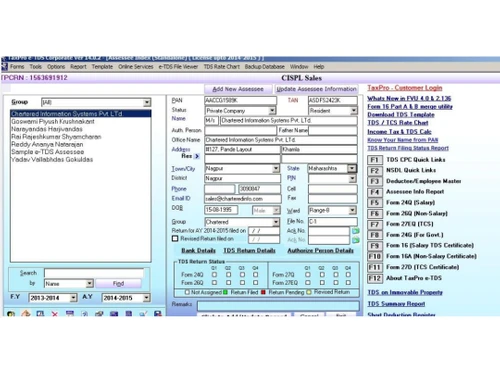
Small Business
Designed for startups and growing businesses
Medium Business
Built for business growth and flexibility
Enterprises
Designed for complex and large-scale business needs
4.6
Out of 5

Overall Rating
Based on
3 Verified Reviews
Rating Breakdown
93% Recommend this Product
Add ReviewUsers of TaxPro TDS Software generally express high satisfaction, highlighting the exceptional customer support and ease of use as significant advantages. Many appreciate features like digital PDF signing and seamless integration with e-way bill systems. The software is noted for its value for money, particularly in payroll management. While there are no major complaints reported, the limited volume of reviews suggests a need for broader user feedback to fully assess its performance across different use cases.

Nov 20, 2018
Techjockey Verified
“Digitally sign your PDF”
Pros
Taxpro is an e-return filing software. It also gives benefits Digitally Signing PDF Files in mass and is an important resource for Payroll Management. The best thing I found about them is their customer support. I found it to be the best value for money.
Cons
None
Feb 5, 2019
Techjockey Verified
“Generate E Way bill directly from your software ”
Pros
Chartered information systems have done their best in integrating the e-way bill system with the NIC servers. As software developers and IT Solution providers we have found their support to be the best in the country. They are just a phone call away and very eager to solve our issues.
Cons
None encountered
Dec 16, 2016
Techjockey Verified
“very very helpful team”
Pros
Easy to use websites and they respond quickly to any questions you may have.
Cons
N/A

TaxPro TDS Software
₹ 4800.00 excl. GST
Desktop
Mobile
Web based
On Premises
Windows
Mac OS

GEN e-TDS
₹ 3500
Desktop
Mobile
Web based
On Premises
Windows
Mac OS

Gen TDS software
₹ 6000
Desktop
Mobile
Web based
On Premises
Windows
Mac OS

Taxmann e-TDS Returns
₹ 8500
Desktop
Mobile
Web based
On Premises
Windows
Mac OS

EasyTDS
Price On Request
Desktop
Mobile
Web based
On Premises
Windows
Mac OS

ClearTax TDS
Price On Request
Desktop
Mobile
Web based
On Premises
Windows
Mac OS

Saral TDS
₹ 5640
Desktop
Mobile
Web based
On Premises
Windows
Mac OS

TDSMAN
₹ 4900
Desktop
Mobile
Web based
On Premises
Windows
Mac OS

Web-e-TDS
Price On Request
Desktop
Mobile
Web based
On Premises
Windows
Mac OS

HostBooks TDS
₹ 4199
Desktop
Mobile
Web based
On Premises
Windows
Mac OS

SureTDS
Price On Request
Desktop
Mobile
Web based
On Premises
Windows
Mac OS
(0) Product(s) selected
Available
Price on Request

Available
Price on Request
Yes, you can get a demo of TaxPro TDS Professional Return Filing Software.
Yes, TaxPro TDS Professional Return Filing Software does provide data security options. It is meant to provide optimum data security to all its users.
Yes, TaxPro TDS Professional Return Filing Software does provide data recovery options.
TaxPro TDS Professional Return Filing Software has been designed for all small, medium, and large businesses. It is suitable for retail, wholesale, distribution, manufacturing and services businesses around the world.
Chartered TaxPro TDS Professional Return Filing Software can help your business grow by manifold as it helps: • Close more deals • Get more leads • Accelerate productivity • Make insightful decisions
20,000+ Software Listed
Best Price Guranteed
Free Expert Consultation
2M+ Happy Customers
Terms and Condtions

Users with registered businesses can purchase goods from merchants on the platform to satisfy their business needs. Users are not permitted to utilize any products acquired through the platform for resale, advertising, business, or further distribution.
For each purchase made, users will receive a Tax Invoice (or 'GST invoice') that includes specific details such as:
the GSTIN of the user associated with their registered business, and
the specified Entity Name for their business.
It should be noted that not all products are eligible for GST Invoice. Only the products displayed by participating sellers with the 'GST-based Invoice Available' callout on the product description page would qualify.
Certain goods and services are not eligible to get a GST Invoice, including items with VAS, i.e., Value Added Services (e.g., Total Mobile Protection/Assured Buyback) and those involving an exchange offer at the time of purchase.
Users must ensure the accuracy of the GSTIN, and business entity name provided for the GST Invoice. Requests for corrections into GST Invoice would not be accommodated by Techjockey.com or any Seller, and any issues arising from user-provided information are the sole responsibility of users.
Techjockey.com is not liable for the GST Invoice or any associated input tax credit. To efficiently claim an input tax credit, users should select the registered place of business address as per the GST authority's data and follow the provisions of the GST Act and rules.
To claim an input tax credit, the delivery and billing addresses must match. Furthermore, input tax credits will not be granted if the delivery address and GSTIN on the invoice are from different states. In case of incorrect GST details provided during the order placement, the order will be canceled automatically.