USA
USA UAE
UAESmall Business
Designed for startups and growing businesses
See More





Brand: SAG Infotech
Gen TDS software simplifies error-free, compliant TDS/TCS return filing with its user-friendly interface, automatic calculations, and direct TRACES login, trusted by 50K clients.
See MoreHave you used Gen TDS software before?
Share your insights for better experience
View plans
 Save upto 18%, Get GST Invoice on your business purchase T&C Buy Now & Pay Later, Check offer on payment page.
 Brand: SAG Infotech
Founded Year: 1999
SAG InfoTech is a software development company which manufactures high-end software for outsourcing services
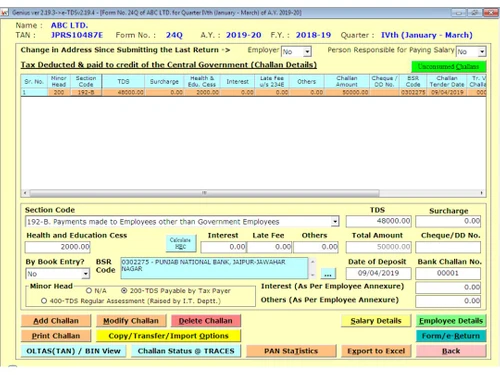
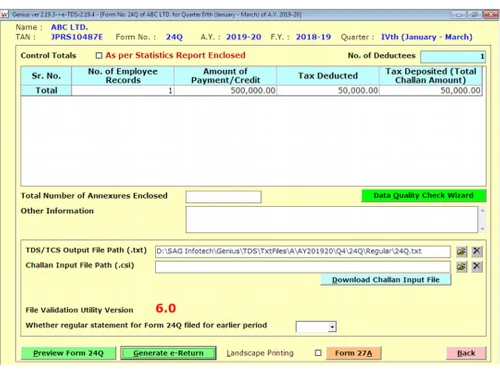
 Browser Flexibility 15G/H Digital Register 26QB/QC/QD Reporting TRACES Request Manager File e-TDS Generate and Print TDS Certificates in Form 16/16A Import & Export Data Interest Calculation Bulk Pan Verification Tan Application Challan E-Payment Compatibility with Browsers Search Facility Report Generation e-Filing Correction Statements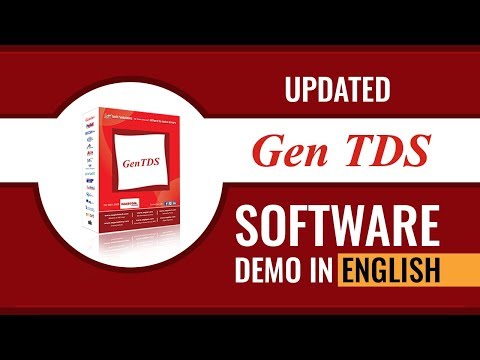

Watch the demo video to explore key features, real workflows, and how the software fits your business needs.
 Windows
  Desktop
  Perpetual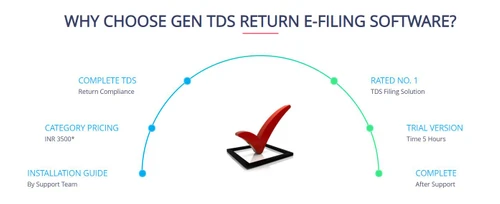
Small Business
Designed for startups and growing businesses
Medium Business
Built for business growth and flexibility
Enterprises
Designed for complex and large-scale business needs
5
Out of 5

Overall Rating
Based on
3 Verified Reviews
Rating Breakdown
96% Recommend this Product
Add ReviewCustomers consistently praise Gen TDS software for its efficiency in filing TDS and TCS returns, highlighting its ability to generate various forms and calculate penalties seamlessly. Users appreciate the user-friendly interface and the comprehensive features available, making it particularly beneficial for tax professionals. However, a common limitation noted is the absence of a cloud version, which some users desire. Overall, the software receives high recommendations, reflecting strong satisfaction among its users.

Oct 27, 2025
Techjockey Verified
“Unlimited TDS and TCS Return Filing with GenTDS Software”
It is an excellent software for TDS return
Pros
In my personal opinion, this is one of the best software solutions in India for filing TDS and TCS returns. I used it to generate TDS challans, import and export Excel data, calculate interest, tax penalties, and late filing fees. You can also easily generate Form 16, 16A, 27D, and even handle Form 15CA and 15CB filings, among others. Additionally, you can try the trial version of this software, which includes a 5-hour demo.
Cons
Good software for CA, CS and tax professionals. So there is no cons
Abhishek 
User
Oct 14, 2024
Techjockey Verified
“Gen TDS: Most Useful TDS and TCS Return Filing Software”
Excellent Software for Tax Professionals
Pros
A few months ago, I purchased SAG Infotech's Gen TDS software for submitting my TDS and TCS returns. This software permits me to efficiently generate TDS challans and import/export deductor and deductee data. It also calculates interest, tax penalties, and late filing fees in one place. My staff members and friends use it to generate Form 16, 16A, and 27D, and handle Form 15CA and 15CB filings, among others. I recommend that taxpayers try this software at least once with the free trial to better understand its features.
Cons
The main thing I found in this software is the cloud version, which is not available.
Suresh Chand 
Executive
Jul 4, 2023
Techjockey Verified
“Gen TDS: Working Process is Good, Smart and Easy”
Pros
Several days ago I bought Gen TDS software, and the unique feature of this software is that it makes submitting TDS/TCS returns simple and easy. With this Gen TDS software, I can prepare TDS returns, and calculate interest, penalty, and late filing free, all from one place. I do not need to generate the user ID every time I use this software. It makes accurate calculations and makes filing TDS/TCS returns easy and error-free with the Gen e-TDS software.
Cons
It is very well supported by the technical team, so no serious problems.
Reason to switch
Every time I submit a TDS e-Return and accompanying form, a technical support engineer consistently resolves any issues I encounter.

Gen TDS software
₹ 6000.00 excl. GST
Desktop
Mobile
Web based
On Premises
Windows
Mac OS

GEN e-TDS
₹ 3500
Desktop
Mobile
Web based
On Premises
Windows
Mac OS

Taxmann e-TDS Returns
₹ 8500
Desktop
Mobile
Web based
On Premises
Windows
Mac OS

EasyTDS
Price On Request
Desktop
Mobile
Web based
On Premises
Windows
Mac OS

ClearTax TDS
Price On Request
Desktop
Mobile
Web based
On Premises
Windows
Mac OS

TDSMAN
₹ 4900
Desktop
Mobile
Web based
On Premises
Windows
Mac OS

Saral TDS
₹ 5640
Desktop
Mobile
Web based
On Premises
Windows
Mac OS

Web-e-TDS
Price On Request
Desktop
Mobile
Web based
On Premises
Windows
Mac OS

HostBooks TDS
₹ 4199
Desktop
Mobile
Web based
On Premises
Windows
Mac OS

TaxPro TDS Software
₹ 4800
Desktop
Mobile
Web based
On Premises
Windows
Mac OS

SureTDS
Price On Request
Desktop
Mobile
Web based
On Premises
Windows
Mac OS
(2) Product(s) selected
Available
Price on Request

Available
Price on Request
Gen TDS software Income Tax Software is compatible with Windows operating systems.
Gen TDS software Income Tax Software app is not available.
Gen TDS software Income Tax Software supports Web-Based and Perpetual.
Gen TDS software Income Tax Software is typically used in All Industries.
Gen TDS software Income Tax Software demo is available for free with Techjockey.com
Gen TDS software Income Tax Software offers a free trial. However, the premium plan with advanced features available at Techjockey .
For Gen TDS software Income Tax Software installation, insert the given CD/USB flash storage in your system and open the Setup Wizard to get started.
Gen TDS software Income Tax Software helps with File e-TDS,Generate and Print TDS Certificates in Form 16/16A,Import & Export Data and Interest Calculation. It's a complete solution for Bulk Pan Verification,Tan Application,Challan E-Payment and Compatibility with Browsers.
Gen TDS software is designed for filing TDS/TCS returns online, accurately calculating amounts, interest, penalties, and late filing fees in compliance with TRACES and CPC, India norms and regulations.
Gen TDS software price starts at INR 6,000 at techjockey.com.
Key features include online TDS/TCS e-return uploads, quarterly filing of Form 121, generation of lower/no deduction forms, online filing of Forms 145/146, and generation of Forms 16, 16A, 27D with optional digital signatures.
Gen TDS software is suitable for professionals and taxpayers who need to file TDS/TCS returns, offering a user-friendly interface for accurate and compliant e-filing.
Gen TDS software is well-versed with all government norms and regulations, performing accurate calculations to facilitate error-free and easy TDS/TCS return filing.
The software complies with the norms and regulations of TRACES and CPC, India, and allows direct login to TRACES CPC and NSDL, supporting e-filing on the ITD Portal.
Yes, Gen TDS software can generate Form 16, 16A, and 27D in PDF format, with the option to sign them using a digital signature, and also provides an email facility.
Yes, taxpayers can easily import and export data from MS-Excel files, text files, or FVU files, enhancing data management flexibility.
20,000+ Software Listed
Best Price Guranteed
Free Expert Consultation
2M+ Happy Customers
Terms and Condtions

Users with registered businesses can purchase goods from merchants on the platform to satisfy their business needs. Users are not permitted to utilize any products acquired through the platform for resale, advertising, business, or further distribution.
For each purchase made, users will receive a Tax Invoice (or 'GST invoice') that includes specific details such as:
the GSTIN of the user associated with their registered business, and
the specified Entity Name for their business.
It should be noted that not all products are eligible for GST Invoice. Only the products displayed by participating sellers with the 'GST-based Invoice Available' callout on the product description page would qualify.
Certain goods and services are not eligible to get a GST Invoice, including items with VAS, i.e., Value Added Services (e.g., Total Mobile Protection/Assured Buyback) and those involving an exchange offer at the time of purchase.
Users must ensure the accuracy of the GSTIN, and business entity name provided for the GST Invoice. Requests for corrections into GST Invoice would not be accommodated by Techjockey.com or any Seller, and any issues arising from user-provided information are the sole responsibility of users.
Techjockey.com is not liable for the GST Invoice or any associated input tax credit. To efficiently claim an input tax credit, users should select the registered place of business address as per the GST authority's data and follow the provisions of the GST Act and rules.
To claim an input tax credit, the delivery and billing addresses must match. Furthermore, input tax credits will not be granted if the delivery address and GSTIN on the invoice are from different states. In case of incorrect GST details provided during the order placement, the order will be canceled automatically.