USA
USA UAE
UAESmall Business
Designed for startups and growing businesses
See More


![Form 16 generation from TRACES with Saral TDS [Webinar]](https://img.youtube.com/vi/NPQFHA7qz-A/default.jpg)


Brand: Relyon Softech
Saral TDS is a comprehensive TDS management software. It is developed with a built-in state of the art technology that improves the speed of tax calculation and filing. The TDS management software strictly adheres to TDS/TCS guidelines established by the Income Tax Laws of India. Saral TDS software provides firmness to tax-related workflows. Saral TDS management software offers timely updates on...
See MoreHave you used Saral TDS before?
Share your insights for better experience
View plans
 Save upto 18%, Get GST Invoice on your business purchase T&C Buy Now & Pay Later, Check offer on payment page.
 Brand: Relyon Softech
Founded Year: 2001
We are a software company based in the IT Hub of India, Bengaluru. We have solutions in the domains of payroll, taxation and accounting with over 60,000+ users accross India.
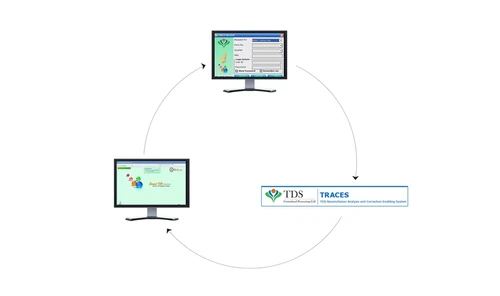
 For Business File e-TDS Generate Form-16s PAN Verification Complete Solutions For TDS Fully Integrated With Traces Comprehensive Corrections Consolidated Form 16 & Form 16A Data Quality Report Detailed Tax Computation MIS Reports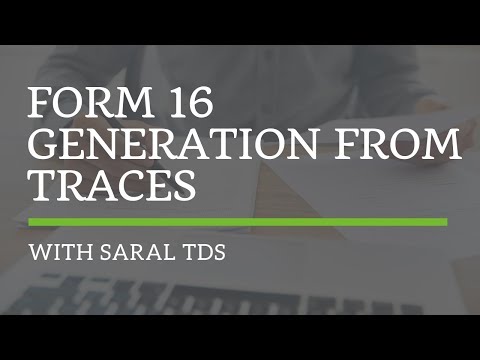

Watch the demo video to explore key features, real workflows, and how the software fits your business needs.
 Windows
  Desktop
  Perpetual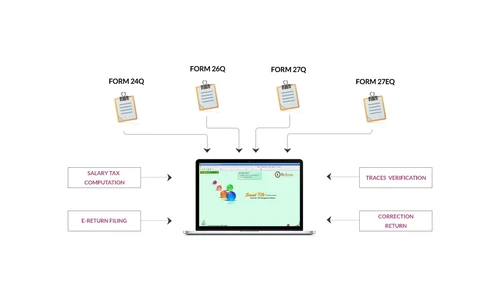
Small Business
Designed for startups and growing businesses
Medium Business
Built for business growth and flexibility
Enterprises
Designed for complex and large-scale business needs
3.7
Out of 5

Overall Rating
Based on
4 Verified Reviews
Rating Breakdown
75% Recommend this Product
Add ReviewCustomer sentiment for Saral TDS is mixed, with some users praising its user-friendly interface and responsive support, highlighting its comprehensive TDS functionalities. However, significant concerns arise from a negative experience regarding order fulfillment and customer service, with one user reporting a lack of execution and refund for their purchase. While a few users express strong satisfaction and intention to continue using the software, the complaints about order handling may deter potential buyers.
Pros
"Saral TDS comes with a user friendly UI with all easily navigable format. For technical difficulty the live support is available to solve it."
"I worked with John Sterle to identify a software system for our recruitment. John was courteous, professional and knowledgeable and we did sign up with his recommended company."
Cons
"The company knows only to take money. After taking money they don't execute the orders & deliver the product."

Jan 1, 2024
Techjockey Verified
“Extremely Bad”
Placed an order on 14.12.2023. Till date i.e. 1.1.2024 my order has not been executed. Company is neither executing nor refunding me my money. PLEASE DON'T BUY ANY SOFTWARE FROM THIS COMPANY
Pros
No Pros
Cons
The company knows only to take money. After taking money they don't execute the orders & deliver the product.
Reason to switch
It does not help anybody. Waste of Money & Time
Aug 28, 2019
Techjockey Verified
“good ”
Pros
What every you need in TDS that will be their
Cons
N/A
Jan 14, 2019
Techjockey Verified
“User friendly”
Pros
Saral TDS comes with a user friendly UI with all easily navigable format. For technical difficulty the live support is available to solve it.
Cons
NO CONS

Saral TDS
₹ 5640.00 excl. GST
Desktop
Mobile
Web based
On Premises
Windows
Mac OS

GEN e-TDS
₹ 3500
Desktop
Mobile
Web based
On Premises
Windows
Mac OS

Gen TDS software
₹ 6000
Desktop
Mobile
Web based
On Premises
Windows
Mac OS

Taxmann e-TDS Returns
₹ 8500
Desktop
Mobile
Web based
On Premises
Windows
Mac OS

TDSMAN
₹ 4900
Desktop
Mobile
Web based
On Premises
Windows
Mac OS

EasyTDS
Price On Request
Desktop
Mobile
Web based
On Premises
Windows
Mac OS

ClearTax TDS
Price On Request
Desktop
Mobile
Web based
On Premises
Windows
Mac OS

TaxPro TDS Software
₹ 4800
Desktop
Mobile
Web based
On Premises
Windows
Mac OS

Web-e-TDS
Price On Request
Desktop
Mobile
Web based
On Premises
Windows
Mac OS

HostBooks TDS
₹ 4199
Desktop
Mobile
Web based
On Premises
Windows
Mac OS

SureTDS
Price On Request
Desktop
Mobile
Web based
On Premises
Windows
Mac OS
(2) Product(s) selected
Available
Price on Request

Available
Price on Request
Yes, if the Deductor is required to provide the TDS Certificate, then it is mandatory to show the details of ZERO TDS deduction of return filing with relevant Deduction remarks.
Yes, only one previous year excess Challan paid can be adjusted for subsequent year i.e. Excess TDS Paid in the FY 2014-15 can be adjusted for TDS Deducted in FY 2015-16
If there are records with ZERO TDS Deduction amount, then it’s required to show these Deduction records in Deductions entry screen with proper ‘No Deduction’ Remark (Like Transporter with Valid PAN or NO Deduction Certification u/s 197). Also it’s advised to link those deductions with a valid Challan. (If there is no Challan for the whole year, Deductor can make use of any subsequent previous year or subsequent next year paid Challan). If these NIL Deductions are not linked to any paid Challan, a NIL Challan record will be considered for return generation, but TRACES will later on ask Deductor to tag these NIL Challans with valid paid Challan through Online Correction. To avoid these inconveniences later on its advised to link all NIL Deduction records to any valid paid Challan. If the ZERO Deductions were not reported then the RelyonSoft Saral TDS Certificates for the same will not available from TRACES.
The steps to be followed to enter Deduction record having Lower Deduction Certificate are as below: i. Goto the required Quarter -> Deduction Details screen ii. Enter the details in RelyonSoft Saral TDS, i.e Name, Section, Payment Amount, Payment Date and the rate of Income Tax for deduction. iii. Next, in Remarks for Deduction, select “LOWER DEDUCTION/NO DEDUCTION U/S 197” and provide the certificate number in U/s 197 Cert. No. Field. iv. Save the entry.
If there are records with ZERO Deduction amount, then it’s required to show those Deduction records in Deductions entry screen with proper ‘No Deduction’ Remark (Like Transporter with Valid PAN or NO Deduction Certification u/s 197). Also it’s advised to link these deductions with a valid Challan. (If there is no Challan for the whole year, Deductor can make use of any subsequent previous year or subsequent next year paid Challan).
20,000+ Software Listed
Best Price Guranteed
Free Expert Consultation
2M+ Happy Customers
Terms and Condtions

Users with registered businesses can purchase goods from merchants on the platform to satisfy their business needs. Users are not permitted to utilize any products acquired through the platform for resale, advertising, business, or further distribution.
For each purchase made, users will receive a Tax Invoice (or 'GST invoice') that includes specific details such as:
the GSTIN of the user associated with their registered business, and
the specified Entity Name for their business.
It should be noted that not all products are eligible for GST Invoice. Only the products displayed by participating sellers with the 'GST-based Invoice Available' callout on the product description page would qualify.
Certain goods and services are not eligible to get a GST Invoice, including items with VAS, i.e., Value Added Services (e.g., Total Mobile Protection/Assured Buyback) and those involving an exchange offer at the time of purchase.
Users must ensure the accuracy of the GSTIN, and business entity name provided for the GST Invoice. Requests for corrections into GST Invoice would not be accommodated by Techjockey.com or any Seller, and any issues arising from user-provided information are the sole responsibility of users.
Techjockey.com is not liable for the GST Invoice or any associated input tax credit. To efficiently claim an input tax credit, users should select the registered place of business address as per the GST authority's data and follow the provisions of the GST Act and rules.
To claim an input tax credit, the delivery and billing addresses must match. Furthermore, input tax credits will not be granted if the delivery address and GSTIN on the invoice are from different states. In case of incorrect GST details provided during the order placement, the order will be canceled automatically.