 USA
USA UAE
UAESmall Business
Designed for startups and growing businesses

See More




Brand: Relyon Softech
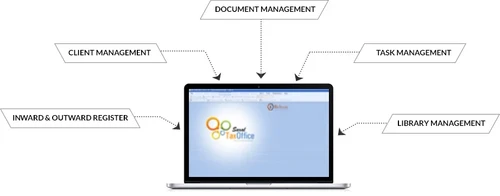
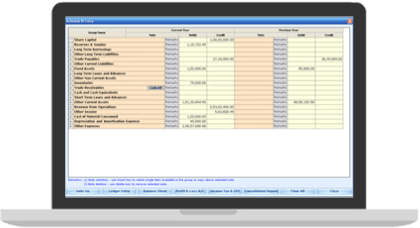
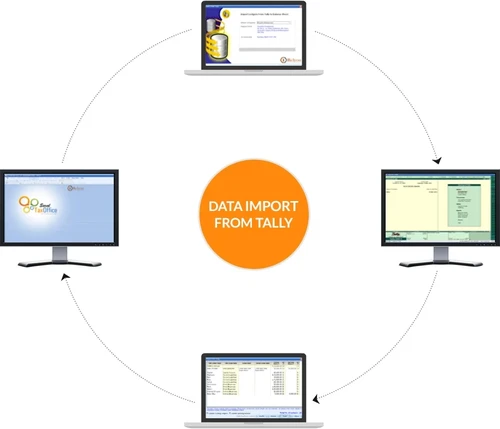
Saral TaxOffice is the most advance and reliable income tax software and audit management software that automates the CA practice and easily manages the tax compliance. CAs can get all the balance sheet related data directly from TALLY without wasting the time to port into an external media and re-e...
See MoreHave you used Saral TaxOffice before?
Share your insights for better experience
View plans
 Save upto 18%, Get GST Invoice on your business purchase T&C Buy Now & Pay Later, Check offer on payment page.
 Brand: Relyon Softech
Founded Year: 2001
We are a software company based in the IT Hub of India, Bengaluru. We have solutions in the domains of payroll, taxation and accounting with over 60,000+ users accross India.
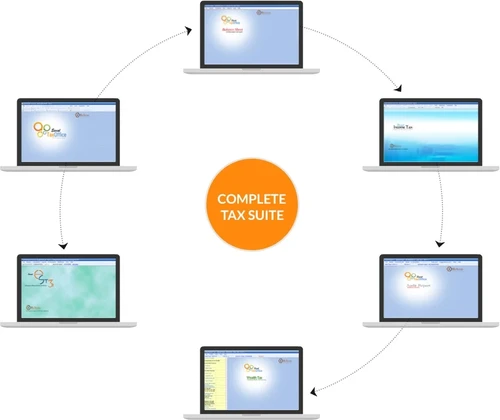
 File e-TDS File TDS PAN Verification CA office Automation Complete Tax Suit Complete Office Suit Revised Schedule Data Interface From Tally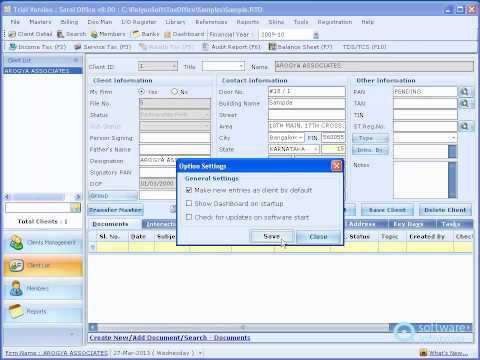

Watch the demo video to explore key features, real workflows, and how the software fits your business needs.
 Windows
  Desktop
  Perpetual
Small Business
Designed for startups and growing businesses
Medium Business
Built for business growth and flexibility
Enterprises
Designed for complex and large-scale business needs
4.3
Out of 5

Overall Rating
Based on
2 Verified Reviews
Rating Breakdown
85% Recommend this Product
Add Review
Dec 20, 2018
Techjockey Verified
“Easy to use”
Pros
Taxation became so easy with this software. Easy to use, no unnecessary steps to follow.
Cons
None
Oct 6, 2016
Techjockey Verified
“Techjockey is a good place to go”
Pros
Excellent fast service.Got an email with product key along with instructions.The key didn't work immediately.I emailed the seller for help(Harry from Techjockey)and received excellent effective customer service!Product still works without problems and certified genuine!Excellent purchase;highly recommend Techjockey!
Cons
N/A

Saral TaxOffice
₹ 8800.00 excl. GST
Desktop
Mobile
Web based
On Premises
Windows
Mac OS

EasyOFFICE
₹ 3900
Desktop
Mobile
Web based
On Premises
Windows
Mac OS

Saral IncomeTax
₹ 5500
Desktop
Mobile
Web based
On Premises
Windows
Mac OS

FreeTaxUSA
Price On Request
Desktop
Mobile
Web based
On Premises
Windows
Mac OS
TdsPac
Price On Request
Desktop
Mobile
Web based
On Premises
Windows
Mac OS

GEN Income Tax
₹ 7000
Desktop
Mobile
Web based
On Premises
Windows
Mac OS

CompuTax
Price On Request
Desktop
Mobile
Web based
On Premises
Windows
Mac OS

DAVO
Price On Request
Desktop
Mobile
Web based
On Premises
Windows
Mac OS

GEN Genius
₹ 7000
Desktop
Mobile
Web based
On Premises
Windows
Mac OS

TaxCloud
Price On Request
Desktop
Mobile
Web based
On Premises
Windows
Mac OS

ClearTax Income Tax
Price On Request
Desktop
Mobile
Web based
On Premises
Windows
Mac OS
(0) Product(s) selected
Available
Price on Request
Available
Price on Request
Starting Price:
$58 /Month
Starting Price:
₹2,999 /quantity
Available
Price on Request

Starting Price:
$25

Starting Price:
₹899 /User/Year

Starting Price:
₹6,000

Available
Price on Request

Available
Price on Request


Please apply before the jurisdictional Assessing officer to initiate the process of acquiring PAN by Jurisdictional Assessing Officer.
Kindly refer to Form 16 or Form 16A issued by the employer for the TAN number. You can also see the details of deductor in the 26AS Tax credit statement made available by the NSDL in its website, which can be easily accessed through ITD e-filing website.
The taxpayer is advised to login to the website using his/her user id and password and select the sub menu option CPC Processing Status? under the menu option services on the homepage of ITD e-filing website to check the status of return for a given assessment year.
To claim the excess paid tax, the assessee has to be file returns of income, irrespective of the fact whether the income is taxable or not. The amount of refund will be remitted to the assessee either through cheque or directly to the back account as mentioned in the ITR form after the processing of the return.
20,000+ Software Listed
Best Price Guranteed
Free Expert Consultation
2M+ Happy Customers
Terms and Condtions

Users with registered businesses can purchase goods from merchants on the platform to satisfy their business needs. Users are not permitted to utilize any products acquired through the platform for resale, advertising, business, or further distribution.
For each purchase made, users will receive a Tax Invoice (or 'GST invoice') that includes specific details such as:
the GSTIN of the user associated with their registered business, and
the specified Entity Name for their business.
It should be noted that not all products are eligible for GST Invoice. Only the products displayed by participating sellers with the 'GST-based Invoice Available' callout on the product description page would qualify.
Certain goods and services are not eligible to get a GST Invoice, including items with VAS, i.e., Value Added Services (e.g., Total Mobile Protection/Assured Buyback) and those involving an exchange offer at the time of purchase.
Users must ensure the accuracy of the GSTIN, and business entity name provided for the GST Invoice. Requests for corrections into GST Invoice would not be accommodated by Techjockey.com or any Seller, and any issues arising from user-provided information are the sole responsibility of users.
Techjockey.com is not liable for the GST Invoice or any associated input tax credit. To efficiently claim an input tax credit, users should select the registered place of business address as per the GST authority's data and follow the provisions of the GST Act and rules.
To claim an input tax credit, the delivery and billing addresses must match. Furthermore, input tax credits will not be granted if the delivery address and GSTIN on the invoice are from different states. In case of incorrect GST details provided during the order placement, the order will be canceled automatically.




