linkedin
Claromentis logo
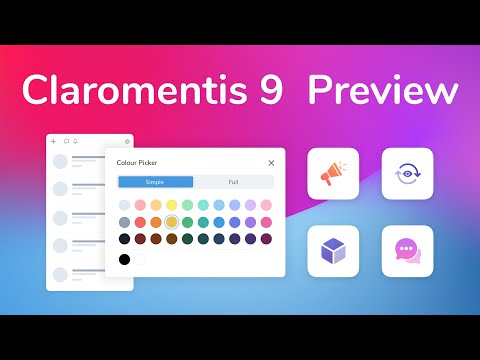
play Claromentis 9 Intranet Software demo
claromentis asset
claromentis profiles

Claromentis

Brand: Claromentis Ltd

  • 4.5

  • 5 Ratings

Claromentis is a cloud-based intranet software with a digital workplace solution for learning, communication, and collaboration.

See More

Have you used Claromentis before?

Share your insights for better experience

Add a Review
Starting Price
₹665 excl.GST
₹ 785 incl. GST

View plans

100% Genuine
Products
Best Price
Guaranteed
Safe & Secure
Payment
  • Description

  • Pricing

  • Features

  • Specification

  • Review

  • Compare

  • Alternatives

  • FAQ

Starting at ₹665

Claromentis Software Overview

What is Claromentis Software?

Claromentis is a digital workplace solution that helps in the intranet for businesses for communication, workflow automation, project management, and collaboration. It is designed with a simple interface that is easy to use, customizable, and secure. The objective of this solution is to help improve internal communication and have a unified platform for project management and workflow automation, information sharing, and e-learning. The digital workplace integrates intranet applications, e-forms, workflows, e-learning, and project management. All these features and key updates are displayed through a dashboard for its uses and thus give a unified platform for access, communication, and management.

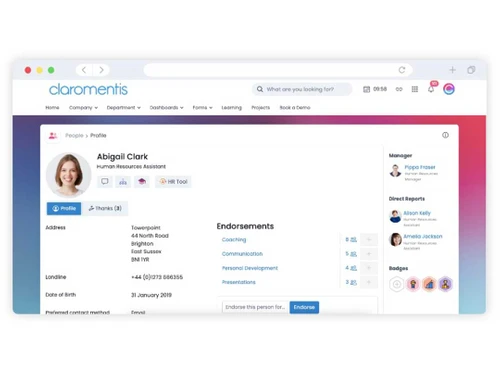
This Intranet platform also offers easy-to-use tools to customize the intranet design, branding, themes, menus, and pages. Claromentis provides a social intranet application for internal communication, collaboration, form creation and sharing, and quiz creation and sharing. The platform offers customizable design tools that give a user-friendly experience. Information management features, such as document management, intranet news, knowledge base, image gallery, digital asset management, etc., make information management and sharing efficient. People management tools include employee profiles, extranets, and badges which help the employees to personalize their profile and get rewards from HR.

The HR tools help in HR management activities. Productivity tools help in self-service activities like intranet calendars, expense management, room booking, and compliance notifications. The application allows users to create and manage tasks, projects, and resources, as well as to design and automate digital forms and workflows. It can relate to third-party tools such as Active Directory, SSO, Google Drive, etc.

Why Choose Claromentis Platform?

A healthcare organization uses Claromentis to streamline compliance management, create and deliver e-learning courses, and share best practices and policies.

  • Project management: It helps manage projects and workflows and integrates with third-party tools for communication, file sharing, and information flow.
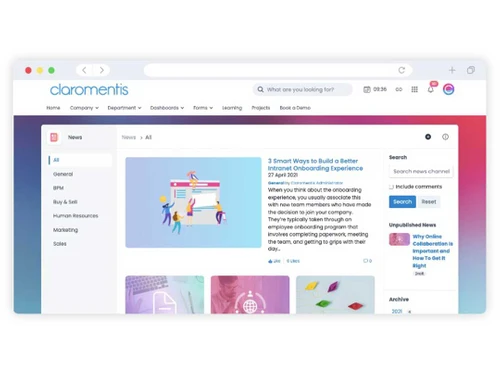
  • Internal communication hub: Helps in the creation of a centralized employee communication intranet that provides real-time updates, discussions, and announcements for information flow.
  • Social intranet: Improves internal communication through the social intranet, which increases user engagement, provides online quizzes and certificates, and shares information easily.
  • Enhanced learning: Implements e-learning programs that enable teams to expand their skills and knowledge within a collaborative digital environment.
  • Document management: Creates a digital workplace for document management and knowledge base and enables push notifications and mobile access.
  • Compliance management: Provides proper regulatory compliance with features like audit logs, policy management, and secure document control.

Benefits of Claromentis Intranet Software

  • Employee engagement: Helps in collaboration and community-building, resulting in motivated, engaged employees by providing interactive and social intranet features.
  • Data Security: Compliance features and SSL security protects sensitive information, ensuring regulatory adherence and data protection.
  • Productivity: Manages workflows and provides unified tools that help to increase efficiency, reducing time spent on repetitive tasks.
  • Better communication: It enhances collaboration and communication across teams by using various applications and tools.
  • Knowledge sharing: Helps to expand knowledge and skills by offering e-learning features and training courses.

Claromentis Pricing

Claromentis Intranet Platform pricing starts from INR 665 at techjockey.com.

For subscription-related details and offers on premium packages, please request a call back from our product experts.

Read more

Claromentis Ltd Company Details

Founded Year:  1998

Our solution combines the best elements of an intranet with the concept of a dynamic digital workplace. At Claromentis, we empower your intranet by providing a fully integrated solution that includes a wide range of features and functionalities.

Director/Founders Claromentis
Company Size 1-100 Employees

Claromentis Pricing & Plans

Claromentis
Key Features
  • Intelligent Business Process Management
  • Collaboration Tools
  • Learning Management System (LMS) Integration
  • Communication
  • Project Management Made Easy
  • Document Management

Calculated Price

₹ 665 Exclusive of all taxes
    • Users

      Users
      Users
    • Monthly

      Monthly
      Monthly

Key Features

  • Intelligent Business Process Management

  • Collaboration Tools

  • Learning Management System (LMS) Integration

  • Communication

  • Project Management Made Easy

  • Document Management

Claromentis Features

  • icon_check Business Process Management
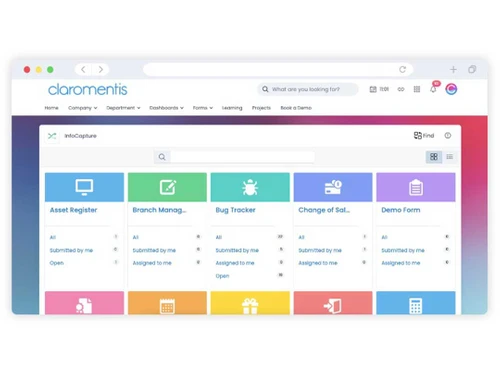
    A powerful, no-code automation engine (InfoCapture) that transforms paper-based forms into digital workflows, routing requests
  • icon_check Collaboration Tools
    Enhance teamwork and productivity with tools that support communication, project management, and workflow automation.
  • icon_check Learning Management System
    A dedicated professional development module that allows trainers to create "Learning Paths," track training records, and issue
  • icon_check Communication
    Improve internal communication with features like news and announcements, social networking, forums, blogs, etc.
  • icon_check Project Management
    A collaborative tracking tool featuring Kanban boards and Gantt-style list views, enabling managers to assign tasks, monitor
  • icon_check Document Management
    Store, organize, and access documents securely and use version control, audit trail, and search.
  • icon_check Dashboards
    Customize and personalize intranet interface and navigation for designing themes, menus, and pages.
  • icon_check Audit Logs
    Track and monitor all activities and changes on the intranet platform with audit logs with detailed information.
  • icon_check Policy Management
    Manage and update the policies and procedures with features such as approval workflows, reminders, and notifications.
  • icon_check Knowledge Base
    Create and share knowledge and information with the employees and customers with features like e-learning, quizzes, etc.
  • icon_check Digital Asset Management
    Organize and manage digital assets with features such as metadata, tags, and categories.
  • icon_check Polls & Surveys
    Create, share, and gather feedback from the employees and customers with polls and surveys.
Claromentis Demo Video play icon

Get Claromentis Demo

Watch the demo video to explore key features, real workflows, and how the software fits your business needs.

Understand
Key Features
Personal
Demo Insights
Interactive
Demo Support

Claromentis Specifications

Supported Platforms
Ubuntu Ubuntu Windows Windows MacOS MacOS
Devices
Desktop Desktop Mobile Mobile
Deployment
Cloud-Based Cloud-Based Perpetual Perpetual
Suitable For
All Industries
Business Specific
All Businesses
Business Size
Small Business Medium Business SMBs SMEs
Customer Support
Email
Language
English
Training Resources
In Person

Explore the Best Alternative Solutions Similar to Your Business Size and Needs

Medium Business

Built for business growth and flexibility

Myhub

4.1

Axero

4.1

Igloo

4.2

See More

Claromentis Review

4.5

Out of 5

img

Overall Rating

Based on
5 Verified Ratings

Rating Breakdown

  • Features 4
  • Value for Money 4.9
  • Ease of Use 4.5
  • Customer Support 4.8

90% Recommend this Product

Add Review

Be the First to Review

This product has no reviews yet. Be the first to leave your feedback.

Add Review

Compare Claromentis With other Intranet Software

Products
Ratings
Pricing
Device Supported
Deployment
Supported Platforms
  • img

    Claromentis

  • 4.5

  • ₹ 665.00 excl. GST

  • Desktop

    Mobile

  • Web based

    On Premises

  • Windows

    Mac OS

  • img

    AgilityPortal

  • 4.3

  • ₹ 12400

  • Desktop

    Mobile

  • Web based

    On Premises

  • Windows

    Mac OS

  • img

    Simpplr

  • 4.2

  • Price On Request

  • Desktop

    Mobile

  • Web based

    On Premises

  • Windows

    Mac OS

  • img

    Zoho Connect

  • 4.4

  • ₹ 240

  • Desktop

    Mobile

  • Web based

    On Premises

  • Windows

    Mac OS

  • img

    Myhub

  • 4.1

  • Price On Request

  • Desktop

    Mobile

  • Web based

    On Premises

  • Windows

    Mac OS

  • img

    GreenOrbit

  • Price On Request

  • Desktop

    Mobile

  • Web based

    On Premises

  • Windows

    Mac OS

  • img

    Axero

  • 4.1

  • Price On Request

  • Desktop

    Mobile

  • Web based

    On Premises

  • Windows

    Mac OS

  • img

    Igloo

  • 4.2

  • Price On Request

  • Desktop

    Mobile

  • Web based

    On Premises

  • Windows

    Mac OS

  • img

    Onsemble

  • 4.2

  • Price On Request

  • Desktop

    Mobile

  • Web based

    On Premises

  • Windows

    Mac OS

  • img

    Speakap

  • 4.1

  • Price On Request

  • Desktop

    Mobile

  • Web based

    On Premises

  • Windows

    Mac OS

(2) Product(s) selected

Claromentis Alternatives

See All Claromentis Alternatives

Which operating system does Claromentis support?

Claromentis is compatible with Windows, Linux, Ubuntu, and macOS.

Is there any Claromentis app?

The Claromentis app is available for Android and iOS mobile devices.

What is the deployment type of Claromentis?

Claromentis supports cloud-based deployment type.

How much does Claromentis cost?

Claromentis pricing starts from INR 665 at techjockey.com.

Who are the potential users of Claromentis?

Claromentis is typically used in healthcare, manufacturing, non-profit, retail, and consulting by employees, managers, and stakeholders of these businesses to improve communication, collaboration, productivity, and learning within their organizations.

Is there any free trial or demo for Claromentis?

Claromentis demo is available for free with techjockey.com.

Is Claromentis free?

Claromentis offers a 14-day free trial.

How can you download Claromentis?

Claromentis installation is not required, as it is cloud-based. Just open the Setup Wizard to get started.

How does Claromentis work?

Claromentis helps with digital workplace solutions that helps with creating and managing a secure, customizable, and integrated intranet platform for business. It provides a range of features that support information management, sharing, collaboration, communication, project management, e-learning, and workflow automation.

20,000+ Software Listed

Best Price Guranteed

Free Expert Consultation

2M+ Happy Customers

Terms and Condtions

close

Users with registered businesses can purchase goods from merchants on the platform to satisfy their business needs. Users are not permitted to utilize any products acquired through the platform for resale, advertising, business, or further distribution.

For each purchase made, users will receive a Tax Invoice (or 'GST invoice') that includes specific details such as:

  • the GSTIN of the user associated with their registered business, and

  • the specified Entity Name for their business.

It should be noted that not all products are eligible for GST Invoice. Only the products displayed by participating sellers with the 'GST-based Invoice Available' callout on the product description page would qualify.

Certain goods and services are not eligible to get a GST Invoice, including items with VAS, i.e., Value Added Services (e.g., Total Mobile Protection/Assured Buyback) and those involving an exchange offer at the time of purchase.

Users must ensure the accuracy of the GSTIN, and business entity name provided for the GST Invoice. Requests for corrections into GST Invoice would not be accommodated by Techjockey.com or any Seller, and any issues arising from user-provided information are the sole responsibility of users.

Techjockey.com is not liable for the GST Invoice or any associated input tax credit. To efficiently claim an input tax credit, users should select the registered place of business address as per the GST authority's data and follow the provisions of the GST Act and rules.

To claim an input tax credit, the delivery and billing addresses must match. Furthermore, input tax credits will not be granted if the delivery address and GSTIN on the invoice are from different states. In case of incorrect GST details provided during the order placement, the order will be canceled automatically.