linkedin
Zoho Connect logo
play Zoho Connect - Bring your team together.
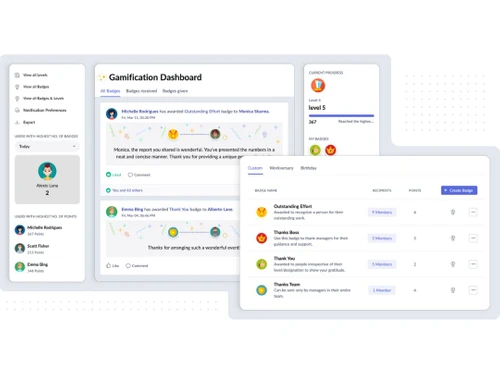
zoho-connect-dashboard
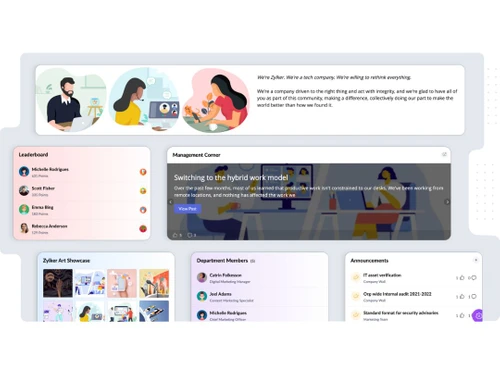
zoho-connect-user

Zoho Connect

Brand: Zoho Corporation

  • 4.4

  • 4 Ratings

What is Zoho Connect Zoho Connect is an advanced team collaboration software used by companies to bring all employees under one single system for better resource management and team collaboration. Admins and managers can use the feeds feature with various support options attached to it like network ...

See More

Have you used Zoho Connect before?

Share your insights for better experience

Add a Review
Starting Price
₹240 excl.GST
₹ 283 incl. GST

View plans

offer Save upto 18%, Get GST Invoice on your business purchase T&C
offer Buy Now & Pay Later, Check offer on payment page.
Buy Now
100% Genuine
Products
Best Price
Guaranteed
Safe & Secure
Payment
  • Description

  • Pricing

  • Features

  • Specification

  • Review

  • Compare

  • Alternatives

  • FAQ

Starting at ₹240
Buy Now

Zoho ConnectSoftware Overview

What is Zoho Connect

Zoho Connect is an advanced team collaboration software used by companies to bring all employees under one single system for better resource management and team collaboration. Admins and managers can use the feeds feature with various support options attached to it like network wall, group wall and private chats to start conversations, share new ideas, exchange knowledge as well as put forth engaging views on important topics.

Teams can store their files within Zoho Connect groups and access them as per their convenience. Moreover, the software also offers various editing tools to help teams prepare spreadsheets, documents and presentations absolutely hassle-free. End users are further free to create group-specific channels for facilitating seamless discussions amongst different team members. Transferring a particular channel into a conference room is also easy.

How does Zoho Connect help organizations in managing the entire work from the home setup?

  1. Internal Communication: Admins can make important announcements, create member-specific groups and streamline communications by either attaching comments or by adding essential feeds into their Zoho Connect Network.
  2. Online Town Halls: Enterprises can organize town hall sessions to facilitate seamless communication between employees and top management. This enhances transparency and also motivates employees to perform their best.
  3. Virtual Meetings: Using the software’s built-in chat function, team members can communicate with each other over video or audio calls with ease. They can also share their screens or deliver presentations on time using this particular facility.
  4. Virtual Work plans: Team leaders can create to-do-lists, set due dates, assign priority levels, create checklists and monitor the overall progress of the project using the virtual work plan or board feature offered by Zoho Connect.

Pricing of Zoho Connect

The pricing of Zoho starts at INR 240/Year at techjockey.com.

The Compatible Platforms for Zoho Connect

Zoho Connect is compatible with Windows and Mac OS. It also has a dedicated app for Android and iOS devices.

Benefits of Zoho Connect

  1. Multi-lingual: Zoho Connect is available in multiple languages like Finnish, German, Swedish, Turkish, Spanish, Dutch, Norwegian and more thus helping multinational companies with large teams, spread across different geographical locations, seamlessly collaborate with each other.
  2. Events: Managers and admins can update their entire work schedule and monitor it using the calendar view. They can also use the event feature to track RSVPs, send invitations to team members and trigger on-time reminders.
  3. Drag-and-Drop Dashboard: By using Zoho Connect, admins get access to an intuitive dashboard that also features a drag and drop interface with necessary fields required for building a group-specific app. They simply need to drag individual blocks showcased within the dashboard and put them together to build the app suitable for individual groups/tasks assigned to them.
Read more

Zoho Corporation Company Details

Founded Year:  1996

Zoho Corporation is an Indian multinational company that specialises in software development, cloud computing, and web-based business tools. It is best known for Zoho Office suite and its enterprise IT management division, ManageEngine

Director/Founders Sridhar Vembu / Tony Thomas
Company Size 1000+ Employees

Zoho Connect Pricing & Plans

Starter(INR 20/Month )

Calculated Price

240 Exclusive of all taxes
    • Licenses

      Licenses
      Licenses
    • Yearly

      Yearly
      Yearly

Key Features

  • For 25 Users

  • Feeds

  • Channels

  • Polls

  • Announcements

  • Forums

  • Events

  • Questions

Enterprise(INR 58/Month)

Calculated Price

696 Exclusive of all taxes
    • Licenses

      Licenses
      Licenses
    • Yearly

      Yearly
      Yearly

Key Features

  • For 10 Users

  • Town Halls

  • Surveys

  • External Users

  • Zia Writing Assistant

  • Post Summary

  • Web Tabs

  • Contextual Search using NLP

Ultimate (INR 116/Month)

Calculated Price

1392 Exclusive of all taxes
    • Licenses

      Licenses
      Licenses
    • Yearly

      Yearly
      Yearly

Key Features

  • For 10 Users

  • Dashboard (Company, Group, Personal)

  • Organization Chart

  • Mandatory Reads

  • Idea Sharing

  • Employee Social Advocacy

  • Enterprise Search

  • All-Hands Group

Zoho Connect Features

  • icon_check Active Directory
    Admins can sync all in-house employees within the active directory of their organization using the advanced network feature
  • icon_check Customization
    Organizations can integrate Zoho Connect within their domain, add logos and colors of their company to express their brand’s
  • icon_check Analytics
    The activity graph offered by the software helps admins monitor interactions amongst different members of a team. Using the
  • icon_check Export
    Admins can export company-related data from Zoho Connect in XML or JSON format. They can select the data that is needed to be
  • icon_check Enterprise Social Network
    The software allows organizations to build in their own social networks for facilitating better communication and knowledge
  • icon_check Business Communication
    Enterprises can create in-house communication forums for sharing reports, updates and newsletters. They can also build external
  • icon_check Culture & Engagement
    Business houses can promote transparency within their work sphere by creating separate spaces like forums, company walls and
  • icon_check Social Intranet
    Organizations can streamline communication processes for all its team members, centralize file storage, customize/automate forms
  • icon_check Tasks
    Managers can create work plan-based boards, break down plans into multiple sections and assign particular tasks to particular
  • icon_check Integrations
    Zoho Connect can be integrated with external applications like Google calendar, Appear.in, MailChimp, RSS Feeds, Zapier, Google
  • icon_check Moderation
    Managers and team leads can approve, deny or make edits on a particular post written by any team member before finally posting it
Zoho Connect Demo Video play icon

Get Zoho Connect Demo

Watch the demo video to explore key features, real workflows, and how the software fits your business needs.

Understand
Key Features
Personal
Demo Insights
Interactive
Demo Support

Zoho Connect Specification

Supported Platforms
Windows Windows iOS iOS Android Android
Devices
Desktop Desktop Mobile Mobile Tablet Tablet iPad iPad
Deployment
Web-Based Web-Based
Suitable For
All Industries
Business Specific
All Businesses
Language
English

Explore the Best Alternative Solutions Similar to Your Business Size and Needs

Small Business

Designed for startups and growing businesses

Igloo

4.2

Onsemble

4.2

Speakap

4.1

See More

Zoho Connect Review

4.4

Out of 5

img

Overall Rating

Based on
4 Verified Ratings

Rating Breakdown

  • Features 4.2
  • Value for Money 4.3
  • Ease of Use 4.7
  • Customer Support 4.5

90% Recommend this Product

Add Review

Be the First to Review

This product has no reviews yet. Be the first to leave your feedback.

Add Review

Compare Zoho Connect With other Intranet Software

Products
Ratings
Pricing
Device Supported
Deployment
Supported Platforms
  • img

    Zoho Connect

  • 4.4

  • ₹ 240.00 excl. GST

  • Desktop

    Mobile

  • Web based

    On Premises

  • Windows

    Mac OS

  • img

    Simpplr

  • 4.2

  • Price On Request

  • Desktop

    Mobile

  • Web based

    On Premises

  • Windows

    Mac OS

  • img

    AgilityPortal

  • 4.3

  • ₹ 12400

  • Desktop

    Mobile

  • Web based

    On Premises

  • Windows

    Mac OS

  • img

    Claromentis

  • 4.5

  • ₹ 665

  • Desktop

    Mobile

  • Web based

    On Premises

  • Windows

    Mac OS

  • img

    Myhub

  • 4.1

  • Price On Request

  • Desktop

    Mobile

  • Web based

    On Premises

  • Windows

    Mac OS

  • img

    GreenOrbit

  • Price On Request

  • Desktop

    Mobile

  • Web based

    On Premises

  • Windows

    Mac OS

  • img

    Axero

  • 4.1

  • Price On Request

  • Desktop

    Mobile

  • Web based

    On Premises

  • Windows

    Mac OS

  • img

    Igloo

  • 4.2

  • Price On Request

  • Desktop

    Mobile

  • Web based

    On Premises

  • Windows

    Mac OS

  • img

    Onsemble

  • 4.2

  • Price On Request

  • Desktop

    Mobile

  • Web based

    On Premises

  • Windows

    Mac OS

  • img

    Speakap

  • 4.1

  • Price On Request

  • Desktop

    Mobile

  • Web based

    On Premises

  • Windows

    Mac OS

(0) Product(s) selected

Zoho Connect Alternatives

See All Zoho Connect Alternatives

Is Zoho Connect secure?

All uploaded data is monitored by the software’s endpoint management system using strong encryption, two-factor authentication, strong passwords and locking mechanism anytime the data is idle.

How can I create groups within Zoho Connect?

As an admin, you can define access rights for your group members and create groups by visiting the “groups” section displayed within the menu. You can create three types of groups- public, open and private.

Can I get a demo of Zoho Connect?’

Yes, TechJockey does offer an online demo of Zoho Connect. You can send in a demo request mentioning your preferred time and date.

As an admin, can I define policies within Zoho Connect?

Yes, as an admin, you can customize user policies for your members and specify members who can create groups, manuals, custom apps and files.

Does Zoho Connect have a mobile app?

Yes, the software does have a mobile app of its own, compatible with Android and iOS devices.

20,000+ Software Listed

Best Price Guranteed

Free Expert Consultation

2M+ Happy Customers

Terms and Condtions

close

Users with registered businesses can purchase goods from merchants on the platform to satisfy their business needs. Users are not permitted to utilize any products acquired through the platform for resale, advertising, business, or further distribution.

For each purchase made, users will receive a Tax Invoice (or 'GST invoice') that includes specific details such as:

  • the GSTIN of the user associated with their registered business, and

  • the specified Entity Name for their business.

It should be noted that not all products are eligible for GST Invoice. Only the products displayed by participating sellers with the 'GST-based Invoice Available' callout on the product description page would qualify.

Certain goods and services are not eligible to get a GST Invoice, including items with VAS, i.e., Value Added Services (e.g., Total Mobile Protection/Assured Buyback) and those involving an exchange offer at the time of purchase.

Users must ensure the accuracy of the GSTIN, and business entity name provided for the GST Invoice. Requests for corrections into GST Invoice would not be accommodated by Techjockey.com or any Seller, and any issues arising from user-provided information are the sole responsibility of users.

Techjockey.com is not liable for the GST Invoice or any associated input tax credit. To efficiently claim an input tax credit, users should select the registered place of business address as per the GST authority's data and follow the provisions of the GST Act and rules.

To claim an input tax credit, the delivery and billing addresses must match. Furthermore, input tax credits will not be granted if the delivery address and GSTIN on the invoice are from different states. In case of incorrect GST details provided during the order placement, the order will be canceled automatically.