linkedin
Cloud Backup logo
skydick
skydick
skydick

Cloud Backup

Brand: SkyKick

  • 4.3

  • 3 Ratings

A service that securely stores your data on remote servers accessed via the internet, protecting it from loss due to accidents, hardware failures, or cyber threats.

See More

Have you used Cloud Backup before?

Share your insights for better experience

Add a Review

Price Available on Request

Questions about pricing or customization? We’re here to help, just a click away.

100% Genuine
Products
Best Price
Guaranteed
Safe & Secure
Payment
  • Description

  • Pricing

  • Features

  • Specification

  • Review

  • Compare

  • Alternatives

  • FAQ

Cloud Backup Software Overview

What is Cloud Backup?

Cloud backup is a service that allows users to store their data securely on remote servers accessed via the internet, protecting against data loss from accidents, hardware failures, or cyber threats. It enables easy recovery of files and ensures that critical information is safe and accessible from anywhere.

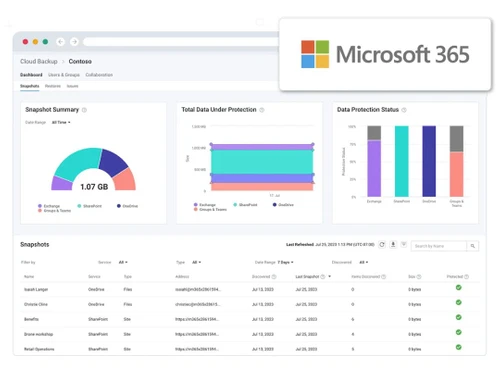
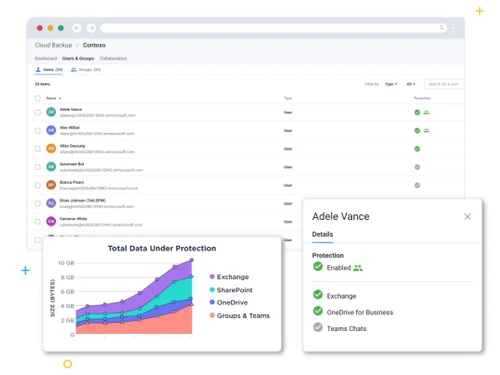
Services like SkyKick Cloud Backup specifically cater to platforms like Microsoft 365, providing automated and comprehensive backup solutions for applications such as Exchange Online and SharePoint. This type of backup is scalable, meaning it can grow with your data needs, and often includes features like advanced search for quick recovery and compliance with data privacy regulations. Overall, cloud backup is essential for maintaining data integrity and ensuring business continuity.

Why Choose Cloud Backup Software?

  • Data Protection: It ensures that all critical data, including emails, documents, and collaboration tools, are securely backed up and easily recoverable.
  • Fast Recovery Options: With advanced search and restore capabilities, users can quickly recover lost data, minimizing downtime and disruption to business operations.
  • Automated Management: The software automates backup processes, reducing the need for manual intervention and allowing IT teams to focus on other important tasks.
  • Scalability: Its solutions can easily scale to accommodate growing data needs without the need for additional hardware or infrastructure.
  • Enhanced Security: Many cloud backup services offer robust security features, including encryption and compliance with data privacy regulations like GDPR and HIPAA, ensuring data is protected against breaches.
  • Accessibility: Data stored in the cloud can be accessed from anywhere with an internet connection, providing flexibility for remote work and collaboration.
  • Cost-Effectiveness: By eliminating the need for on-premises hardware and maintenance, cloud backup solutions can be more cost-effective over time.
  • Peace of Mind: Knowing that data is securely backed up and can be restored quickly provides businesses with confidence in their data management strategies.

Benefits of Cloud Backup Software

  • Unlimited Storage and Retention: It offers unlimited storage capabilities, allowing businesses to back up as much data as needed without worrying about additional costs or limits.
  • Quick Deployment: The software can be set up rapidly without the need for physical installations or appliances, enabling businesses to start protecting their data almost immediately.
  • Auto-Scaling Storage: This feature ensures that storage automatically adjusts to accommodate growing data needs, eliminating the hassle of manual upgrades.
  • Granular Recovery Options: Users can restore specific files or data points instead of recovering entire systems, providing flexibility and precision in data recovery.
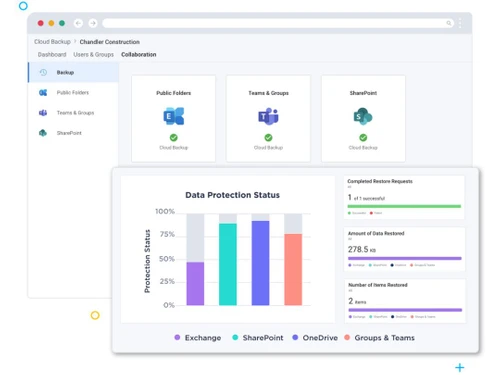
  • Centralized Management: Cloud backup solutions often provide a single dashboard for managing backups across multiple platforms and services, simplifying oversight and administration.
  • Enhanced Collaboration Support: It integrates seamlessly with collaboration tools (like Microsoft Teams), ensuring that all shared files and communications are protected.
  • Compliance with Regulations: Cloud backup solutions typically come with built-in compliance features that help organizations meet legal requirements, such as GDPR and HIPAA, without additional costs.
  • Regular Updates and Maintenance: Cloud providers manage updates and maintenance for the backup software, ensuring that users always have access to the latest features and security enhancements without extra effort.
  • Cost-Effective Solution: By eliminating the need for on-premises hardware and reducing maintenance costs, cloud backup can be a more economical choice for businesses.

Pricing of Cloud Backup

Cloud Backup price details are available on request at techjockey.com.

The pricing model is based on different parameters, including extra features, deployment type, and the total number of users. For further queries related to the product, you can contact our product team and learn more about the pricing and offers.

Read more

Cloud Backup Pricing & Plans

Looking for The Right Pricing?

Share your requirements and get a plan built around your business.

  • Define your business needs
  • Get customised pricing
  • Choose features that fit your workflow

Price Available on Request

Get personalised Cloud Backup pricing that fits your needs. Our team will connect with you.

Cloud Backup Features

  • icon_check Database Backup/Restore (Management)
    Ensures secure and efficient backup and restoration of database systems.
  • icon_check E-Mail Security
    Protects email communications from threats like phishing and malware.
  • icon_check Customer Retention
    Enhances data security and reliability to improve customer trust and loyalty.
  • icon_check Higher Profits
    Reduces downtime and data loss, leading to improved operational efficiency and profitability.

Cloud Backup Specifications

Supported Platforms
Windows Windows
Devices
Desktop Desktop
Deployment
Cloud-Based Cloud-Based
Suitable For
All Industries
Business Specific
All Businesses
Business Size
Small Business Startups Medium Business
Customer Support
Phone Email Communities
Language
English
Training Resources
Documentation

Explore the Best Alternative Solutions Similar to Your Business Size and Needs

Cloud Backup Review

4.3

Out of 5

img

Overall Rating

Based on
3 Verified Ratings

Rating Breakdown

  • Features 4.1
  • Value for Money 4.3
  • Ease of Use 4.5
  • Customer Support 4.3

93% Recommend this Product

Add Review

Techjockey Trusted Reviews from Verified Users

No reviews are currently available for Cloud Backup. Discover similar Data Security Software reviews

  • Gemalto SafeNet Tokenization

    4.6

    Whats great - Gemalto's Tokenization solution enables organizations to verify delicate information in databases, applications, stockpiling ... read more

  • Gemalto SafeNet ProtectApp

    4.7

    Whats great - This is an astounding tool for any organization. It helped our team in maintaining ownership of encryption keys at all times.... read more

  • Sophos Intercept X for Server

    4.7

    Whats great - I stumbled across Techjockey at the start of my research into best in breed vendors for a software. I didn't know what to exp... read more

Compare Cloud Backup With other Data Security Software

Products
Ratings
Pricing
Device Supported
Deployment
Supported Platforms
  • img

    Cloud Backup

  • 4.3

  • Price On Request

  • Desktop

    Mobile

  • Web based

    On Premises

  • Windows

    Mac OS

  • img

    inDefend

  • 4.3

  • Price On Request

  • Desktop

    Mobile

  • Web based

    On Premises

  • Windows

    Mac OS

  • img

    TokenEx

  • 4.5

  • Price On Request

  • Desktop

    Mobile

  • Web based

    On Premises

  • Windows

    Mac OS

  • img

    VGS Platform

  • 4.2

  • Price On Request

  • Desktop

    Mobile

  • Web based

    On Premises

  • Windows

    Mac OS

  • img

    Matters AI

  • 4.2

  • Price On Request

  • Desktop

    Mobile

  • Web based

    On Premises

  • Windows

    Mac OS

  • img

    Seclore

  • 4.2

  • Price On Request

  • Desktop

    Mobile

  • Web based

    On Premises

  • Windows

    Mac OS

  • img

    Silent Circle

  • 4.3

  • Price On Request

  • Desktop

    Mobile

  • Web based

    On Premises

  • Windows

    Mac OS

  • img

    Actifile

  • 4.2

  • Price On Request

  • Desktop

    Mobile

  • Web based

    On Premises

  • Windows

    Mac OS

(0) Product(s) selected

Cloud Backup Alternatives

See All Cloud Backup Alternatives

Available

Price on Request

Available

Price on Request

Available

Price on Request

Starting Price:

$50 /Month

Articles for Cloud Backup

See All Related Articles

What is the cost of Cloud Backup Software?

Cloud backup pricing details can be obtained upon request at techjockey.com.

Is there a Cloud Backup Software app available?

No, cloud backup does not offer apps.

Which operating systems are supported by Cloud Backup Software?

Cloud backup software generally supports Windows only.

Does Cloud Backup Software offer a free trial?

No, cloud backup does not offer a free trial.

How does Cloud Backup Software function?

Cloud backup software automatically backs up data to remote servers, ensuring secure storage and easy recovery.

Who can benefit from using Cloud Backup Software?

Cloud backup software can benefit businesses of all sizes, IT service providers, and organizations that rely on Microsoft 365 for data management, ensuring their critical data is securely protected and easily recoverable.

Is there a free demo available for Cloud Backup Software?

Yes, cloud backup provides a free demo.

Is Cloud Backup Software available for free?

No, cloud backup is not available for free.

20,000+ Software Listed

Best Price Guranteed

Free Expert Consultation

2M+ Happy Customers

Terms and Condtions

close

Users with registered businesses can purchase goods from merchants on the platform to satisfy their business needs. Users are not permitted to utilize any products acquired through the platform for resale, advertising, business, or further distribution.

For each purchase made, users will receive a Tax Invoice (or 'GST invoice') that includes specific details such as:

  • the GSTIN of the user associated with their registered business, and

  • the specified Entity Name for their business.

It should be noted that not all products are eligible for GST Invoice. Only the products displayed by participating sellers with the 'GST-based Invoice Available' callout on the product description page would qualify.

Certain goods and services are not eligible to get a GST Invoice, including items with VAS, i.e., Value Added Services (e.g., Total Mobile Protection/Assured Buyback) and those involving an exchange offer at the time of purchase.

Users must ensure the accuracy of the GSTIN, and business entity name provided for the GST Invoice. Requests for corrections into GST Invoice would not be accommodated by Techjockey.com or any Seller, and any issues arising from user-provided information are the sole responsibility of users.

Techjockey.com is not liable for the GST Invoice or any associated input tax credit. To efficiently claim an input tax credit, users should select the registered place of business address as per the GST authority's data and follow the provisions of the GST Act and rules.

To claim an input tax credit, the delivery and billing addresses must match. Furthermore, input tax credits will not be granted if the delivery address and GSTIN on the invoice are from different states. In case of incorrect GST details provided during the order placement, the order will be canceled automatically.