linkedin
Vaultize logo
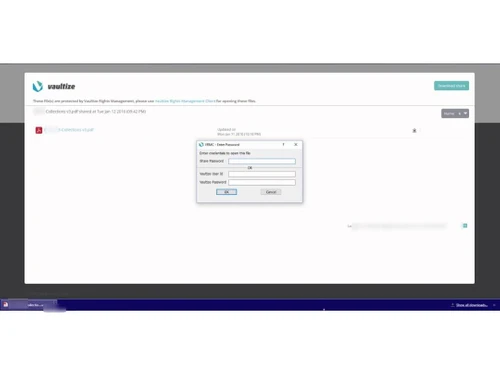
play Vaultize DRM Demo
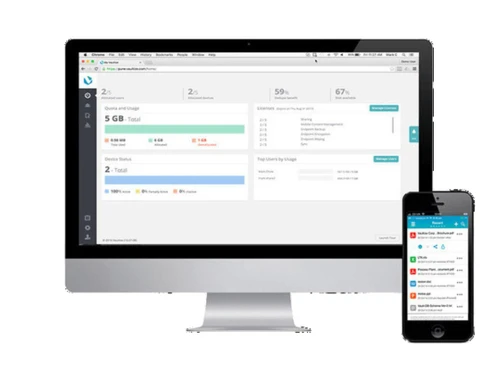
Vaultize overview
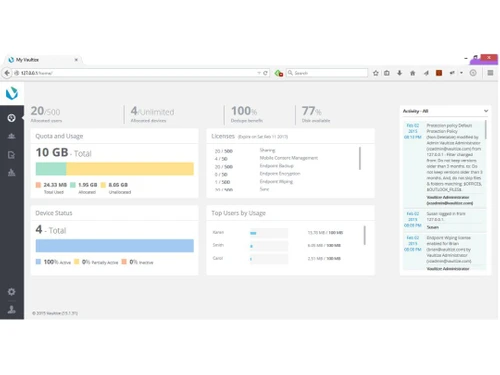
Vaultize dashboard

Vaultize

Brand: Vaultize

  • 4.2

  • 1 Rating & 1 Review

Vaultize protects, tracks, and controls enterprise files across environments with secure file sharing, digital rights management (DRM), and continuous data protection.

See More

Have you used Vaultize before?

Share your insights for better experience

Add a Review

Price Available on Request

Questions about pricing or customization? We’re here to help, just a click away.

100% Genuine
Products
Best Price
Guaranteed
Safe & Secure
Payment
  • Description

  • Pricing

  • Features

  • Specification

  • Review

  • Compare

  • Alternatives

  • FAQ

Vaultize Software Overview

What is Vaultize?

Vaultize is a comprehensive data security software platform designed for the modern enterprise. It provides a unified solution for secure file storage, access, and sharing, combined with robust data protection and control capabilities. The platform integrates several critical security functions into a single, manageable system, including built-in Digital Rights Management (DRM), Mobile Content Management (MCM), and continuous endpoint data protection. Vaultize enables organizations to empower their teams with mobile collaboration and anywhere access, similar to consumer-grade tools like Dropbox, but with the enterprise-level security, governance, and control necessary to prevent data leakage and ensure compliance.

At its core, Vaultize focuses on protecting files throughout their entire lifecycle, both inside and outside the corporate network. It achieves this through military-grade, source-side encryption and de-duplication, ensuring that data is secure from the moment it is created until it is retired. This end-to-end security model allows businesses to confidently share sensitive information with employees, partners, and customers without losing control over the data.

Why Choose Vaultize?

  • Zero Data Leakage: Vaultize is built on a foundation of end-to-end security, ensuring that files remain protected and controlled wherever they go. This significantly reduces the risk of accidental or malicious data breaches.
  • Integrated Digital Rights Management (DRM): Unlike many file-sharing solutions, Vaultize has DRM built-in. This allows administrators to track and control file access in real-time, with the ability to revoke permissions, apply watermarks, and prevent unauthorized printing or copying, even after a file has been shared.
  • Military-Grade Security: The platform employs Vault KNOX Security, which features efficient, source-side encryption and de-duplication. This ensures data is encrypted before it leaves the endpoint device, providing maximum security during transit and at rest.
  • Secure Mobile Productivity: With robust Mobile Content Management (MCM) features, Vaultize enables secure Bring-Your-Own-Device (BYOD) policies. It creates an encrypted container on mobile devices, allowing employees to access and edit corporate files without compromising security.
  • Centralized Control and Auditing: Administrators gain complete visibility and control over data through a centralized dashboard. Features like policy-based access control, geo-fencing, IP-fencing, and detailed audit trails provide the tools needed for comprehensive governance and compliance reporting.

Advanced Features of Vaultize

  • Enterprise Digital Rights Management (eDRM): Track, control, and revoke access to files anytime, anywhere. Apply policies that restrict viewing, editing, printing, and forwarding of sensitive documents.
  • Digital Watermarking: Dynamically embed user-identifiable watermarks on documents viewed through the online document viewer, deterring screenshots and unauthorized distribution.
  • Geo and IP Fencing: Enforce access policies based on the user's geographical location or IP address, ensuring that sensitive data is only accessed from trusted networks and locations.
  • Policy-Based Endpoint Backup: Automate the continuous backup of data from user endpoints (laptops, desktops) to prevent data loss from hardware failure, accidental deletion, or ransomware attacks.
  • Integration with DLP and Antivirus: Seamlessly integrates with existing Data Loss Prevention (DLP) and antivirus solutions to enhance the overall security posture and enforce corporate policies.
  • Secure Outlook & Notes Plug-ins: Allows users to send secure emails and automatically convert large attachments into secure, tracked links, preventing data loss and optimizing email server storage.

Key Capabilities of Vaultize

  • Secure File Sharing and Storage: Provides a secure alternative to consumer-grade services for storing and sharing files both internally and externally without risk of data loss.
  • Secure Repositories for Confidential Processes: Vaultize's DRM and access-control tools can be used to create secure environments for storing, distributing, and tracking sensitive documents during due diligence, M&A, or other confidential business processes.
  • FTP / MFT Replacement: Offers a more secure, user-friendly, and manageable alternative to traditional FTP and Managed File Transfer (MFT) solutions.
  • Secure Mobile Collaboration: Enables employees to securely access, edit, and share corporate files on iOS and Android devices, with features like an integrated MS Office editor and PDF annotation.
  • Endpoint Data Protection: Delivers continuous data backup from endpoints with efficient versioning and self-service restore options, providing a robust defense against data loss and ransomware.

How to Use Vaultize?

  1. Choose a Deployment Model: Select the best fit for your infrastructure, whether it's a purpose-built on-premise appliance, a private cloud deployment on your own hardware/VMs, or a fully hosted public cloud solution.
  2. Integrate and Configure: Connect Vaultize with your existing directory services like LDAP or Active Directory for seamless user management. Administrators can then define and assign granular policies for user groups, controlling access, sharing rights, and DRM settings.
  3. Deploy to Users: Users can install Vaultize clients on their desktops (Windows) and mobile devices (iOS, Android) or access the platform via a web browser.
  4. Securely Collaborate: Once set up, users can begin storing, syncing, and sharing files securely. All actions are governed by the predefined security policies, ensuring data remains protected at all times.
  5. Monitor and Audit: Administrators can use the central dashboard to monitor all file activities, generate reports, and maintain a complete audit trail for compliance purposes.

Vaultize Pricing

Vaultize pricing details are available on request on techjockey.com.

The pricing model is based on different parameters, including extra features, deployment type, and the total number of users. For further queries related to the product, you can contact our product team and learn more about the pricing and offers.

Read more

Vaultize Company Details

Founded Year:  2010

Vaultize

Director/Founders Anand A. Kekre
Company Size 1-100

Vaultize Pricing & Plans

Looking for The Right Pricing?

Share your requirements and get a plan built around your business.

  • Define your business needs
  • Get customised pricing
  • Choose features that fit your workflow

Price Available on Request

Get personalised Vaultize pricing that fits your needs. Our team will connect with you.

Vaultize Features

  • icon_check Secure Share
  • icon_check Access Control
  • icon_check Storage
  • icon_check Data Transfer Security
  • icon_check Data leakage
  • icon_check Encryption..
  • icon_check Collaboration
  • icon_check Virtual Data Rooms
  • icon_check Secure Email
  • icon_check Endpoint Protection
Vaultize Demo Video play icon

Get Vaultize Demo

Watch the demo video to explore key features, real workflows, and how the software fits your business needs.

Understand
Key Features
Personal
Demo Insights
Interactive
Demo Support

Vaultize Specification

Supported Platforms
Windows Windows iOS iOS Android Android
Devices
Desktop Desktop
Deployment
Web-Based Web-Based
Suitable For
All Industries
Business Specific
All Businesses
Business Size
Enterprises
Language
English

Explore the Best Alternative Solutions Similar to Your Business Size and Needs

Vaultize Review

4.2

Out of 5

img

Overall Rating

Based on
1 Verified Review

Rating Breakdown

  • Features 4.5
  • Value for Money 4
  • Ease of Use 5
  • Customer Support 3.5

80% Recommend this Product

Add Review

Vishal Singh

Chief Information Officer

Industry: Human Resources User since: < 6 months

4.2

Reviewed on: Aug 15, 2023

Techjockey Verified

“Vaultize Data Security”

Pros

Setting expiration dates and revoking access remotely? That's my superhero move! Vaultize DRM nails it. Perfect for keeping tabs on top-secret or time-sensitive stuff.

Cons

Now, here's the hiccup. Depending on how fast Vaultize tech support swoops in, you might hit a snag. Bugs and compatibility issues can be a headache. Do a support check before diving in.

Switched from Vaultize

Compare Vaultize With other Data Security Software

Products
Ratings
Pricing
Device Supported
Deployment
Supported Platforms
  • img

    Vaultize

  • 4.2

  • Price On Request

  • Desktop

    Mobile

  • Web based

    On Premises

  • Windows

    Mac OS

  • img

    inDefend

  • 4.3

  • Price On Request

  • Desktop

    Mobile

  • Web based

    On Premises

  • Windows

    Mac OS

  • img

    TokenEx

  • 4.5

  • Price On Request

  • Desktop

    Mobile

  • Web based

    On Premises

  • Windows

    Mac OS

  • img

    VGS Platform

  • 4.2

  • Price On Request

  • Desktop

    Mobile

  • Web based

    On Premises

  • Windows

    Mac OS

  • img

    Matters AI

  • 4.2

  • Price On Request

  • Desktop

    Mobile

  • Web based

    On Premises

  • Windows

    Mac OS

  • img

    Seclore

  • 4.2

  • Price On Request

  • Desktop

    Mobile

  • Web based

    On Premises

  • Windows

    Mac OS

  • img

    Silent Circle

  • 4.3

  • Price On Request

  • Desktop

    Mobile

  • Web based

    On Premises

  • Windows

    Mac OS

  • img

    Actifile

  • 4.2

  • Price On Request

  • Desktop

    Mobile

  • Web based

    On Premises

  • Windows

    Mac OS

  • img

    DBHawk

  • 4.5

  • Price On Request

  • Desktop

    Mobile

  • Web based

    On Premises

  • Windows

    Mac OS

(0) Product(s) selected

Vaultize Alternatives

See All Vaultize Alternatives

Available

Price on Request

Available

Price on Request

Available

Price on Request

Starting Price:

$50 /Month

Articles for Vaultize

See All Related Articles

Which operating system does Vaultize DRM support?

Vaultize DRM Data Security Software is compatible with Windows, IOS and Android operating systems.

Is there any Vaultize DRM app?

Vaultize DRM Data Security Software app is not available.

What is deployment type of Vaultize DRM?

Vaultize DRM Data Security Software supports Web-Based.

Who are the potential users of Vaultize DRM?

Vaultize DRM Data Security Software is typically used in All Industries.

Is there any free trial or demo for Vaultize DRM?

Vaultize DRM Data Security Software demo is available for free with Techjockey.com

Is Vaultize DRM free?

Vaultize DRM Data Security Software offers a free trial. However, the premium plan with advanced features available at Techjockey .

How can you download Vaultize DRM?

For Vaultize DRM Data Security Software installation, insert the given CD/USB flash storage in your system and open the Setup Wizard to get started.

How does Vaultize DRM work?

Vaultize DRM Data Security Software helps with Secure Share,Access Control,Storage and Data Transfer Security. It's a complete solution for Data leakage,Encryption..,Collaboration and Virtual Data Rooms.

What is Vaultize?

Vaultize is a data security software solution for secure file sharing, storage, and mobile collaboration that includes built-in digital rights management (DRM), mobile content management (MCM), and continuous data protection.

What is Vaultize used for?

Vaultize is used for secure file sharing, digital rights management (DRM), endpoint data protection, and replacing traditional FTP solutions to ensure files are safe and controlled throughout their entire lifecycle.

Who can use Vaultize?

Vaultize is ideal for enterprises and SMBs across industries such as finance, healthcare, legal, and manufacturing that need secure file sharing, data protection, compliance, and collaboration tools.

How does Vaultize work?

Vaultize works by providing end-to-end security for files using military-grade encryption and de-duplication at the source, along with policy-based access controls and digital rights management (DRM) to track files everywhere.

How much does Vaultize cost?

Vaultize pricing details are available on request on techjockey.com.

What deployment options are available for Vaultize?

Vaultize offers several deployment options, including a purpose-built on-premise appliance, an on-premise or private cloud installation, and a public cloud solution hosted on AWS.

Can Vaultize protect against ransomware?

Yes, Vaultize provides endpoint data protection with continuous backup and efficient versioning, which helps protect enterprise data against ransomware attacks.

How does Vaultize secure email attachments?

Vaultize secures emails by automatically converting attachments into secure, tracked links, which helps prevent data loss while also optimizing email storage.

20,000+ Software Listed

Best Price Guranteed

Free Expert Consultation

2M+ Happy Customers

Terms and Condtions

close

Users with registered businesses can purchase goods from merchants on the platform to satisfy their business needs. Users are not permitted to utilize any products acquired through the platform for resale, advertising, business, or further distribution.

For each purchase made, users will receive a Tax Invoice (or 'GST invoice') that includes specific details such as:

  • the GSTIN of the user associated with their registered business, and

  • the specified Entity Name for their business.

It should be noted that not all products are eligible for GST Invoice. Only the products displayed by participating sellers with the 'GST-based Invoice Available' callout on the product description page would qualify.

Certain goods and services are not eligible to get a GST Invoice, including items with VAS, i.e., Value Added Services (e.g., Total Mobile Protection/Assured Buyback) and those involving an exchange offer at the time of purchase.

Users must ensure the accuracy of the GSTIN, and business entity name provided for the GST Invoice. Requests for corrections into GST Invoice would not be accommodated by Techjockey.com or any Seller, and any issues arising from user-provided information are the sole responsibility of users.

Techjockey.com is not liable for the GST Invoice or any associated input tax credit. To efficiently claim an input tax credit, users should select the registered place of business address as per the GST authority's data and follow the provisions of the GST Act and rules.

To claim an input tax credit, the delivery and billing addresses must match. Furthermore, input tax credits will not be granted if the delivery address and GSTIN on the invoice are from different states. In case of incorrect GST details provided during the order placement, the order will be canceled automatically.