linkedin
Clueso logo
play Introducing the all-new Clueso! June 2024
clueso dashboard
clueso producttour

Clueso

Brand: Desklamp

  • 4.2

  • 5 Ratings

Clueso transforms screen recordings into polished product videos and step-by-step guides, streamlining content creation for SaaS teams.

See More

Have you used Clueso before?

Share your insights for better experience

Add a Review
Starting Price
$150

View plans

100% Genuine
Products
Best Price
Guaranteed
Safe & Secure
Payment
  • Description

  • Pricing

  • Features

  • Specification

  • Review

  • Compare

  • Alternatives

  • FAQ

Starting at $150

Clueso Software Overview

What is Clueso?

Clueso is a video making software that transforms basic screen recordings into polished product videos and step-by-step documentation.

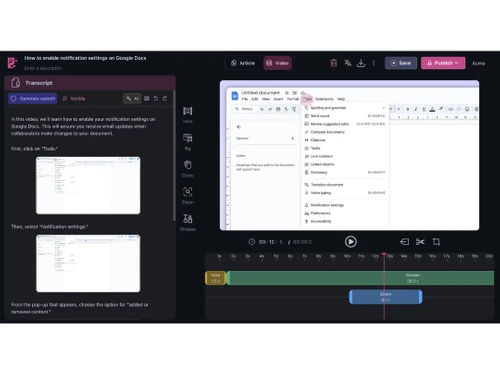
Users can record their screen or upload existing content, and Clueso AI enhances the material by generating scripts, adding professional voice overs, and applying visual effects like zooms and highlights.

It supports over 30 languages, allowing for easy translation of content to reach a global audience.

The platform is particularly useful for creating training materials, onboarding guides, and customer support documentation, streamlining the content creation process for teams and businesses.

Why Choose Clueso Software?

  • AI-Powered Content Creation: Clueso transforms screen recordings into polished videos and detailed documentation using advanced AI technology.
  • Rapid Video Production: Produce professional-grade videos in minutes, significantly reducing content creation time.
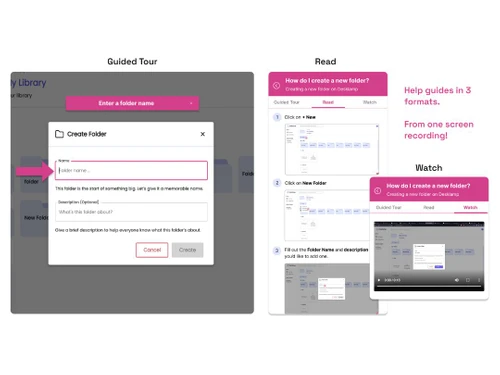
  • Automated Documentation: Automatically generate step-by-step guides with screenshots and GIFs from your recordings.
  • Multi-Language Support: Translate content into over 20 languages with a single click, enhancing global accessibility.
  • Custom Branding: Maintain brand consistency by applying personalized branding and templates across all content.
  • Integrated Knowledge Base: Host all created content on a branded, searchable knowledge base for easy access and sharing.
  • User-Friendly Interface: Designed for ease of use, Clueso requires no prior video editing experience.
  • Voiceover Capabilities: Enhance videos with natural-sounding AI-generated voice overs, improving viewer engagement.
  • Customizable Scripts: Edit AI-generated scripts to tailor content to your specific needs and audience.
  • Efficient Workflow: Streamline the content creation process, allowing teams to focus on other critical tasks.
  • Scalable Solution: Suitable for teams and businesses of all sizes, from startups to large enterprises.
  • High-Quality Output: Deliver studio-quality videos and professional documentation without the need for extensive resources.

Benefits of Clueso Software

  • Responsive Support: Benefit from Clueso highly responsive customer support team.
  • Regular Updates: Clueso continuously improves its platform, adding new features and enhancements.
  • Secure Hosting: Ensure data privacy and security with Clueso robust hosting solutions.
  • Flexible Export Options: Download, embed, or share your creations instantly in various formats.
  • Custom Templates: Utilize custom templates to maintain consistency across all content.
  • Interactive Tutorials: Create engaging tutorials that enhance user understanding and retention.
  • Enhanced Collaboration: Facilitate collaboration among team members during the content creation process.
  • Versatile Use Cases: Ideal for various applications, including onboarding, training, and customer support.
  • Cost-Effective: Offer a cost-efficient solution for creating high-quality content without the need for external agencies.
  • Analytics and Insights: Gain insights into content performance to inform future improvements.
  • Customizable Workflows: Adapt Clueso workflows to fit your organization specific processes and requirements.
  • API Access: Leverage Clueso API for custom integrations and large-scale operations.
  • Mobile Compatibility: Access and use Clueso across various devices, ensuring flexibility and convenience.
  • Continuous Learning Resources: Access a rich library of tutorials and guides to help users get started quickly.
  • Positive User Feedback: Clueso has received high ratings for accuracy, ease of use, and functionality.
  • Innovative Approach: Clueso stands out with its unique integration of video and documentation capabilities into one seamless workflow.

Clueso Pricing

Clueso price starts at $150 per month. The pricing model is based on different parameters, including extra features, deployment type, and the total number of users. For further queries related to the product, you can contact our product team and learn more about the pricing and offers.

Read more

Desklamp Company Details

Founded Year:  2020

Desklamp's vision is to help people make the most of this human knowledge. We do this by making it effortless to capture insights across everything you read, watch, or hear so that you and your team never lose ideas or learnings ever again.

Director/Founders Akash Anand, Neel Balar, Prajwal Prakash
Company Size 1-100 Employees

Clueso Pricing & Plans

Starter
Starting at $150
    • Monthly

      Monthly
      Monthly

Key Features

  • 2 users

  • 6 hours of video exports/year

  • 360 doc exports/year

  • Watermark-free exports

  • In-app chat support

Growth
Starting at $250
    • Monthly

      Monthly
      Monthly

Key Features

  • 4 users

  • 12 hours of video exports/year

  • 720 doc exports/year

  • Watermark-free exports

  • In-app chat support

Clueso Features

  • icon_check Analytics
    Track viewer engagement and performance of your content to improve effectiveness.
  • icon_check Share and Publish
    Easily share videos and guides via links or embed them on your website or help center.
  • icon_check Artificial Intelligence
    Automatically generate videos, scripts, subtitles, and translations using powerful AI tools.
  • icon_check User Access Management
    Control who can view, edit, or share your content by setting user roles and permissions.
  • icon_check Custom Domain
    Host your content on a personalized domain for a professional, branded experience.
  • icon_check Video Subtitles
    Add AI-generated subtitles to your videos to improve accessibility and comprehension.
  • icon_check Collaboration
    Work with team members in real-time to edit, review, and publish content seamlessly.
Clueso Demo Video play icon

Get Clueso Demo

Watch the demo video to explore key features, real workflows, and how the software fits your business needs.

Understand
Key Features
Personal
Demo Insights
Interactive
Demo Support

Clueso Specifications

Supported Platforms
Ubuntu Ubuntu Windows Windows MacOS MacOS Linux Linux
Devices
Desktop Desktop
Deployment
Cloud-Based Cloud-Based
Suitable For
All Industries
Business Specific
All Businesses
Business Size
Small Business Startups Medium Business Enterprises
Customer Support
Email Communities
Language
English
Training Resources
Videos
AI Features
AI Integrated

Explore the Best Alternative Solutions Similar to Your Business Size and Needs

Small Business

Designed for startups and growing businesses

Lumen5

4.7

Animoto

4.4

Movio

4.6

See More

Clueso Review

4.2

Out of 5

img

Overall Rating

Based on
5 Verified Ratings

Rating Breakdown

  • Features 3.9
  • Value for Money 4.3
  • Ease of Use 4.5
  • Customer Support 4.3

96% Recommend this Product

Add Review

Techjockey Trusted Reviews from Verified Users

No reviews are currently available for Clueso. Discover similar Video Making Software reviews

  • Designs Videomaker

    5.0

    Whats great - Quick and easy way of creating short form videos. All the content is available. Video making process is very intuitive read more

  • Wondershare Filmora

    4.3

    Whats great - It seemed to me all so familiar and straightforward, I easily processed various video files and made interesting titles and e... read more

  • Monarch Smart Cut Pro

    4.8

    Whats great - Awesome service and product! I would highly recommend Techjockey. read more

Compare Clueso With other Video Making Software

Products
Ratings
Pricing
Device Supported
Deployment
Supported Platforms
  • img

    Clueso

  • 4.2

  • Price On Request

  • Desktop

    Mobile

  • Web based

    On Premises

  • Windows

    Mac OS

  • img

    VEED

  • 4.6

  • ₹ 5988

  • Desktop

    Mobile

  • Web based

    On Premises

  • Windows

    Mac OS

  • img

    Movio

  • 4.6

  • Price On Request

  • Desktop

    Mobile

  • Web based

    On Premises

  • Windows

    Mac OS

  • img

    Renderforest

  • 4.5

  • ₹ 899

  • Desktop

    Mobile

  • Web based

    On Premises

  • Windows

    Mac OS

  • img

    D-ID

  • 4.7

  • Price On Request

  • Desktop

    Mobile

  • Web based

    On Premises

  • Windows

    Mac OS

  • img

    Designs Videomaker

  • 5

  • Price On Request

  • Desktop

    Mobile

  • Web based

    On Premises

  • Windows

    Mac OS

  • img

    Lumen5

  • 4.7

  • Price On Request

  • Desktop

    Mobile

  • Web based

    On Premises

  • Windows

    Mac OS

  • img

    Tavus

  • 4.5

  • Price On Request

  • Desktop

    Mobile

  • Web based

    On Premises

  • Windows

    Mac OS

  • img

    Quinvio AI

  • 4.6

  • Price On Request

  • Desktop

    Mobile

  • Web based

    On Premises

  • Windows

    Mac OS

  • img

    Beeble AI

  • 4.7

  • Price On Request

  • Desktop

    Mobile

  • Web based

    On Premises

  • Windows

    Mac OS

(0) Product(s) selected

Clueso Alternatives

See All Clueso Alternatives

Starting Price:

$275

Starting Price:

$12 /Month

Starting Price:

$59

Starting Price:

$18 /Month

Starting Price:

$59 /Month

Starting Price:

$47

How much does Clueso Software cost?

Clueso pricing starts from $150 per month.

Is there a mobile app available for Clueso Software?

Clueso is accessible via web browsers, a dedicated mobile app is not currently available .

Which operating systems are compatible with Clueso Software?

Clueso is compatible with Ubuntu, Linux, macOS and Windows operating systems .

Does Clueso Software offer a free trial?

Yes, Clueso provides a 7-day free trial with access to core features .

How does Clueso Software function?

Clueso transforms screen recordings into professional videos and step-by-step guides using AI-driven automation .

Who uses Clueso Software?

Clueso is utilized by SaaS companies, product teams, customer support, and training departments to create onboarding and help content .

Is a free demo available for Clueso Software?

Yes, you can book a free demo directly through Clueso's website .

Is Clueso Software available for free?

Clueso offers a 7-day free trial; ongoing use requires a paid subscription .

Can I brand Clueso content with my company logo?

Yes, Clueso supports branding options like adding your logo and using a custom domain.

20,000+ Software Listed

Best Price Guranteed

Free Expert Consultation

2M+ Happy Customers

Terms and Condtions

close

Users with registered businesses can purchase goods from merchants on the platform to satisfy their business needs. Users are not permitted to utilize any products acquired through the platform for resale, advertising, business, or further distribution.

For each purchase made, users will receive a Tax Invoice (or 'GST invoice') that includes specific details such as:

  • the GSTIN of the user associated with their registered business, and

  • the specified Entity Name for their business.

It should be noted that not all products are eligible for GST Invoice. Only the products displayed by participating sellers with the 'GST-based Invoice Available' callout on the product description page would qualify.

Certain goods and services are not eligible to get a GST Invoice, including items with VAS, i.e., Value Added Services (e.g., Total Mobile Protection/Assured Buyback) and those involving an exchange offer at the time of purchase.

Users must ensure the accuracy of the GSTIN, and business entity name provided for the GST Invoice. Requests for corrections into GST Invoice would not be accommodated by Techjockey.com or any Seller, and any issues arising from user-provided information are the sole responsibility of users.

Techjockey.com is not liable for the GST Invoice or any associated input tax credit. To efficiently claim an input tax credit, users should select the registered place of business address as per the GST authority's data and follow the provisions of the GST Act and rules.

To claim an input tax credit, the delivery and billing addresses must match. Furthermore, input tax credits will not be granted if the delivery address and GSTIN on the invoice are from different states. In case of incorrect GST details provided during the order placement, the order will be canceled automatically.