linkedin
Cross DJ logo
play Cross DJ | The Perfect DJ
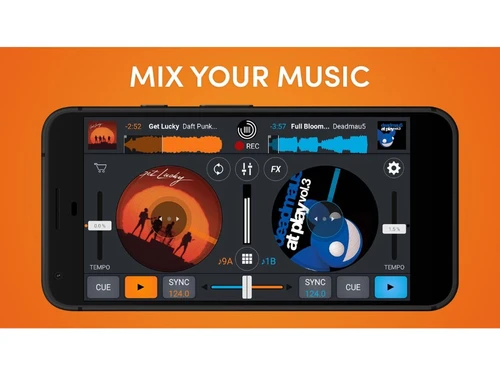
Cross DJ mix music
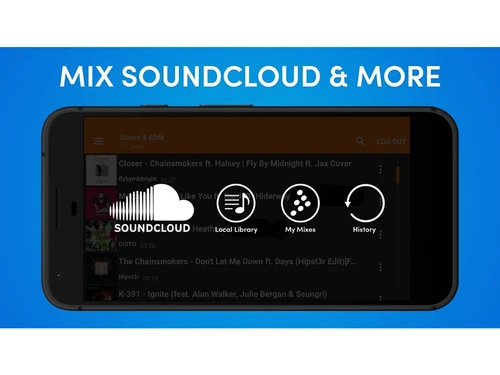
Cross DJ mix soundcloud

Cross DJ

Brand: MIXVIBES

  • 4.2

  • 3 Ratings

Cross DJ lets you easily mix, blend, and perform music tracks live using features like beat-sync, looping, effects, and a user-friendly interface on computers and mobile devices.

See More

Have you used Cross DJ before?

Share your insights for better experience

Add a Review

Price Available on Request

Questions about pricing or customization? We’re here to help, just a click away.

100% Genuine
Products
Best Price
Guaranteed
Safe & Secure
Payment
  • Description

  • Pricing

  • Features

  • Specification

  • Review

  • Compare

  • Alternatives

  • FAQ

Cross DJ Software Overview

What is Cross DJ?

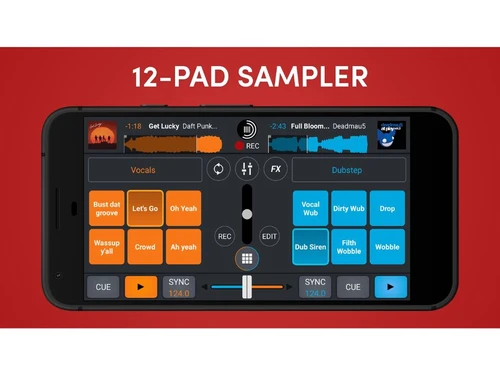
Cross DJ is a digital DJ software developed by Mixvibes, designed for both beginners and professionals to mix music seamlessly. It offers features like two virtual decks, real-time effects, beat-syncing, looping, and waveform displays for precise mixing.

The software supports various audio formats and integrates with platforms like SoundCloud, allowing users to import and sort their music library efficiently.

Cross DJ provides a versatile platform for DJs to perform live sets or practice on the go. While the free version includes ads and some limitations, it remains a valuable tool for those looking to explore DJing without initial investment.

Why Choose Cross DJ Software?

  • Dual Deck Setup: Start your mix with the essential 2-deck DJ setup.
  • Accurate BPM Detection: Precise BPM detection of your music, down to the last decimal.
  • Key Detection: Detect the key of the songs to know which tracks sound good together.
  • Auto-Gain Adjustment: Automatically equalize the levels of 2 tracks with Auto-gain.
  • Auto-Sync Feature: Sync the two tracks in the player with Auto-sync.
  • Automix Feature: Cross DJ can mix your tracks & play music automatically, from any source with Automix (playlist, album, etc.).
  • Ableton Link Support: Go live with your friends through Ableton Link.
  • Multichannel Audio Support: Multichannel audio for USB compliant multichannel sound cards.
  • External Audio Interface Support: Works with any audio interface.

Benefits of Cross DJ Software

  • Portrait Mode for Mobile Devices: Set the view to portrait mode for easier access while on the go.
  • iTunes Integration: Access your music with iTunes integration.
  • History and Record to Save Your Great DJ Sets: History and record to save your great DJ sets.
  • Automix: Tracks Keep Playing Automatically
  • Track Match: Suggest New Tracks: suggest new tracks with 3 modes (auto, history, manual).
  • Enhanced Collection Navigation: Enhanced collection (navigation History, exact & waterfall search).
  • Album Browser for Visual Search: Album browser for visual search.
  • Advanced Info Tool to Edit Any Tag Field: Advanced info tool to edit any tag field.
  • Automatic Track Quality Indicator: Automatic track quality indicator.

Cross DJ Pricing

Cross DJ price details are available on request at techjockey.com.

The pricing model is based on different parameters, including extra features, deployment type, and the total number of users. For further queries related to the product, you can contact our product team and learn more about the pricing and offers.

Read more

MIXVIBES Company Details

Founded Year:  2003

Creative music apps for DJs and producers

Director/Founders Eric Guez
Company Size 1-100 Employees

Cross DJ Pricing & Plans

Looking for The Right Pricing?

Share your requirements and get a plan built around your business.

  • Define your business needs
  • Get customised pricing
  • Choose features that fit your workflow

Price Available on Request

Get personalised Cross DJ pricing that fits your needs. Our team will connect with you.

Cross DJ Features

  • icon_check Pro-Grade Mixing Engine
    Ensures smooth, low-latency audio processing for flawless mixing.
  • icon_check Beatmatching & Sync
    Automatically matches BPM and aligns beats for seamless track transitions.
  • icon_check Audio Waveforms
    Displays detailed waveforms side-by-side to help you mix tracks precisely.
  • icon_check Audio FX & Filters
    Lets you add effects like reverb, delay, phaser, and flanger to enhance your sound.
  • icon_check External Mixer & Soundcard Suppor
    Allows routing audio through professional hardware setups.
  • icon_check Automix Mode
    Automatically mixes your tracks without manual intervention.
  • icon_check Hot Cues & Loops
    Enables quick setting of cue points and looping parts of a track during a live mix.
Cross DJ Demo Video play icon

Get Cross DJ Demo

Watch the demo video to explore key features, real workflows, and how the software fits your business needs.

Understand
Key Features
Personal
Demo Insights
Interactive
Demo Support

Cross DJ Specifications

Supported Platforms
iOS iOS Android Android
Devices
Mobile Mobile Tablet Tablet iPad iPad
Deployment
Perpetual Perpetual
Suitable For
All Industries
Business Specific
All Businesses
Business Size
Small Business Startups Medium Business Enterprises SMBs SMEs MSMBs MSMEs
Customer Support
Email Communities
Language
English
Training Resources
Videos

Explore the Best Alternative Solutions Similar to Your Business Size and Needs

Small Business

Designed for startups and growing businesses

YOUDJ

4.2

DJUCED

4.2

See More

Cross DJ Review

4.2

Out of 5

img

Overall Rating

Based on
3 Verified Ratings

Rating Breakdown

  • Features 4.1
  • Value for Money 4.5
  • Ease of Use 4.5
  • Customer Support 4

83% Recommend this Product

Add Review

Be the First to Review

This product has no reviews yet. Be the first to leave your feedback.

Add Review

Compare Cross DJ With other DJ Software

Products
Ratings
Pricing
Device Supported
Deployment
Supported Platforms
  • img

    Cross DJ

  • 4.2

  • Price On Request

  • Desktop

    Mobile

  • Web based

    On Premises

  • Windows

    Mac OS

  • img

    MixMeister Fusion

  • 4.6

  • ₹ 17074

  • Desktop

    Mobile

  • Web based

    On Premises

  • Windows

    Mac OS

  • img

    VirtualDJ

  • 4.4

  • Price On Request

  • Desktop

    Mobile

  • Web based

    On Premises

  • Windows

    Mac OS

  • img

    rekordbox

  • 4.5

  • Price On Request

  • Desktop

    Mobile

  • Web based

    On Premises

  • Windows

    Mac OS

  • img

    Serato DJ

  • 4.4

  • Price On Request

  • Desktop

    Mobile

  • Web based

    On Premises

  • Windows

    Mac OS

  • img

    Zulu DJ Software

  • 4.5

  • Price On Request

  • Desktop

    Mobile

  • Web based

    On Premises

  • Windows

    Mac OS

  • img

    PCDJ DEX 3

  • 4.5

  • Price On Request

  • Desktop

    Mobile

  • Web based

    On Premises

  • Windows

    Mac OS

  • img

    DJ Studio

  • 4.4

  • Price On Request

  • Desktop

    Mobile

  • Web based

    On Premises

  • Windows

    Mac OS

  • img

    YOUDJ

  • 4.2

  • Price On Request

  • Desktop

    Mobile

  • Web based

    On Premises

  • Windows

    Mac OS

  • img

    Djay

  • 4.5

  • Price On Request

  • Desktop

    Mobile

  • Web based

    On Premises

  • Windows

    Mac OS

  • img

    TRAKTOR DJ

  • 4.3

  • Price On Request

  • Desktop

    Mobile

  • Web based

    On Premises

  • Windows

    Mac OS

(0) Product(s) selected

Cross DJ Alternatives

See All Cross DJ Alternatives

Djay

4.5

Available

Price on Request

Available

Price on Request

Available

Price on Request

Available

Price on Request

How much does Cross DJ Software cost?

Cross DJ pricing details can be obtained upon request at techjockey.com.

Is there a mobile app available for Cross DJ Software?

Yes, Cross DJ is available as a mobile app for iOS and Android devices.

Which operating systems are compatible with Cross DJ Software?

Cross DJ is compatible with iOS and Android.

Does Cross DJ Software offer a free trial?

Yes, Cross DJ free version with limited features is available for trial.

How does Cross DJ Software function?

ICross DJ allows users to mix tracks using dual decks, beat-sync, loops, and effects for live or recorded DJ sets.

Who uses Cross DJ Software?

Both beginner and professional DJs use Cross DJ for music mixing and live performances.

Is a free demo available for Cross DJ Software?

Yes, Cross DJ free version acts as a demo with some limitations.

Is Cross DJ Software available for free?

Yes, a free version of Cross DJ is available with basic features.

Can Cross DJ Software connect with external DJ controllers?

Yes, Cross DJ supports many popular MIDI controllers for enhanced control.

Does Cross DJ support streaming services like SoundCloud?

Yes, Cross DJ integrates with SoundCloud to access and mix online tracks.

Can you record mixes directly within Cross DJ?

Yes, Cross DJ allows you to record your DJ sets within the software.

20,000+ Software Listed

Best Price Guranteed

Free Expert Consultation

2M+ Happy Customers

Terms and Condtions

close

Users with registered businesses can purchase goods from merchants on the platform to satisfy their business needs. Users are not permitted to utilize any products acquired through the platform for resale, advertising, business, or further distribution.

For each purchase made, users will receive a Tax Invoice (or 'GST invoice') that includes specific details such as:

  • the GSTIN of the user associated with their registered business, and

  • the specified Entity Name for their business.

It should be noted that not all products are eligible for GST Invoice. Only the products displayed by participating sellers with the 'GST-based Invoice Available' callout on the product description page would qualify.

Certain goods and services are not eligible to get a GST Invoice, including items with VAS, i.e., Value Added Services (e.g., Total Mobile Protection/Assured Buyback) and those involving an exchange offer at the time of purchase.

Users must ensure the accuracy of the GSTIN, and business entity name provided for the GST Invoice. Requests for corrections into GST Invoice would not be accommodated by Techjockey.com or any Seller, and any issues arising from user-provided information are the sole responsibility of users.

Techjockey.com is not liable for the GST Invoice or any associated input tax credit. To efficiently claim an input tax credit, users should select the registered place of business address as per the GST authority's data and follow the provisions of the GST Act and rules.

To claim an input tax credit, the delivery and billing addresses must match. Furthermore, input tax credits will not be granted if the delivery address and GSTIN on the invoice are from different states. In case of incorrect GST details provided during the order placement, the order will be canceled automatically.