linkedin
UltraMixer logo
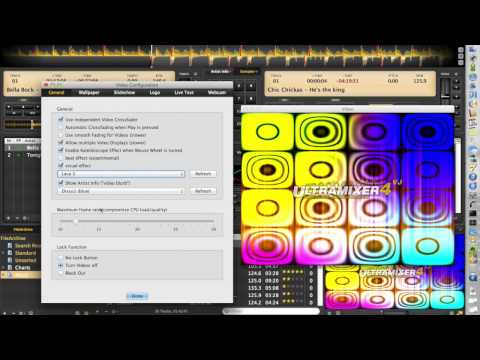
play UltraMixer-4.1-Live-Visualisations
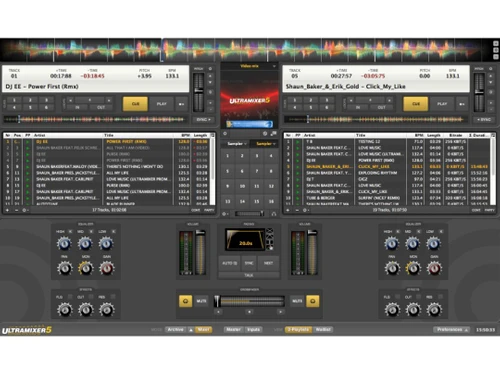
ultramixer dashboard
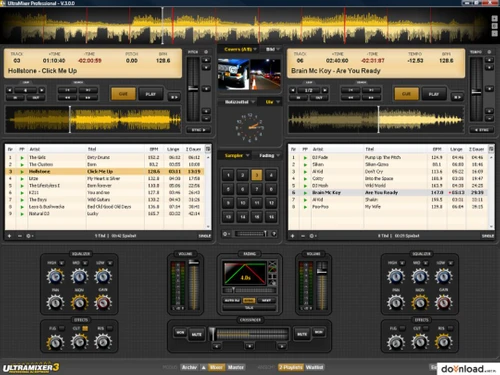
ultramixer panel

UltraMixer

Brand: onexip

  • 4.4

  • 3 Ratings

UltraMixer is a DJ software that allows DJs to mix music, videos, and karaoke tracks.

See More

Have you used UltraMixer before?

Share your insights for better experience

Add a Review
Starting Price
€4995

View plans

100% Genuine
Products
Best Price
Guaranteed
Safe & Secure
Payment
  • Description

  • Pricing

  • Features

  • Specification

  • Review

  • Compare

  • Alternatives

  • FAQ

Starting at €4,995

UltraMixer Software Overview

What is UltraMixer?

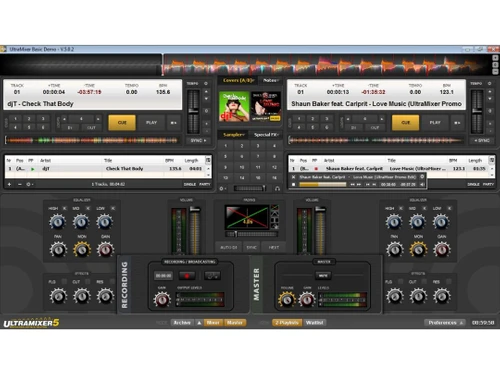
UltraMixer is a mixing software that allows users to create seamless mixes and engaging performances. Its intuitive interface featuring two channels, a mixer, and a library provides DJs with a seamless platform to store, organize, and play their tracks easily. From the crossfader to the equalizer and cue controls, the DJ software facilitates a smooth transition for users transitioning from hardware mixers to software-based solutions.

It offers a well-organized library in a convenient tree structure that allows DJs to navigate and manage their extensive collection of tracks effortlessly. Whether organizing music by genre, artist, or BPM, it will enable users to customize their library organization to suit their preferences and workflow.

Why Choose UltraMixer Software?

  • The DJ software allows you to manage your music library, create playlists, and edit ID3 tags and BPM values within the file archive.
  • It enables you to stream your mixing sessions online to connect with your audience.
  • The platform allows you to browse and access your music library conveniently with the built-in file explorer.
  • Using the sample player empowers you to incorporate up to 16 different sound samples into your mixes.
  • The DJ software allows you to enhance transitions with digital effects, use the audio sampler to trigger sound samples, and adjust speed like a DJ.

Benefits of UltraMixer Platform

  • The DJ software allows you to automatically create playlists based on matching ID3 tags in your file archive.
  • It enables you to control the volume and gain of all four players simultaneously with a single click.
  • The platform allows you to automatically play background music with perfect transitions using the Auto DJ feature.
  • It allows you to easily create and access notes to guide your audience or remember schedules.
  • The DJ software lets you play official music videos or display karaoke lyrics during your performance.

Pricing of UltraMixer DJ Software

UltraMixer price in India starts from €4995 at techjockey.com. It comes with multiple pricing plans and caters to a diverse customer base.

For subscription-related details and offers on premium packages, please request a call back from our product experts.

Read more

onexip Company Details

Founded Year:  2017

onexip

Director/Founders onexip
Company Size 1-100 Employees

UltraMixer Pricing & Plans

HOME
Key Features
  • Two Player Mode
  • Mini-Waveforms & Big Waveform
  • FileArchive with ID3 Tags & BPM Values
  • Various Search Methods
  • Waitlist & Wishlist
  • Import from iTunes, Apple Music & M3U
  • Export Playlists to M3U & CSV
  • Pre-listen to Songs
  • AutoDJ, Crossfader & Equalizer, 16 Audio Samples
  • Record your own Music Mixes
Starting at €4995
    • Licenses

      Licenses
      Licenses

Key Features

  • Two Player Mode

  • Mini-Waveforms & Big Waveform

  • FileArchive with ID3 Tags & BPM Values

  • Various Search Methods

  • Waitlist & Wishlist

  • Import from iTunes, Apple Music & M3U

  • Export Playlists to M3U & CSV

  • Pre-listen to Songs

  • AutoDJ, Crossfader & Equalizer, 16 Audio Samples

  • Record your own Music Mixes

UltraMixer Features

  • icon_check Big Waveform
    Provides a detailed view of the currently playing track for precise mixing.
  • icon_check Mini-Waveforms
    Offer a compact view of waveforms in each deck for easy track comparison.
  • icon_check Two Player Mode
    Allows you to play and mix between two tracks simultaneously.
  • icon_check Waitlist
    Lets you queue up songs for upcoming playback.
  • icon_check Pre-listening
    Enables you to privately listen to a track before mixing it in.
  • icon_check Crossfader & Equalizer
    Controls the blend between two tracks and adjusts their tonal balance.
  • icon_check Master Equalizer
    Fine - tunes the overall sound output of your mix.
  • icon_check BPM Analysis
    Automatically detects the tempo of your tracks for seamless beatmatching.
  • icon_check Search Methods
    Provide various ways to find specific songs in your music library.
  • icon_check Widgets Tool
    Customizes the user interface with additional tools and information panels.
UltraMixer Demo Video play icon

Get UltraMixer Demo

Watch the demo video to explore key features, real workflows, and how the software fits your business needs.

Understand
Key Features
Personal
Demo Insights
Interactive
Demo Support

UltraMixer Specifications

Supported Platforms
Windows Windows iOS iOS Android Android MacOS MacOS
Devices
Desktop Desktop Mobile Mobile
Deployment
Perpetual Perpetual
Suitable For
All Industries
Business Specific
All Businesses
Business Size
Small Business Startups Medium Business Enterprises
Customer Support
Email Communities
Language
Nederlands English
Training Resources
Videos

Explore the Best Alternative Solutions Similar to Your Business Size and Needs

Small Business

Designed for startups and growing businesses

YOUDJ

4.2

DJUCED

4.2

See More

UltraMixer Review

4.4

Out of 5

img

Overall Rating

Based on
3 Verified Ratings

Rating Breakdown

  • Features 4
  • Value for Money 4.5
  • Ease of Use 4.5
  • Customer Support 4.6

93% Recommend this Product

Add Review

Be the First to Review

This product has no reviews yet. Be the first to leave your feedback.

Add Review

Compare UltraMixer With other DJ Software

Products
Ratings
Pricing
Device Supported
Deployment
Supported Platforms
  • img

    UltraMixer

  • 4.4

  • Price On Request

  • Desktop

    Mobile

  • Web based

    On Premises

  • Windows

    Mac OS

  • img

    MixMeister Fusion

  • 4.6

  • ₹ 17074

  • Desktop

    Mobile

  • Web based

    On Premises

  • Windows

    Mac OS

  • img

    VirtualDJ

  • 4.4

  • Price On Request

  • Desktop

    Mobile

  • Web based

    On Premises

  • Windows

    Mac OS

  • img

    rekordbox

  • 4.5

  • Price On Request

  • Desktop

    Mobile

  • Web based

    On Premises

  • Windows

    Mac OS

  • img

    Serato DJ

  • 4.4

  • Price On Request

  • Desktop

    Mobile

  • Web based

    On Premises

  • Windows

    Mac OS

  • img

    Zulu DJ Software

  • 4.5

  • Price On Request

  • Desktop

    Mobile

  • Web based

    On Premises

  • Windows

    Mac OS

  • img

    PCDJ DEX 3

  • 4.5

  • Price On Request

  • Desktop

    Mobile

  • Web based

    On Premises

  • Windows

    Mac OS

  • img

    DJ Studio

  • 4.4

  • Price On Request

  • Desktop

    Mobile

  • Web based

    On Premises

  • Windows

    Mac OS

  • img

    YOUDJ

  • 4.2

  • Price On Request

  • Desktop

    Mobile

  • Web based

    On Premises

  • Windows

    Mac OS

  • img

    Djay

  • 4.5

  • Price On Request

  • Desktop

    Mobile

  • Web based

    On Premises

  • Windows

    Mac OS

  • img

    TRAKTOR DJ

  • 4.3

  • Price On Request

  • Desktop

    Mobile

  • Web based

    On Premises

  • Windows

    Mac OS

(0) Product(s) selected

UltraMixer Alternatives

See All UltraMixer Alternatives

Djay

4.5

Available

Price on Request

Available

Price on Request

Available

Price on Request

Available

Price on Request

Available

Price on Request

Which operating system does UltraMixer support?

UltraMixer is compatible with Ubuntu, Windows, MacOS, and Linux operating systems.

Is there any UltraMixer app?

UltraMixer is available for Android and iOS app users.

What is the deployment type of UltraMixer software?

UltraMixer supports web-based deployment.

How much does UltraMixer cost?

UltraMixer price starts from €4995 at techjockey.com.

Who are the potential users of UltraMixer?

UltraMixer can help DJs to mix music and videos at the same time.

Does UltraMixer offer a free demo?

Yes, a demo of UltraMixer is available at techjockey.com.

Is UltraMixer free?

Yes, UltraMixer is available for free.

Does UltraMixer offer a free trial?

Yes, UltraMixer offers a free trial to allow users to test the software before committing to a subscription.

How can you download UltraMixer software?

UltraMixer is a web-based application that does not need to be downloaded. So, just open the setup wizard and get started.

How does UltraMixer software work?

UltraMixer is a music software for DJs and dancing schools, including a customizable interface, playlist mode, and iTunes mixing.

20,000+ Software Listed

Best Price Guranteed

Free Expert Consultation

2M+ Happy Customers

Terms and Condtions

close

Users with registered businesses can purchase goods from merchants on the platform to satisfy their business needs. Users are not permitted to utilize any products acquired through the platform for resale, advertising, business, or further distribution.

For each purchase made, users will receive a Tax Invoice (or 'GST invoice') that includes specific details such as:

  • the GSTIN of the user associated with their registered business, and

  • the specified Entity Name for their business.

It should be noted that not all products are eligible for GST Invoice. Only the products displayed by participating sellers with the 'GST-based Invoice Available' callout on the product description page would qualify.

Certain goods and services are not eligible to get a GST Invoice, including items with VAS, i.e., Value Added Services (e.g., Total Mobile Protection/Assured Buyback) and those involving an exchange offer at the time of purchase.

Users must ensure the accuracy of the GSTIN, and business entity name provided for the GST Invoice. Requests for corrections into GST Invoice would not be accommodated by Techjockey.com or any Seller, and any issues arising from user-provided information are the sole responsibility of users.

Techjockey.com is not liable for the GST Invoice or any associated input tax credit. To efficiently claim an input tax credit, users should select the registered place of business address as per the GST authority's data and follow the provisions of the GST Act and rules.

To claim an input tax credit, the delivery and billing addresses must match. Furthermore, input tax credits will not be granted if the delivery address and GSTIN on the invoice are from different states. In case of incorrect GST details provided during the order placement, the order will be canceled automatically.