linkedin
DJUCED logo
play DJUCED | Know your gear | 04 Customize your DJUCED Interface
djuced dashboard
djuced settings

DJUCED

Brand: Guillemot

  • 4.2

  • 1 Rating & 1 Review

DJUCED offers a versatile and professional DJ software experience with customizable interfaces.

See More

Have you used DJUCED before?

Share your insights for better experience

Add a Review
Starting Price
€6

View plans

100% Genuine
Products
Best Price
Guaranteed
Safe & Secure
Payment
  • Description

  • Pricing

  • Features

  • Specification

  • Review

  • Compare

  • Alternatives

  • FAQ

Starting at €6

DJUCED Software Overview

What is DJUCED?

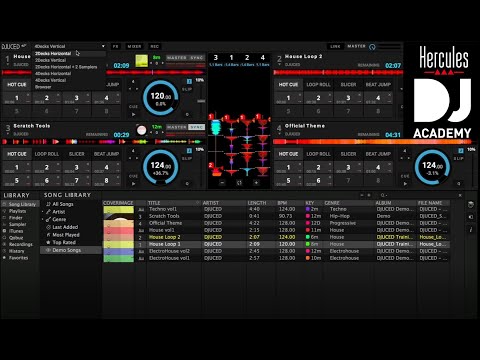
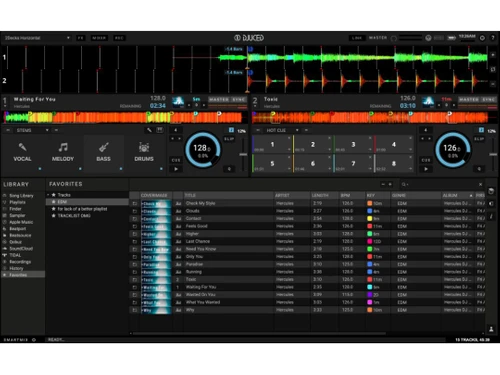
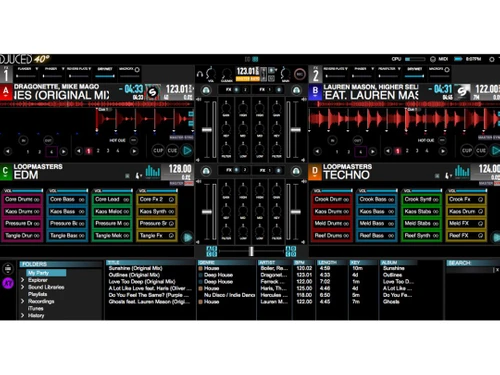
DJUCED is a leading DJ software option renowned for its versatility and professionalism, catering to DJs of varying skill levels. The software has a modular interface that adapts to individual preferences, allowing users to tailor the layout to their needs. This customizable feature enhances the DJing experience by providing an intuitive workflow. DJs can arrange elements according to their workflow preferences, ensuring seamless navigation and easy access to essential tools and features.

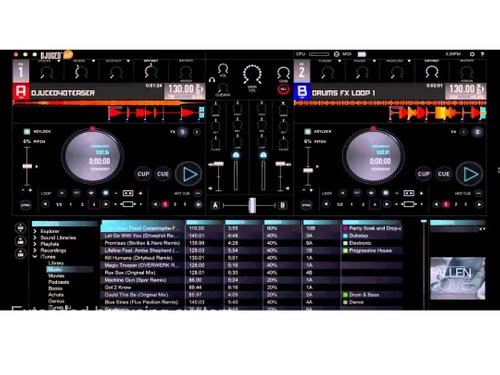
One of the hallmark features of DJUCED is its comprehensive suite of effects, designed to elevate mixes to new heights of creativity and precision. DJs have many tools to remix and manipulate tracks with finesse, from loops and hot cues to beat jumps and multilayer samplers. This extensive selection empowers DJs to experiment with different sounds and textures, adding depth and dynamism to their performances. With advanced synchronization capabilities extending to four decks, DJs can explore innovative mixing techniques and push the boundaries of traditional DJing.

DJUCED also introduces additional modes like slip, quantize, and DJUCED STEMS. These modes enable DJs to enhance their mixing prowess, facilitating seamless transitions and precise timing. Whether seamlessly blending tracks or layering intricate beats, DJUCED provides the tools and features necessary to elevate DJ performances to a professional level. By empowering DJs with creative freedom and technical precision, DJUCED remains a top choice for DJs seeking a comprehensive and intuitive software solution.

Why Choose DJUCED Software?

  • Customizable Interface: Personalize the interface according to your preferences for a tailored and intuitive DJing experience.
  • Professional-grade Effects: Access a comprehensive suite of effects and tools to elevate your mixes and performances to the next level.
  • Advanced Synchronization: Utilize advanced synchronization capabilities to synchronize up to four decks and explore innovative mixing techniques.
  • Effortless Recording and Sharing: Record and share your sets effortlessly on popular platforms and connect with your audience.
  • Transparent Pricing: Enjoy access to all standard functionalities without hidden upgrade costs, ensuring a transparent and cost-effective DJing solution.
  • User-Friendly Design: Benefit from a user-friendly design with intuitive features and functions to enhance your DJing workflow and creativity.

Benefits of using DJUCED Platform

  • Modular Interface Customization: Tailor the interface to suit your preferences, ensuring a personalized and intuitive workflow for seamless DJing experiences.
  • Comprehensive Effects Suite: Access a full suite of effects to remix and manipulate tracks creatively and precisely.
  • Advanced Synchronization Capabilities: Sync up to four decks with different modes, enabling DJs to push the boundaries of traditional mixing techniques.
  • Effortless Recording and Sharing: Record your sets and easily share them on platforms like Mixcloud or Soundcloud, allowing you to showcase your talent and connect with your audience effortlessly.
  • No Hidden Upgrade Costs: Enjoy access to all standard functionalities without limitations or hidden upgrade costs, ensuring a seamless and affordable DJing experience.
  • User-Friendly Features: Benefit from user-friendly features for enhanced performance and creativity.

Pricing of DJUCED DJ Software

DJUCED pricing is available on request at techjockey.com.

The pricing model is based on different parameters, including extra features, deployment type, and total users. For further queries related to the DJUCED, you can contact our DJUCED team and learn more about the pricing and offers.

Read more

Guillemot Company Details

Founded Year:  1984

Guillemot Corporation designs and manufactures interactive entertainment hardware and accessories.

Director/Founders Claude Michel Marcel Guillemot
Company Size 101-500 Employees

DJUCED Pricing & Plans

Pro
Starting at €90
    • Licenses (OneTime)

      Licenses (OneTime)
      Licenses (OneTime)

Key Features

  • Access all DJUCED Standard features

  • Remap Hercules controllers

  • Unlock the software without controller

  • Day mode /AutoHotcue

  • Extra FX + Filter FX/VJing : Videoloops

Pro+
Starting at €6
    • Monthly

      Monthly
      Monthly

Key Features

  • Access all DJUCED Standard features

  • Remap Hercules controllers

  • Unlock the software without controller

  • Day mode /AutoHotcue

  • Extra FX + Filter FX/VJing : Videoloops

DJUCED Features

  • icon_check Dashboard
    Access a centralized hub for essential controls and settings, streamlining your DJing experience.
  • icon_check System Bar
    Stay informed and in control with a dedicated system bar displaying key information and functions.
  • icon_check Layout Selection
    Customize your workspace with various layout options to suit your workflow preferences.
  • icon_check Master Level Output
    Maintain precise control over your master output level for optimal sound quality and balance.
  • icon_check MIDI Control
    Harness the power of MIDI control to manipulate your DJ software and hardware seamlessly.
  • icon_check Battery Level Status
    Monitor your device's battery status directly within the software for uninterrupted performance.
  • icon_check Full Screen Display
    Immerse yourself in your DJing environment with a clutter-free full-screen display.
  • icon_check Effects Rack
    Explore a diverse range of effects with an intuitive effects rack, enhancing your mixes with creativity and flair.
  • icon_check MacroFX Function
    Streamline your mixing process with the MacroFX function, offering customizable and efficient effects chains.
  • icon_check TransDelay Effect
    Experiment with innovative sound manipulation using the TransDelay effect, adding depth and texture to your mixes.
DJUCED Demo Video play icon

Get DJUCED Demo

Watch the demo video to explore key features, real workflows, and how the software fits your business needs.

Understand
Key Features
Personal
Demo Insights
Interactive
Demo Support

DJUCED Specifications

Supported Platforms
Windows Windows iOS iOS Android Android MacOS MacOS
Devices
Desktop Desktop Mobile Mobile
Deployment
Perpetual Perpetual
Suitable For
All Industries
Business Specific
All Businesses
Business Size
Small Business Startups Medium Business Enterprises
Customer Support
Email Communities
Language
English français
Training Resources
Documentation Videos

Explore the Best Alternative Solutions Similar to Your Business Size and Needs

Small Business

Designed for startups and growing businesses

YOUDJ

4.2

Mixxx

4.3

See More

DJUCED Review

4.2

Out of 5

img

Overall Rating

Based on
1 Verified Review

Rating Breakdown

  • Features 4
  • Value for Money 4
  • Ease of Use 4
  • Customer Support 5

80% Recommend this Product

Add Review

Aman

Founder

Industry: Computer Networking

4.2

Reviewed on: Jan 23, 2025

Techjockey Verified

“Fun and Easy to Learn for Hobby DJs”

I've always wanted to try DJing, and DJUCED made it incredibly easy to get started. The tutorials are helpful, and the software is intuitive enough to learn the basics quickly. I enjoy mixing my own tracks and experimenting with the effects. It's a great way to have fun and express my creativity.

Pros

User-friendly interface, affordable, good selection of built-in effects, easy to learn and use, supports a variety of controllers.

Cons

Sound quality might not be as professional as some high-end DJ software, limited advanced features compared to professional tools.

Compare DJUCED With other DJ Software

Products
Ratings
Pricing
Device Supported
Deployment
Supported Platforms
  • img

    DJUCED

  • 4.2

  • Price On Request

  • Desktop

    Mobile

  • Web based

    On Premises

  • Windows

    Mac OS

  • img

    MixMeister Fusion

  • 4.6

  • ₹ 17074

  • Desktop

    Mobile

  • Web based

    On Premises

  • Windows

    Mac OS

  • img

    VirtualDJ

  • 4.4

  • Price On Request

  • Desktop

    Mobile

  • Web based

    On Premises

  • Windows

    Mac OS

  • img

    rekordbox

  • 4.5

  • Price On Request

  • Desktop

    Mobile

  • Web based

    On Premises

  • Windows

    Mac OS

  • img

    Serato DJ

  • 4.4

  • Price On Request

  • Desktop

    Mobile

  • Web based

    On Premises

  • Windows

    Mac OS

  • img

    Zulu DJ Software

  • 4.5

  • Price On Request

  • Desktop

    Mobile

  • Web based

    On Premises

  • Windows

    Mac OS

  • img

    PCDJ DEX 3

  • 4.5

  • Price On Request

  • Desktop

    Mobile

  • Web based

    On Premises

  • Windows

    Mac OS

  • img

    DJ Studio

  • 4.4

  • Price On Request

  • Desktop

    Mobile

  • Web based

    On Premises

  • Windows

    Mac OS

  • img

    YOUDJ

  • 4.2

  • Price On Request

  • Desktop

    Mobile

  • Web based

    On Premises

  • Windows

    Mac OS

  • img

    Djay

  • 4.5

  • Price On Request

  • Desktop

    Mobile

  • Web based

    On Premises

  • Windows

    Mac OS

  • img

    TRAKTOR DJ

  • 4.3

  • Price On Request

  • Desktop

    Mobile

  • Web based

    On Premises

  • Windows

    Mac OS

(0) Product(s) selected

DJUCED Alternatives

See All DJUCED Alternatives

Djay

4.5

Available

Price on Request

Available

Price on Request

Available

Price on Request

Available

Price on Request

Which operating system does DJUCED support?

DJUCED is compatible with Windows and MacOS device systems.

Is there any DJUCED App?

DJUCED Software is not available for Android and iOS devices.

What is the deployment type of DJUCED?

DJUCED supports web-based deployment.

How much does DJUCED cost?

DJUCED is available for free on techjockey.com.

Who are the potential users of DJUCED?

DJUCED caters to DJs of all skill levels, from beginners to professionals, seeking a versatile and intuitive DJ software solution for their performances and mixes.

Is there any free demo for DJUCED Software?

DJUCED platform demo is available with techjockey.com.

Is DJUCED available for Free?

Yes, DJUCED is available for free.

Does DJUCED Offer a Free Trial?

Yes, DJUCED offers a free trial.

How can you download DJUCED?

There is no need for software installation since DJUCED supports web-based deployment. So just open the setup wizard and get started.

How does DJUCED Work?

DJUCED utilizes a modular interface, comprehensive effects suite, and advanced synchronization capabilities to provide DJs with a personalized and intuitive workflow, enhancing creativity and performance.

20,000+ Software Listed

Best Price Guranteed

Free Expert Consultation

2M+ Happy Customers

Terms and Condtions

close

Users with registered businesses can purchase goods from merchants on the platform to satisfy their business needs. Users are not permitted to utilize any products acquired through the platform for resale, advertising, business, or further distribution.

For each purchase made, users will receive a Tax Invoice (or 'GST invoice') that includes specific details such as:

  • the GSTIN of the user associated with their registered business, and

  • the specified Entity Name for their business.

It should be noted that not all products are eligible for GST Invoice. Only the products displayed by participating sellers with the 'GST-based Invoice Available' callout on the product description page would qualify.

Certain goods and services are not eligible to get a GST Invoice, including items with VAS, i.e., Value Added Services (e.g., Total Mobile Protection/Assured Buyback) and those involving an exchange offer at the time of purchase.

Users must ensure the accuracy of the GSTIN, and business entity name provided for the GST Invoice. Requests for corrections into GST Invoice would not be accommodated by Techjockey.com or any Seller, and any issues arising from user-provided information are the sole responsibility of users.

Techjockey.com is not liable for the GST Invoice or any associated input tax credit. To efficiently claim an input tax credit, users should select the registered place of business address as per the GST authority's data and follow the provisions of the GST Act and rules.

To claim an input tax credit, the delivery and billing addresses must match. Furthermore, input tax credits will not be granted if the delivery address and GSTIN on the invoice are from different states. In case of incorrect GST details provided during the order placement, the order will be canceled automatically.