linkedin
Daemon Tools Lite logo
play DAEMON Tools Pro 8. Overview
Daemon Tools
Daemon Tools

Daemon Tools Lite

Brand: Disc Soft

  • 4.1

  • 4 Ratings

Daemon Tools Lite allows users to create and manage virtual drives by emulating CD/DVD/Blu-ray drives.

See More

Have you used Daemon Tools Lite before?

Share your insights for better experience

Add a Review
Starting Price
$5

View plans

100% Genuine
Products
Best Price
Guaranteed
Safe & Secure
Payment
  • Description

  • Pricing

  • Features

  • Specification

  • Review

  • Compare

  • Alternatives

  • FAQ

Starting at $5

Daemon Tools Lite Software Overview

What is Daemon Tools Lite?

Daemon Tools Lite is a cloud storage primarily used for creating and managing virtual drives on a computer. It allows users to mount disk images like ISO, IMG, and other formats as virtual drives, eliminating the need for physical media like CDs or DVDs. The software enables easy access to the contents of these images without requiring them to be burned to physical discs.

While it is not directly focused on cloud services, Daemon Tools Lite can integrate with cloud storage by mounting cloud-based disk images. Users can manage their virtual storage and access files stored in the cloud using the software's virtual drive functionality. The software is lightweight, user-friendly, and suitable for both casual and advanced users. It offers a free version with essential features, with premium options providing advanced capabilities.

Why Choose Daemon Tools Lite Software?

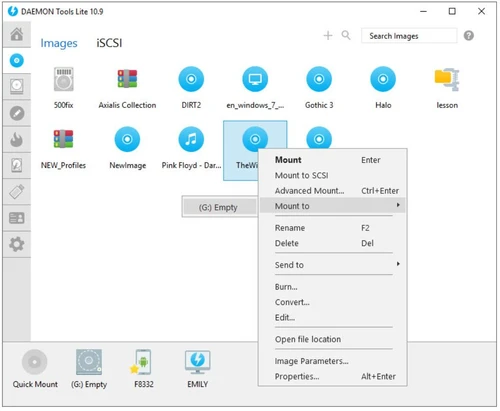
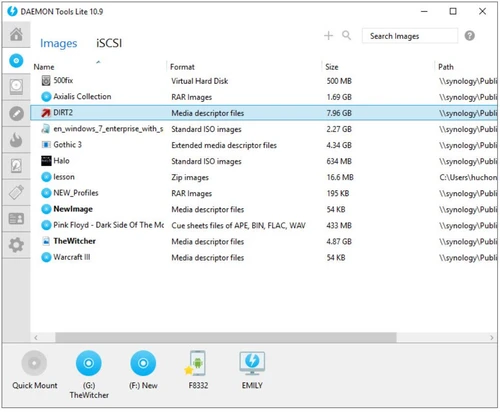
  • Virtual Drive Creation: It allows users to create multiple virtual drives, making it easier to access and manage disk images without using physical discs.
  • Wide Format Support: Daemon Tools Lite supports various disk image formats like ISO, BIN, and IMG, ensuring compatibility with different types of files.
  • Ease of Use: The user-friendly interface makes it simple for both beginners and advanced users to mount disk images with just a few clicks.
  • Cost-Effective: The software offers a free version that covers most essential features, making it a budget-friendly option for personal use.
  • No Need for Physical Media: Users can access software, games, and files stored in disk images without needing physical discs, which is more convenient and space-saving.
  • Cloud Storage Integration: It can integrate with cloud storage services, allowing users to manage and mount images stored remotely.
  • Reliable and Lightweight: The software is light on system resources, providing a smooth experience without bogging down your computer.

Benefits of Daemon Tools Lite Software

  • Fast Image Mounting: It allows quick mounting of disk images, speeding up access to files and applications stored in ISO or other image formats without lengthy installation processes.
  • Support for VHD and VMDK Files: Daemon Tools Lite supports Virtual Hard Disk (VHD) and VMware Disk (VMDK) files, which is useful for virtualization purposes and managing virtual machines.
  • No Need for External Media: It eliminates the need for external USB drives or CDs/DVDs by mounting disk images directly from your local storage or cloud, reducing the clutter of physical media.
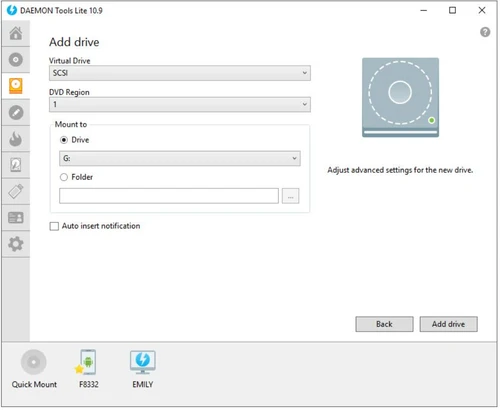
  • Multiple Mounting Options: You can mount up to 4 virtual drives simultaneously, making it convenient for tasks that require quick access to multiple disk images at once.
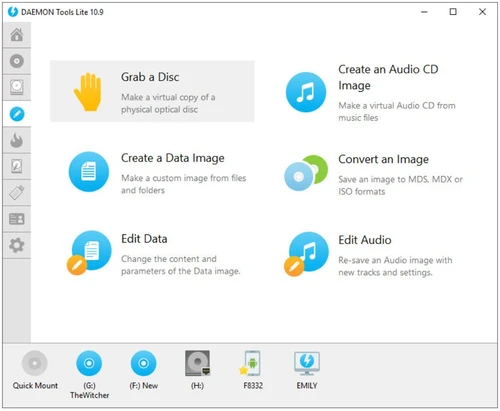
  • Image Creation: Besides mounting, Daemon Tools Lite allows you to create ISO images from physical CDs/DVDs, giving you a backup of your data in a more portable, digital format.
  • User Customization: The software allows users to set up custom drive letters for their virtual drives, giving them more control over how they organize and access their mounted images.
  • Free Updates: With the free version, you still get regular updates and bug fixes, ensuring the software remains reliable and up-to-date.

Daemon Tools Lite Pricing

Daemon Tools Lite price in India starts at $5 at techjockey.com.

The pricing model is based on different parameters, including extra features, deployment type, and the total number of users. For further queries related to the product, you can contact our product team and learn more about the pricing and offers.

Read more

Daemon Tools Lite Pricing & Plans

Daemon Tools Lite
Key Features
  • Get Lifetime updates for 3 PCs
  • Mount images
  • VHDs and ZIP archives
  • Grab discs to ISO, MDX, MDS & APE files
Starting at $5
    • Licenses

      Licenses
      Licenses

Key Features

  • Get Lifetime updates for 3 PCs

  • Mount images

  • VHDs and ZIP archives

  • Grab discs to ISO, MDX, MDS & APE files

Daemon Tools Lite Features

  • icon_check Imaging Tools
    Allows you to create disk images from physical disks and store them in various formats like ISO, BIN, and more.
  • icon_check Image Editing
    Enables basic editing of disk image files, such as adding or removing files within the image.
  • icon_check Virtual HDD
    Provides the ability to create and manage Virtual Hard Disks (VHD), which are useful for virtual environments and testing.
  • icon_check Disc Burn
    Allows users to burn disk images (like ISO files) to physical discs, facilitating the creation of bootable CDs/DVDs.
  • icon_check Bootable USB
    Supports creating bootable USB drives from ISO or other disk image files, useful for installing OS or running recovery tools.
  • icon_check iSCI Initiator
    It connects to remote storage devices over a network via the iSCSI protocol, allowing access to remote disks as local drives.
  • icon_check Unlimited Devices
    Daemon Tools Lite supports mounting images on multiple virtual devices simultaneously, with no device limit.
  • icon_check Virtual Banner
    Adds a virtual banner or label to the virtual drives, making it easier to identify them.
  • icon_check Windows Integration
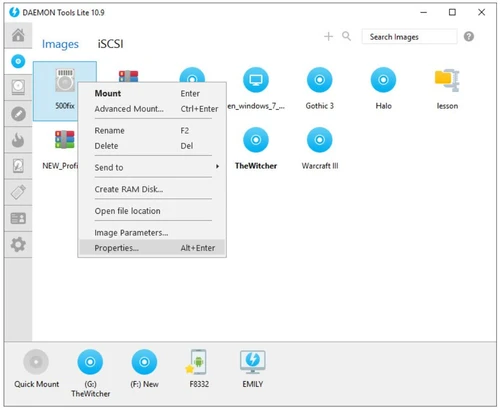
    Seamlessly integrates with Windows, allowing you to mount and manage disk images directly from the right-click context menu.
Daemon Tools Lite Demo Video play icon

Get Daemon Tools Lite Demo

Watch the demo video to explore key features, real workflows, and how the software fits your business needs.

Understand
Key Features
Personal
Demo Insights
Interactive
Demo Support

Daemon Tools Lite Specifications

Supported Platforms
Windows Windows iOS iOS Android Android
Devices
Desktop Desktop Mobile Mobile Tablet Tablet iPad iPad
Deployment
Cloud-Based Cloud-Based
Suitable For
All Industries
Business Specific
All Businesses
Business Size
Small Business Medium Business Enterprises SMBs SMEs
Customer Support
Phone Email
Language
English
Training Resources
Videos

Explore the Best Alternative Solutions Similar to Your Business Size and Needs

Daemon Tools Lite Review

4.1

Out of 5

img

Overall Rating

Based on
4 Verified Ratings

Rating Breakdown

  • Features 4
  • Value for Money 3.8
  • Ease of Use 4
  • Customer Support 4.7

90% Recommend this Product

Add Review

Techjockey Trusted Reviews from Verified Users

No reviews are currently available for Daemon Tools Lite. Discover similar Cloud Storage reviews

  • TeraBox

    4.4

    Whats great - Offers a substantial amount of free storage space. read more

  • Dropbox Business

    4.4

    Whats great - The user-friendly design, intuitive interface, and valuable features make Dropbox a go-to solution for my team and me. read more

  • Zoolz BigMIND

    2.4

    Whats great - Company is not trustworthy which means that they do not offer any long term value. They use to sell a pay upfront lifetime d... read more

Compare Daemon Tools Lite With other Cloud Storage

Products
Ratings
Pricing
Device Supported
Deployment
Supported Platforms
  • img

    Daemon Tools Lite

  • 4.1

  • Price On Request

  • Desktop

    Mobile

  • Web based

    On Premises

  • Windows

    Mac OS

  • img

    TeraBox

  • 4.3

  • Price On Request

  • Desktop

    Mobile

  • Web based

    On Premises

  • Windows

    Mac OS

  • img

    Zoho WorkDrive

  • 4.5

  • ₹ 170

  • Desktop

    Mobile

  • Web based

    On Premises

  • Windows

    Mac OS

  • img

    PikPak

  • 4.1

  • Price On Request

  • Desktop

    Mobile

  • Web based

    On Premises

  • Windows

    Mac OS

  • img

    Mega

  • 4.3

  • ₹ 537

  • Desktop

    Mobile

  • Web based

    On Premises

  • Windows

    Mac OS

  • img

    Hostzop

  • 4.1

  • ₹ 950

  • Desktop

    Mobile

  • Web based

    On Premises

  • Windows

    Mac OS

  • img

    Mesh Drive

  • 4.1

  • Price On Request

  • Desktop

    Mobile

  • Web based

    On Premises

  • Windows

    Mac OS

  • img

    Zata.AI

  • 4.3

  • ₹ 599

  • Desktop

    Mobile

  • Web based

    On Premises

  • Windows

    Mac OS

  • img

    iCloud

  • 4.5

  • Price On Request

  • Desktop

    Mobile

  • Web based

    On Premises

  • Windows

    Mac OS

  • img

    Dropbox Business

  • 4.4

  • Price On Request

  • Desktop

    Mobile

  • Web based

    On Premises

  • Windows

    Mac OS

(2) Product(s) selected

Daemon Tools Lite Alternatives

See All Daemon Tools Lite Alternatives

Available

Price on Request

SAVE UPTO 49%

Starting Price:

$5 /Month

Starting Price:

$1 /Month

Starting Price:

$7 /Monthly

Available

Price on Request

Starting Price:

€2 /Monthly

Starting Price:

€5 /Monthly

Available

Price on Request

Articles for Daemon Tools Lite

See All Related Articles

How much does Daemon Tools Lite Software cost?

The price of Daemon Tools Lite in India starts at $5 on TechJockey.com.

Is there a mobile version of Daemon Tools Lite Software?

Yes, Daemon Tools Lite is available for Android and iOS.

Which operating systems are supported by Daemon Tools Lite Software?

Daemon Tools Lite is compatible with Windows, iOS and Android.

Does Daemon Tools Lite Software provide a free trial?

No, Daemon Tools Lite is free to use with some features in the paid version.

How does Daemon Tools Lite Software work?

Daemon Tools Lite creates virtual drives to mount disk images and allows easy access to their contents without physical media.

Who uses Daemon Tools Lite Software?

Users who need to mount disk images, create virtual drives, or manage virtual storage will benefit Daemon Tools Lite.

Is a free demo of Daemon Tools Lite Software available?

Yes, DAEMON Tools Lite can be used for free with ads, but paid subscriptions are available to remove ads and unlock more features.

Can Daemon Tools Lite cloud storage Software be used for free?

DAEMON Tools Lite is free with ads, but also offers paid subscriptions starting at $4.99 to remove ads and unlock additional features.

Can Daemon Tools Lite mount ISO files?

Yes, Daemon Tools Lite can't mount ISO files and other disk image formats like BIN, CUE, and NRG.

How many virtual drives can Daemon Tools Lite create?

Daemon Tools Lite allows you to create up to 4 virtual drives.

Does Daemon Tools Lite support VHD and VMDK files?

Yes, Daemon Tools Lite supports mounting Virtual Hard Disk (VHD) and VMware Disk (VMDK) files.

20,000+ Software Listed

Best Price Guranteed

Free Expert Consultation

2M+ Happy Customers

Terms and Condtions

close

Users with registered businesses can purchase goods from merchants on the platform to satisfy their business needs. Users are not permitted to utilize any products acquired through the platform for resale, advertising, business, or further distribution.

For each purchase made, users will receive a Tax Invoice (or 'GST invoice') that includes specific details such as:

  • the GSTIN of the user associated with their registered business, and

  • the specified Entity Name for their business.

It should be noted that not all products are eligible for GST Invoice. Only the products displayed by participating sellers with the 'GST-based Invoice Available' callout on the product description page would qualify.

Certain goods and services are not eligible to get a GST Invoice, including items with VAS, i.e., Value Added Services (e.g., Total Mobile Protection/Assured Buyback) and those involving an exchange offer at the time of purchase.

Users must ensure the accuracy of the GSTIN, and business entity name provided for the GST Invoice. Requests for corrections into GST Invoice would not be accommodated by Techjockey.com or any Seller, and any issues arising from user-provided information are the sole responsibility of users.

Techjockey.com is not liable for the GST Invoice or any associated input tax credit. To efficiently claim an input tax credit, users should select the registered place of business address as per the GST authority's data and follow the provisions of the GST Act and rules.

To claim an input tax credit, the delivery and billing addresses must match. Furthermore, input tax credits will not be granted if the delivery address and GSTIN on the invoice are from different states. In case of incorrect GST details provided during the order placement, the order will be canceled automatically.