linkedin
Delta Sales Force Automation logo
play Field Sales App | Employee Location Tracking App
Delta Sales Force Automation

Delta Sales Force Automation

Brand: Delta Tech

  • 4.5

  • 44 Ratings & 44 Reviews

Delta Sales App is a field sales force automation app for employees. It is intuitive, yet powerful SaaS-based software for tracking field sales employees and for sales order reporting. This app helps to track the real-time location of the sales employees, streamline order taking process, generate sales order reports, track employee attendance, and plan daily routes for the field employees. Other ...

See More

Have you used Delta Sales Force Automation before?

Share your insights for better experience

Add a Review

Price Available on Request

Questions about pricing or customization? We’re here to help, just a click away.

100% Genuine
Products
Best Price
Guaranteed
Safe & Secure
Payment
  • Description

  • Pricing

  • Features

  • Specification

  • Review

  • Compare

  • Alternatives

  • FAQ

Delta Sales Force Automation Software Overview

What is Delta Sales App?

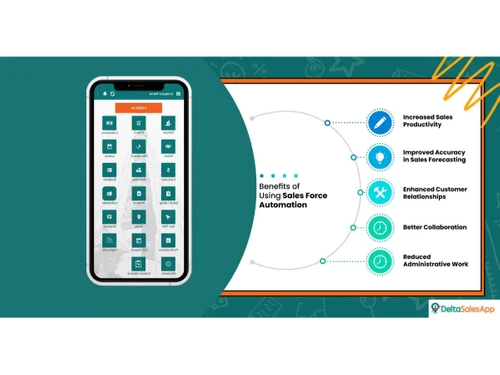
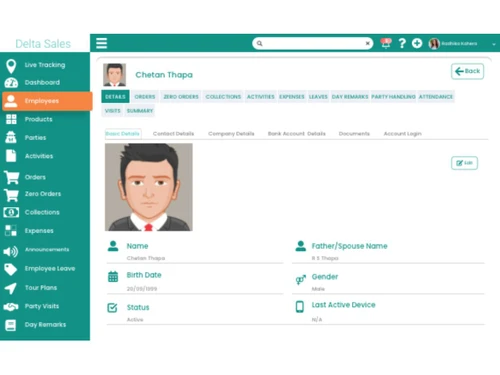
Delta Sales App is a field sales force automation app for employees. It is intuitive, yet powerful SaaS-based software for tracking field sales employees and for sales order reporting. This app helps to track the real-time location of the sales employees, streamline order taking process, generate sales order reports, track employee attendance, and plan daily routes for the field employees. Other features include managing employees’ expenses, leaves, making announcements and setting up targets for salespeople.

Delta Sales app allows distributors, manufacturers, and wholesalers to streamline, automate, and accelerate sales and field activities. The field sales management software supports database administration and live tracking to manage the field employees paying customer visits. It is extremely beneficial for the automotive, solar, warehousing, pharmaceuticals, and food & beverage industry to manage their products, clients, and orders.

Why Use Delta Sales Force Automation App?

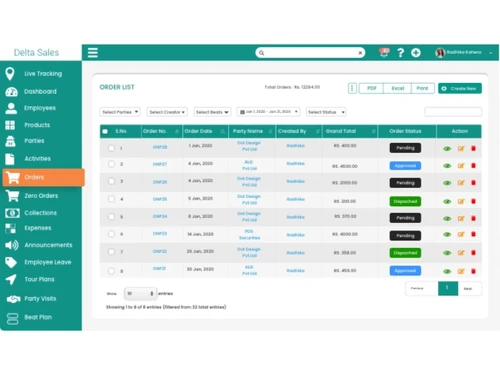
  • Order reporting: This feature helps automate all field sales for tracking orders, minimizing manual errors, and increasing recurring sales.
  • Payment/collection automation: The sales force automation software helps manage payment, invoices & receipts and check the payment status.
  • Employee location tracking: The employee location feature is a GPS-based tracking system allowing employers to capture an employee’s location and auto-calculate the distance traveled for improving a team’s productivity.
  • Mark attendance & leaves: Delta Sales App streamlines check-in/check-out, leave application, and attendance checking systems to save time and reduce error.
  • Expense reporting: It also offers a claim status and approval system to look, accept and reject employees’ expense sheets and claims.
  • Assign activities: Delta Sales App helps assign activities, monitor progress, and check the daily schedule helping businesses save administrative costs.
  • Parties & customer management: The sales force automation application organizes all customer details in a centralized location to simplify the selling process, enhance communication, and improve customer experience.
  • Product management: Delta sales automation app gives access to product details, sets up custom rates, and instantly updates the changes to field reps.
  • Stocktaking: Easy stock counting and marking increases profitability, improves the pricing strategy, and avoids over-stocking.
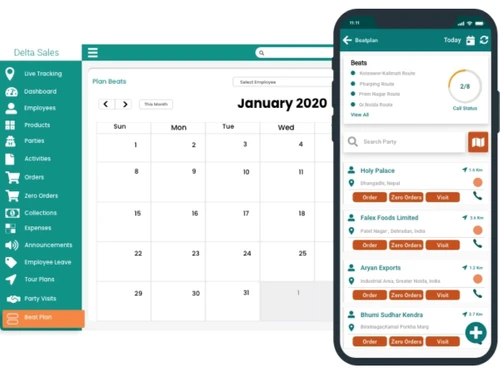
  • Beat plan: Get access to a pre-journey planner for enhancing sales force efficiency and tracking visit effectiveness.
  • Announcements: The feature helps send notifications and messages to notify employees about any updates or information to ensure proactive communication.
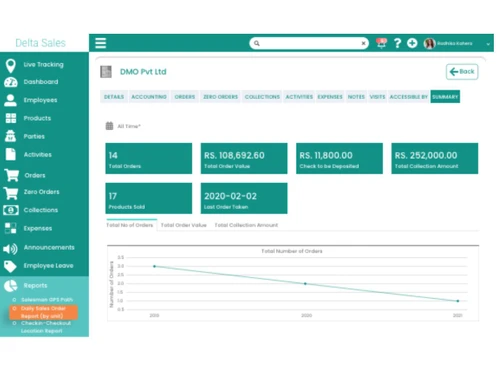
  • Automated response/analytics: Provides automated graphical analytics, reports, and insights to analyze the sales teams' productivity and reward the top performers.

Who Uses Delta Sales App?

  • Pharmaceuticals & Healthcare Industry for logging their daily sales activities
  • Food and Beverage Industry for managing customers and orders
  • Wine And Spirits Industry for performing well in the field visits
  • Beauty and Cosmetics Industry for enhancing product visibility
  • Pet Food Industry for looking after the salespeople in the field
  • Ayurvedic and Herbal industry for accessing detailed information on sales orders
  • Paints And Chemicals Companies for handling the field data
  • Stationery and Office Suppliers for looking after product catalog
  • Paper and Plastics Industry for enhancing sales force performance
  • Automotive Industry for boosting sales revenue
  • Solar Industry for managing repetitive tasks
  • Distribution Industry for managing retailers and wholesalers

Modules in Delta Sales App

  • Field Order Reporting: The module automates all order management tasks to increase overall recurring sales.
  • Customer Insights: The feature helps geotag the customers for looking after the clients who have been contacted and pending ones.
  • Visit Tracking: Keep track of customers your sales reps visit to improve task efficiency and team productivity.
  • Beat Plan: Create route plans allowing your sales reps to plan their customer to save time and administrative costs.
  • Attendance Management: Auto-attendance reports to track employee date and time to continue improving staff performance.
  • Activities: Establish quick collaboration among staff and managers for assigning tasks as per priority and deadlines.

Benefits of Delta Sales App

There are many benefits of using the delta field sales management app. Here are a few:

  • Easy management of sales orders in real-time with quick availability of customer information
  • Efficient tracking of all customer visits made by the sales staff
  • Pre-planning of field employee sales journey & auto-attendance reports of field employees
  • Collaboration between field sales reps and sales managers.

How Does Delta Sales App work?

The latest version of the Delta Sales App is primarily used for sales force automation. It has an intuitive interface and is simple to use. Delta Sales App can be easily integrated with your existing systems to ensure a smooth workflow. For more information, you can also refer to user manuals and take an online Delta Sales App demo at Techjockey.com.

How to Use Delta Sales App?

Get started with Delta Sales App in 5 simple steps:

  • Step 1: Buy Delta Sales App installation key from techjockey.com
  • Step 2: Directly login through the official website
  • Step 3: Sign up & create your account
  • Step 4: Add users & assign permissions
  • Step 5: Get started with Delta Sales App

What is the Price of the Delta Sales App?

Delta Sales App price may vary based on factors like customization, additional features required, number of users, and the deployment type. For subscription-related details and offers on premium packages, please request a call back from our product experts.

Read more

Delta Tech Company Details

Founded Year:  2016

Delta Sales App is a field sales automation software that mainly caters to FMCG, CPG and Pharma industries. This software helps to automate field sales activities through its various features like order taking, visit management, party management, payment collection management, attendance and GPS.

Director/Founders Ekta Golchha
Company Size 1-100 Employees

Delta Sales Force Automation Pricing & Plans

Looking for The Right Pricing?

Share your requirements and get a plan built around your business.

  • Define your business needs
  • Get customised pricing
  • Choose features that fit your workflow

Price Available on Request

Get personalised Delta Sales Force Automation pricing that fits your needs. Our team will connect with you.

Delta Sales Force Automation Features

  • icon_check Order Reporting
    Use the module to automate all order management tasks to increase the overall recurring sales.
  • icon_check Payment Collection Management
    Automation for quick updates on payment status, accessing the invoices & managing post-dated cheques.
  • icon_check Field Reps Tracking & Measure Travel Distance
    Keeps track of your sales reps visits to improve task efficiency and team productivity.
  • icon_check Attendance & Leaves Management
    Easy-to-use check-in/ check-out, leave application, and attendance checking system.
  • icon_check Product Management
    Sales reps can easily access all order details for managing clients, orders, and products.
  • icon_check Parties/Customer Management
    Organize all customer details in a single place for simplifying the product selling processes.
  • icon_check Customer Visit Tracking
    Use the module to analyze sales visits, track working hours, and manage tasks accordingly.
  • icon_check Beat /Tour Planning
    Set route plans to assign tasks that can be completed on that route & increase sales force efficiency.
  • icon_check Field Expense Reporting
    Approve or reject claims and check expenses with this module.
  • icon_check Stock Taking
    Counts and marks the stock for managing the details of products available with the retailer.
  • icon_check Assign Activities & Sales Target
    Manage sales orders in real-time by accessing customer and order information to assign sales targets.
  • icon_check Party Location Mapping
    GPS coordinates for capturing client’s/employee’s location to auto-calculate the distance to be travelled.
  • icon_check Custom Forms
    Design forms as per a business’s requirement for your sales representatives to fill them up.
  • icon_check File Sharing with Field Team
    Improve the system available for accessing information & file sharing for improving communication amongst teams.
  • icon_check Distributor Panel
    The module helps to manage parties and products for improving secondary and primary sales.
  • icon_check Direct Customer Order
    Outlets, retailers, and distributors can use the feature for directly placing the orders.
  • icon_check Field Sales Team Performance
    Allows users to compare the assigned targets and analyze a team’s performance.
  • icon_check Field Force Management
    Real-time reports on customer visits and orders help with field force management.
  • icon_check Remarks & Daily Work Logs
    The system helps managers monitor employees' daily activities for better task planning.
  • icon_check Reports & Analytics
    Graphical reports and analytics offer detailed insights for assessing a business’s performance.
  • icon_check App Works Offline
    Offline support helps with automated data syncing anytime the internet connection is back.
Delta Sales Force Automation Demo Video play icon

Get Delta Sales Force Automation Demo

Watch the demo video to explore key features, real workflows, and how the software fits your business needs.

Understand
Key Features
Personal
Demo Insights
Interactive
Demo Support

Delta Sales Force Automation Specifications

Supported Platforms
Windows Windows Android Android MacOS MacOS Linux Linux
Devices
Desktop Desktop Mobile Mobile
Deployment
Cloud-Based Cloud-Based
Suitable For
All Industries
Business Specific
All Businesses
Language
English

Explore the Best Alternative Solutions Similar to Your Business Size and Needs

Delta Sales Force Automation Reviews

4.5

Out of 5

img

Overall Rating

Based on
44 Verified Reviews

Rating Breakdown

  • Features 4.6
  • Value for Money 4.5
  • Ease of Use 4.6
  • Customer Support 4.4

89% Recommend this Product

Add Review

Pros

  • "I can follow the resolution process and get real-time updates from the consumer. The fact that I can leave team members with internal notes is the nicest part."

    Fasia SamreenAug 22, 2022

  • "The collection of data for managing sales campaigns and monitoring the outcomes is made simpler by all of these possibilities."

    AKASH AGRAWALAug 22, 2022

  • "I'll start by mentioning that I've used this CRM ever when Base had its original name. I've been a consistent user for a long time."

    Asha WaikarAug 18, 2022

Cons

  • "look for other features also, some features are still missing "

    Aplikasi POS2Jul 12, 2022

  • "To get straight to the point . I haven't seen any cons till now."

    Anu KhadkaDec 29, 2021

  • "Although Delta sales app is very good but needs improvement in some fields."

    Suman Dec 29, 2021

Basheer Mohamed

Chief Technology Officer

Industry: Hospitality User since: 6-12 months

4.5

Reviewed on: Jul 12, 2022

Techjockey Verified

“perfect operating system fo business”

Pros

It has made it quite simple to use and enables me to directly customise to my business. The ability to attach emails to users has made it simple and automated for me to keep track of interactions between leads and consumers. IT has effectively and easily accompanied our business' growth for more than 3 years, starting from the very beginning and continuing to the present.

Cons

NO CONS

Ashwani

Chief Information Officer

Industry: Travel & Tourism User since: 6-12 months

4.5

Reviewed on: Jul 13, 2022

Techjockey Verified

“Good crm tool”

Pros

The app is perfect. I adore the app to the hilt. I lost count of the number of times my outbound team assigned me a transaction and I was able to read the notes.

Cons

NO CONS

rameshwar prasad

Co-founder

Industry: Education User since: < 6 months

4.5

Reviewed on: Jul 27, 2022

Techjockey Verified

“Efficient crm”

Pros

I can simply keep track of progress, conversation time, call outcomes, and much more to evaluate how well staff are doing. The call quality is SUPERB compared to other CRMs I have tested in the past. Beautiful UI, highly adaptable to meet your needs, extremely detailed reporting.

Cons

NO CONS

See All Delta Sales Reviews

Compare Delta Sales Force Automation With other Sales Force Automation Software

Products
Ratings
Pricing
Device Supported
Deployment
Supported Platforms
  • img

    Delta Sales Force Automation

  • 4.5

  • Price On Request

  • Desktop

    Mobile

  • Web based

    On Premises

  • Windows

    Mac OS

  • img

    OmniAssist

  • 4.8

  • Price On Request

  • Desktop

    Mobile

  • Web based

    On Premises

  • Windows

    Mac OS

  • img

    SalesJump SFA

  • 4.3

  • ₹ 300

  • Desktop

    Mobile

  • Web based

    On Premises

  • Windows

    Mac OS

  • img

    Peri CRM

  • 4.4

  • ₹ 800

  • Desktop

    Mobile

  • Web based

    On Premises

  • Windows

    Mac OS

  • img

    GogreenSFA 360

  • 4.6

  • Price On Request

  • Desktop

    Mobile

  • Web based

    On Premises

  • Windows

    Mac OS

  • img

    InstaCX

  • 4.1

  • Price On Request

  • Desktop

    Mobile

  • Web based

    On Premises

  • Windows

    Mac OS

  • img

    Zams

  • 4.4

  • Price On Request

  • Desktop

    Mobile

  • Web based

    On Premises

  • Windows

    Mac OS

  • img

    Instantly

  • 4.4

  • Price On Request

  • Desktop

    Mobile

  • Web based

    On Premises

  • Windows

    Mac OS

  • img

    FieldMI

  • 5

  • ₹ 5988

  • Desktop

    Mobile

  • Web based

    On Premises

  • Windows

    Mac OS

  • img

    Recibo

  • 4.2

  • ₹ 449

  • Desktop

    Mobile

  • Web based

    On Premises

  • Windows

    Mac OS

(0) Product(s) selected

Delta Sales Force Automation Alternatives

See All Delta Sales Force Automation Alternatives

Zams

4.4

Starting Price:

$1,000 /Month

Starting Price:

$47 /Month

Starting Price:

₹449 /Month

Starting Price:

$49 /Month

Starting Price:

$39 /Month

Available

Price on Request

Available

Price on Request

Articles for Delta Sales Force Automation

See All Related Articles

Which operating system does Delta Sales App support?

Delta Sales App is compatible with any operating systems as it is a web based applications.

Is there any Delta Sales App?

Delta Sales App is available for Android devices on Google Play Store.

What is the deployment type of Delta Sales App?

Delta Sales App supports web-based deployment type.

How much does Delta Sales App cost?

Delta Sales App pricing starts at Rs. 500/month for a basic tracker plan.

Who are the potential users of Delta Sales App?

Delta Sales App is typically used in automotive, healthcare, warehousing, and wines & spirits industry.

Is there any free trial or demo for Delta Sales App?

Delta Sales App demo is available for free with techjockey.com.

Is Delta Sales App free?

Delta Sales App offers a free trial. However, the premium plan with advanced features starts at Rs. 2500.

How can you download Delta Sales App?

Delta Sales App installation is not required on PC, as it is web-based. Sales reps can download the app in their Android devices through Google Play Store.

How does Delta Sales App work?

Delta Sales App helps with sales force automation. It's a complete solution for analysing business performance, tracking the field staff and order reporting.

20,000+ Software Listed

Best Price Guranteed

Free Expert Consultation

2M+ Happy Customers

Terms and Condtions

close

Users with registered businesses can purchase goods from merchants on the platform to satisfy their business needs. Users are not permitted to utilize any products acquired through the platform for resale, advertising, business, or further distribution.

For each purchase made, users will receive a Tax Invoice (or 'GST invoice') that includes specific details such as:

  • the GSTIN of the user associated with their registered business, and

  • the specified Entity Name for their business.

It should be noted that not all products are eligible for GST Invoice. Only the products displayed by participating sellers with the 'GST-based Invoice Available' callout on the product description page would qualify.

Certain goods and services are not eligible to get a GST Invoice, including items with VAS, i.e., Value Added Services (e.g., Total Mobile Protection/Assured Buyback) and those involving an exchange offer at the time of purchase.

Users must ensure the accuracy of the GSTIN, and business entity name provided for the GST Invoice. Requests for corrections into GST Invoice would not be accommodated by Techjockey.com or any Seller, and any issues arising from user-provided information are the sole responsibility of users.

Techjockey.com is not liable for the GST Invoice or any associated input tax credit. To efficiently claim an input tax credit, users should select the registered place of business address as per the GST authority's data and follow the provisions of the GST Act and rules.

To claim an input tax credit, the delivery and billing addresses must match. Furthermore, input tax credits will not be granted if the delivery address and GSTIN on the invoice are from different states. In case of incorrect GST details provided during the order placement, the order will be canceled automatically.