linkedin
Dia Browser logo
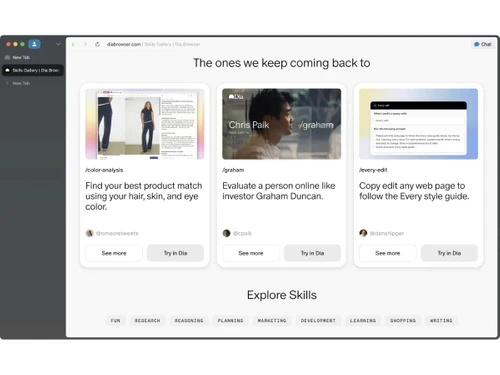
Dia Browser-gallery
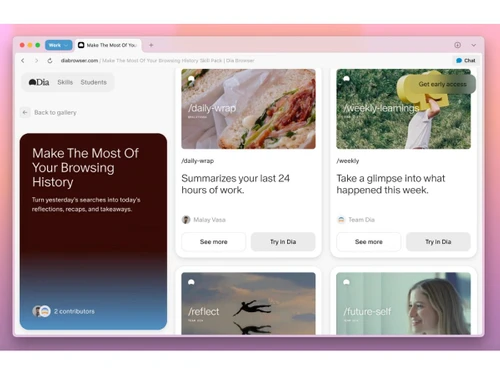
Dia Browser-skills
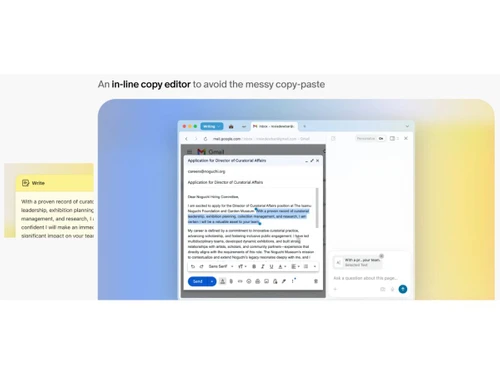
Dia Browser-copy editor

Dia Browser

Brand: The Browser Company

  • No Ratings & Reviews

A Browser software that makes your browser feel like a helpful companion as it works with more responsive experience.

See More

Have you used Dia Browser before?

Share your insights for better experience

Add a Review

Price Available on Request

Questions about pricing or customization? We’re here to help, just a click away.

100% Genuine
Products
Best Price
Guaranteed
Safe & Secure
Payment
  • Description

  • Pricing

  • Features

  • Specification

  • Review

  • FAQ

Dia Browser Software Overview

What is Dia Browser?

Dia Browser is a web browser software built with intelligence at its core. It combines everyday browsing with a smarter and more responsive experience. The platform keeps the interface simple while improving how tasks are handled. It helps users manage online activity with less effort and more clarity. The design is clean and easy to navigate.

Dia Browser acts like a helpful layer within regular browsing sessions. It responds based on context and recent activity patterns. The smart browser keeps things organized without adding complexity. It supports a smoother and more natural browsing flow. It suits users who prefer simplicity with a touch of intelligence.

Why Choose Dia Browser Software?

  • Smart Address Use: Intelligence sitting inside the search bar makes everyday browsing feel more guided. Context awareness adds smoother handling of tasks.
  • Clean Interface Feel: A simple layout keeps attention on content without visual overload. Reading and navigation feel naturally balanced.
  • Tab Awareness Flow: Active tabs stay connected to ongoing work without confusion. Switching between pages feels less scattered.
  • Context Memory Layer: Recent browsing activity quietly shapes better responses over time. Results feel more relevant during use.
  • Skill-Based Actions: Small automated actions help reduce repeated manual effort. Routine tasks become easier to manage.
  • Natural Interaction Style: Everyday language works smoothly within search and browsing. Communication with the browser feels effortless.
  • Light System Design: Performance stays stable without slowing down device response. Browsing feels steady throughout usage.

Benefits of Dia Browser Software

  • AI Chat Access: Built-in chat support inside the browser helps quick understanding of pages. Information gets processed without switching apps.
  • Writing Support Tool: Text assistance improves clarity while writing inside browser space. Editing becomes smoother during daily tasks.
  • Search Refinement Layer: Queries are refined through smart interpretation of input intent. Results appear more aligned with usage.
  • Learning Companion Mode: Browsing patterns help improve guidance over time. Information discovery becomes more structured.
  • Inline Editing Help: Quick corrections come about directly within content areas. Writing flow stays uninterrupted during work.
  • Translation Assistance Flow: Language conversion support helps read global content easily. Understanding foreign pages becomes simpler.
  • Privacy Control Layer: Browsing data stays protected with controlled access handling. Security remains stable during usage.

Dia Browser Pricing

Dia Browser price is available on request at techjockey.com. The pricing model is based on different parameters, including extra features, deployment type, and the total number of users. For further queries related to the product, you can contact our product team and learn more about the pricing and offers.

Read more

The Browser Company Company Details

Founded Year:  2019

The Browser Company is a software company that designs and operates web browser for internet users.

Director/Founders N/A
Company Size 1-100 Employees

Dia Browser Pricing & Plans

Looking for The Right Pricing?

Share your requirements and get a plan built around your business.

  • Define your business needs
  • Get customised pricing
  • Choose features that fit your workflow

Price Available on Request

Get personalised Dia Browser pricing that fits your needs. Our team will connect with you.

Dia Browser Features

  • icon_check AI Chat
    Ask questions about open tabs and get contextual answers without switching apps or copying content manually.
  • icon_check Writing Assistant
    Generates, edits, and refines text directly in input fields while matching your tone and style preferences.
  • icon_check Inline Copy Editor
    Improves grammar, clarity, and readability in real time without needing external writing tools.
  • icon_check Content Summarization
    Converts long articles, PDFs, or pages into concise summaries highlighting key insights quickly.
  • icon_check Research Assistant
    Combines data from multiple tabs to provide synthesized insights for faster research workflows.
  • icon_check Personalization Engine
    Learns your habits, tone, and preferences to deliver tailored suggestions and smarter responses.
  • icon_check Learning Companion
    Breaks down complex topics, explains concepts, and even generates practice questions for learning.
  • icon_check Planning Assistant
    Creates to-do lists, plans, and structured outputs based on your browsing and task context.
  • icon_check Translation Management
    Instantly translates content across languages directly within the browser interface.
  • icon_check Privacy Control
    Encrypts data locally and limits sensitive data processing, giving users control over information.
  • icon_check Contextual Memory
    Uses browsing history and session context to improve responses and maintain continuity.
  • icon_check Minimal UI Design
    Clean, Chrome-like interface designed for simplicity and ease of use for everyday users.
  • icon_check Cross-Tab Insights
    Pulls information across multiple tabs to generate comparisons, summaries, or reports.

Dia Browser Specifications

Supported Platforms
Windows Windows MacOS MacOS
Devices
Desktop Desktop
Deployment
Cloud-Based Cloud-Based
Suitable For
All Industries
Business Specific
All Businesses
Business Size
Small Business Startups Medium Business Enterprises
Customer Support
Email Communities
Language
English
AI Features
AI Integrated

Dia Browser Review

Techjockey Trusted Reviews from Verified Users

No reviews are currently available for Dia Browser. Discover similar Browser Software reviews

  • Safari

    4.4

    Whats great - Helps my MacBook battery last noticeably longer. read more
  • Brave Browser

    4.4

    Whats great - Sync bookmarks and settings across devices read more

  • DICloak Antidetect Browser

    5.0

    Whats great - I am very satisfied with DICloak's seamless proxy integration and IP isolation features. It can bind a dedicated proxy IP for... read more

How much does Dia Browser cost?

The price is not fixed and depends on usage and requirements. Details are available on techjockey.com.

Who uses Dia Browser Software?

Dia Browser is used by people who prefer AI-based browsing support. It also suits users who want smarter and simpler web navigation.

Is there a mobile app available for Dia Browser Software?

There is no official mobile application for Dia AI Browser. It is mainly designed for desktop use.

Which operating systems are compatible with Dia Browser Software?

It works on Windows and macOS operating systems. These platforms support smooth installation and usage.

Does Dia Browser Software offer a free trial?

Yes, Dia Browser Software offers a free trial. Users can try it before making a decision.

How does Dia Browser Software function?

The solution works as an AI-powered browser with built-in assistance tools. It helps users browse, search, and manage tasks more easily.

20,000+ Software Listed

Best Price Guranteed

Free Expert Consultation

2M+ Happy Customers

Terms and Condtions

close

Users with registered businesses can purchase goods from merchants on the platform to satisfy their business needs. Users are not permitted to utilize any products acquired through the platform for resale, advertising, business, or further distribution.

For each purchase made, users will receive a Tax Invoice (or 'GST invoice') that includes specific details such as:

  • the GSTIN of the user associated with their registered business, and

  • the specified Entity Name for their business.

It should be noted that not all products are eligible for GST Invoice. Only the products displayed by participating sellers with the 'GST-based Invoice Available' callout on the product description page would qualify.

Certain goods and services are not eligible to get a GST Invoice, including items with VAS, i.e., Value Added Services (e.g., Total Mobile Protection/Assured Buyback) and those involving an exchange offer at the time of purchase.

Users must ensure the accuracy of the GSTIN, and business entity name provided for the GST Invoice. Requests for corrections into GST Invoice would not be accommodated by Techjockey.com or any Seller, and any issues arising from user-provided information are the sole responsibility of users.

Techjockey.com is not liable for the GST Invoice or any associated input tax credit. To efficiently claim an input tax credit, users should select the registered place of business address as per the GST authority's data and follow the provisions of the GST Act and rules.

To claim an input tax credit, the delivery and billing addresses must match. Furthermore, input tax credits will not be granted if the delivery address and GSTIN on the invoice are from different states. In case of incorrect GST details provided during the order placement, the order will be canceled automatically.