USA
USA UAE
UAESmall Business
Designed for startups and growing businesses

See More


Brand: Digen
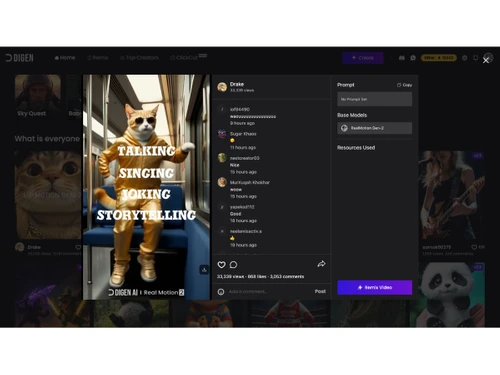
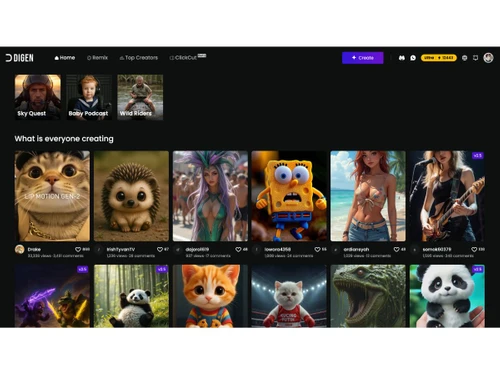
A browser-based AI video generator that turns static images into talking-head videos with realistic lip-sync.
See MoreHave you used Digen AI before?
Share your insights for better experience
Core Features
 Background Removal Text-to-Video Generation AI Audio Enhancement Voiceover Generation Subtitle Generation Template-Based Editing AI Scene Detection Auto Color Correction Object Detection
 Advanced Features
Dynamic Background Replacement AI Avatar Generation AI Motion Tracking Emotion Recognition Scene Reframing Video Summarization AI Voice Cloning Deepfake Detection Editing Tools & Effects
Transition Effects Basic Editing Tools Visual and Sound Effects Overlays and Animations Real-Time Previews Keyframe Animations Split-Screen Effect Speed Adjustments Video Stabilization Multi-Layered Editing Chroma Key Support Collaboration & Workflow
Cloud Storage Project Sharing Export Options Real-Time Collaboration Batch Processing Direct Social Media Sharing Performance Insights Role-Based Access Control (RBAC) Version Control Integration & Automation
Third Party Integrations Automated Video Creation & Scheduling Social Media Integration API Publishing  Windows
  iOS
iOS  Android MacOS
  Desktop
  Mobile
  Tablet
  iPad
iPad  Cloud-Based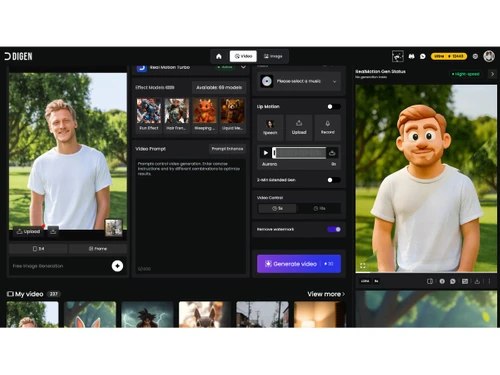
Small Business
Designed for startups and growing businesses
Medium Business
Built for business growth and flexibility
Enterprises
Designed for complex and large-scale business needs
Techjockey Trusted Reviews from Verified Users
No reviews are currently available for Digen AI. Discover similar AI Video Generators reviews

InVideo AI
Whats great - InVideo has a massive collection of templates and assets, including premium images and footage from Shutterstock and iStock. ... read more

Fliki
Whats great - Fliki is very easy to learn and user-friendly. Editing is easy and it makes the process enjoyable. read more

Pictory AI
Whats great - We can easily convert blog post into video with minimal efforts and makes video making task a calk walk read more

Digen AI
$ 4.99 excl. GST
Desktop
Mobile
Web based
On Premises
Windows
Mac OS
Pictory AI
Price On Request
Desktop
Mobile
Web based
On Premises
Windows
Mac OS

HeyGen
Price On Request
Desktop
Mobile
Web based
On Premises
Windows
Mac OS

Runway ML
Price On Request
Desktop
Mobile
Web based
On Premises
Windows
Mac OS

Synthesia
₹ 999
Desktop
Mobile
Web based
On Premises
Windows
Mac OS

AI Studios
Price On Request
Desktop
Mobile
Web based
On Premises
Windows
Mac OS

PixVerse AI
Price On Request
Desktop
Mobile
Web based
On Premises
Windows
Mac OS

Vidu AI
Price On Request
Desktop
Mobile
Web based
On Premises
Windows
Mac OS

Elai
Price On Request
Desktop
Mobile
Web based
On Premises
Windows
Mac OS
InVideo AI
Price On Request
Desktop
Mobile
Web based
On Premises
Windows
Mac OS

Vidnoz AI
Price On Request
Desktop
Mobile
Web based
On Premises
Windows
Mac OS
(0) Product(s) selected
Starting Price:
$100 /Month
Starting Price:
$10 /Month
Starting Price:
$23 /Month
Starting Price:
$27 /Month

Starting Price:
$18 /Month

Starting Price:
$29 /Month

Starting Price:
$39 /Month

Starting Price:
$30 /Month

Starting Price:
$39 /Month

Starting Price:
$19 /Month

Starting Price:
$29 /Month
Digen AI price starts at USD 5 at Techjockey.com, with a freemium plan offering daily credits for testing.
You upload a photo or select an AI avatar, input a script or audio file, choose voice and motion style, and the AI generates a talking video with lip-sync in minutes.
It is used by social media marketers, content creators, educators, and e-commerce businesses for short-form video content.
It allows you to upload a photo and a separate action video, applying the movements from the video to your still image.
Yes, Lip Motion Gen-2 supports precise lip-syncing for people, cartoon characters, and animals.
The platform is designed for short clips of 5-10 seconds, ideal for social media content.
Yes, free plan provides daily credits or one-time allotment with watermarks on output videos.
AI voiceovers support over 20 languages with different emotional tones for global content.
Yes, AI-powered background removal and replacement tools are included for scene customization.
Paid tiers include Ultra, Ultra Pro, and Ultra Max with watermark removal, higher resolution, and unlimited generation.
20,000+ Software Listed
Best Price Guranteed
Free Expert Consultation
2M+ Happy Customers
Terms and Condtions

Users with registered businesses can purchase goods from merchants on the platform to satisfy their business needs. Users are not permitted to utilize any products acquired through the platform for resale, advertising, business, or further distribution.
For each purchase made, users will receive a Tax Invoice (or 'GST invoice') that includes specific details such as:
the GSTIN of the user associated with their registered business, and
the specified Entity Name for their business.
It should be noted that not all products are eligible for GST Invoice. Only the products displayed by participating sellers with the 'GST-based Invoice Available' callout on the product description page would qualify.
Certain goods and services are not eligible to get a GST Invoice, including items with VAS, i.e., Value Added Services (e.g., Total Mobile Protection/Assured Buyback) and those involving an exchange offer at the time of purchase.
Users must ensure the accuracy of the GSTIN, and business entity name provided for the GST Invoice. Requests for corrections into GST Invoice would not be accommodated by Techjockey.com or any Seller, and any issues arising from user-provided information are the sole responsibility of users.
Techjockey.com is not liable for the GST Invoice or any associated input tax credit. To efficiently claim an input tax credit, users should select the registered place of business address as per the GST authority's data and follow the provisions of the GST Act and rules.
To claim an input tax credit, the delivery and billing addresses must match. Furthermore, input tax credits will not be granted if the delivery address and GSTIN on the invoice are from different states. In case of incorrect GST details provided during the order placement, the order will be canceled automatically.