linkedin
DNSFilter logo
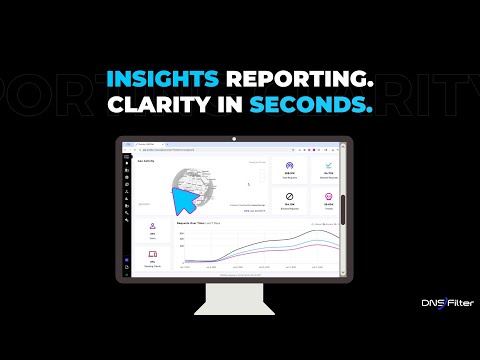
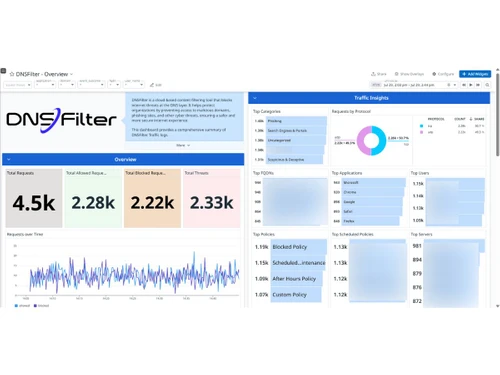
play Get Instant Answers: Start your day with live traffic insights to spot spikes and fix issues before they become problems.
dnsfilter -activity
dnsfilter -analytics

DNSFilter

Brand: DNSFilter

  • No Ratings & Reviews

A cloud-based network security solution that uses AI to block malicious domains and filter unwanted content at the DNS level.

See More

Have you used DNSFilter before?

Share your insights for better experience

Add a Review

Price Available on Request

Questions about pricing or customization? We’re here to help, just a click away.

100% Genuine
Products
Best Price
Guaranteed
Safe & Secure
Payment
  • Description

  • Pricing

  • Features

  • Specification

  • Review

  • FAQ

DNSFilter Software Overview

What is DNSFilter?

DNSFilter is a leading network security solution that provides cybersecurity protection by filtering internet traffic at the Domain Name System (DNS) level. It is essential cyber security software that acts as a first line of defense, intercepting requests before users even connect to malicious sites.

Instead of relying on traditional signature-based security that can miss new threats, DNSFilter uses AI and machine learning to identify and block phishing sites, malware hosts, botnets, and ransomware command-and-control servers in real time. Its proprietary machine learning engine categorizes billions of domains, often detecting zero-day threats an average of 10 days earlier than competitor feeds.

The platform is built for modern, distributed workforces with a lightweight roaming client that enforces consistent security policies whether employees are in the office, at home, or on public Wi-Fi. As a comprehensive cyber security software solution, DNSFilter includes AppAware for one-click blocking of risky SaaS applications, Active Directory integration for granular policy enforcement by user or group, and real-time analytics dashboards for immediate network visibility.

Why Choose DNSFilter?

  • Malware Protection: Automatically blocks access to command-and-control servers, botnets, and malicious payload sites.
  • Phishing Protection: Identifies and restricts deceptive websites designed to steal credentials and sensitive information.
  • Log Retention: Stores historical DNS query data for compliance requirements and forensic investigations.
  • Tenant Management: Hierarchical console for overseeing multiple organizations or clients from a single login.
  • SSL Inspection Bypass: Operates at DNS layer providing security without SSL certificate installation or decryption.
  • Threat Intelligence: Real-time data feeds and machine learning identify malicious domains before they reach the network.
  • Content Filtering: Block or allow web content based on categories like social media, adult content, or streaming.
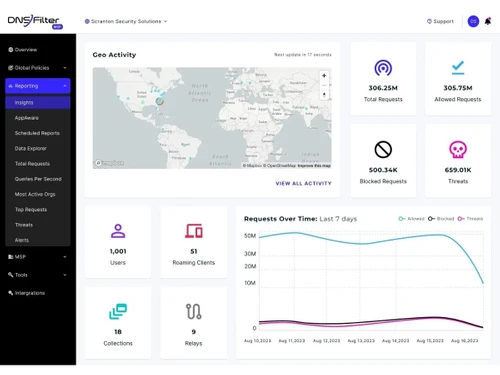
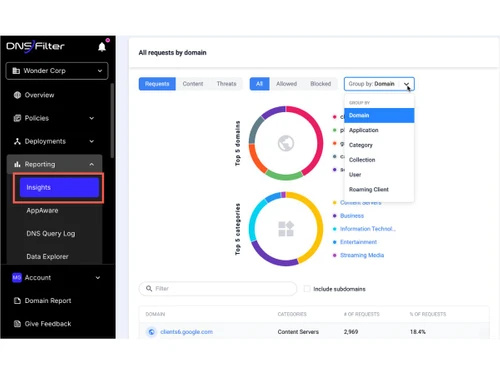
  • Real-Time Analytics: Centralized dashboard displaying live DNS query data for immediate network-wide monitoring.
  • Application Blocking: Block specific web applications at the DNS layer to prevent unauthorized software usage.

Benefits of DNSFilter

  • Blocks Threats Before They Connect: DNS-layer filtering prevents users from ever reaching malicious sites.
  • Detects Zero-Day Threats Earlier: AI identifies new malicious domains on average 10 days faster than competitors.
  • Protects Remote Workers Anywhere: Roaming client enforces security policies on and off corporate networks.
  • Reduces Load on Endpoint Security: Blocks threats upstream, decreasing reliance on endpoint antivirus software.
  • Increases Employee Productivity: Content filtering restricts distracting, non-work websites during business hours.

DNSFilter Pricing

DNSFilter pricing is available on request at techjockey.com. The pricing model is based on different parameters, including extra features, deployment type, and the total number of users. For further queries related to the product, you can contact our product team and learn more about the pricing and offers.

Read more

DNSFilter Company Details

Founded Year:  2015

DNSFilter protects every click, leveraging AI-driven content filtering and threat protection to block threats 10 days earlier than competitors and secure users everywhere they work.

Director/Founders Brian Gillis, Ken Carnesi, Michael Schroll
Company Size 101-500 Employees

DNSFilter Pricing & Plans

Looking for The Right Pricing?

Share your requirements and get a plan built around your business.

  • Define your business needs
  • Get customised pricing
  • Choose features that fit your workflow

Price Available on Request

Get personalised DNSFilter pricing that fits your needs. Our team will connect with you.

DNSFilter Features

  • icon_check Malware Protection
    Automatically blocks access to known command-and-control servers, botnets, and sites hosting various malicious payloads.
  • icon_check Phishing Protection
    Identifies and restricts access to deceptive websites designed to steal user credentials or sensitive personal information.
  • icon_check Log Retention
    Stores historical DNS query data for a specified period to assist with compliance requirements and forensic investigations.
  • icon_check Tenant Management
    Provides a hierarchical management console for overseeing multiple separate organizations or clients from a single login.
  • icon_check SSL Inspection Bypass
    Operates at the DNS layer to provide security without the need for SSL certificate installation or traffic decryption.
  • icon_check Threat Intelligence
    Leverages real-time data feeds and machine learning to identify and block malicious domains before they reach the network.
  • icon_check Content Filtering
    Allows administrators to block or allow web content based on predefined categories such as social media or adult content.
  • icon_check Real-Time Analytics
    Offers a centralized dashboard that displays live DNS query data, allowing for immediate monitoring of network-wide activity.
  • icon_check Application Blocking
    Enables the blocking of specific web applications at the DNS layer to prevent unauthorized software usage across a network.
  • icon_check Active Directory Sync
    Integrates with Microsoft Active Directory to map DNS queries to specific users or groups for granular policy enforcement.
  • icon_check SIEM Integration
    Facilitates the export of DNS security logs to external tools like Splunk or Datadog for advanced security event analysis.
  • icon_check White Labeling
    Provides options for Managed Service Providers to brand the dashboard and reporting tools with their own corporate identity.
DNSFilter Demo Video play icon

Get DNSFilter Demo

Watch the demo video to explore key features, real workflows, and how the software fits your business needs.

Understand
Key Features
Personal
Demo Insights
Interactive
Demo Support

DNSFilter Specifications

Supported Platforms
Ubuntu Ubuntu Windows Windows MacOS MacOS Linux Linux
Devices
Desktop Desktop
Deployment
Cloud-Based Cloud-Based
Suitable For
All Industries
Business Specific
All Businesses
Business Size
Small Business Startups Medium Business Enterprises SMBs MSMBs
Customer Support
Email Communities
Language
English
Integration
API Integration
Training Resources
Webinars Videos
AI Features
AI Integrated

DNSFilter Review

Techjockey Trusted Reviews from Verified Users

No reviews are currently available for DNSFilter. Discover similar Network Security Solutions reviews

  • Nebtree

    4.3

    Whats great - I am thankful to Techjockey for suggesting this software. Not only does Nebtree provide insightful analytics of internet usag... read more
  • Net Protector Corporate Web Control

    4.5

    Whats great - It is useful in blocking entertainment websites, it works appropriately there is no issue in working. It is minimal complex, ... read more

  • TrackOFF

    4.5

    Whats great - Foils sites that track your online action utilizing fingerprinting. Effectively identifies following endeavors. Can clear tre... read more

Articles for DNSFilter

See All Related Articles

How much does DNSFilter cost?

DNSFilter pricing is available on request at Techjockey.com.

How does DNSFilter work?

DNSFilter routes your internet traffic through its global Anycast network, analyzing each DNS request against AI-powered threat intelligence and blocking connections to malicious or unwanted domains in real time.

Who uses DNSFilter?

It is used by businesses, educational institutions, and Managed Service Providers (MSPs) needing to secure networks, remote workers, and comply with content filtering regulations.

Does it work for remote employees?

Yes, its lightweight roaming client protects laptops and mobile devices anywhere, ensuring consistent security on or off the corporate network.

What is AppAware?

It is a one-click feature that allows IT administrators to block risky SaaS applications and unapproved chat platforms at the DNS level.

Can MSPs manage multiple clients?

Yes, the multi-tenant management console allows MSPs to oversee all client organizations from a single, white-labeled dashboard.

20,000+ Software Listed

Best Price Guranteed

Free Expert Consultation

2M+ Happy Customers

Terms and Condtions

close

Users with registered businesses can purchase goods from merchants on the platform to satisfy their business needs. Users are not permitted to utilize any products acquired through the platform for resale, advertising, business, or further distribution.

For each purchase made, users will receive a Tax Invoice (or 'GST invoice') that includes specific details such as:

  • the GSTIN of the user associated with their registered business, and

  • the specified Entity Name for their business.

It should be noted that not all products are eligible for GST Invoice. Only the products displayed by participating sellers with the 'GST-based Invoice Available' callout on the product description page would qualify.

Certain goods and services are not eligible to get a GST Invoice, including items with VAS, i.e., Value Added Services (e.g., Total Mobile Protection/Assured Buyback) and those involving an exchange offer at the time of purchase.

Users must ensure the accuracy of the GSTIN, and business entity name provided for the GST Invoice. Requests for corrections into GST Invoice would not be accommodated by Techjockey.com or any Seller, and any issues arising from user-provided information are the sole responsibility of users.

Techjockey.com is not liable for the GST Invoice or any associated input tax credit. To efficiently claim an input tax credit, users should select the registered place of business address as per the GST authority's data and follow the provisions of the GST Act and rules.

To claim an input tax credit, the delivery and billing addresses must match. Furthermore, input tax credits will not be granted if the delivery address and GSTIN on the invoice are from different states. In case of incorrect GST details provided during the order placement, the order will be canceled automatically.