linkedin
eCMS logo
ecms-dashboard
ecms-details
ecms-projects

eCMS

Brand: Computer Guidance

  • 4.2

  • 4 Ratings

eCMS is a construction ERP that provides features for managing construction-specific accounting, budgeting, reporting, HR, and project management capabilities.

See More

Have you used eCMS before?

Share your insights for better experience

Add a Review

Price Available on Request

Questions about pricing or customization? We’re here to help, just a click away.

100% Genuine
Products
Best Price
Guaranteed
Safe & Secure
Payment
  • Description

  • Pricing

  • Features

  • Specification

  • Review

  • FAQ

eCMSSoftware Overview

What is eCMS?

eCMS is a cloud-based ERP software designed for managing construction businesses' operations. It centralizes the business data and helps in smooth information flow across departments. It comes with construction-specific features to manage finance, project tracking, HR tasks, and job costing with a customizable interface accessible for users based on their roles. The platform is browser-friendly and provides access for anytime connectivity.

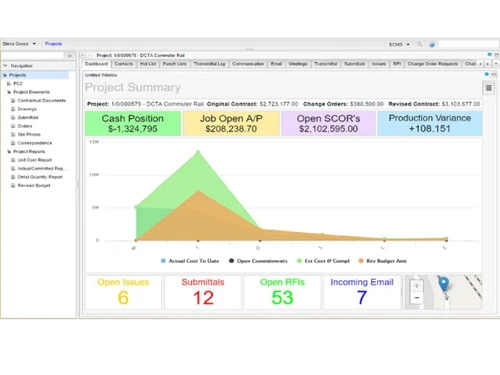
eCMS provides dynamic dashboards giving a centralized view of the entire business. It provides custom forms and gives alerts for real-time coordination between field and office teams. The software includes modules for project time tracking, job costing, document control, and equipment management.

It provides a smart analytical engine that helps in data analysis and gives visibility into budgets, contract progress, and workforce data. The software relies on business intelligence-based reporting and contract automation that helps to improve decision-making.

Why Choose eCMS

  • Centralized Business View: This software unifies financials, HR, projects, and assets in one platform, removing silos and giving a single business view, improving transparency.
  • Real-Time Insights: Interactive dashboards and live data give status on business processes to help in faster decision-making and better project and financial management.
  • Business Intelligence: Advanced reporting tools and analytics provide actionable insights to optimize performance across departments and job sites.
  • Secure Database: Collects entire business data, which is hosted in Tier III data centers with 99.99% uptime, with enterprise-grade data protection and system reliability.
  • HR Management Tools: Handles onboarding, compliance, records, and scheduling under a unified interface.

Benefits of eCMS Construction ERP Software

  • Budget Oversight: Helps to track real-time budget allocation and variance across tasks and projects to improve cost control.
  • Better decision making: Real-time data, predictive analytics, and customizable dashboards help to act quickly and reduce costly delays.
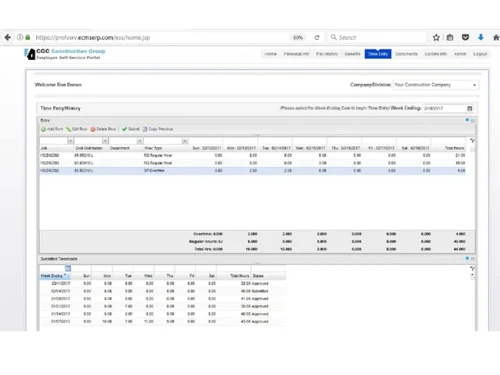
  • Payroll Integration: Automates timesheets, approvals, and syncing to payroll modules for efficient payroll processing.
  • Flexible Architecture: Designed to support contractors of all sizes and help businesses across multiple projects, divisions, and locations.
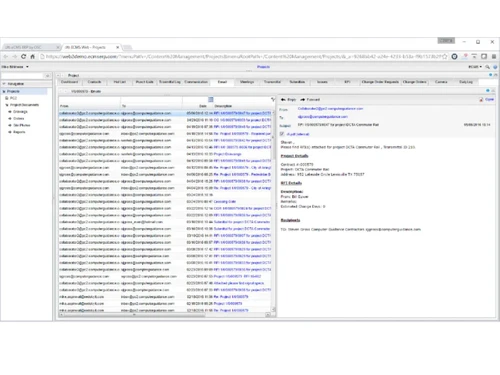
  • Secure Documentation: Stores contracts, RFIs, and drawings with version tracking and access permissions.
  • Mobile Accessibility: Field teams can access data, submit reports, and manage tasks from any mobile device with authorized permissions.

Pricing of eCMS

eCMS details are available on request at techjockey.com.

eCMS may vary based on factors like customization, additional features required, number of users, and the deployment type. Please request a callback for subscription-related details and to avail offers on premium packages.

Read more

Computer Guidance Company Details

Founded Year:  1981

Computer Guidance Corporation (CGC) offers eCMS Cloud-based Construction ERP software for commercial contractors in North America.

Director/Founders Roger D. Kirk
Company Size 101-500 Employees

eCMS Pricing & Plans

Looking for The Right Pricing?

Share your requirements and get a plan built around your business.

  • Define your business needs
  • Get customised pricing
  • Choose features that fit your workflow

Price Available on Request

Get personalised eCMS pricing that fits your needs. Our team will connect with you.

eCMS Features

  • icon_check Financial Reporting
    Real-time accounting with ledger summaries, forecasting, audit support, and compliance tools.
  • icon_check Budget Management
    Tracks department budgets, flags overspending, and supports multi-phase financial planning.
  • icon_check Project Tracking
    Manages schedules, milestones, resources, deliverables, and updates progress in real time.
  • icon_check Document Management
    Organizes contracts, RFIs, blueprints, and revisions with searchable, version-controlled document storage.
  • icon_check Business Intelligence
    Displays KPIs, trends, and analytics dashboards for planning, forecasting, and performance decisions.
  • icon_check HR Management
    Handles onboarding, payroll, compliance checks, timesheets, employee records, and benefits tracking.
  • icon_check Job Costing
    Calculates labor, material, and equipment costs across phases with comparison and reporting tools.
  • icon_check Time Tracking
    Logs daily work hours, syncs with payroll, costing, and attendance systems.
  • icon_check Equipment Management
    Tracks machinery location, fuel usage, maintenance schedules, and job site allocation.
  • icon_check Contract Management
    Oversees subcontractor agreements, change orders, expiry alerts, and audit readiness workflows.

eCMS Specification

Supported Platforms
Ubuntu Ubuntu Windows Windows MacOS MacOS Linux Linux
Devices
Desktop Desktop
Deployment
Web-Based Web-Based
Suitable For
Construction
Business Specific
All Businesses
Business Size
Medium Business Enterprises MSMBs MSMEs
Customer Support
Email Communities
Language
English
Integration
API Integration
Training Resources
Videos

eCMS Review

4.2

Out of 5

img

Overall Rating

Based on
4 Verified Ratings

Rating Breakdown

  • Features 4.5
  • Value for Money 3.7
  • Ease of Use 4.5
  • Customer Support 4.3

80% Recommend this Product

Add Review

Be the First to Review

This product has no reviews yet. Be the first to leave your feedback.

Add Review

Articles for eCMS

See All Related Articles

How much does eCMS cost?

eCMS software pricing is available on request at www.techjockey.com.

Who uses eCMS?

eCMS is used by construction firms, contractors, project leads, and finance teams for ERP automation.

How does eCMS work?

eCMS operates via cloud modules for finance, HR, and projects, using forms, dashboards, and automated workflows.

Which operating systems are compatible with eCMS software?

eCMS runs on any operating system via browser: Windows, macOS, Linux.

Is a free demo available for eCMS software?

Yes, eCMS provides a free trial and demo walkthrough.

Can eCMS integrate with other platforms?

eCMS supports integration with payroll tools, CRM platforms, accounting software, and mobile apps.

What kind of content can eCMS generate or manage?

eCMS manages financial reports, HR records, contracts, job costing summaries, and document workflows.

Is eCMS suitable for bulk workforce and equipment tracking?

Yes, eCMS supports bulk tracking of staff logs and equipment data via import tools and automated dashboards.

20,000+ Software Listed

Best Price Guranteed

Free Expert Consultation

2M+ Happy Customers

Terms and Condtions

close

Users with registered businesses can purchase goods from merchants on the platform to satisfy their business needs. Users are not permitted to utilize any products acquired through the platform for resale, advertising, business, or further distribution.

For each purchase made, users will receive a Tax Invoice (or 'GST invoice') that includes specific details such as:

  • the GSTIN of the user associated with their registered business, and

  • the specified Entity Name for their business.

It should be noted that not all products are eligible for GST Invoice. Only the products displayed by participating sellers with the 'GST-based Invoice Available' callout on the product description page would qualify.

Certain goods and services are not eligible to get a GST Invoice, including items with VAS, i.e., Value Added Services (e.g., Total Mobile Protection/Assured Buyback) and those involving an exchange offer at the time of purchase.

Users must ensure the accuracy of the GSTIN, and business entity name provided for the GST Invoice. Requests for corrections into GST Invoice would not be accommodated by Techjockey.com or any Seller, and any issues arising from user-provided information are the sole responsibility of users.

Techjockey.com is not liable for the GST Invoice or any associated input tax credit. To efficiently claim an input tax credit, users should select the registered place of business address as per the GST authority's data and follow the provisions of the GST Act and rules.

To claim an input tax credit, the delivery and billing addresses must match. Furthermore, input tax credits will not be granted if the delivery address and GSTIN on the invoice are from different states. In case of incorrect GST details provided during the order placement, the order will be canceled automatically.