linkedin
ESET Endpoint Security logo
play ESET Endpoint Security Overview
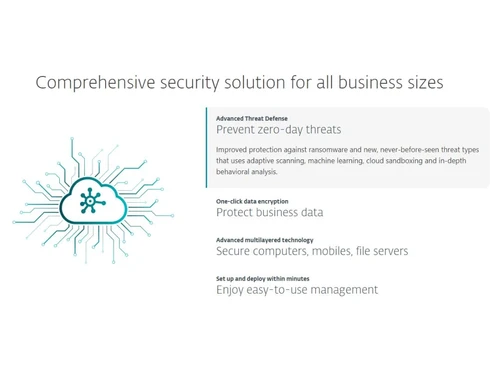
ESET Endpoint Security-Comprehensive Security Solution for all business sizes

ESET Endpoint Security

Brand: ESET ts_icon_wide

  • 4.5

  • 1 Rating & 1 Review

Protect your business across the entire malware lifecycle with ESET Endpoint Security, your multi-layered solution using machine learning for ultimate defense.

See More

Have you used ESET Endpoint Security before?

Share your insights for better experience

Add a Review
Starting Price
$211

View plans

100% Genuine
Products
Best Price
Guaranteed
Safe & Secure
Payment
  • Description

  • Pricing

  • Features

  • Specification

  • Review

  • Compare

  • Alternatives

  • FAQ

Starting at $211

ESET Endpoint SecuritySoftware Overview

What is ESET Endpoint Security?

ESET Endpoint Security is a comprehensive cybersecurity solution designed to protect corporate networks and endpoints from a wide array of digital threats. It operates on a multi-layered defense model, providing proactive protection for computers, file servers, and mobile devices across various operating systems. The platform is managed through a centralized console, the ESET Security Management Center, which offers administrators a single-pane-of-glass view for overseeing security policies, threat detection, and system updates across the entire organization. This unified approach simplifies security management while delivering robust protection against malware, ransomware, and other sophisticated attacks.

The solution leverages advanced technologies, including machine learning and neural networks, to identify and neutralize threats throughout their entire lifecycle. By focusing on pre-execution, execution, and post-execution phases of an attack, ESET Endpoint Security ensures a higher level of protection compared to traditional antivirus software. It can be deployed on-premise on Windows or Linux servers or as a convenient virtual appliance for rapid setup and integration into existing IT infrastructures.

Why Choose ESET Endpoint Security?

  • Complete Malware Lifecycle Protection: Unlike solutions that only focus on one stage of an attack, ESET monitors threats at every phase. This comprehensive visibility allows it to detect and block malware before it runs, while it's running, and even after it has attempted to execute, ensuring no threat goes unnoticed.
  • Advanced Threat Intelligence: ESET has a long history of innovation, utilizing machine learning in its products since 1997. This deep experience is embedded in its security engine, which uses sophisticated algorithms and neural networks to identify new and emerging zero-day threats with exceptional accuracy.
  • Centralized and Simplified Management: The ESET Security Management Center is a powerful tool that significantly reduces administrative overhead. It allows IT teams to manage all endpoint products from a single console, deploy policies, view security reports, and respond to incidents efficiently, regardless of the endpoint's location or operating system.
  • Low System Footprint: ESET solutions are renowned for their minimal impact on system resources. This ensures that endpoint devices remain performant and productive, without the slowdowns often associated with heavy security software.

Advanced Features of ESET Endpoint Security

  1. Modern Endpoint Protection: Utilizes a combination of signature-based detection, advanced heuristics, and behavioral analysis to defend against file-based and fileless malware, ransomware, and targeted attacks.
  2. Machine Learning Integration: Employs proprietary machine learning models, including consolidated output and neural networks, to enhance the detection of previously unseen threats without requiring constant signature updates.
  3. Cross-Platform Management Console: The ESET Security Management Center can be installed on both Windows and Linux servers, and a virtual appliance is available for quick deployment, offering flexibility for diverse IT environments.
  4. Full Disk Encryption: An available feature that allows administrators to enforce and manage strong encryption on hard drives across endpoints, protecting sensitive data from being compromised in the event of device theft or loss.
  5. Advanced Threat Defense: Provides a cloud-based sandboxing environment to analyze suspicious samples. This technology detonates potential threats in an isolated space to observe their behavior, effectively stopping zero-day exploits before they can cause harm.

Key Capabilities of ESET Endpoint Security

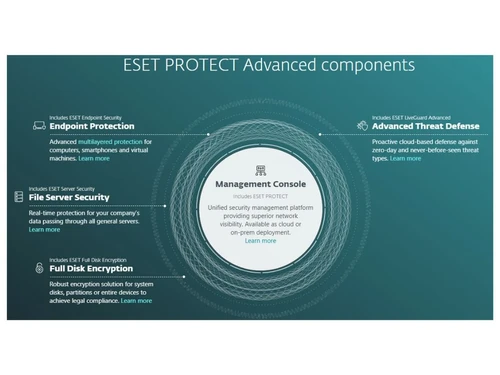
  • Centralized Security Console: A unified dashboard for managing all ESET security products deployed across the network.
  • Endpoint Protection: Core antivirus and antispyware defense for desktops, laptops, and virtual machines.
  • Server Security: Specialized protection for file servers to ensure that stored data remains secure and uncorrupted.
  • Mobile Threat Defense: Secures corporate smartphones and tablets against mobile-specific threats and provides anti-theft features.
  • Full Disk Encryption: Manages device encryption to safeguard data at rest on company endpoints.
  • Cloud Sandbox (Advanced Threat Defense): Offers an additional layer of security by analyzing suspicious files in a secure, isolated cloud environment.

How to Use ESET Endpoint Security?

  1. Deploy the Management Center: First, an administrator installs the ESET Security Management Center. This can be done on a Windows or Linux server or by importing the provided virtual appliance into a hypervisor like VMware or Hyper-V for a faster setup.
  2. Install Endpoint Agents: Once the management console is running, the administrator deploys the ESET agent to all endpoints that need protection. This includes workstations, servers, and mobile devices. The deployment can be done remotely from the console.
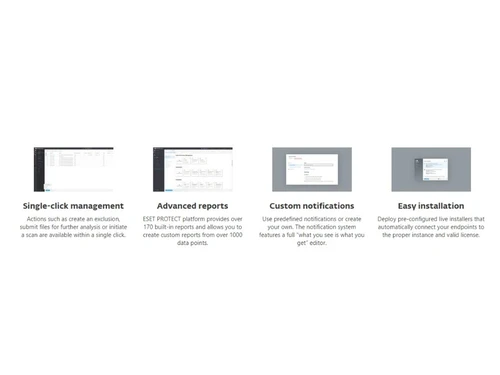
  3. Manage and Monitor: With the agents installed, all devices will appear in the Security Management Center. From here, administrators can apply security policies, monitor threat activity, generate reports, and manage software updates from the single, web-based interface.

ESET Endpoint Security Price

ESET software price starts at USD 211 per year at Techjockey. The pricing model is based on different parameters, including extra features, deployment type, and the total number of users. For further queries related to the product, you can contact our product expert and learn more about the pricing and offers.

Read more

ESET Company Details

Founded Year:  1987

ESET is an information technology security company that develops security software solutions.

Director/Founders Miroslav Trnka, Peter Paško
Company Size 501-1000 Employees

ESET Endpoint Security Pricing & Plans

ESET Protect Entry
Starting at $211
    • Device

      Device
      Device
    • Yearly

      Yearly
      Yearly

Key Features

  • Console

  • Modern Endpoint Protection

  • Server Security

  • Mobile Threat Prevention

ESET Protect Advance
Starting at $275
    • Device

      Device
      Device
    • Yearly

      Yearly
      Yearly

Key Features

  • Console

  • Modern Endpoint Protection

  • Server Security

  • Mobile Threat Defense

  • Full Disk Encryption

  • Advance Threat Defence

ESET Protect Complete
Starting at $287 $338 SAVE UPTO 15%
    • Device

      Device
      Device
    • Yearly

      Yearly
      Yearly

Key Features

  • Console

  • Modern Endpoint Protection

  • Server Security

  • Mobile Threat Defense

  • Full Disk Encryption

  • Advance Threat Defence

  • Cloud App Protection

  • Mail server security

  • Vulnerability & Patch

ESET Endpoint Security Features

  • icon_check Full Disk Encryption
    Protect business data and meet legal compliance by encrypting system disks and partitions on Windows and macOS devices fast.
  • icon_check Advanced Threat Defense
    Utilize a cloud-based sandbox to analyze suspicious samples in an isolated environment to stop zero-day threats today.
  • icon_check Cloud Protection
    Safeguard Microsoft 365 and Google Workspace apps with proactive threat defense for email, OneDrive, and cloud storage fast.
  • icon_check Mail Server Security
    Filter out spam, phishing attempts, and malware at the server level before they reach your employees' private inboxes now.
  • icon_check Vulnerability & Patch
    Automatically track and patch software vulnerabilities across your network from the unified ESET PROTECT management console.
  • icon_check Safe Banking Browser
    Protect financial transactions with a secured browser mode that defends against keyloggers and unauthorized data access fast.
  • icon_check Advanced Memory Scan
    Identify and neutralize fileless malware that hides directly in system memory to bypass traditional file-based scanners.
  • icon_check Botnet Protection Pro
    Prevent your company computers from being used for malicious purposes as part of an infected network or botnet today fast.
  • icon_check Network Inspector
    Test your office routers and smart devices for vulnerabilities and see a list of everyone connected to your network fast.
  • icon_check Ransomware Shield Pro
    Monitor applications for behavior similar to ransomware and block malicious processes before they can encrypt your data.
  • icon_check Global Search Engine
    Instantly find specific endpoint threats, users, or quarantined items using a powerful keyword search bar in the console.
  • icon_check Unified Cloud Console
    Manage all your network endpoints, mobiles, and servers from a single-pane-of-glass cloud-based management dashboard now.
  • icon_check Modern Endpoint Shield
    Leverage multilayered scanning and machine learning to block malware, ransomware, and fileless attacks across your network.
  • icon_check Server Security
    Protect your data passing through all general servers and network file storage with specialized, low-impact scanning today.
  • icon_check Mobile Threat Defense
    Secure company mobile devices with integrated anti-malware, anti-theft, and app-vetting tools for Android and iOS systems now.
ESET Endpoint Security Demo Video play icon

Get ESET Endpoint Security Demo

Watch the demo video to explore key features, real workflows, and how the software fits your business needs.

Understand
Key Features
Personal
Demo Insights
Interactive
Demo Support

ESET Endpoint Security Specification

Supported Platforms
Ubuntu Ubuntu Windows Windows Android Android MacOS MacOS Linux Linux
Devices
Desktop Desktop Mobile Mobile iPad iPad
Deployment
Web-Based Web-Based Perpetual Perpetual
Suitable For
All Industries
Business Specific
All Businesses
Business Size
Small Business Medium Business
Customer Support
Email Live Chat
Language
English
Training Resources
In Person Live Online Webinars Documentation

Explore the Best Alternative Solutions Similar to Your Business Size and Needs

ESET Endpoint Security Review

4.5

Out of 5

img

Overall Rating

Based on
1 Verified Review

Rating Breakdown

  • Features 4.5
  • Value for Money 4.5
  • Ease of Use 4.5
  • Customer Support 4.5

90% Recommend this Product

Add Review

Akshita Ratnakar

User

4.5

Reviewed on: Feb 28, 2020

Techjockey Verified

“Very very good at handling threats”

Pros

handles threats very effectively

Cons

NO CONS

Compare ESET Endpoint Security With other Endpoint Security Software

Products
Ratings
Pricing
Device Supported
Deployment
Supported Platforms
  • img

    ESET Endpoint Security

  • 4.5

  • Price On Request

  • Desktop

    Mobile

  • Web based

    On Premises

  • Windows

    Mac OS

  • img

    NinjaOne

  • 4.7

  • Price On Request

  • Desktop

    Mobile

  • Web based

    On Premises

  • Windows

    Mac OS

  • img

    ThreatLocker

  • 4.2

  • Price On Request

  • Desktop

    Mobile

  • Web based

    On Premises

  • Windows

    Mac OS

  • img

    Syxsense

  • 4.7

  • Price On Request

  • Desktop

    Mobile

  • Web based

    On Premises

  • Windows

    Mac OS

(0) Product(s) selected

ESET Endpoint Security Alternatives

See All ESET Endpoint Security Alternatives

Available

Price on Request

Available

Price on Request

Available

Price on Request

Articles for ESET Endpoint Security

See All Related Articles

What is end point security?

Endpoint security or endpoint protection is an approach to the protection of computer networks that are remotely bridged to client devices. The connection of laptops, tablets, mobile phones and other wireless devices to corporate networks creates attack paths for security threats.

What is the difference between ESET Endpoint Security and ESET Endpoint Antivirus?

ESET Endpoint Security is a more comprehensive solution that includes all the features of ESET Endpoint Antivirus, plus additional layers of protection such as a firewall, web control, and device control for greater security.

What is ESET Endpoint Security used for?

ESET Endpoint Security is used to protect business endpoints like computers and servers from malware by using multiple layers of defense, including machine learning, to detect threats before, during, and after execution.

Is ESET Endpoint a good antivirus?

ESET Endpoint Security is considered a strong security solution as it provides multi-layered protection that detects malware throughout its entire lifecycle and has utilized machine learning in its defense technology since 1997.

How do I temporarily disable ESET Endpoint Security?

Temporarily disabling ESET Endpoint Security is typically performed by an administrator through the central management console, such as the ESET Security Management Center, to maintain security policies.

What is the difference between ESET Protect and ESET Endpoint Security?

ESET Protect is the name of the solution bundle or subscription plan, such as ESET Protect Entry, which includes the ESET Endpoint Security software along with a management console and other security tools.

How is ESET Endpoint Security managed across a network?

ESET Endpoint Security is managed centrally from a single pane of glass using the ESET Security Management Center, which can be installed on Windows, Linux, or deployed as a virtual appliance.

What kind of technology does ESET use to detect threats?

ESET Endpoint Security utilizes a multi-layered defense approach that includes machine learning in the form of consolidated output and neural networks to detect threats across the entire malware lifecycle.

What is the starting price for ESET Endpoint Security?

ESET software price starts at USD 211 per year at Techjockey.com.

Does ESET Endpoint Security offer full disk encryption?

Yes, full disk encryption is available as part of the ESET Protect Advance subscription plan, which builds upon the core features of ESET Endpoint Security.

20,000+ Software Listed

Best Price Guranteed

Free Expert Consultation

2M+ Happy Customers

Terms and Condtions

close

Users with registered businesses can purchase goods from merchants on the platform to satisfy their business needs. Users are not permitted to utilize any products acquired through the platform for resale, advertising, business, or further distribution.

For each purchase made, users will receive a Tax Invoice (or 'GST invoice') that includes specific details such as:

  • the GSTIN of the user associated with their registered business, and

  • the specified Entity Name for their business.

It should be noted that not all products are eligible for GST Invoice. Only the products displayed by participating sellers with the 'GST-based Invoice Available' callout on the product description page would qualify.

Certain goods and services are not eligible to get a GST Invoice, including items with VAS, i.e., Value Added Services (e.g., Total Mobile Protection/Assured Buyback) and those involving an exchange offer at the time of purchase.

Users must ensure the accuracy of the GSTIN, and business entity name provided for the GST Invoice. Requests for corrections into GST Invoice would not be accommodated by Techjockey.com or any Seller, and any issues arising from user-provided information are the sole responsibility of users.

Techjockey.com is not liable for the GST Invoice or any associated input tax credit. To efficiently claim an input tax credit, users should select the registered place of business address as per the GST authority's data and follow the provisions of the GST Act and rules.

To claim an input tax credit, the delivery and billing addresses must match. Furthermore, input tax credits will not be granted if the delivery address and GSTIN on the invoice are from different states. In case of incorrect GST details provided during the order placement, the order will be canceled automatically.