USA
USA UAE
UAESmall Business
Designed for startups and growing businesses
See More





Brand: Experion
FieldMax Pharma solution is an agile software for pharmaceutical organizations allowing them to streamline daily requirements of the field sales teams and enhance their productivity with mission critical real time data. Available as innovative mobile solution, the product provides access to core sal...
See MoreHave you used Experion FieldMax SFA before?
Share your insights for better experience
Brand: Experion
Founded Year: 2006
Experion
Looking for The Right Pricing?
Share your requirements and get a plan built around your business.
Price Available on Request
Get personalised Experion FieldMax SFA pricing that fits your needs. Our team will connect with you.
 User Authentication Order Management Sales Tracking Sales & Market Performance Dashboard Analytics Planning Management Customer Classification system Real-time BI Route Planning

Watch the demo video to explore key features, real workflows, and how the software fits your business needs.
 Android
  Mobile
  Tablet
  Cloud-Based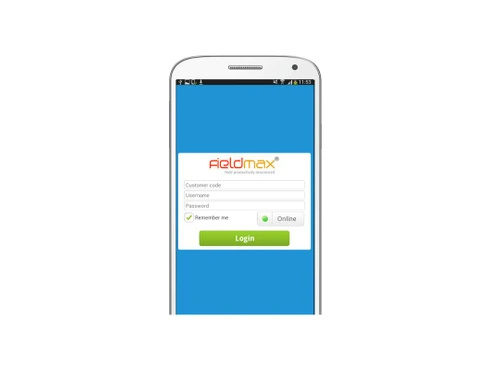
Small Business
Designed for startups and growing businesses
Medium Business
Built for business growth and flexibility
Enterprises
Designed for complex and large-scale business needs
4.7
Out of 5

Overall Rating
Based on
3 Verified Reviews
Rating Breakdown
83% Recommend this Product
Add ReviewUsers generally express high satisfaction with Experion FieldMax SFA, highlighting its effectiveness in streamlining sales order management and its integration capabilities with existing ERP systems. Many appreciate the responsive customer service and support received during the software selection process. However, some users note that customization can be time-consuming. Overall, the product is well-recommended for its utility and the assistance provided by the service team, despite minor limitations in customization efficiency.

Jan 14, 2019
Techjockey Verified
“Sales Order Management is easy with this solution”
Pros
Very useful tool for the sales team. FieldMax could be interfaced with the ERP implemented, so that data entry was eliminated at the back end.
Cons
Customization takes time.
Aug 1, 2016
Techjockey Verified
“Very happy with my product”
Pros
Great service! I ran across the site which looking for software options for software system. I filled out the form and within a short time I had a telephone call and email from Melissa at Techjockey, giving me 5 options that fit our criteria. Those 5 companies all contacted me that day and we got conversations/demos/in-person visits all arranged during that first day! Each of the companies provided excellent information that I can utilize. Highly recommend Techjockey!
Cons
N/A
Jul 25, 2016
Techjockey Verified
“Techjockey - Highly recommended”
Pros
I used Techjockey to help me narrow down software search. The rep was extremely responsive and shared many suggested vendors with me. I ended up choosing one that he recommended. When looking for our next software that we wanted to integrate, my first step was to reach out to my rep. Once again, he has been extremely helpful and I am happy that I had this great tool! Much better than browsing the internet and looking for something on my own.
Cons
N/A

Experion FieldMax SFA
Price On Request
Desktop
Mobile
Web based
On Premises
Windows
Mac OS

OmniAssist
Price On Request
Desktop
Mobile
Web based
On Premises
Windows
Mac OS
SalesJump SFA
₹ 300
Desktop
Mobile
Web based
On Premises
Windows
Mac OS

Peri CRM
₹ 800
Desktop
Mobile
Web based
On Premises
Windows
Mac OS

GogreenSFA 360
Price On Request
Desktop
Mobile
Web based
On Premises
Windows
Mac OS

Delta Sales Force Automation
Price On Request
Desktop
Mobile
Web based
On Premises
Windows
Mac OS

InstaCX
Price On Request
Desktop
Mobile
Web based
On Premises
Windows
Mac OS

Zams
Price On Request
Desktop
Mobile
Web based
On Premises
Windows
Mac OS

Instantly
Price On Request
Desktop
Mobile
Web based
On Premises
Windows
Mac OS

KOOPS Sales Force Automation
₹ 2500
Desktop
Mobile
Web based
On Premises
Windows
Mac OS

FieldMI
₹ 5988
Desktop
Mobile
Web based
On Premises
Windows
Mac OS
(0) Product(s) selected
Starting Price:
₹300
Starting Price:
$1,000 /Month
Starting Price:
$47 /Month

Starting Price:
₹449 /Month

Starting Price:
₹250 /Month

Starting Price:
$49 /Month

Available
Price on Request

Starting Price:
$39 /Month

Available
Price on Request

Starting Price:
$10

Available
Price on Request
FieldMax is a suite of mobile and web-based applications used for field sales automation. It has two components - FieldMax Mobile application is used by the field staff to enter field sales information on a simple Java/Android enabled mobile handset. FieldMax Office is a web-based application used by the operations team to track and process the field sales data.
FieldMax would be a definite fit in organizations who have a large field sales team working in the market, meeting more than 15 customer per day, entering sales data in paper and DSR sheets, executing primary/secondary sales, meeting distributors/C&F agent reporting, end of the day sales data to reporting managers over calls/SMS/emails and so on.
No. It is not mandatory that you must have a smartphone to use FieldMax application. The only requirement is the device should be Java/Android/Windows supportive with internet connectivity. Our team would advise you on the best device as per business requirement.
Implementation time depends on factors such as master data availability and team readiness. In a normal scenario it would take 15 - 30 days for a full roll-out for a 100 member sales team.
Yes. All data transactions through FieldMax is visible to authorized users in real-time. The data is shown to the users based on their privileges. Data transfer between the mobile and web applications is through GPRS.
20,000+ Software Listed
Best Price Guranteed
Free Expert Consultation
2M+ Happy Customers
Terms and Condtions

Users with registered businesses can purchase goods from merchants on the platform to satisfy their business needs. Users are not permitted to utilize any products acquired through the platform for resale, advertising, business, or further distribution.
For each purchase made, users will receive a Tax Invoice (or 'GST invoice') that includes specific details such as:
the GSTIN of the user associated with their registered business, and
the specified Entity Name for their business.
It should be noted that not all products are eligible for GST Invoice. Only the products displayed by participating sellers with the 'GST-based Invoice Available' callout on the product description page would qualify.
Certain goods and services are not eligible to get a GST Invoice, including items with VAS, i.e., Value Added Services (e.g., Total Mobile Protection/Assured Buyback) and those involving an exchange offer at the time of purchase.
Users must ensure the accuracy of the GSTIN, and business entity name provided for the GST Invoice. Requests for corrections into GST Invoice would not be accommodated by Techjockey.com or any Seller, and any issues arising from user-provided information are the sole responsibility of users.
Techjockey.com is not liable for the GST Invoice or any associated input tax credit. To efficiently claim an input tax credit, users should select the registered place of business address as per the GST authority's data and follow the provisions of the GST Act and rules.
To claim an input tax credit, the delivery and billing addresses must match. Furthermore, input tax credits will not be granted if the delivery address and GSTIN on the invoice are from different states. In case of incorrect GST details provided during the order placement, the order will be canceled automatically.