linkedin
Final Draft logo
play What’s New in Final Draft 13
Final Draft Reimagine
Final Draft Outline

Final Draft

Brand: Final Draft

  • 4.2

  • 5 Ratings

Final Draft is a popular and widely used screenwriting software that provides an intuitive interface with automatic formatting features. This allows writers to focus on the creative process of crafting scripts for film, television, and theater productions.

See More

Have you used Final Draft before?

Share your insights for better experience

Add a Review
Starting Price
$80

View plans

100% Genuine
Products
Best Price
Guaranteed
Safe & Secure
Payment
  • Description

  • Pricing

  • Features

  • Specification

  • Review

  • Compare

  • Alternatives

  • FAQ

Starting at $80

Final Draft Software Overview

What is Final Draft?

Final Draft is a popular screenwriting software that helps writers create and format film, television, and theater scripts. It provides an intuitive interface with automatic formatting features, allowing writers to focus on the creative process without worrying about industry-standard formatting.

It offers outlining, note-taking, and real-time collaboration tools, enabling writers to develop their ideas and work with others on projects. The software is compatible with various file formats and is trusted by 95% of the entertainment industry. While Final Draft is proprietary software, it has won awards for its contributions to screenwriting and is considered the industry standard for professional scriptwriting.

Why Choose Final Draft Software?

  • Industry Standard: Trusted by 95% of the entertainment industry.
  • Automatic Formatting: Formats scripts to industry standards automatically.
  • Collaborative Writing: Offers real-time collaboration tools for efficient teamwork.
  • Professional Templates: Provides over 40 templates for various script types.
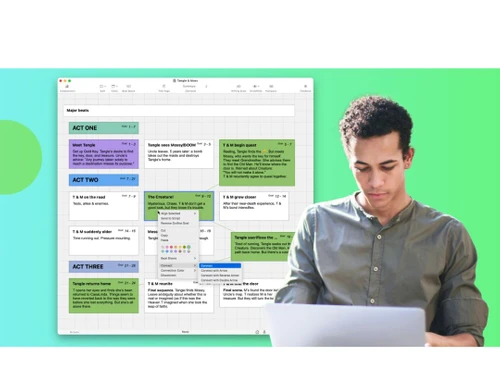
  • Productivity Tools: Enhances productivity with features like the Beat BoardTM.
  • Export Capabilities: Streamlines script delivery with easy export options.
  • Technical Support: Access world-class support via phone, email, or chat.
  • Continuous Updates: Regular updates to keep the software current.
  • Community and Resources: Provides a blog, tutorials, and industry news.
  • Professional Endorsements: Endorsed by renowned filmmakers, highlighting its credibility.

Benefits of Final Draft Platform

  • Customizable Templates: Users can customize templates to suit their preferences and project requirements.
  • Efficient Revision Tools: Tools for tracking revisions and managing drafts streamline the review and refinement process.
  • Automatic Formatting: Automates pagination, indentation, and dialogue formatting for consistency and time-saving.
  • Production Features: Includes budgeting tools, scheduling capabilities, and integration with production management software for pre-production and production stages.
  • Advanced Export Options: Various export options, such as PDF, HTML, and Fountain, ensure compatibility with different platforms and software.

Pricing of Final Draft

Final Draft pricing starts at $80 at techjockey.com.

The pricing model is based on different parameters, including extra features, deployment type, and the total number of users. If you have further queries related to the product, you can contact our product team to learn more about the pricing and offers.

Read more

Final Draft Company Details

Founded Year:  1991

Final Draft, Inc. engages in the development and sale of scriptwriting software programs for film, television, and theatre professionals.

Director/Founders Benjamin Cahan
Company Size 1-100 Employees

Final Draft Pricing & Plans

Final Draft 13 Personal
Starting at $200
    • Licenses

      Licenses
      Licenses

Key Features

  • Screenwriters

  • Filmmakers

  • Producers

  • Graphic novelists, playwrights, and more, new to F

Upgrade to Final Draft 13
Starting at $80
    • Licenses

      Licenses
      Licenses

Key Features

  • Owners of any previous version of the Final Draft

Final Draft Features

  • icon_check Scene Navigator
    Jump between scenes and view summaries for seamless script navigation.
  • icon_check Multiple Dialogue Versions
    Store alternate lines for experimentation and creative flexibility.
  • icon_check Sprint Timer Tools
    Track writing sessions and boost productivity with timed writing sprints.
  • icon_check Production Reports
    Generate detailed script reports for scheduling, budgeting, and logistics.
  • icon_check Multi Language Support
    Supports over 90 languages including Hindi, Tamil, Marathi, and Nepali.
  • icon_check Intelligent Formatting
    Final Draft auto-formats scripts to industry standards, eliminating manual adjustments.
  • icon_check Notes
    Easily add, manage, and reference notes for idea tracking and revisions.
  • icon_check Collaboration Tools
    Facilitate real-time collaboration, feedback sharing, and effortless revisions among users.
  • icon_check Storytellers
    Efficiently organize characters, locations, and story elements for script clarity.
  • icon_check Data Import/Export
    Streamline workflow by importing/exporting script data from various formats.
  • icon_check Track Changes
    Review and manage script revisions by collaborators for transparency.
  • icon_check Outline
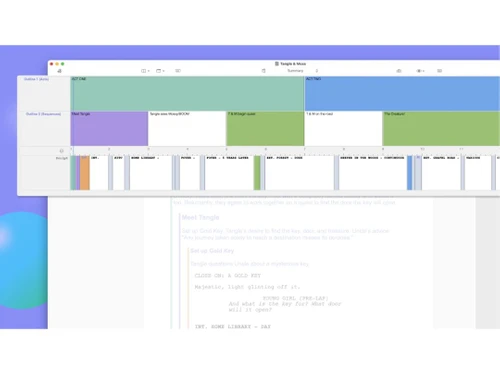
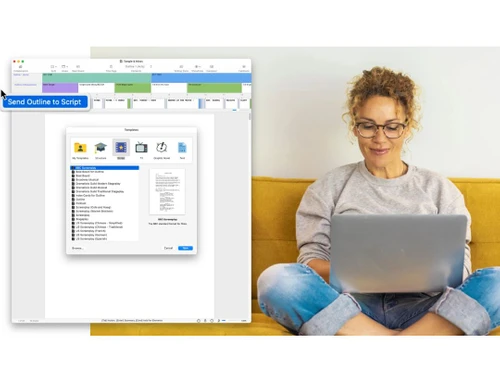
    Plan and visualize your story structure before writing with a structured outline.
Final Draft Demo Video play icon

Get Final Draft Demo

Watch the demo video to explore key features, real workflows, and how the software fits your business needs.

Understand
Key Features
Personal
Demo Insights
Interactive
Demo Support

Final Draft Specifications

Supported Platforms
Ubuntu Ubuntu Windows Windows MacOS MacOS Linux Linux
Devices
Desktop Desktop
Deployment
Cloud-Based Cloud-Based
Suitable For
All Industries
Business Specific
All Businesses
Business Size
Small Business Startups Medium Business Enterprises
Customer Support
Email Communities
Language
English
Training Resources
Videos

Explore the Best Alternative Solutions Similar to Your Business Size and Needs

Final Draft Review

4.2

Out of 5

img

Overall Rating

Based on
5 Verified Ratings

Rating Breakdown

  • Features 4.1
  • Value for Money 4.1
  • Ease of Use 4.5
  • Customer Support 4.4

90% Recommend this Product

Add Review

Be the First to Review

This product has no reviews yet. Be the first to leave your feedback.

Add Review

Compare Final Draft With other Screenwriting Software

Products
Ratings
Pricing
Device Supported
Deployment
Supported Platforms
  • img

    Final Draft

  • 4.2

  • Price On Request

  • Desktop

    Mobile

  • Web based

    On Premises

  • Windows

    Mac OS

  • img

    StudioBinder

  • 4.2

  • Price On Request

  • Desktop

    Mobile

  • Web based

    On Premises

  • Windows

    Mac OS

  • img

    WriterDuet

  • 4.1

  • Price On Request

  • Desktop

    Mobile

  • Web based

    On Premises

  • Windows

    Mac OS

  • img

    Fade In

  • 4

  • Price On Request

  • Desktop

    Mobile

  • Web based

    On Premises

  • Windows

    Mac OS

  • img

    StudioVity

  • 4.1

  • Price On Request

  • Desktop

    Mobile

  • Web based

    On Premises

  • Windows

    Mac OS

  • img

    AIScreenwriter

  • 4.6

  • Price On Request

  • Desktop

    Mobile

  • Web based

    On Premises

  • Windows

    Mac OS

  • img

    KIT Scenarist

  • 4.3

  • Price On Request

  • Desktop

    Mobile

  • Web based

    On Premises

  • Windows

    Mac OS

  • img

    Story Architect

  • Price On Request

  • Desktop

    Mobile

  • Web based

    On Premises

  • Windows

    Mac OS

  • img

    Story Planner

  • Price On Request

  • Desktop

    Mobile

  • Web based

    On Premises

  • Windows

    Mac OS

  • img

    Arc Studio

  • 4.1

  • Price On Request

  • Desktop

    Mobile

  • Web based

    On Premises

  • Windows

    Mac OS

(2) Product(s) selected

Final Draft Alternatives

See All Final Draft Alternatives

Available

Price on Request

SAVE UPTO 25%

Starting Price:

$15 /Month

Available

Price on Request

Available

Price on Request

Available

Price on Request

Starting Price:

$19 /Quantity

How much does Final Draft Software Cost?

Final Draft Software pricing starts at $80 at techjockey.com.

Does Final Draft have a mobile app available?

No, Final Draft does not offer mobile apps.

What operating systems is Final Draft compatible with?

Final Draft Software supports Ubuntu, Linux, MacOS, and Windows operating systems.

Is there a way to try this product without purchasing it?

Final Draft often provides a free trial period for users to test the software.

How does Final Draft Software Work?

Final Draft Software functions by providing tools for screenwriting, formatting, and collaboration.

To whom is Final Draft software typically intended for use?

Potential users of Final Draft Software include screenwriters, filmmakers, and professionals in the entertainment industry.

Is Final Draft Software Free?

No, Final Draft Software typically requires a purchase.

20,000+ Software Listed

Best Price Guranteed

Free Expert Consultation

2M+ Happy Customers

Terms and Condtions

close

Users with registered businesses can purchase goods from merchants on the platform to satisfy their business needs. Users are not permitted to utilize any products acquired through the platform for resale, advertising, business, or further distribution.

For each purchase made, users will receive a Tax Invoice (or 'GST invoice') that includes specific details such as:

  • the GSTIN of the user associated with their registered business, and

  • the specified Entity Name for their business.

It should be noted that not all products are eligible for GST Invoice. Only the products displayed by participating sellers with the 'GST-based Invoice Available' callout on the product description page would qualify.

Certain goods and services are not eligible to get a GST Invoice, including items with VAS, i.e., Value Added Services (e.g., Total Mobile Protection/Assured Buyback) and those involving an exchange offer at the time of purchase.

Users must ensure the accuracy of the GSTIN, and business entity name provided for the GST Invoice. Requests for corrections into GST Invoice would not be accommodated by Techjockey.com or any Seller, and any issues arising from user-provided information are the sole responsibility of users.

Techjockey.com is not liable for the GST Invoice or any associated input tax credit. To efficiently claim an input tax credit, users should select the registered place of business address as per the GST authority's data and follow the provisions of the GST Act and rules.

To claim an input tax credit, the delivery and billing addresses must match. Furthermore, input tax credits will not be granted if the delivery address and GSTIN on the invoice are from different states. In case of incorrect GST details provided during the order placement, the order will be canceled automatically.