linkedin
StudioVity logo
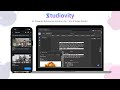
play Studiovity Introduction
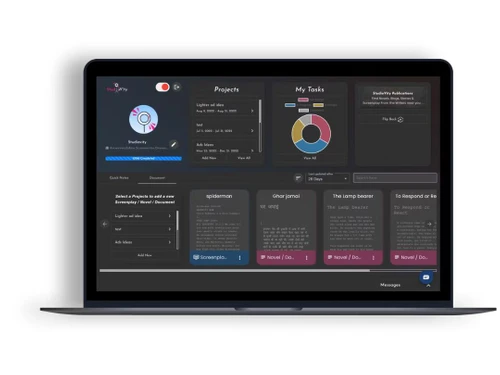
StudioVity Dashboard
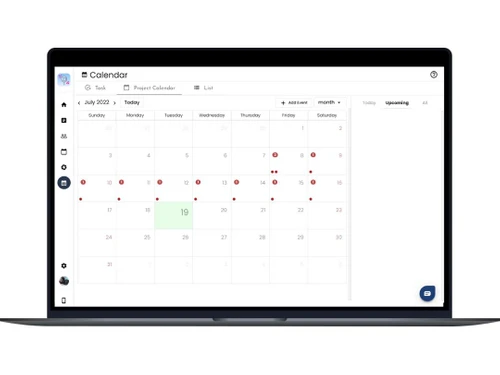
StudioVity Calendar

StudioVity

Brand: StudioVity

  • 4.1

  • 3 Ratings

StudioVity is an AI-powered film production and screenwriting platform designed to help filmmakers, writers, and production teams manage the entire pre-production workflow from script to screen.

See More

Have you used StudioVity before?

Share your insights for better experience

Add a Review
Starting Price
$3

View plans

100% Genuine
Products
Best Price
Guaranteed
Safe & Secure
Payment
  • Description

  • Pricing

  • Features

  • Specification

  • Review

  • Compare

  • Alternatives

  • FAQ

Starting at $3

StudioVity Software Overview

What is StudioVity?

StudioVity is a script-writing software and a screenwriting software that helps filmmakers, writers, and production teams create, organize, and manage the entire filmmaking workflow from screenplay development to production planning. It provides tools for writing scripts, generating storyboards, scheduling shoots, and collaborating with cast and crew in one centralized platform.

With features like AI-powered screenplay editing, script breakdowns, call sheet generation, budgeting, production calendars, and team collaboration tools, StudioVity streamlines film and TV production processes. It helps creators improve productivity, simplify pre-production tasks, and efficiently manage projects for movies, television, and digital content creation.

Why Choose StudioVity?

  • All-in-One Film Production Platform: StudioVity combines screenwriting, storyboarding, scheduling, budgeting, call sheets, and production management into one unified platform, reducing the need for multiple tools.
  • AI-Powered Screenwriting & Storyboarding: Its AI tools help writers refine dialogue, generate storyboards, create shot lists, and visualize scenes faster, improving creativity and pre-production efficiency.
  • Automated Production Planning: Features like AI script breakdowns, stripboards, and automated shooting schedules simplify complex production workflows and save significant planning time.
  • Real-Time Collaboration: Teams can collaborate on scripts, schedules, call sheets, and production tasks in real time, ensuring better communication across departments.
  • Ideal for Independent & Professional Filmmakers: Whether for indie creators or large production studios, StudioVity supports efficient film, TV, commercial, and digital content production workflows.

Benefits of StudioVity

  • Streamlined Film Production Workflow: StudioVity combines screenwriting, scheduling, budgeting, storyboarding, and production planning in one platform, reducing the need for multiple disconnected tools.
  • Faster Pre-Production Planning: AI-powered script breakdowns, shot lists, and automated scheduling help filmmakers save time and speed up production preparation.
  • Improved Team Collaboration: Real-time collaboration features allow writers, directors, producers, and crew members to work together seamlessly from anywhere.
  • Enhanced Creativity & Visualization: Built-in storyboard generation and screenplay tools help creators visualize scenes and refine storytelling more effectively.

Pricing

StudioVity pricing starts at USD 3 at techjockey.com. The pricing model is based on different parameters, including the amount of bandwidth you need, the number of servers you need, and the features you need. For further queries related to the product, you can contact our product team and learn more about the pricing and offers.

Read more

StudioVity Company Details

Founded Year:  2021

We are building a SaaS-based Screenwriting software focused on video, film-tv production management. Currently, users can write Screenplay, scripts, novels in all major languages worldwide.

Director/Founders Akshay Kumar Jain, Santosh Kumar Gupta, and Udit Kumar Mishra
Company Size 1-100 Employees

StudioVity Pricing & Plans

Screenwriting
Key Features
  • 350+ Languages
  • Index cards
  • Unlimited Documents
  • Access from any device
Starting at $3
    • Licenses

      Licenses
      Licenses
    • Monthly

      Monthly
      Monthly

Key Features

  • 350+ Languages

  • Index cards

  • Unlimited Documents

  • Access from any device

StudioVity Features

  • icon_check Advanced Screenwriting Editor
    An intuitive editor with auto-formatting, auto-save, and industry-standard screenplay layout.
  • icon_check File Sharing
    Easily share project files and scripts with your entire production team in real time, keeping everyone on the same page.
  • icon_check Film Crew Management
    Manage crew details, roles, and permissions centrally and enforce secure access controls for a safer production workflow.
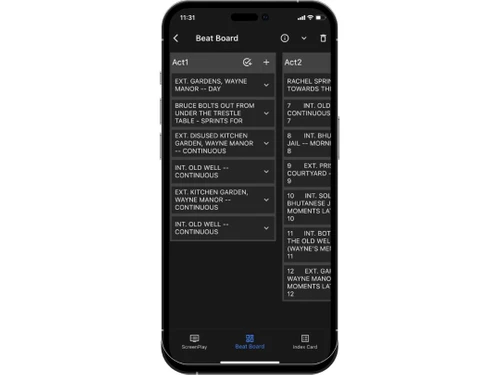
  • icon_check Index card view
    Scene-based index cards for outlining, reordering, and organising scenes visually.
  • icon_check Screenwriting
    Use on tablets or touch-enabled devices to write, edit, storyboard and manage production tasks wherever you are.
  • icon_check Story Board
    Visually map out shots and sequences using drag-and-drop storyboard tools to refine your film’s structure and pacing.
  • icon_check Calendar Management
    Schedule shoots, tasks and deadlines in a built-in calendar view, syncing production events across devices and teams.
  • icon_check Multi-Language Support & Availability
    Enables writing, collaboration & export in over 350 languages.
  • icon_check Client Management
    Keep track of clients, stakeholders and contacts in one system, assign access and monitor communications throughout production.
  • icon_check Shooting Schedules
    Create detailed shoot schedules, automatically arrange scenes by location/time and share with cast & crew for streamlined
  • icon_check Notes
    Tag, annotate and attach notes to script elements or production tasks—perfect for feedback, revisions and on-set reminders.
  • icon_check AI-powered Writing Assistance
    AI features for dialogue enhancement, tone adjustment, error detection and rewriting.
  • icon_check User Management
    Assign roles (writer, admin, viewer) for team workflows and production houses.
StudioVity Demo Video play icon

Get StudioVity Demo

Watch the demo video to explore key features, real workflows, and how the software fits your business needs.

Understand
Key Features
Personal
Demo Insights
Interactive
Demo Support

StudioVity Specifications

Supported Platforms
Ubuntu Ubuntu Windows Windows MacOS MacOS Linux Linux
Devices
Desktop Desktop
Deployment
Cloud-Based Cloud-Based
Suitable For
All Industries
Business Specific
All Businesses
Business Size
Small Business Startups Medium Business Enterprises
Customer Support
Email Communities
Language
English
Training Resources
Videos

Explore the Best Alternative Solutions Similar to Your Business Size and Needs

StudioVity Review

4.1

Out of 5

img

Overall Rating

Based on
3 Verified Ratings

Rating Breakdown

  • Features 4.3
  • Value for Money 4.1
  • Ease of Use 4.1
  • Customer Support 4

83% Recommend this Product

Add Review

Be the First to Review

This product has no reviews yet. Be the first to leave your feedback.

Add Review

Compare StudioVity With other Screenwriting Software

Products
Ratings
Pricing
Device Supported
Deployment
Supported Platforms
  • img

    StudioVity

  • 4.1

  • Price On Request

  • Desktop

    Mobile

  • Web based

    On Premises

  • Windows

    Mac OS

  • img

    Final Draft

  • 4.2

  • Price On Request

  • Desktop

    Mobile

  • Web based

    On Premises

  • Windows

    Mac OS

  • img

    StudioBinder

  • 4.2

  • Price On Request

  • Desktop

    Mobile

  • Web based

    On Premises

  • Windows

    Mac OS

  • img

    WriterDuet

  • 4.1

  • Price On Request

  • Desktop

    Mobile

  • Web based

    On Premises

  • Windows

    Mac OS

  • img

    Fade In

  • 4

  • Price On Request

  • Desktop

    Mobile

  • Web based

    On Premises

  • Windows

    Mac OS

  • img

    AIScreenwriter

  • 4.6

  • Price On Request

  • Desktop

    Mobile

  • Web based

    On Premises

  • Windows

    Mac OS

  • img

    KIT Scenarist

  • 4.3

  • Price On Request

  • Desktop

    Mobile

  • Web based

    On Premises

  • Windows

    Mac OS

  • img

    Story Architect

  • Price On Request

  • Desktop

    Mobile

  • Web based

    On Premises

  • Windows

    Mac OS

  • img

    Story Planner

  • Price On Request

  • Desktop

    Mobile

  • Web based

    On Premises

  • Windows

    Mac OS

  • img

    Arc Studio

  • 4.1

  • Price On Request

  • Desktop

    Mobile

  • Web based

    On Premises

  • Windows

    Mac OS

(2) Product(s) selected

StudioVity Alternatives

See All StudioVity Alternatives

Available

Price on Request

SAVE UPTO 25%

Starting Price:

$15 /Month

Available

Price on Request

Available

Price on Request

Available

Price on Request

Starting Price:

$19 /Quantity

How much does StudioVity cost?

StudioVity pricing starts at USD 3 at techjockey.com. Pricing is customised based on specific business needs.

Which operating system does StudioVity support?

StudioVity supports Windows, macOS, Android, and iOS through its web-based platform and mobile accessibility features.

How does StudioVity work?

StudioVity helps users manage screenwriting, storyboarding, scheduling, budgeting, and production workflows from a centralized cloud-based platform.

Is StudioVity suitable for small businesses?

Yes, StudioVity is suitable for independent filmmakers, small production teams, and growing studios looking for affordable production management tools.

Does StudioVity offer a free trial or a demo?

Yes, StudioVity offers free access plans and demos that allow users to explore its filmmaking and screenwriting features.

What features does StudioVity offer?

It includes screenwriting, AI storyboard generation, script breakdowns, scheduling, budgeting, call sheets, collaboration tools, and production calendars.

Is there a StudioVityApp?

Yes, StudioVity supports mobile access on Android and iOS, allowing users to manage production workflows on the go.

Who are the potential users of StudioVity?

StudioVity is used by filmmakers, screenwriters, directors, producers, production houses, and creative teams working on films, TV shows, and digital content.

How secure is StudioVity?

StudioVity uses cloud-based infrastructure and secure access controls to help protect scripts, production files, and collaboration data.

What is StudioVity used for?

StudioVity is used for screenwriting, pre-production planning, storyboarding, scheduling, and managing film and video production workflows.

20,000+ Software Listed

Best Price Guranteed

Free Expert Consultation

2M+ Happy Customers

Terms and Condtions

close

Users with registered businesses can purchase goods from merchants on the platform to satisfy their business needs. Users are not permitted to utilize any products acquired through the platform for resale, advertising, business, or further distribution.

For each purchase made, users will receive a Tax Invoice (or 'GST invoice') that includes specific details such as:

  • the GSTIN of the user associated with their registered business, and

  • the specified Entity Name for their business.

It should be noted that not all products are eligible for GST Invoice. Only the products displayed by participating sellers with the 'GST-based Invoice Available' callout on the product description page would qualify.

Certain goods and services are not eligible to get a GST Invoice, including items with VAS, i.e., Value Added Services (e.g., Total Mobile Protection/Assured Buyback) and those involving an exchange offer at the time of purchase.

Users must ensure the accuracy of the GSTIN, and business entity name provided for the GST Invoice. Requests for corrections into GST Invoice would not be accommodated by Techjockey.com or any Seller, and any issues arising from user-provided information are the sole responsibility of users.

Techjockey.com is not liable for the GST Invoice or any associated input tax credit. To efficiently claim an input tax credit, users should select the registered place of business address as per the GST authority's data and follow the provisions of the GST Act and rules.

To claim an input tax credit, the delivery and billing addresses must match. Furthermore, input tax credits will not be granted if the delivery address and GSTIN on the invoice are from different states. In case of incorrect GST details provided during the order placement, the order will be canceled automatically.