linkedin
StudioBinder logo
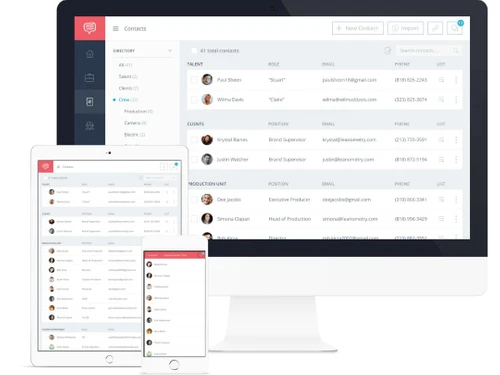
StudioBinder Dashboard
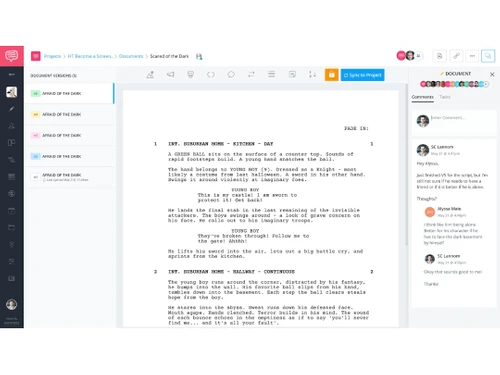
StudioBinder Documents
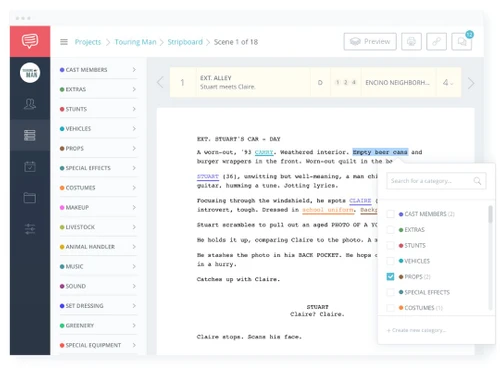
StudioBinder StripBoard

StudioBinder

Brand: StudioBinder

  • 4.2

  • 6 Ratings

StudioBinder is designed for filmmakers, offering tools for writing, pre-production planning, and collaboration. It helps streamline script formatting, storyboarding, and production management in one platform.

See More

Have you used StudioBinder before?

Share your insights for better experience

Add a Review
Starting Price
$49

View plans

100% Genuine
Products
Best Price
Guaranteed
Safe & Secure
Payment
  • Description

  • Pricing

  • Features

  • Specification

  • Review

  • Compare

  • Alternatives

  • FAQ

Starting at $49

StudioBinder Software Overview

What is StudioBinder?

StudioBinder is a screenwriting software that offers a script writing tool designed to help filmmakers write and organize scripts efficiently. It formats scripts according to industry standards, making sure they meet the requirements for professional production. The software allows users to import scripts from different formats, such as Final Draft, PDF, or Word, while preserving the original structure.

It also provides features like auto-complete and keyboard shortcuts to speed up writing. StudioBinder helps writers collaborate with their team by sharing scripts and tracking revisions. Once the script is finished, it integrates with other tools for scheduling, storyboarding, and creating call sheets, making it a comprehensive solution for managing all stages of production.

Why Choose StudioBinder Software?

  • Production Management: It integrates various production tools like scriptwriting, scheduling, and task management into one platform.
  • Industry-Standard Formatting: StudioBinder automatically formats your scripts to meet professional standards.
  • Collaboration Features: The software allows team members to collaborate in real-time, sharing scripts and revisions seamlessly.
  • Streamlined Pre-Production: It offers tools for storyboarding, scheduling, and creating call sheets, saving time during pre-production.
  • Cloud-Based Access: Being cloud-based, StudioBinder allows you to work on scripts and manage production from anywhere, at any time.
  • Easy-to-Use Interface: It has an intuitive user interface, making it accessible even for beginners in filmmaking.
  • Revision Tracking: The software tracks changes and revisions to scripts, ensuring that everyone is on the same page.
  • Customizable Features: You can tailor StudioBinder’s features to fit the specific needs of your project.
  • Resource Library: StudioBinder provides a collection of helpful templates, guides, and resources to enhance your production process.
  • Time-Saving Automation: It automates many production processes, such as scheduling and task allocation, saving valuable time for your team.

Benefits of StudioBinder Software

  • Centralized Project Management: StudioBinder helps you keep all production materials in one place, making project tracking and management easier.
  • Seamless Integration with Google Calendar: Sync your production schedule with Google Calendar for easy access and real-time updates.
  • Advanced Reporting Tools: Generate detailed reports about your production’s budget, schedule, and crew, helping you keep track of expenses and progress.
  • Script Breakdown Tools: Easily break down scripts to identify key elements like characters, locations, and props, making pre-production efficient.
  • Advanced Scheduling: The software offers powerful scheduling tools that handle complex timelines and location-based schedules.
  • Customizable Call Sheets: Create professional call sheets with customizable layouts that suit your specific production needs.
  • Easy Task Assignment: Quickly assign tasks to team members with deadlines, ensuring everyone knows their responsibilities.
  • Budget Management: Helps you track and manage your production budget, ensuring you stay within financial limits.
  • Cloud Storage: Safely store production documents, scripts, and media in the cloud, so they are easily accessible and secure.
  • Seamless Casting Call Features: StudioBinder makes it easy to manage casting calls, auditions, and actor information, all in one place.

StudioBinder Pricing

StudioBinder pricing starts at $49 at techjockey.com.

The pricing model is based on different parameters, including extra features, deployment type, and the total number of users. For further queries related to the product, you can contact our product team and learn more about the pricing and offers.

Read more

StudioBinder Company Details

Founded Year:  2014

Studio Binder allows filmmakers to send and track call times via email or text message.

Director/Founders Shant Kiraz, Simona Clapan
Company Size 1-100 Employees

StudioBinder Pricing & Plans

Starter
Starting at $49
    • Licenses

      Licenses
      Licenses
    • Monthly

      Monthly
      Monthly

Key Features

  • Screenplays

  • Title Page Designer

  • Unlimited AV Scripts

  • Segments

  • Unlimited Documents

  • Folders

  • Include Images

Indie
Starting at $99
    • Licenses

      Licenses
      Licenses
    • Monthly

      Monthly
      Monthly

Key Features

  • Screenplays

  • Title Page Designer

  • Unlimited AV Scripts

  • Segments

  • Unlimited Documents

  • Folders

  • Include Images

Professional
Starting at $149
    • Licenses

      Licenses
      Licenses
    • Monthly

      Monthly
      Monthly

Key Features

  • Screenplays

  • Title Page Designer

  • Unlimited AV Scripts

  • Segments

  • Unlimited Documents

  • Folders

  • Include Images

StudioBinder Features

  • icon_check Script versioning
    Unlimited versions saved with WGA-standard color-coding and full revision history.
  • icon_check Sync to Production Pipeline
    Sync your locked script with pre-production tools like storyboards, breakdowns, schedules.
  • icon_check Unlimited Revision History
    Access past versions anytime, revert back or compare drafts with ease.
  • icon_check File Sharing
    Easily share scripts, schedules, and production files with your team in a secure cloud-based platform.
  • icon_check Film Crew Management
    Assign roles, track availability, and manage crew details efficiently in one place.
  • icon_check Screenwriting
    Write, format, and edit scripts using industry-standard tools with real-time collaboration.
  • icon_check Story Board
    Create and organize visual storyboards to plan shots and sequences effectively.
  • icon_check Calendar Management
    Schedule tasks, deadlines, and shooting days with an integrated calendar system.
  • icon_check Client Management
    Keep track of client details, communications, and project requirements seamlessly.
  • icon_check Shooting Schedules
    Plan and organize shooting dates, locations, and scene breakdowns for smooth execution.
  • icon_check Notes
    Add and share important notes, feedback, and revisions across the production workflow.

StudioBinder Specifications

Supported Platforms
Ubuntu Ubuntu Windows Windows MacOS MacOS Linux Linux
Devices
Desktop Desktop
Deployment
Cloud-Based Cloud-Based
Suitable For
All Industries
Business Specific
All Businesses
Business Size
Small Business Startups Medium Business Enterprises
Customer Support
Email Communities
Language
English
Training Resources
Videos

Explore the Best Alternative Solutions Similar to Your Business Size and Needs

StudioBinder Review

4.2

Out of 5

img

Overall Rating

Based on
6 Verified Ratings

Rating Breakdown

  • Features 3.9
  • Value for Money 4.4
  • Ease of Use 4.1
  • Customer Support 4.6

88% Recommend this Product

Add Review

Be the First to Review

This product has no reviews yet. Be the first to leave your feedback.

Add Review

Compare StudioBinder With other Screenwriting Software

Products
Ratings
Pricing
Device Supported
Deployment
Supported Platforms
  • img

    StudioBinder

  • 4.2

  • Price On Request

  • Desktop

    Mobile

  • Web based

    On Premises

  • Windows

    Mac OS

  • img

    Final Draft

  • 4.2

  • Price On Request

  • Desktop

    Mobile

  • Web based

    On Premises

  • Windows

    Mac OS

  • img

    WriterDuet

  • 4.1

  • Price On Request

  • Desktop

    Mobile

  • Web based

    On Premises

  • Windows

    Mac OS

  • img

    Fade In

  • 4

  • Price On Request

  • Desktop

    Mobile

  • Web based

    On Premises

  • Windows

    Mac OS

  • img

    StudioVity

  • 4.1

  • Price On Request

  • Desktop

    Mobile

  • Web based

    On Premises

  • Windows

    Mac OS

  • img

    AIScreenwriter

  • 4.6

  • Price On Request

  • Desktop

    Mobile

  • Web based

    On Premises

  • Windows

    Mac OS

  • img

    KIT Scenarist

  • 4.3

  • Price On Request

  • Desktop

    Mobile

  • Web based

    On Premises

  • Windows

    Mac OS

  • img

    Story Architect

  • Price On Request

  • Desktop

    Mobile

  • Web based

    On Premises

  • Windows

    Mac OS

  • img

    Story Planner

  • Price On Request

  • Desktop

    Mobile

  • Web based

    On Premises

  • Windows

    Mac OS

  • img

    Arc Studio

  • 4.1

  • Price On Request

  • Desktop

    Mobile

  • Web based

    On Premises

  • Windows

    Mac OS

(0) Product(s) selected

StudioBinder Alternatives

See All StudioBinder Alternatives

Available

Price on Request

SAVE UPTO 25%

Starting Price:

$15 /Month

Available

Price on Request

Available

Price on Request

Available

Price on Request

Starting Price:

$19 /Quantity

How much does StudioBinder Software cost?

The starting price of StudioBinder is $49 on Techjockey.com.

Is there a mobile app available for StudioBinder Software?

No, StudioBinder does not currently offer a dedicated mobile app.

Which operating systems are compatible with StudioBinder Software?

StudioBinder is a cloud-based platform and works on Ubuntu, Windows, MacOS and Linux operating systems with a web browser.

Does StudioBinder Software offer a free trial?

Yes, StudioBinder provides a free version with limited features and paid plans with additional tools.

How does StudioBinder function?

StudioBinder helps in scriptwriting, scheduling, storyboarding, and project management for filmmakers.

Who uses StudioBinder Software?

Filmmakers, production teams, screenwriters, and content creators can benefit from using StudioBinder.

Is a free demo available for StudioBinder?

No, StudioBinder does not offer a free demo, but a free version is available for basic use.

Is StudioBinder available for free?

Yes, StudioBinder has a free version with limited features, while advanced tools require a subscription.

Can multiple users collaborate on the same project in StudioBinder?

Yes, StudioBinder allows team members to collaborate in real-time on scripts, schedules, and production tasks.

Does StudioBinder support automatic script formatting?

Yes, StudioBinder ensures industry-standard script formatting, making it easy to write and edit screenplays.

20,000+ Software Listed

Best Price Guranteed

Free Expert Consultation

2M+ Happy Customers

Terms and Condtions

close

Users with registered businesses can purchase goods from merchants on the platform to satisfy their business needs. Users are not permitted to utilize any products acquired through the platform for resale, advertising, business, or further distribution.

For each purchase made, users will receive a Tax Invoice (or 'GST invoice') that includes specific details such as:

  • the GSTIN of the user associated with their registered business, and

  • the specified Entity Name for their business.

It should be noted that not all products are eligible for GST Invoice. Only the products displayed by participating sellers with the 'GST-based Invoice Available' callout on the product description page would qualify.

Certain goods and services are not eligible to get a GST Invoice, including items with VAS, i.e., Value Added Services (e.g., Total Mobile Protection/Assured Buyback) and those involving an exchange offer at the time of purchase.

Users must ensure the accuracy of the GSTIN, and business entity name provided for the GST Invoice. Requests for corrections into GST Invoice would not be accommodated by Techjockey.com or any Seller, and any issues arising from user-provided information are the sole responsibility of users.

Techjockey.com is not liable for the GST Invoice or any associated input tax credit. To efficiently claim an input tax credit, users should select the registered place of business address as per the GST authority's data and follow the provisions of the GST Act and rules.

To claim an input tax credit, the delivery and billing addresses must match. Furthermore, input tax credits will not be granted if the delivery address and GSTIN on the invoice are from different states. In case of incorrect GST details provided during the order placement, the order will be canceled automatically.