linkedin
Scrite logo
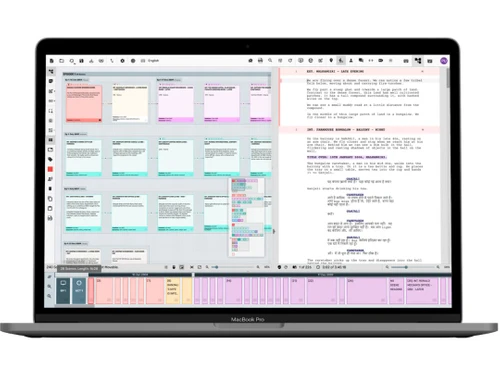
Scrite Dashboard
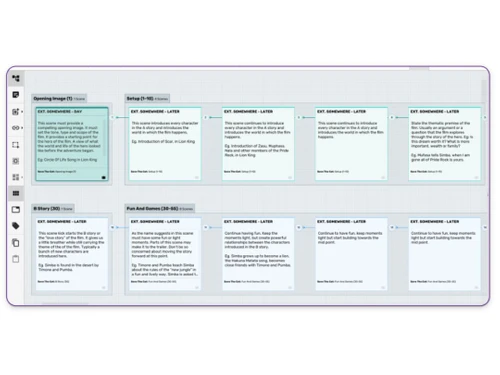
Scrite Structure
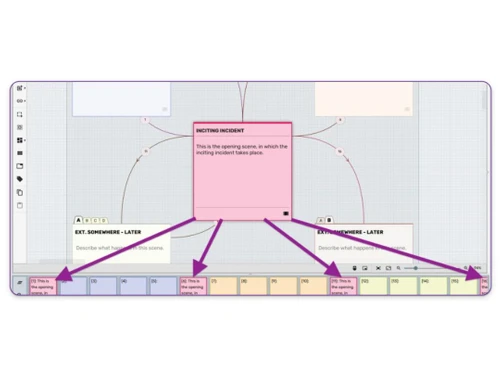
Scrite Visually Capture

Scrite

Brand: Scrite

  • 4.4

  • 7 Ratings & 1 Review

Scrite is a free screenwriting software designed for writers to craft professional scripts with ease, offering tools for structure, formatting, and collaboration.

See More

Have you used Scrite before?

Share your insights for better experience

Add a Review

Free Forever

Get started immediately at no cost. Upgrade anytime if your business demand more.

100% Genuine
Products
Best Price
Guaranteed
Safe & Secure
Payment
  • Description

  • Pricing

  • Features

  • Specification

  • Review

  • Compare

  • Alternatives

  • FAQ

Scrite Software Overview

What is Scrite?

Scrite is a versatile screenwriting software tailored for writers aiming to create professional-quality scripts. It provides a comprehensive suite of tools that assist in structuring narratives, formatting scripts to industry standards, and facilitating collaboration among writers. With its user-friendly interface, Scrite ensures that both novice and experienced writers can navigate and utilize its features effectively.

The software supports multiple languages, including various Indian languages, making it accessible to a diverse user base. Its visual tools, such as the Structure Canvas and Timeline, allow writers to map out their stories visually, ensuring a coherent flow of scenes and acts. Additionally, the Notebook feature enables users to jot down character notes, scene details, and other annotations, all integrated seamlessly within the scriptwriting process.

Why Choose Scrite Screenwriting Software?

  • Visual Story Mapping: Utilize index cards and color-coding to outline and organize your screenplay structure visually.
  • Industry-Standard Formatting: Automatically format scripts to meet professional standards, ensuring readiness for production.
  • Multilingual Support: Write scripts in English and multiple Indian languages, catering to a broad spectrum of writers.
  • Integrated Notebook: Keep all your notes, character details, and scene annotations within the software for easy reference.
  • Timeline View: Visualize the sequence of scenes and acts, aiding in maintaining narrative coherence.
  • Character Relationship Mapping: Clearly define and visualize relationships between characters to enhance story depth.
  • Import/Export Flexibility: Seamlessly import scripts from other software and export your work in various formats.
  • Collaboration Tools: Work with co-writers efficiently, sharing notes and edits within the platform.
  • Regular Updates: Benefit from continuous improvements and feature additions based on user feedback.
  • Free Access: Enjoy a comprehensive set of features without any cost, making it accessible to all writers.

Benefits of Scrite Screenwriting Software

  • Enhanced Organization: Keep your script, notes, and structure organized within a single platform.
  • Time Efficiency: Streamline the writing process with tools designed to reduce manual formatting and organization.
  • Improved Collaboration: Share your work and collaborate with others seamlessly, enhancing the creative process.
  • Accessible Learning Curve: User-friendly design ensures that writers can quickly adapt and utilize the software effectively.
  • Creative Flexibility: Visual tools and multilingual support allow for a more personalized writing experience.
  • Consistent Formatting: Maintain consistency throughout your script with automated formatting features.
  • Comprehensive Story Development: Tools like the Structure Canvas and Notebook support in-depth story development.
  • Resource Integration: Access a library of screenplays for reference and inspiration directly within the software.
  • Adaptable to Various Genres: Suitable for writing scripts across different genres and formats.
  • Community Support: Engage with a community of writers for support, feedback, and shared learning.

Scrite Pricing

Scrite pricing is available for free at Techjockey.com. The pricing model is based on different parameters, including extra features, deployment type, and the total number of users. For further queries related to the product, you can contact our product team and learn more about the pricing and offers.

Read more

Scrite Pricing & Plans

This Product is Available Free Forever.

Start instantly with no fees, no subscriptions, and no commitments.

  • Full access to basic version available
  • No credit card or sign-up required

Free Forever Plan

Get started immediately at no cost. Upgrade anytime if your business demand more.

Free Forever

Scrite Features

  • icon_check Structure
    Visualize and organize your screenplay using index cards and color-coded acts.
  • icon_check Annotations
    Add notes and comments directly within your script for easy reference.
  • icon_check Visually Capture
    Map out your story's flow and structure visually to maintain narrative coherence.
  • icon_check Intelligent Formatting
    Automatically format your script to meet industry standards.
  • icon_check Notes
    Keep detailed notes on characters, scenes, and plot points within the integrated Notebook.
  • icon_check Data Import/Export
    Import scripts from other software and export your work in various formats.
  • icon_check Collaboration Tools
    Share your script and collaborate with co-writers within the platform.
  • icon_check Multi-language input support
    Write in English plus several Indian languages (Hindi, Tamil, Kannada, etc.) via built-in transliteration.
  • icon_check Scene manipulation
    Easily split long scenes, merge small ones or drag to reorder for story refinement.

Scrite Specifications

Supported Platforms
Windows Windows MacOS MacOS Linux Linux
Devices
Desktop Desktop
Deployment
Cloud-Based Cloud-Based
Suitable For
All Industries
Business Specific
All Businesses
Business Size
Small Business Startups Medium Business Enterprises
Customer Support
Email Communities
Language
English
Training Resources
Videos

Explore the Best Alternative Solutions Similar to Your Business Size and Needs

Scrite Review

4.4

Out of 5

img

Overall Rating

Based on
1 Verified Review

Rating Breakdown

  • Features 4.3
  • Value for Money 4.2
  • Ease of Use 4.4
  • Customer Support 4.7

91% Recommend this Product

Add Review

Jaggedah twitter_verify

User

Industry: Entertainment

5

Reviewed on: Dec 23, 2025

Techjockey Verified

“Very smooth interface and UX”

Loved the feature to write in my own language and I'm a visual person so being able to see the structure in a visual way is a plus

Pros

Interface, Features and easy to use.

Cons

Wish it had an online web version

Switched from Final Draft

Reason to switch

Feels more modern, has better updates and support, easy to use

Compare Scrite With other Screenwriting Software

Products
Ratings
Pricing
Device Supported
Deployment
Supported Platforms
  • img

    Scrite

  • 4.4

  • FREE

  • Desktop

    Mobile

  • Web based

    On Premises

  • Windows

    Mac OS

  • img

    Final Draft

  • 4.2

  • Price On Request

  • Desktop

    Mobile

  • Web based

    On Premises

  • Windows

    Mac OS

  • img

    StudioBinder

  • 4.2

  • Price On Request

  • Desktop

    Mobile

  • Web based

    On Premises

  • Windows

    Mac OS

  • img

    WriterDuet

  • 4.1

  • Price On Request

  • Desktop

    Mobile

  • Web based

    On Premises

  • Windows

    Mac OS

  • img

    Fade In

  • 4

  • Price On Request

  • Desktop

    Mobile

  • Web based

    On Premises

  • Windows

    Mac OS

  • img

    StudioVity

  • 4.1

  • Price On Request

  • Desktop

    Mobile

  • Web based

    On Premises

  • Windows

    Mac OS

  • img

    AIScreenwriter

  • 4.6

  • Price On Request

  • Desktop

    Mobile

  • Web based

    On Premises

  • Windows

    Mac OS

  • img

    KIT Scenarist

  • 4.3

  • Price On Request

  • Desktop

    Mobile

  • Web based

    On Premises

  • Windows

    Mac OS

  • img

    Story Architect

  • Price On Request

  • Desktop

    Mobile

  • Web based

    On Premises

  • Windows

    Mac OS

  • img

    Story Planner

  • Price On Request

  • Desktop

    Mobile

  • Web based

    On Premises

  • Windows

    Mac OS

  • img

    Arc Studio

  • 4.1

  • Price On Request

  • Desktop

    Mobile

  • Web based

    On Premises

  • Windows

    Mac OS

(0) Product(s) selected

Scrite Alternatives

See All Scrite Alternatives

Available

Price on Request

SAVE UPTO 25%

Starting Price:

$15 /Month

Available

Price on Request

Available

Price on Request

Available

Price on Request

Starting Price:

$19 /Quantity

How much does Scrite Screenwriting Software cost?

Scrite is currently available for free, offering a comprehensive set of features without any cost to the user.

How does Scrite work?

Scrite provides tools for structuring, writing, and formatting screenplays. Users can visually map out their stories, write scripts with industry-standard formatting, and collaborate with others, all within a single platform.

Who uses Scrite Screenwriting Software?

Scrite is used by a diverse range of writers, from beginners to professionals, who are looking for a free and feature-rich screenwriting tool.

Can I write scripts in languages other than English?

Yes, Scrite Screenwriting Software supports multiple Indian languages in addition to English, catering to a wide range of writers.

Is Scrite suitable for collaborative writing?

Absolutely. Scrite offers collaboration tools that allow multiple writers to work on a script simultaneously, sharing notes and edits within the platform.

Does Scrite provide templates for scriptwriting?

Yes, Scrite offers templates like 'Save The Cat' to help writers outline their screenplays effectively.

Can I import scripts from other software into Scrite?

Yes, Scrite Screenwriting Software allows you to import scripts from various formats, making it easy to transition from other screenwriting tools.

Is there a library of screenplays available in Scrite Screenwriting Software?

Yes, Scrite includes 'Scriptalay,' a library of screenplays that users can access for reference and inspiration.

Does Scrite offer any analytics or reports?

Yes, Scrite provides statistics and reports that give writers insights into their scripts, such as character appearances and scene breakdowns.

Is Scrite Screenwriting Software available on multiple platforms?

Scrite is available for macOS, Windows, and Linux desktop computers, ensuring accessibility for a wide range of users.

20,000+ Software Listed

Best Price Guranteed

Free Expert Consultation

2M+ Happy Customers

Terms and Condtions

close

Users with registered businesses can purchase goods from merchants on the platform to satisfy their business needs. Users are not permitted to utilize any products acquired through the platform for resale, advertising, business, or further distribution.

For each purchase made, users will receive a Tax Invoice (or 'GST invoice') that includes specific details such as:

  • the GSTIN of the user associated with their registered business, and

  • the specified Entity Name for their business.

It should be noted that not all products are eligible for GST Invoice. Only the products displayed by participating sellers with the 'GST-based Invoice Available' callout on the product description page would qualify.

Certain goods and services are not eligible to get a GST Invoice, including items with VAS, i.e., Value Added Services (e.g., Total Mobile Protection/Assured Buyback) and those involving an exchange offer at the time of purchase.

Users must ensure the accuracy of the GSTIN, and business entity name provided for the GST Invoice. Requests for corrections into GST Invoice would not be accommodated by Techjockey.com or any Seller, and any issues arising from user-provided information are the sole responsibility of users.

Techjockey.com is not liable for the GST Invoice or any associated input tax credit. To efficiently claim an input tax credit, users should select the registered place of business address as per the GST authority's data and follow the provisions of the GST Act and rules.

To claim an input tax credit, the delivery and billing addresses must match. Furthermore, input tax credits will not be granted if the delivery address and GSTIN on the invoice are from different states. In case of incorrect GST details provided during the order placement, the order will be canceled automatically.