linkedin
KIT Scenarist logo
KIT Scenarist Dashboard
KIT Scenarist Notes
KIT Scenarist Screenwriting

KIT Scenarist

Brand: KIT Scenarist

  • 4.3

  • 3 Ratings

KIT Scenarist screenwriting solution helps shape stories from spark to screenplay. Every scene you imagine finds its place on the page!

See More

Have you used KIT Scenarist before?

Share your insights for better experience

Add a Review
Starting Price
$5

View plans

100% Genuine
Products
Best Price
Guaranteed
Safe & Secure
Payment
  • Description

  • Pricing

  • Features

  • Specification

  • Review

  • Compare

  • Alternatives

  • FAQ

Starting at $5

KIT Scenarist Software Overview

What is KIT Scenarist Software?

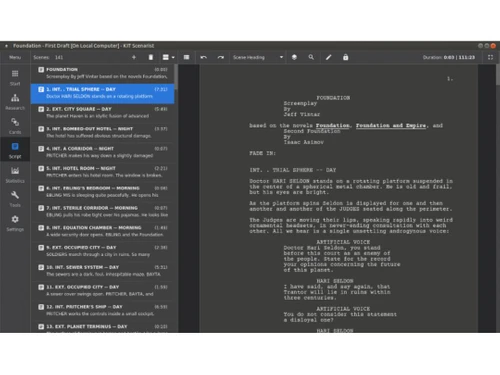
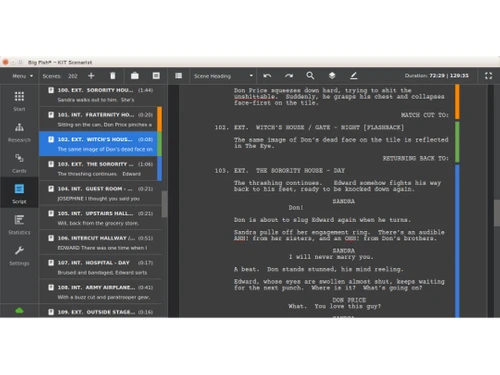
KIT Scenarist is a versatile platform designed for script creation and management. It is widely utilized across film, television, and comic productions. The trusted software solution focuses on developing stories from their foundation. Writers can work on characters, plots, and scenes within the platform. In short, it serves as a unified hub for screenwriting tasks.

The software solution combines writing activities with story planning functions. It allows writers to structure scripts within one environment. KIT Scenarist is available on desktop and mobile platforms. The reliable scriptwriting platform is regularly used by individual storytellers and writing teams. Its main objective is to aid script development and organization.

Why Choose KIT Scenarist Software?

  • Automatic Script Formatting:Proper screenplay structure is applied while writing. Writers spend less time adjusting layouts manually.
  • Story Planning Tools:Early ideas can develop alongside script drafts. Narrative elements sit within the same environment.
  • Visual Scene Arrangement:Story sections can be viewed in sequence. Scene order stays easier to review and adjust.
  • Research Storage Space:Notes and reference materials sit together conveniently. Project information becomes easier to access later.
  • Detailed Script Statistics:Writing data is available through script reports. Character activity and page counts stay visible.
  • Cross-Platform Access:Different devices can conveniently access the same project. Writers can work across preferred operating systems.
  • Multiple Export Choices:Scripts can be shared in common formats. Different production requirements become easier to meet.
  • Collaboration Capability:Co-writers can contribute from different locations. Shared projects involve less need for file exchange.

Benefits of KIT Scenarist Software

  • Faster First Drafts:Writers spend less time setting things up. More attention goes into actual writing stuff.
  • Fewer Writing Interruptions:Creative thoughts keep flowing without distractions. Story momentum stays easier to maintain.
  • Better Character Tracking:Character appearances are easier to review. Writers may spot imbalances across scripts sooner.
  • Simpler Project Navigation:Important sections are easier to locate. Less time goes into searching content.
  • Clearer Story Development:Narrative gaps are easier to notice. Writers can refine plots with greater confidence.
  • Improved Draft Consistency:Script structure looks consistent throughout. Pages follow the same writing style.
  • Convenient Offline Usage:Writing continues without internet access. Projects remain available during travel.
  • Multilingual Writing Support:Scripts can be written in different languages. Writers can work comfortably in their native languages.

KIT Scenarist Software Pricing

KIT Scenarist Software price starts at USD 5.00 per month at techjockey.com.

The pricing model is based on different parameters, including extra features, deployment type, and the total number of users. For further queries related to the product, you can contact our product team and learn more about the pricing and offers.

Read more

KIT Scenarist Pricing & Plans

Basic
Key Features
  • Notes
  • Outlining
  • Collaboration Tools
  • Intelligent Formatting
Starting at $5
    • Monthly

      Monthly
      Monthly

Key Features

  • Notes

  • Outlining

  • Collaboration Tools

  • Intelligent Formatting

KIT Scenarist Features

  • icon_check Notes
    Capture scene notes, character ideas and research items in one place to support your script-writing process.
  • icon_check Outlining
    Automatically flag abnormal pacing, dialogue/action ratios or location shifts to help tighten your screenplay’s structure.
  • icon_check Collaboration Tools
    Work with co-authors via cloud-sync, share projects and edit in parallel (subject to subscription/cloud service).
  • icon_check Intelligent Formatting
    Write your scenes while the software applies correct screenplay formatting (headings, dialogue, action) automatically.
  • icon_check Spell Checker
    Use built-in spell checking to avoid typos and ensure your script maintains professional polish throughout.
  • icon_check Auto Correction
    Let the program auto-correct common writing or formatting errors to maintain tidy, production-ready text.
  • icon_check Screenplay Editor
    Use on a touch-screen device (tablet/mobile) to draft or edit your script on the go, supporting mobility and flexibility.
  • icon_check Research Module
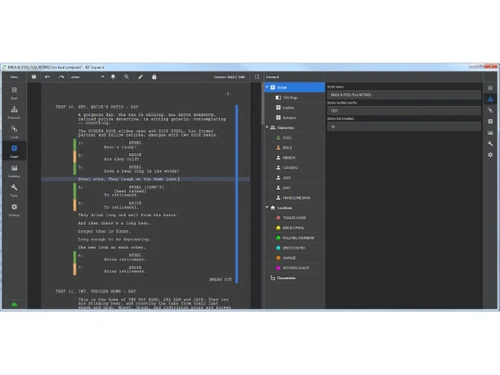
    Collect all project materials: characters, locations, documents, images and links so your story material is in one place
  • icon_check Corkboard
    View script structure as draggable cards on a board, group them, colour-code them, and changes sync with script text.
  • icon_check Statistics & Reports Module
    Real-time word/character counts, page duration, graphs of scenes and character activity let you monitor pacing and structure.
  • icon_check Multilingual Script Support
    Write in any language (Chinese, Greek, Hebrew, Polish etc) and save/load without formatting issues.

KIT Scenarist Specifications

Supported Platforms
Ubuntu Ubuntu Windows Windows iOS iOS Android Android MacOS MacOS Linux Linux
Devices
Desktop Desktop Mobile Mobile Tablet Tablet iPad iPad
Deployment
Cloud-Based Cloud-Based Perpetual Perpetual
Suitable For
All Industries
Business Specific
All Businesses
Business Size
Small Business Startups Medium Business Enterprises
Customer Support
Email Communities
Language
English
Training Resources
Videos

Explore the Best Alternative Solutions Similar to Your Business Size and Needs

KIT Scenarist Review

4.3

Out of 5

img

Overall Rating

Based on
3 Verified Ratings

Rating Breakdown

  • Features 4.6
  • Value for Money 4.5
  • Ease of Use 4.3
  • Customer Support 3.8

93% Recommend this Product

Add Review

Be the First to Review

This product has no reviews yet. Be the first to leave your feedback.

Add Review

Compare KIT Scenarist With other Screenwriting Software

Products
Ratings
Pricing
Device Supported
Deployment
Supported Platforms
  • img

    KIT Scenarist

  • 4.3

  • Price On Request

  • Desktop

    Mobile

  • Web based

    On Premises

  • Windows

    Mac OS

  • img

    Final Draft

  • 4.2

  • Price On Request

  • Desktop

    Mobile

  • Web based

    On Premises

  • Windows

    Mac OS

  • img

    StudioBinder

  • 4.2

  • Price On Request

  • Desktop

    Mobile

  • Web based

    On Premises

  • Windows

    Mac OS

  • img

    WriterDuet

  • 4.1

  • Price On Request

  • Desktop

    Mobile

  • Web based

    On Premises

  • Windows

    Mac OS

  • img

    Fade In

  • 4

  • Price On Request

  • Desktop

    Mobile

  • Web based

    On Premises

  • Windows

    Mac OS

  • img

    StudioVity

  • 4.1

  • Price On Request

  • Desktop

    Mobile

  • Web based

    On Premises

  • Windows

    Mac OS

  • img

    AIScreenwriter

  • 4.6

  • Price On Request

  • Desktop

    Mobile

  • Web based

    On Premises

  • Windows

    Mac OS

  • img

    Story Architect

  • Price On Request

  • Desktop

    Mobile

  • Web based

    On Premises

  • Windows

    Mac OS

  • img

    Story Planner

  • Price On Request

  • Desktop

    Mobile

  • Web based

    On Premises

  • Windows

    Mac OS

  • img

    Arc Studio

  • 4.1

  • Price On Request

  • Desktop

    Mobile

  • Web based

    On Premises

  • Windows

    Mac OS

(0) Product(s) selected

KIT Scenarist Alternatives

See All KIT Scenarist Alternatives

Available

Price on Request

SAVE UPTO 25%

Starting Price:

$15 /Month

Available

Price on Request

Available

Price on Request

Available

Price on Request

Starting Price:

$19 /Quantity

How much does KIT Scenarist Software cost?

Pricing starts at USD 5.00 per month at techjockey.com. Different plans may vary in costs based on feature selection and user requirements.

Who uses KIT Scenarist Software?

It is used by screenwriters, filmmakers, television writers, and comic creators. The platform is suitable for individuals and collaborative writing teams.

Is there a mobile app available for KIT Scenarist Software?

Yes, it offers dedicated mobile apps for Android and iOS users.

Which operating systems are compatible with KIT Scenarist Software?

Its compatible with Ubuntu, Windows, iOS, Android, macOS, and Linux systems.

Does KIT Scenarist Software offer a free trial?

Yes, KIT Scenarist does offer a free trial option for interested users.

How does KIT Scenarist Software function?

KIT Scenarist helps writers create, format, and organize scripts. It also assists with story planning, research storage, and screenplay development.

20,000+ Software Listed

Best Price Guranteed

Free Expert Consultation

2M+ Happy Customers

Terms and Condtions

close

Users with registered businesses can purchase goods from merchants on the platform to satisfy their business needs. Users are not permitted to utilize any products acquired through the platform for resale, advertising, business, or further distribution.

For each purchase made, users will receive a Tax Invoice (or 'GST invoice') that includes specific details such as:

  • the GSTIN of the user associated with their registered business, and

  • the specified Entity Name for their business.

It should be noted that not all products are eligible for GST Invoice. Only the products displayed by participating sellers with the 'GST-based Invoice Available' callout on the product description page would qualify.

Certain goods and services are not eligible to get a GST Invoice, including items with VAS, i.e., Value Added Services (e.g., Total Mobile Protection/Assured Buyback) and those involving an exchange offer at the time of purchase.

Users must ensure the accuracy of the GSTIN, and business entity name provided for the GST Invoice. Requests for corrections into GST Invoice would not be accommodated by Techjockey.com or any Seller, and any issues arising from user-provided information are the sole responsibility of users.

Techjockey.com is not liable for the GST Invoice or any associated input tax credit. To efficiently claim an input tax credit, users should select the registered place of business address as per the GST authority's data and follow the provisions of the GST Act and rules.

To claim an input tax credit, the delivery and billing addresses must match. Furthermore, input tax credits will not be granted if the delivery address and GSTIN on the invoice are from different states. In case of incorrect GST details provided during the order placement, the order will be canceled automatically.