linkedin
Flick logo
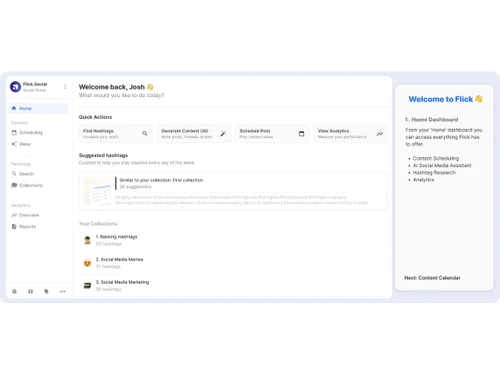
Flick-dashboard
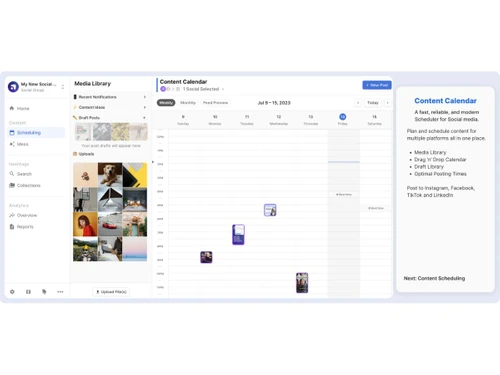
Flick-calendar
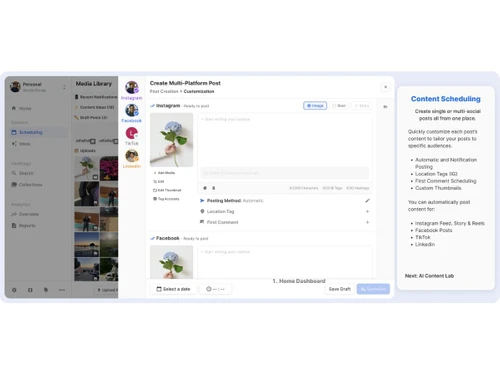
Flick-post creation

Flick

Brand: Flick.Tech

  • No Ratings & Reviews

Flick is an AI-powered social media management platform that helps users plan and schedule content, manage hashtags, and analyze performance across social media platforms.

See More

Have you used Flick before?

Share your insights for better experience

Add a Review
Starting Price
£14

View plans

100% Genuine
Products
Best Price
Guaranteed
Safe & Secure
Payment
  • Description

  • Pricing

  • Features

  • Specification

  • Review

  • Compare

  • Alternatives

  • FAQ

Starting at £14

Flick Software Overview

What is Flick?

Flick is an AI-powered social media marketing platform designed to streamline and enhance the social media management process for business owners, marketers, and content creators. It serves as an all-in-one toolkit that simplifies complex tasks such as content scheduling, hashtag optimization, caption writing, and performance analytics. The platform's core objective is to help users save time, reduce their workload, and achieve measurable growth across their social channels by providing intelligent tools and actionable insights.

By integrating with major platforms like Instagram, Facebook, TikTok, and LinkedIn, Flick provides tools for managing and scheduling social media content. It moves beyond basic scheduling by incorporating an AI assistant and Instagram-focused analytics and data-driven features to help users plan and publish content more effectively.

Why Choose Flick?

  • Time-Saving Automation: Flick significantly reduces the time spent on manual tasks. With its intuitive post scheduler, media library, and AI-powered content assistance, you can plan and publish weeks of content in a fraction of the time.
  • Data-Driven Hashtag Strategy: Eliminate uncertainty in your hashtag selection. Flick provides advanced tools to find, analyze, and manage niche hashtags, helping your content reach a larger, more relevant audience and consistently rank higher.
  • Actionable Analytics: Gain clarity on what content resonates with your audience. The platform offers comprehensive analytics and reporting, tracking key metrics for your account, content performance, and hashtag effectiveness to inform future decisions.
  • Enhanced Productivity: Features like "Best Times to Post" suggestions, a visual feed preview, and draft management are designed to make your workflow more organized and productive.
  • Support and Community: Flick is recognized for its hands-on customer support and thoughtful user experience. Users also gain access to the Flick Social Hub, a private community of creators and marketers for networking and idea sharing.
  • Trusted by Professionals: With a user base of over 100,000 creators, brands, and marketers, Flick has established itself as a reliable and effective tool for achieving social media goals.

Advanced Features of Flick

  • Iris, AI Social Media Assistant: Your personal AI-powered strategist that assists with brainstorming content ideas, writing compelling captions, and refining your overall social media plan.
  • Advanced Hashtag Metrics: Access in-depth data on hashtags, including potential reach versus popularity, to make highly informed decisions and optimize for visibility.
  • Smart Auditing: Flick includes Smart Auditing tools to help users review and optimize their hashtag strategy.
  • Visual Feed Preview: Plan the aesthetic of your Instagram grid before you post. This feature allows you to arrange and visualize your upcoming posts to maintain a cohesive and professional look.
  • Best Times to Post: Flick analyzes your audience's activity and suggests the optimal times to publish your content for maximum engagement and reach.
  • Comprehensive Analytics Suite: (Instagram Only) Dive deep into your performance with detailed reports on your account, content (including Feed, Stories, and Reels), audience demographics, and hashtag rankings.

Modules of Flick

  • Hashtag Tools: This is the core discovery and optimization engine of Flick. It allows you to search, filter, and analyze hashtags to find the perfect mix for every post. You can create and manage collections, track performance, and ensure you are using tags that actively contribute to your growth.
  • Post Scheduler: The central hub for content management. This module provides a reliable, easy-to-use calendar to plan, create, and schedule posts across Instagram, Facebook, TikTok, and LinkedIn. It includes a media library, caption drafting, and a visual planner to streamline your entire publishing workflow.
  • Analytics & Reporting: This intelligence module transforms raw data into clear, understandable insights. It provides the clarity needed to understand what is working and what isn't, tracking everything from post engagement to long-term hashtag performance, empowering you to make confident, data-backed decisions.
  • AI Content Lab (Iris): This creative and strategic module leverages artificial intelligence to combat creative blocks. Iris helps generate fresh content ideas, write engaging captions, and develop a more robust content strategy, acting as a built-in marketing assistant.

How to Use Flick?

  1. Connect Accounts: Begin by securely linking your social media profiles. Flick uses official APIs, ensuring your account information is safe and never requires your direct password.
  2. Research and Plan: Use the Hashtag Tools to discover relevant tags for your niche and save them into collections. Leverage the AI Assistant to brainstorm content pillars and post ideas.
  3. Create and Schedule: Upload your images and videos to the Media Library. Use the Post Scheduler to draft your posts, write captions, add your optimized hashtag collections, and schedule them to be published at the best times.
  4. Visualize and Organize: Use the Feed Preview to ensure your Instagram grid looks polished and professional. Organize your scheduled content on the visual calendar for a clear overview of your content pipeline.
  5. Track and Refine: Once posts are live, navigate to the Analytics dashboard. Monitor the performance of your content and track which hashtags are driving the most impressions and engagement. Use these insights to refine your strategy for future posts.

Flick Pricing

Flick price starts at Pounds 14 at techjockey.com.

The pricing model is based on different parameters, including extra features, deployment type, and the total number of users. For further queries related to the product, you can contact our product team and learn more about the pricing and offers.

Read more

Flick.Tech Company Details

Founded Year:  2018

Flick is an instagram marketing platform.

Director/Founders Sam King
Company Size 1-100 Employees

Flick Pricing & Plans

Solo
Starting at £14
    • Licenses

      Licenses
      Licenses
    • Monthly

      Monthly
      Monthly

Key Features

  • Link 4 social profiles

  • 1 user login

  • Schedule 30 posts per social

  • Track 30 Instagram posts

  • Access some features

Pro
Starting at £30
    • Licenses

      Licenses
      Licenses
    • Monthly

      Monthly
      Monthly

Key Features

  • Link 8 social profiles

  • 2 user login

  • Schedule unlimited posts

  • Track unlimited Instagram posts

  • Access some features

Agency
Starting at £68
    • Licenses

      Licenses
      Licenses
    • Monthly

      Monthly
      Monthly

Key Features

  • Link 20 social profiles

  • 5 user login

  • Schedule unlimited posts

  • Track unlimited Instagram posts

  • Access some features

Flick Features

  • icon_check Scheduling
    Plan, schedule, and auto-publish posts across multiple social platforms from a single, unified dashboard.
  • icon_check AI Caption Generator
    Create engaging, platform-ready captions using AI tailored to tone, audience intent, and content goals.
  • icon_check Hashtag Research & Analytics
    Discover relevant, high-performing hashtags with data-backed insights to improve reach and visibility.
  • icon_check Hashtag Collections
    Save, organize, and reuse hashtag sets for faster posting and consistent content categorization.
  • icon_check Social Content Calendar
    Visual calendar view to plan, organize, and manage posts efficiently across weeks or months.
  • icon_check Post Preview
    Preview posts before publishing to ensure correct formatting, spacing, and visual appearance.
  • icon_check Performance Tracking
    Monitor engagement, reach, growth, and post performance with clear, actionable analytics dashboards.
  • icon_check Analytics
    Track Instagram-specific metrics including follower growth, engagement rates, and hashtag impact.
  • icon_check AI Content Ideas
    Generate post ideas and content prompts aligned with your niche, goals, and posting strategy.
  • icon_check Insights
    Get data-driven recommendations on optimal posting times to maximize engagement and reach.
  • icon_check Content Repurposing Tools
    Adapt and reuse content across platforms while maintaining relevance and platform-specific formatting.
  • icon_check Notes Management
    Save drafts, add notes, and collaborate internally before finalizing and publishing posts.
  • icon_check Multi Account Support
    Manage multiple social profiles from one account, ideal for creators, brands, and agencies.
  • icon_check Team Collaboration
    Collaborate with team members using shared access, approvals, and content workflows.
  • icon_check Content Strategy
    Built-in strategic recommendations help users plan consistent, goal-driven social media content.

Flick Specifications

Supported Platforms
Windows Windows MacOS MacOS
Devices
Desktop Desktop
Deployment
Cloud-Based Cloud-Based
Suitable For
All Industries
Business Specific
All Businesses
Business Size
Small Business Startups Medium Business Enterprises
Customer Support
Email
Language
English
Training Resources
Videos

Explore the Best Alternative Solutions Similar to Your Business Size and Needs

Flick Review

Techjockey Trusted Reviews from Verified Users

No reviews are currently available for Flick. Discover similar Social Media Management Tools reviews

  • Antler

    4.5

    Whats great - Ideal for first-time or idea-stage founders read more

  • Publer

    4.4

    Whats great - Supports various content types, integrates with multiple platforms, reliable performance read more

  • Hootsuite

    3.9

    Whats great - Hootsuite is incredibly easy to user, allows quick scheduling, posting, and monitoring. This software also provides detailed ... read more
Compare Flick With other Social Media Management Tools

Products
Ratings
Pricing
Device Supported
Deployment
Supported Platforms
  • img

    Flick

  • Price On Request

  • Desktop

    Mobile

  • Web based

    On Premises

  • Windows

    Mac OS

  • img

    Hootsuite

  • 4.1

  • ₹ 2600

  • Desktop

    Mobile

  • Web based

    On Premises

  • Windows

    Mac OS

  • img

    MySampark

  • 5

  • Price On Request

  • Desktop

    Mobile

  • Web based

    On Premises

  • Windows

    Mac OS

  • img

    Loomly

  • 4.0

  • Price On Request

  • Desktop

    Mobile

  • Web based

    On Premises

  • Windows

    Mac OS

  • img

    Inflact

  • 4.4

  • Price On Request

  • Desktop

    Mobile

  • Web based

    On Premises

  • Windows

    Mac OS

  • img

    TubeBuddy

  • 4.5

  • Price On Request

  • Desktop

    Mobile

  • Web based

    On Premises

  • Windows

    Mac OS

  • img

    Predis AI

  • 4.5

  • Price On Request

  • Desktop

    Mobile

  • Web based

    On Premises

  • Windows

    Mac OS

  • img

    Zoho Social

  • 4.6

  • ₹ 900

  • Desktop

    Mobile

  • Web based

    On Premises

  • Windows

    Mac OS

  • img

    Postiz

  • 4.5

  • Price On Request

  • Desktop

    Mobile

  • Web based

    On Premises

  • Windows

    Mac OS

  • img

    Postly

  • 4.3

  • Price On Request

  • Desktop

    Mobile

  • Web based

    On Premises

  • Windows

    Mac OS

  • img

    Hypefury

  • 4.3

  • Price On Request

  • Desktop

    Mobile

  • Web based

    On Premises

  • Windows

    Mac OS

(0) Product(s) selected

Flick Alternatives

See All Flick Alternatives

Starting Price:

$65 /Month

Starting Price:

$29 /Month

Starting Price:

$4 /Month

Starting Price:

$29 /Month
Starting Price:

$30 /Month

Starting Price:

$1,249
Orlo

4.1

Available

Price on Request

Starting Price:

$37 /Month
Starting Price:

$49 /Month
Articles for Flick

See All Related Articles

How much does Flick cost?

Flick price starts at Pounds 14 at techjockey.com.

What is Flick used for?

Flick is an AI-powered social marketing platform used for managing and growing social media presence, offering tools for scheduling posts, researching and optimizing hashtags, writing captions, and analyzing performance. It helps business owners, marketers, and creators streamline their social media strategy and content creation.

Is Flick free?

Flick is not entirely free, but it offers a 7-day free trial for all its plans, allowing users to explore the platform's features before committing to a subscription. If the subscription is not canceled during the trial, it will be activated and charged.

What is Flick social media?

Flick social media refers to Flick, an AI-powered social marketing platform designed to help business owners, marketers, and creators manage and grow their social media presence. It provides tools for scheduling, hashtag research, content creation, and performance analytics across various platforms.

Who can use Flick?

Flick is designed for busy business owners, marketers, and creators who want to manage and grow their social media presence effectively. It is also suitable for social media managers, content creators, and brands of various sizes looking to streamline their social marketing efforts.

What social media platforms does Flick support for scheduling?

Flick supports scheduling for a variety of major social media platforms, including Instagram (for both posts and Reels), Facebook, TikTok, and LinkedIn.

How does Flick ensure the safety of my Instagram account?

Flick ensures the safety of your Instagram account by using Instagram/Facebbook official API for connection, meaning it does not require your Instagram password or perform any automated actions on your account. This approach makes Flick 100% safe for users.

What is Iris, Flick's AI Social Media Assistant?

Iris is Flick's AI Social Media Assistant designed to help users grow their brand and reduce their workload by assisting with strategy, planning, and content creation.

Can I track hashtag performance with Flick?

Yes, all Flick plans include a Hashtag Tracking feature that allows you to monitor the performance of your hashtags on each post, with the Solo plan tracking up to 30 Instagram posts monthly, while Pro and Agency plans offer unlimited tracking.

20,000+ Software Listed

Best Price Guranteed

Free Expert Consultation

2M+ Happy Customers

Terms and Condtions

close

Users with registered businesses can purchase goods from merchants on the platform to satisfy their business needs. Users are not permitted to utilize any products acquired through the platform for resale, advertising, business, or further distribution.

For each purchase made, users will receive a Tax Invoice (or 'GST invoice') that includes specific details such as:

  • the GSTIN of the user associated with their registered business, and

  • the specified Entity Name for their business.

It should be noted that not all products are eligible for GST Invoice. Only the products displayed by participating sellers with the 'GST-based Invoice Available' callout on the product description page would qualify.

Certain goods and services are not eligible to get a GST Invoice, including items with VAS, i.e., Value Added Services (e.g., Total Mobile Protection/Assured Buyback) and those involving an exchange offer at the time of purchase.

Users must ensure the accuracy of the GSTIN, and business entity name provided for the GST Invoice. Requests for corrections into GST Invoice would not be accommodated by Techjockey.com or any Seller, and any issues arising from user-provided information are the sole responsibility of users.

Techjockey.com is not liable for the GST Invoice or any associated input tax credit. To efficiently claim an input tax credit, users should select the registered place of business address as per the GST authority's data and follow the provisions of the GST Act and rules.

To claim an input tax credit, the delivery and billing addresses must match. Furthermore, input tax credits will not be granted if the delivery address and GSTIN on the invoice are from different states. In case of incorrect GST details provided during the order placement, the order will be canceled automatically.