linkedin
Forecaster logo
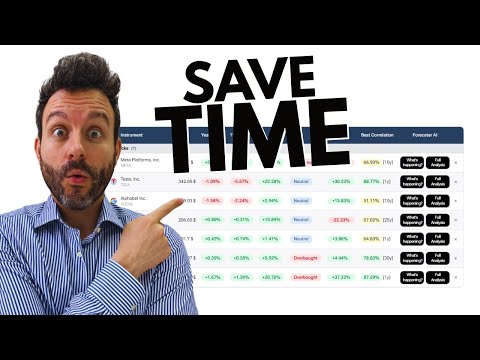
play WATCHLIST: the new Forecaster Terminal feauture
forecaster-lists
forecaster-screener

Forecaster

Brand: Forecaster

  • 4.3

  • 5 Ratings

Have you used Forecaster before?

Share your insights for better experience

Add a Review
Starting Price
€35

View plans

100% Genuine
Products
Best Price
Guaranteed
Safe & Secure
Payment
  • Description

  • Pricing

  • Features

  • Specification

  • Review

Starting at €35

Forecaster Software Overview

Forecaster Company Details

Founded Year:  2015

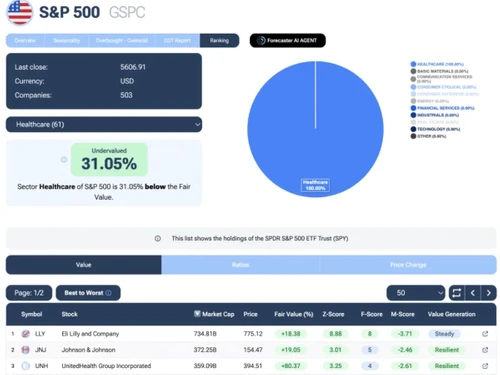
The Forecaster Terminal is your one-stop shop for powerful financial analysis.

Director/Founders Forecaster
Company Size 1-100 Employees

Forecaster Pricing & Plans

Monthly Plan
Key Features
  • Access to +150,000 instruments
  • Up-to-date Fair Value and Ratios
  • Seasonality and COT Reports
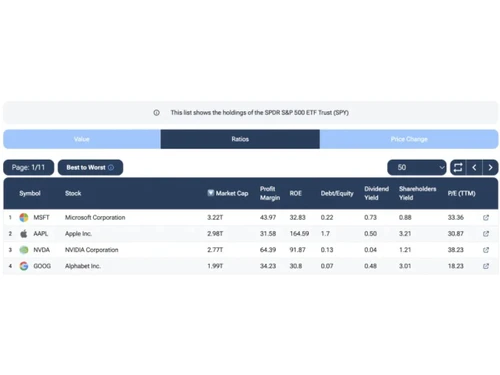
  • Stock Screener and Rankings
  • Insider Transactions
  • Key events on all Companies
  • Forecaster AI Agent
Starting at €35
    • Licenses

      Licenses
      Licenses
    • Monthly

      Monthly
      Monthly

Key Features

  • Access to +150,000 instruments

  • Up-to-date Fair Value and Ratios

  • Seasonality and COT Reports

  • Stock Screener and Rankings

  • Insider Transactions

  • Key events on all Companies

  • Forecaster AI Agent

Forecaster Features

Core Features

  • icon_check Portfolio Management
    Tooling to adjust and manage personal portfolios based on economic cycles and projections.
  • icon_check Market Data
    Real-time and historical data for over 150,000 instruments including stocks and forex.
  • icon_check Watchlist
    'Favorites' feature allows users to keep track of important updates for selected assets.
  • icon_check Charting Tools
    Advanced charts with overlays for seasonality, fair value, and proprietary technical indicators.
  • icon_check Stock Screener
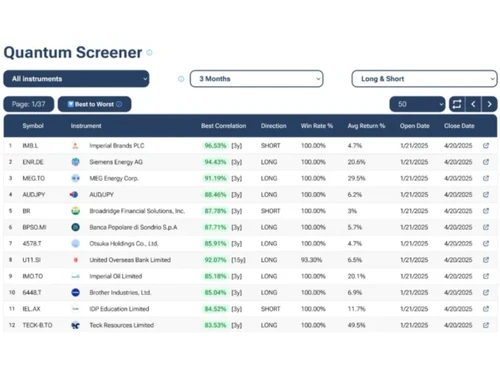
    Quantum Screener scans global markets to find opportunities based on specific criteria.
  • icon_check Order Control
    Tools to manage, modify, and cancel buy or sell orders efficiently on the trading platform.
  • icon_check Order Execution
    Automated system to process buy/sell orders directly via the broker and stock exchange.

Order Execution

  • icon_check Limit Order
    An order to buy/sell at a specific price or better, ensuring price control but not guaranteed execution.
  • icon_check Market Order
    Buy/sell immediately at the current market price, ensuring execution but no price control.
  • icon_check Stop (Loss) Order
    Automatically sells stock when it drops to a pre-set price to minimize losses.
  • icon_check Stop Limit Orders
    Combines a stop-loss order with a limit order to sell/buy once a set price is triggered.
  • icon_check Trailing Stop Order
    Automatically adjusts stop price as the market price moves in favor of the position.

Research and Analysis

  • icon_check Sentiment Analysis
    The 'Market Mood Indicator' gauges investor emotions from Extreme Fear to FOMO.
  • icon_check Analyst Ratings
    Curated news section and AI summaries highlight analyst perspectives and price movements.
  • icon_check Multi-Timeframe Analysis
    Analysis of instruments over periods ranging from 1 month to 30 years.
  • icon_check Advanced Order Flow Analysis
    Tracks and analyzes buying and selling activity across the market.

Technical Analysis

  • icon_check Smart drawing tools
    Features specialized pattern-matching and Projection tools to map future price paths.
  • icon_check Trendlines
    Technical analysis tools include trend tracking and automated projection scenarios.
  • icon_check Technical Indicators
    Includes proprietary tools like Advanced DPO, Wyckoff, and Hull Moving Average Speed.
  • icon_check Automated Technical Patterns Detection
    Projection engine automatically detects and matches historical technical patterns.
  • icon_check Custom Indicators
    Create and apply personalized technical indicators for unique trading strategies.

Fundamental Analysis

  • icon_check Balance Sheet
    Access to company assets, liabilities, and equity for deep fundamental analysis.
  • icon_check Income Statement
    Provides detailed net income, revenue trends, and profit/loss data for financial modeling.
  • icon_check Industry Analysis
    Allows ranking and filtering of specific segments to identify undervalued industry opportunities.
  • icon_check Financial Ratios
    Access to P/E, ROE, Debt/Equity, and other key fundamental metrics for stock valuation.
  • icon_check Cash Flow Statements
    Analysis includes evaluating future cash flows and assessing financial sustainability.
  • icon_check Earnings Forecasts
    Forecasts future cash flows and earnings expectations using DCF and average fair value models.
  • icon_check Company Valuation Models
    Uses DCF, Peter Lynch method, and Economic Value Added (EVA) to calculate intrinsic fair value.

Backtesting and Optimization

  • icon_check Historical Data Simulation
    Pattern-matching engine scans decades of past data to simulate likely future scenarios.
  • icon_check Strategy Tester
    Statistics page allows testing seasonal trends and pattern success rates over historical data.
  • icon_check Strategy Optimization
    Users can refine their approach by combining seasonality with COT reports and fundamentals.
  • icon_check Paper Trading
    Practice trading without risking real capital using simulated environments.
  • icon_check Monte Carlo Simulation
    Uses probabilistic models to forecast trading outcomes in uncertain conditions.

Risk Management

  • icon_check Performance Analytics
    Statistics on success rates and average returns for seasonal patterns and historical projections.
  • icon_check Risk Calculator
    Gauges bankruptcy risk and financial health using models like Z-Score and F-Score.
  • icon_check Diversification Analysis
    Analysis tools for index and sector composition to help users diversify based on fair value.
  • icon_check Position Sizing Calculator
    Determines the appropriate trade size based on risk tolerance and market conditions.
  • icon_check Stop-Loss Automation
    Automatically implements stop-loss rules to limit potential trading losses.
  • icon_check Maximum Drawdown Analysis
    Measures the largest peak-to-trough decline in a portfolio's value.

Trading Options

  • icon_check Swing Trading
    Specifically optimized for swing traders using seasonal patterns and multi-layered analysis.
  • icon_check Intraday Trading
    Data refreshes throughout the day to support short-term decision-making.
  • icon_check Algorithm Trading
    Uses AI-driven pattern-matching engines (Projection) to automate historical analysis for users.
  • icon_check Futures Trading
    Analysis of futures markets via the Commitment of Traders (COT) report insights.
  • icon_check Forex Trading
    Comprehensive analysis tools for major and minor currency pairs including seasonality.
  • icon_check Crypto Trading
    Provides data and forecasting for various cryptocurrencies within the terminal.
  • icon_check Rotational Trading
    Sectors and Rankings tools help identify which market segments are rotating into undervalued areas.
  • icon_check Paper Trading
    Practice trading without risking real capital using simulated environments.
  • icon_check Options Trading
    Allows the buying/selling of call and put options for speculative or hedging purposes.
  • icon_check Automatic Trading
    Uses automated systems to execute trades according to predefined criteria.
  • icon_check Derivative Trading
    Trade derivatives like options, futures, and swaps based on underlying assets.
  • icon_check Spread Trading
    Speculative trading of the price difference between two assets.

Reporting & Analytics

  • icon_check Dashboards
    Centralized AI Agent dashboard providing a one-stop hub for global macro and stock intelligence.
  • icon_check Portfolio Tracking
    Real-time metrics to monitor position performance and manage holdings with data-backed insights.
  • icon_check Risk Analytics
    Financial scoring models (Beneish M-Score) identify potential earnings manipulation and risk.
  • icon_check Customizable Reports
    Tailored reports to analyze performance, tax implications, or investment behavior.
  • icon_check Trade Performance Attribution
    Breaks down the source of trading gains or losses for better analysis.

Account Management

  • icon_check User Access Management
    Standard account registration and subscription-based access controls for individual users.
  • icon_check Customizable User Interface
    User-friendly interface designed for easy navigation with simple search and menu panels.
  • icon_check Multi-Factor Authentication (MFA)
    Adds a second layer of security to protect accounts from unauthorized access.
  • icon_check Account Summary Reports
    Provides detailed summaries of account balances, holdings, and transactions.
  • icon_check Audit Trail
    Tracks and logs user activity to maintain compliance and security.

Integrations

  • icon_check Multi-Language Support
    The platform is available in over 20 translations to cater to a global user base.
  • icon_check Market Data Integration
    Integrates vast amounts of financial data for over 150k instruments into a single terminal.
  • icon_check Cloud Data Integration
    Browser-based 'software as a service' that syncs account settings across all devices.
  • icon_check Brokerage Integration
    Connects to brokerage accounts for seamless trading and order execution.
  • icon_check Third Party Integration
    Supports tools like research platforms, analytics software, and financial news services.
  • icon_check Social Media Integration
    Connects with social platforms to track sentiment, discussions, and trends.
  • icon_check API Integration
    Connects with external APIs for custom trading, data feeds, or system automation.

Alerts & Notifications

  • icon_check Real-Time Market Updates
    Refreshes data regularly throughout the trading day for up-to-date analysis.
  • icon_check News Alert
    Curated news section provides articles on strategic partnerships and analyst views.
  • icon_check Price Alert
    Notifies users when stock prices reach a specific target or threshold.
  • icon_check Volume Alerts
    Signals abnormal trading volume, indicating potential market movements.
  • icon_check Push Notifications
    Sends updates directly to mobile devices for timely decisions.
  • icon_check Sentiment Alerts
    Notifies users of changes in market sentiment based on social or news analysis.
Forecaster Demo Video play icon

Get Forecaster Demo

Watch the demo video to explore key features, real workflows, and how the software fits your business needs.

Understand
Key Features
Personal
Demo Insights
Interactive
Demo Support

Forecaster Specifications

Supported Platforms
Ubuntu Ubuntu Windows Windows MacOS MacOS Linux Linux
Devices
Desktop Desktop
Deployment
Cloud-Based Cloud-Based
Suitable For
Stock Market
Business Specific
Stock Market
Business Size
Individual Small Business Startups SMBs SMEs Freelancers
Customer Support
Email Communities
Language
English
Training Resources
Videos
AI Features
AI Integrated

Forecaster Review

4.3

Out of 5

img

Overall Rating

Based on
5 Verified Ratings

Rating Breakdown

  • Features 4.6
  • Value for Money 3.9
  • Ease of Use 4.5
  • Customer Support 4.5

80% Recommend this Product

Add Review

Techjockey Trusted Reviews from Verified Users

No reviews are currently available for Forecaster. Discover similar Stock Market Software reviews

  • Amisignals

    4.6

    Whats great - Product actually good but u have to work hard read more

  • RichLiveTrade

    4.7

    Whats great - I have used this software for buying shares of a company and then later on when the time came, this software automatically sh... read more

  • Adonomist Algo Software

    1.5

    Whats great - NOTHING read more

Articles for Forecaster

See All Related Articles

20,000+ Software Listed

Best Price Guranteed

Free Expert Consultation

2M+ Happy Customers

Terms and Condtions

close

Users with registered businesses can purchase goods from merchants on the platform to satisfy their business needs. Users are not permitted to utilize any products acquired through the platform for resale, advertising, business, or further distribution.

For each purchase made, users will receive a Tax Invoice (or 'GST invoice') that includes specific details such as:

  • the GSTIN of the user associated with their registered business, and

  • the specified Entity Name for their business.

It should be noted that not all products are eligible for GST Invoice. Only the products displayed by participating sellers with the 'GST-based Invoice Available' callout on the product description page would qualify.

Certain goods and services are not eligible to get a GST Invoice, including items with VAS, i.e., Value Added Services (e.g., Total Mobile Protection/Assured Buyback) and those involving an exchange offer at the time of purchase.

Users must ensure the accuracy of the GSTIN, and business entity name provided for the GST Invoice. Requests for corrections into GST Invoice would not be accommodated by Techjockey.com or any Seller, and any issues arising from user-provided information are the sole responsibility of users.

Techjockey.com is not liable for the GST Invoice or any associated input tax credit. To efficiently claim an input tax credit, users should select the registered place of business address as per the GST authority's data and follow the provisions of the GST Act and rules.

To claim an input tax credit, the delivery and billing addresses must match. Furthermore, input tax credits will not be granted if the delivery address and GSTIN on the invoice are from different states. In case of incorrect GST details provided during the order placement, the order will be canceled automatically.